
Housecall Pro to GoHighLevel automation works by polling the Housecall Pro API on a schedule, then sending each text through GoHighLevel from your own business number instead of Housecall Pro's generic notifications. A live system texts every estimate reminder a day ahead, asks for a review the moment a job is marked complete, confirms walkthroughs with the address, and mirrors the Housecall Pro schedule into Outlook so nobody double-enters appointments. If you run a field-service business on Housecall Pro but your follow-up texts and your calendar live somewhere else, this guide covers the exact integration we built for Jolly Heating & Cooling, a heating and cooling contractor.
This was a production deployment for Jolly Heating & Cooling, and the same pattern applies to other Housecall Pro teams.
Three ways to send GoHighLevel SMS from Housecall Pro
There are three ways to send GoHighLevel SMS from Housecall Pro events: the native GoHighLevel marketplace app, Zapier or Make middleware, or custom API polling. The native app is the fastest to turn on but the shallowest on trigger coverage. Middleware is a middle ground you can build yourself. A custom API poller, the one we built here, gives you the most control over exactly which events fire a text and how the calendar mirrors into Outlook.
| Method | Setup time | Cost | Trigger coverage | Limits |
|---|---|---|---|---|
| Native GHL marketplace app | Minutes, click to connect | Included with GoHighLevel | Contact and basic appointment sync only | No estimate reminders, no completed-job review triggers, no Outlook mirror |
| Zapier or Make middleware | Hours to a day | Per-task or per-operation fees that grow with volume | Whatever the app's triggers expose, plus polling you add | Limited by the connectors' available triggers, timezone handling is on you |
| Custom API build (our option 3) | A build, done once | No per-task fee, runs free on Apps Script | Every Housecall Pro event you choose: estimates, completed jobs, walkthroughs, calendar | Requires engineering the polling, dedup, and timezone logic correctly |
We built option 3 for Jolly Heating & Cooling because reminders, review requests, walkthrough confirmations, and the Outlook mirror all needed to fire on specific Housecall Pro events the native app does not expose.
The problem it solves
Housecall Pro is excellent at being a field-service system of record. It is not built to be your customer-messaging engine or your calendar. Two gaps show up the moment a service business gets busy.
First, reminders. Housecall Pro can send its own notifications, but they come from Housecall Pro, not from the number your customers already text back. Jolly Heating & Cooling wanted estimate reminders, post-install review requests, and walkthrough confirmations going out from their GoHighLevel number, in their voice, on their cadence. So the office ends up texting reminders by hand off a printed schedule, which means the busy days (the ones with the most estimates) are exactly the days the reminders get skipped.
Second, the calendar. At Jolly Heating & Cooling, the owner and the install crew live in Outlook, not in Housecall Pro. Every scheduled estimate, job, and event has to be re-typed into Outlook, or it simply is not visible to the people planning the week. Double entry is the tax, and a missed copy-paste is a missed appointment.
Here is the manual process against the automated one.
| Task | Manual on Housecall Pro alone | Automated HCP + GoHighLevel |
|---|---|---|
| Estimate reminders | Office texts each customer by hand off the schedule | Auto-text 24 hours before, from your GHL number |
| Review requests | Someone remembers to ask, days late, if at all | Fires the moment the job is marked complete in HCP |
| Walkthrough confirmations | Manual text, address looked up separately | Auto-text with the address pulled from HCP |
| Outlook calendar | Re-typed from Housecall Pro, or not visible at all | Mirrored automatically, no double entry |
| Office time on this | A chunk of every morning | Zero, it runs every 15 minutes on its own |
The automation replaces the morning ritual of texting reminders and copying appointments into Outlook.
What automatic reminders and rebooking are worth
Move the sliders to your own numbers. The defaults are only an example business, not client data.
Revenue from visits you stop losing each year
$25,920
400 a month × 12 × 12% × 30% × $150
- Visits saved a year
- 173
- 400 × 12 × 12% × 30%
How the automation works
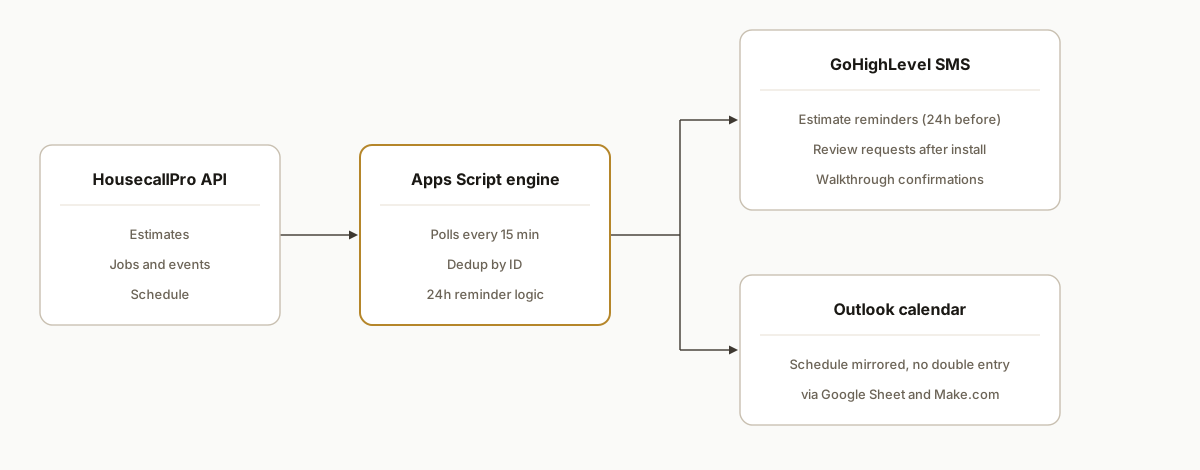
The architecture is a single Google Apps Script project that polls the Housecall Pro API on a timer, decides what needs to happen, and pushes each action to the right place. There is no server to maintain.
- Housecall Pro API. The source of truth for estimates, jobs, and events. The script reads from it on a schedule and never writes back to it, so it cannot corrupt your Housecall Pro data.
- Apps Script engine. The brain. It runs on time-based triggers every 15 minutes, decides which estimates need a reminder, which completed jobs need a review request, and which walkthroughs need a confirmation, and de-duplicates so nobody gets texted twice.
- GoHighLevel conversations API. The mouth. Every text goes out through GoHighLevel from the contractor's own number, so replies land in their existing inbox.
- Google Sheet. The memory. It stores which estimates have already been handled (so reminders never double-fire) and acts as the bridge row for the calendar sync.
- Make.com to Outlook. The calendar leg. Make.com watches the Sheet and writes each appointment into Outlook, so the schedule shows up where the team already works.
Step-by-step: how to build it
Step 1: Get Housecall Pro API access
Housecall Pro exposes a REST API at api.housecallpro.com. You need an API key from your Housecall Pro account (the API is available on the plans that include it). Everything downstream reads from this one key. The key call is listing estimates and jobs with their schedule and work status, which is what tells the script whether an appointment is real and upcoming.
Step 2: Set up the GoHighLevel side
In GoHighLevel, create a Private Integration token and grab your location (sub-account) ID. Messages go through the conversations endpoint, and GoHighLevel pins the API version with a header, so every call carries it.
function ghlHeaders() {
  return {
    Authorization: "Bearer " + getGhlToken(),
    Version: "2021-07-28",
    "Content-Type": "application/json",
  };
}
The gotcha here is the Version header. Leave it off and GoHighLevel rejects the call with an unhelpful error.
Step 3: Poll Housecall Pro and remember what you have seen
Pull the estimates, then store each one's ID in a Google Sheet. On every later run, you skip the IDs you have already handled. This dedup step is the difference between a helpful reminder and texting a customer the same thing four times an hour.
function pollHcpEstimates() {
  const sheet = getSheet("Estimate Reminders");
  const seen = getExistingIds(sheet); // IDs already in the Sheet
  const estimates = fetchHcpEstimates(getHcpApiKey());

  estimates.forEach((est) => {
    const id = String(est.id || "");
    if (seen.has(id)) return;                 // already handled
    if (est.work_status !== "scheduled") return; // ignore drafts/unscheduled
    // ...compute the reminder date and queue the row
  });
}
Step 4: Compute the 24-hour reminder and send the SMS
The reminder fires the day before the appointment. The script computes the date, and a separate daily pass sends every text whose reminder date is today, through GoHighLevel.
function sendEstimateReminderSms(contactId, name, apptDate, apptTime) {
  const body = `Hi ${name}, this is a reminder about your estimate `
    + `tomorrow at ${apptTime}. Reply here with any questions.`;
  UrlFetchApp.fetch(GHL_API_BASE + "/conversations/messages", {
    method: "post",
    headers: ghlHeaders(),
    payload: JSON.stringify({ type: "SMS", contactId, message: body }),
    muteHttpExceptions: true,
  });
}
Step 5: Add the review and walkthrough flows on the same poll
The same pattern handles two more jobs. One pass watches for jobs marked complete in Housecall Pro and sends a review request. Another watches for scheduled walkthroughs and sends a confirmation that includes the address. They reuse the same dedup-by-ID logic, so each customer hears from you exactly once per event.
Step 6: Mirror the schedule into Outlook
A second polling function writes every estimate, job, and event into a dedicated "Calendar Sync" tab in the Google Sheet, keyed by ID so rows update in place instead of duplicating. Make.com watches that tab and creates or updates the matching Outlook event. The Housecall Pro schedule now appears in Outlook without anyone retyping it.
Step 7: Wire the triggers and a debug endpoint
Set every poller on a 15-minute time-based trigger, created in code so the setup is repeatable.
function setupAllTriggers() {
  ScriptApp.getProjectTriggers().forEach((t) => ScriptApp.deleteTrigger(t));
  ScriptApp.newTrigger("pollHcpEstimates").timeBased().everyMinutes(15).create();
  ScriptApp.newTrigger("pollAllForCalendar").timeBased().everyMinutes(15).create();
  ScriptApp.newTrigger("pollCompletedInstalls").timeBased().everyMinutes(15).create();
  ScriptApp.newTrigger("pollWalkthroughJobs").timeBased().everyMinutes(15).create();
}
Add a doGet web-app endpoint that dumps the last run's decisions. When a customer says they never got a text, you open one URL and see exactly what the script saw, instead of guessing.
Where it gets complicated
Rescheduled and cancelled estimates. A customer who moves an appointment must not get the old reminder. The script tracks which estimate IDs are still scheduled in Housecall Pro on each run and cancels any queued reminder whose estimate has dropped off the schedule. Without this, your "smart" reminders text people about appointments that no longer exist.
Date and timezone coercion. Housecall Pro returns schedule timestamps as strings. Apps Script's Date will happily parse them into the wrong day if you are not explicit about format and timezone, which sends a "tomorrow" reminder on the wrong day. This is the single most common source of off-by-one reminders, and it is worth a unit-style test on a handful of known appointments before going live.
Phone number formatting. Housecall Pro and GoHighLevel do not agree on phone format. Numbers have to be cleaned to a consistent shape before GoHighLevel will match them to a contact, or the message silently goes nowhere.
Work-status filtering. Not every estimate in Housecall Pro is a real upcoming appointment. Drafts, unscheduled, and completed records all come back from the API. The script only acts on the specific work statuses that represent a live, scheduled appointment, which keeps it from texting customers about estimates that were never booked.
Dedup is load-bearing. Because the pollers run every 15 minutes, every action has to be idempotent. The Google Sheet of handled IDs is what makes a 15-minute loop safe instead of a way to spam your customers.
Real-world results
Jolly Heating & Cooling had been texting estimate reminders by hand and re-typing appointments into Outlook every morning. After the integration went live, every scheduled estimate gets a reminder a day out, every completed install triggers a review request, and every walkthrough gets a confirmation with the address, all from their own GoHighLevel number, with no one touching the schedule.
The structural win is that the busiest days no longer break the system. Manual reminders fail exactly when there are the most appointments to remind about, because that is when the office has the least time. A poller that runs every 15 minutes does the same thing on a ten-estimate day as on a one-estimate day. The schedule mirrors into Outlook on the same loop, so the owner plans the week from the calendar he already uses.
The reason this holds up is that it reads from Housecall Pro and never writes to it. Housecall Pro stays the single source of truth, and the automation is a layer on top that can be changed or switched off without touching the data the business runs on.
Frequently asked questions
Does Housecall Pro have an API?
Yes. Housecall Pro offers a REST API at api.housecallpro.com that exposes estimates, jobs, customers, and schedules. You authenticate with an API key from your account. It is read-and-write, but for a reminder and calendar integration you only need read access, which keeps the automation from ever changing your Housecall Pro data.
Can Housecall Pro send SMS reminders from my own number?
Not on its own in the way most businesses want. Housecall Pro sends its own notifications, but to text customers from your GoHighLevel number, in your wording, and on your cadence (24 hours before an estimate, after an install, ahead of a walkthrough), you connect Housecall Pro to GoHighLevel and send through GoHighLevel's conversations API. That also keeps replies in the inbox your team already watches.
How do you connect Housecall Pro to GoHighLevel?
Poll the Housecall Pro API on a schedule, decide which customers need a message, and send each one through GoHighLevel's conversations endpoint using a Private Integration token and your location ID. A Google Apps Script project is enough to run the whole thing on a 15-minute timer with no server. The one required header most people miss is the GoHighLevel API version.
Can Housecall Pro sync to an Outlook calendar?
Yes, with a bridge. Housecall Pro does not push to Outlook directly, so the schedule is written to a Google Sheet keyed by appointment ID, and Make.com mirrors each row into Outlook as an event. Keying by ID means rescheduled appointments update in place instead of creating duplicates, which is the failure mode of most naive calendar syncs.
What does this cost to run per month?
The Apps Script engine is free on a standard Google account. The real costs are the tools you already pay for: your Housecall Pro plan, your GoHighLevel sub-account, and a Make.com plan for the Outlook leg, which for this volume sits on a low tier. There is no separate server bill because the polling runs on Google's infrastructure.
Can a non-developer set this up?
You can wire up the GoHighLevel token and the Make.com scenario yourself, but the polling logic, the dedup, the timezone handling, and the rescheduled-appointment cancellation are real engineering. Most service businesses get further having it built once, correctly, than debugging off-by-one reminders and duplicate texts while running the company.
If you run on Housecall Pro and your reminders or your calendar still depend on someone remembering to do them, this is the pattern that fixes it. We build these as a layer on top of the systems you already pay for, never a replacement. See how we approach CRM and field-service automation, read the related build on automating GoHighLevel itself, or book a 20-minute call and we will tell you in the first five minutes whether your Housecall Pro setup maps to this pattern.
Related comparison
GoHighLevel vs Zapier: which to actually use
Integration we have built
Housecall Pro to GoHighLevel: the build at a glance
Want us to build this for you?
Nine questions, about 90 seconds. You see the revenue it is costing you, then pick a time. No pitch.
See your options