
Every new iClassPro enrollment can land in a GoHighLevel follow up sequence the same day, even though iClassPro has no public, documented, supported API. A headless browser logs into the iClassPro office portal once a day, runs the New Enrollments List report for the previous day, exports the CSV, and posts each new family to a GoHighLevel webhook with tags, so the right workflow starts without anyone at the front desk pulling a report. We built this and run it live for Wesley Jones's gym and family entertainment locations.
There are two ways data comes out of iClassPro, and they solve different problems:
- Writes and private records (this guide). Enrollments, families and contact details only exist behind the staff login, so they come out through browser automation.
- Public class data. Class openings, schedules, tuition and capacity are readable from an open, unauthenticated JSON endpoint behind the parent booking portal. The full field reference is in Does iClassPro have an API? The endpoint reference.
The short version of this build, with the trigger, steps and stack on one page, is on the iClassPro to GoHighLevel integration page.
The problem it solves
iClassPro is the system of record for class enrollments at a lot of activity businesses. It is also a walled garden. There is no public, documented, supported API, no Zapier integration, and no way to have it email you a report on a schedule. iClassPro has confirmed it has no plans to publish one. So getting the data you need out of it is genuinely hard, and that is the whole problem.
Here is what staff actually do today. Every morning (in theory), someone logs into the iClassPro office portal, runs the New Enrollments List report, sets the date range, downloads a CSV, opens it, segments the rows, and manually uploads the contacts into GoHighLevel so the follow-up sequences can fire. It is ten minutes of clicking that depends entirely on a busy front desk person remembering to do it.
They do not remember, not consistently. And every day the report does not get pulled is a day of brand new enrollments, families who just gave you money and attention, that never enter a follow-up sequence. The leads go cold in the exact window when they are warmest. The cost of the missing integration is not the ten minutes. It is the enrollments that never get nurtured.
| Step | Manual iClassPro to GHL | Automated pipeline |
|---|---|---|
| Log in and run the report | A staff member, when they remember | Headless script, every day |
| Set the date range | By hand each time | Always yesterday, automatically |
| Export and open the CSV | Download, open, eyeball | Parsed in memory |
| Get contacts into GoHighLevel | Manual upload and segment | Webhook per contact, tagged |
| Days it actually happens | The ones someone has time for | All of them |
The automation replaces the daily report pull and upload that, realistically, was not happening every day.
What keeping your systems in sync is worth
Move the sliders to your own numbers. The defaults are only an example business, not client data.
Revenue from deals that stop slipping each year
$100,800
80 a month × 12 × 5% × 70% × $3000
- Deals kept a year
- 34
- 80 × 12 × 5% × 70%
- Staff cost of doing it by hand each year
- $9,100
- 5 hrs a week × $35/hr × 52 weeks
- Hours handed to the system each month
- 22 hrs
- 5 hrs a week × 52 ÷ 12
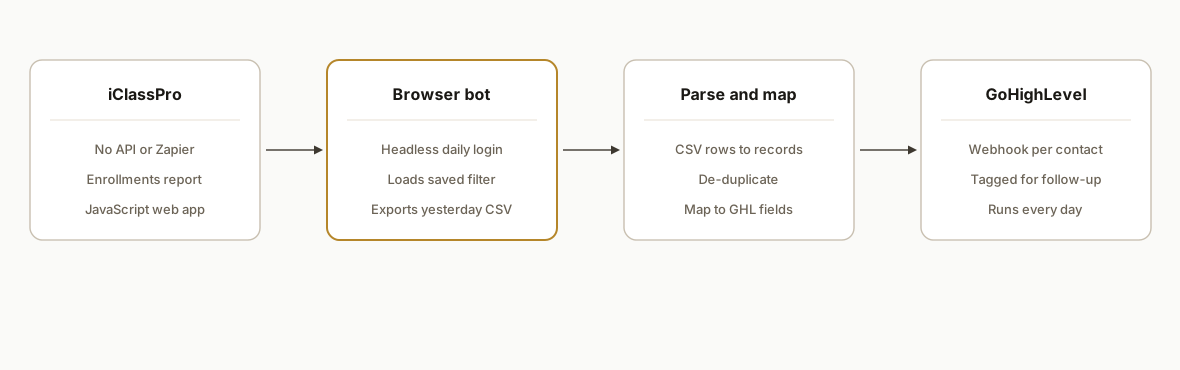
How the automation works
Because there is no supported API to call, the integration is a browser that drives iClassPro exactly the way a person would, just reliably and on a schedule. It runs in under a minute and pushes the results to GoHighLevel.
- iClassPro. The source. A JavaScript web app with no supported API and no export on schedule, so the only way to the enrollment data is the office portal a human uses.
- Browser automation. The engine. A headless Playwright script on a daily cron logs in, opens the new enrollments report, loads a saved filter preset, sets the date range to the previous day, and exports the CSV.
- Parse and map. The CSV rows are parsed into structured records, de-duplicated, and mapped to the fields GoHighLevel expects.
- GoHighLevel. The destination. Each new contact is sent to a GoHighLevel inbound webhook and tagged so the right follow-up workflow picks it up automatically.
Step by step: how to build it
Step 1: Accept that browser automation is the only path
Before writing code, confirm the constraint, because it determines the entire approach. iClassPro has no public, documented, supported API, no Zapier app, and no scheduled export feature, and the office portal is a client rendered JavaScript app, so you cannot just fetch a URL.
There is one undocumented exception worth knowing about (full endpoint reference). The parent facing booking portal is a single page app, and it is fed by an unauthenticated JSON endpoint that returns a location's class catalog, schedule, tuition, and live remaining openings with no login at all. That is genuinely useful if what you need is accurate classes and available spaces published on your own website. It does not help here. It is read only, it carries no enrollment or family records, and because it is undocumented and unsupported it can change shape without notice, so nothing you bill a client for should depend on it without schema validation and alerting around it. For getting new enrollments out, the viable approach is a real browser driven by Playwright. This is the right tool when a SaaS has no integration surface, and it is more common than vendors like to admit.
Step 2: Log in headless, and fail loudly
The script opens the iClassPro login page and signs in with credentials from environment variables, never hard coded. The important part is the failure path: if login fails (wrong password, locked account, a changed page), the script screenshots the page and logs it, so a silent break is impossible to miss.
await page.goto(`https://app.iclasspro.com/a/${process.env.ICLASS_ACCOUNT_NAME}`);
await page.fill("#email", process.env.ICLASS_EMAIL);
await page.fill("#password", process.env.ICLASS_PASSWORD);
await page.click('button[type="submit"]');
const ok = await page.waitForSelector(".dashboard", { timeout: 15000 })
  .then(() => true).catch(() => false);
if (!ok) { await page.screenshot({ path: `fail-${Date.now()}.png` }); throw new Error("iClassPro login failed"); }
Step 3: Run the new enrollments report with a saved filter
Navigate to the New Enrollments List report. Configure the filter preset once by hand inside iClassPro, then have the script load that preset every run, so the columns and segmentation are consistent without rebuilding them in code. Set the date range to the previous day so each run picks up exactly the new enrollments since the last one.
Step 4: Export and parse the CSV
iClassPro offers the report in CSV, which is the cleanest to parse. The script triggers the export, reads the file, and turns each row into a structured record.
const rows = parseCsv(await readDownload(page));
const contacts = rows.map((r) => ({
  firstName: r["Student First"], lastName: r["Student Last"],
  phone: cleanPhone(r["Phone"]), email: r["Email"],
  className: r["Class"], enrolledOn: r["Enroll Date"],
}));
Step 5: De-duplicate before sending
A daily date range pull is mostly clean, but edits and re-runs can repeat a row. Key each contact by a stable field (phone or email plus enrollment date) and skip ones already sent, so a family does not get dropped into the same sequence twice.
Step 6: Push each contact into GoHighLevel
GoHighLevel takes inbound contacts through a webhook. The script posts each new enrollment to the webhook with a tag, and a GoHighLevel workflow watches for that tag and starts the right follow-up automatically.
for (const c of contacts) {
  await fetch(process.env.GHL_WEBHOOK_URL, {
    method: "POST",
    headers: { "Content-Type": "application/json" },
    body: JSON.stringify({ ...c, tags: ["new-enrollment", "iclasspro"] }),
  });
}
Step 7: Schedule it and log every run
Put the whole thing on a daily cron on any host that supports it. Log how many rows were pulled and how many contacts were sent every run, so you can glance at a log and know the pipeline ran instead of finding out from a cold lead three weeks later.
Where it gets complicated
There is no supported API, so the page is your contract. When you automate a UI instead of an API, a layout change on iClassPro's side can break the script. The defenses are selecting elements by stable attributes rather than brittle positions, screenshotting on any failure, and alerting when a run pulls zero rows on a day you would expect enrollments. Treat a silent zero as a failure, not a quiet success.
Session and JavaScript requirements. iClassPro requires JavaScript and times out sessions after about an hour of inactivity. A run that completes in under a minute sidesteps the timeout, but the script still has to wait for the client rendered app to actually finish loading each view before it acts, which is the difference between a reliable run and a flaky one.
The saved filter is load-bearing. The report's preset filter is configured once inside iClassPro and reused every run. If someone edits that preset in the portal, the export changes shape underneath the parser. It is worth documenting that the preset is part of the integration, not a casual setting to tweak.
De-duplication across runs. Because you pull by date range, an edited enrollment or a manual re-run can resend a contact. Without a dedup key, GoHighLevel ends up with duplicates and a family gets two welcome texts. The dedup key is small to build and annoying to retrofit, so build it in from the start.
Credentials and access. The script logs in as a real iClassPro user, so it needs its own portal login with the right permissions, and those credentials live in environment variables, never in the code. Rotating them is a planned operation, not a surprise that breaks the pipeline overnight.
Real-world results
We built and run this live for Wesley Jones, whose locations run enrollments through iClassPro and follow-up through GoHighLevel. Before the pipeline, the new enrollments report was a manual download and upload that depended on a front desk person finding time for it, which meant it happened on some days and not others.
The structural change is that the follow-up no longer depends on anyone remembering. New enrollments flow into GoHighLevel on a daily schedule, tagged and ready for the sequence, on the busy days as much as the quiet ones. The value is not a number of minutes saved, it is the enrollments that used to slip through on the days nobody pulled the report and now never do.
The reason this approach holds up is that it treats iClassPro as the source of truth and reads from it the same way a person would, so nothing about the enrollment data changes. The automation is a reliable courier between two systems that the vendors never connected.
Frequently asked questions
Does iClassPro have an API?
Not a public, documented, supported one. iClassPro publishes no API, has no Zapier integration and no scheduled export email, and has said it does not plan to add one. There is an undocumented, unauthenticated JSON endpoint behind the parent facing booking portal that returns class listings, schedules, tuition and live remaining openings, which is worth knowing about if you want accurate classes and available spaces on your own site. It is read only, it exposes no enrollment or family records, and it is unsupported, so it can change without notice and cannot be treated as a contract. For moving new enrollments into a follow-up system there is still nothing to integrate against, which is why the practical way to move data out of iClassPro is browser automation that drives the office portal the same way a staff member would, just on a reliable daily schedule.
How do you connect iClassPro to GoHighLevel without an API?
With a headless browser. A Playwright script logs into the iClassPro portal on a schedule, runs the New Enrollments List report with a saved filter, exports the CSV, parses it, and posts each contact to a GoHighLevel inbound webhook. GoHighLevel then tags the contact and runs the follow-up workflow. The browser is doing exactly what a person would do, without the person.
Is it safe to automate a tool that has no supported API?
It is reliable when it is built defensively. Because you are automating a UI, you select elements by stable attributes, screenshot on failure, alert on an unexpected zero row run, and keep the saved report filter documented as part of the integration. Those guards turn "a layout change could break it silently" into "a layout change pages us and we fix it the same day."
How often can it pull new enrollments?
As often as you schedule it, typically once a day with the date range set to the previous day, so each run captures exactly the new enrollments since the last one. It can run more frequently if your follow-up needs same day speed, since a single run completes in well under a minute and stays inside iClassPro's session limits.
What does this cost to run per month?
The pipeline runs as a small scheduled job on an inexpensive host, so the infrastructure cost is minor. The real value is recovering enrollments that were not being followed up on the days the report did not get pulled by hand. Compared to the lifetime value of a single recovered family, the monthly run cost is rounding error.
Can a nontechnical studio owner set this up?
The GoHighLevel side (the webhook and the follow-up workflow) is approachable, but the browser automation half (reliable login, waiting on a JavaScript app, the saved filter export, de-duplication, and failure alerting) is real engineering with real edge cases. Most operators get further having the pipeline built and monitored than maintaining a brittle browser script themselves.
If you run on iClassPro and your new enrollments are not reliably making it into GoHighLevel, the missing API is exactly the problem this pipeline solves. See how we handle CRM and follow-up automation, read the related build on automating GoHighLevel itself, check the iClassPro to GoHighLevel integration summary, or book a 20 minute call and we will tell you in the first five minutes whether your iClassPro setup can be bridged this way.
Related comparison
GoHighLevel vs Zapier: which to actually use
Integration we have built
iClassPro to GoHighLevel: the build at a glance
Want us to build this for you?
Nine questions, about 90 seconds. You see the revenue it is costing you, then pick a time. No pitch.
See your options