
Make.com, n8n, and Google Apps Script each solve the same problem: turn repeatable work into a reliable system. The differences show up in build speed, maintenance effort, and who carries hosting and upgrades. This guide breaks down build vs buy, how to model true cost to maintain, and the moments it pays to hire an agency instead of DIY.
Automation platform choice is the decision many owners postpone until something breaks. Here is the decision pattern we use, the cost model that keeps surprises low, and the caveats that bite first-time builds.
Automation platform definition: a runtime that connects tools, transforms data, and schedules work so a repeatable task runs without someone clicking buttons.
The problem it solves
You either do glue work by hand or you do it once in code and let a system run it. Manual glue looks like CSV exports, copy paste between tools, and inbox triage. Automated glue looks like a scheduled job with alerts when something needs a human.
| Work mode | What happens each week | Cost profile | What breaks |
|---|---|---|---|
| Manual glue | Export files, clean columns, upload, send emails, chase errors | Low cash. High hours. Unpredictable delays | People get interrupted or forget. Version drift across files |
| Automated glue | Triggered runs on a schedule or webhook. Errors logged and alerted | Upfront build. Small ongoing. Predictable cadence | Integration limits. Bad assumptions. Silent API shape changes |
How the automation decision works
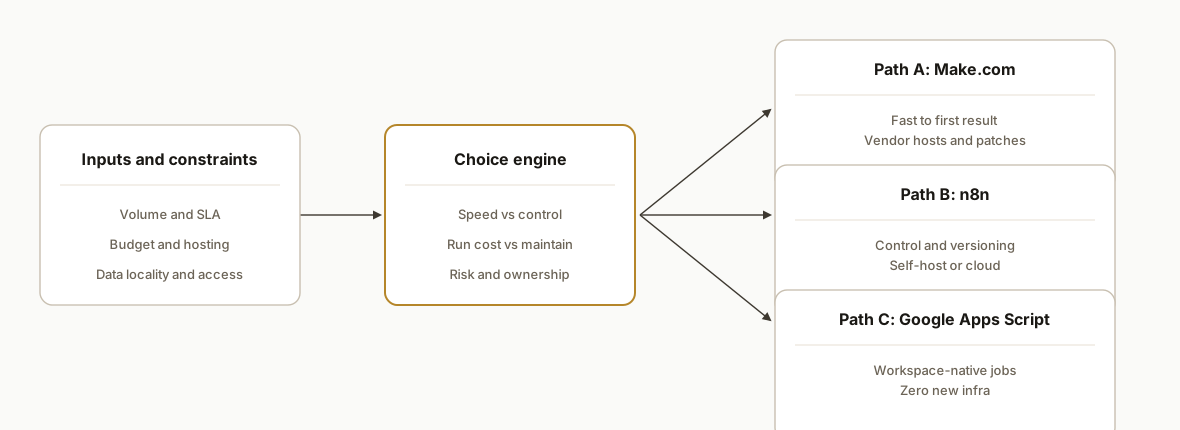
Pick the engine based on three levers: speed to first result, ownership of hosting and upgrades, and the complexity you can tolerate when something fails.
- Make.com: fastest path to a working flow when you do not want to host anything. You pay per operation and inherit vendor uptime and editor UX. Great for prototypes, departmental ops, and business users who want to see runs and tweak without a dev environment.
- n8n: self-hosted or cloud. Strong for teams that want control, versioning, git workflows, and no per-operation billing on self-host. You own reliability, backups, and upgrades if you self-host. Better when flows get larger or you need secrets and audit under your control.
- Google Apps Script: runs inside Google Workspace. Perfect when the source of truth is Sheets or Drive and you want zero new infrastructure. Quotas and a 6 minute execution ceiling force async design for long jobs. Triggers and web apps are simple but owned by a user account.
Step-by-step: how to build it
1) Score your workflows before picking a tool
Answer-first: list your top 3 recurring tasks and score them for volume, time per run, and risk if wrong. The highest composite score wins the right to be automated first.
// scoring.js, simple worksheet you can run in Node or a browser console
const flows = [
  { name: "Leads to CRM", volume: 5, minutes: 8, risk: 2 },
  { name: "Invoice sync", volume: 3, minutes: 20, risk: 5 },
  { name: "Weekly report", volume: 1, minutes: 60, risk: 3 },
];
const score = f => f.volume * f.minutes * (1 + f.risk/5);
console.table(flows.map(f => ({ flow: f.name, score: score(f) })));
Gotcha: do not start with the sexiest flow. Start with the one that will stick even if the champion leaves.
2) Model TCO: build, run, and maintain
Answer-first: capture one-time build, monthly runtime, and maintenance hours. Compare platforms against that same structure.
// tco.js, toy model you can paste into a console
function tco({buildHours, hourly, vendor, infra, maintHours}) {
  const build = buildHours * hourly;
  const run = vendor + infra;
  const maintain = maintHours * hourly;
  return { build, monthly: run + maintain };
}

const make = tco({ buildHours: 18, hourly: 150, vendor: 120, infra: 0, maintHours: 1 });
const n8n  = tco({ buildHours: 26, hourly: 150, vendor: 0, infra: 35, maintHours: 2 });
const gas  = tco({ buildHours: 22, hourly: 150, vendor: 0, infra: 0, maintHours: 1.5 });
console.log({ make, n8n, gas });
Gotcha: your cheapest month 1 is rarely your cheapest year 1. Maintenance hours compound.
3) Prototype fast in Make.com, then freeze a blueprint
Answer-first: when time to first result matters, build the smallest working scenario and pin a readme on it.
{
  "name": "Leads to CRM v1",
  "triggers": ["new_form_entry"],
  "steps": [
    { "type": "transform", "name": "Normalize fields" },
    { "type": "dedupe", "name": "Skip existing" },
    { "type": "write", "name": "Create lead in CRM" }
  ],
  "alerts": ["on_error"],
  "notes": "Owner: ops@company. Change log: v1 seeded."
}
Gotcha: connection ownership and webhook URLs change when you clone or import. Document who owns auth and how you rotate it.
4) Move complex or high-volume flows to n8n
Answer-first: use n8n when you need version control, self-hosted secrets, or when per-operation billing hurts.
# docker-compose.yml, minimal n8n stack for a pilot
services:
  n8n:
    image: n8nio/n8n:latest
    ports: ["5678:5678"]
    environment:
      - N8N_ENCRYPTION_KEY=change_me
      - N8N_DIAGNOSTICS_ENABLED=false
    volumes:
      - ./n8n_data:/home/node/.n8n
    restart: unless-stopped
Gotcha: back up the encryption key and data volume. Lose either and credentials break or history vanishes.
5) Use Google Apps Script for Workspace-native jobs
Answer-first: when the truth lives in Sheets or Drive, Apps Script is the shortest path and carries zero new infra.
// Code.gs, time-driven runner with async handoff
function runWeekly() {
  const rows = SpreadsheetApp.getActive().getSheetByName('Config').getDataRange().getValues();
  rows.slice(1).forEach(r => CacheService.getScriptCache().put(r[0], JSON.stringify(r), 3600));
}

function doPost(e) { // receives webhook posts from a safe intermediary
  const body = JSON.parse(e.postData.contents || '{}');
  const log = SpreadsheetApp.getActive().getSheetByName('Log');
  log.appendRow([new Date(), body.event || 'unknown', JSON.stringify(body).slice(0, 1000)]);
  return ContentService.createTextOutput('ok');
}

function createTrigger() {
  ScriptApp.newTrigger('runWeekly').timeBased().onWeekDay(ScriptApp.WeekDay.MONDAY).atHour(7).create();
}
Gotcha: long jobs must go async. Time-driven scripts have a short ceiling. Use caches, queued tabs, or time triggers to break work into chunks.
6) Add observability before scale
Answer-first: centralize run status, error objects, and last-changed versions so you can revert quickly.
{
  "flow": "invoice_sync",
  "version": "2026-10-13.1",
  "run_id": "rs-01HF..",
  "status": "error",
  "at": "2026-10-13T14:05:33Z",
  "retry": 1,
  "detail": { "where": "transform:normalize", "why": "unexpected null in currency" }
}
Gotcha: alert on change. More outages come from unannounced vendor changes than from your code.
Where it gets complicated
- Make.com billing and ownership: per-operation billing spikes on loops and retries. OAuth connections live under a user. Blueprint imports often mint new webhook URLs. Decide who owns connections and how you rotate them.
- n8n upgrades and secrets: major upgrades can rename or change nodes. Test on a staging stack before prod. Keep the encryption key and database backups off the box. Queue mode, workers, and memory limits need sizing before volume rises.
- Apps Script limits: a single execution caps out quickly. Web apps require creating a new deployment to update the live URL. Triggers are owned by the installer account. Emails send from the installer unless a send-as alias exists.
- Hidden data drift: fields and formats change in upstream tools without notice. Defensive mappers and schema checks prevent silent corruption.
- Adapter seams: weld your business logic to a small adapter so you can swap engines. That is how Make to n8n or Apps Script to a Node service becomes a migration, not a rewrite.
What this actually changes
When you pick the right engine for the right job and model maintenance honestly, two structural wins show up: fewer surprise fires and a stable per-month cost you can budget. The decision pattern here consistently cut break-fix time because runs were observable and adapters made swaps surgical.
One external anchor for why this matters: McKinsey reports that about 60 percent of occupations have at least 30 percent of activities that could be automated (https://www.mckinsey.com/featured-insights/future-of-work/a-future-that-works-automation-employment-and-productivity). Turning even a single high-frequency activity into a reliable system pays back quickly when you stop context switching and chasing CSVs.
Frequently asked questions
Which is cheaper over a year: Make.com, n8n, or Apps Script?
It depends on volume and who runs it. Make.com often wins for low to medium volume because you skip hosting and upgrades. n8n tends to win at higher volumes when self-hosted because you avoid per-operation charges but accept server and admin time. Apps Script is cheapest when work lives in Workspace and fits within quotas.
Should I self-host n8n or use their cloud?
Self-host when you need data locality, custom SSO, or want to avoid per-seat limits. Cloud when you want someone else to patch and monitor. A clean pattern is prototype on cloud, then migrate to self-host once flows are stable and volume justifies it.
Can a non-developer maintain Make.com scenarios?
Yes, up to a point. Business users can follow run histories, fix simple mapper issues, and update small transforms. As flows grow, you want versioning, change logs, and a developer to guard against silent logic drift, especially around error handling and deduplication.
When should I hire an agency vs DIY?
Hire when a missed run costs real money, when flows cross three or more systems, or when you need a migration path between engines. An agency designs adapter seams, observability, and safe cutovers. DIY is great for one-tool-to-one-tool tasks that do not touch revenue.
How long does a migration take from Make.com to n8n or to Apps Script?
Small flows port in days. Larger flows with branching, retries, and custom transforms take weeks. The adapter seam is the delta: if business logic is isolated, you rewire only the edges. If logic is welded into vendor nodes, you rewrite more.
What about vendor lock-in?
Lock-in lives where your logic lives. If it is trapped inside a vendor's proprietary node set, you are locked. If you keep transforms and rules in portable code or config and call them from the engine, swapping engines becomes a weekend project.
If you want a second opinion on your flow and how to price year-one cost versus speed to first result, see our workflow-automation service overview at /services#workflow-automation and our detailed write-up on stabilizing large Make.com fleets at /blog/patching-200-make-com-scenarios-safely. Or book a 20 minute call at /book and we will map your first build and its maintenance plan.
Curious what this would actually save you?
Put real numbers to it. The ROI calculator estimates the hours and dollars an automation like this returns, in about a minute.
Calculate your automation ROI