
If you are hiring an AI automation agency in Vancouver, the safe path is straightforward: treat personal information like a regulated asset, host sensitive systems on client-owned infrastructure in Canada where practical, and keep vendors contractually bound to BC PIPA standards with clear logging, retention, and a human-approval gate for anything customer-facing. That is how we run onsite and Canadian-resident builds for small and mid-sized teams without slowing delivery.
AI automation for Vancouver businesses is: the design and implementation of workflows that use AI to process data under BC's Personal Information Protection Act, with regional hosting choices and operational controls so you can prove safeguards. This guide covers what we deliver onsite, what BC PIPA and Canadian residency mean in practice, and the exact gates we build.
Statistic: small businesses make up about 98 percent of all businesses in British Columbia, which is why the compliance bar must fit SME realities while staying defensible (BC Stats: Small Business Profile).
The problem it solves
Most Vancouver SMEs want automation but stall on two blockers: uncertainty about BC PIPA and where data can live, and a fear that a vendor will spray customer information through foreign SaaS. The manual alternative is slow: staff export spreadsheets, paste into tools, and write replies by hand to avoid risk.
| Manual Vancouver SME workflow | Automated, PIPA-aware build |
|---|---|
| Staff copy data into third-party tools to test ideas | Data boundaries documented first, then vendors are connected only through a redactor and a principle of least privilege |
| All processing in the vendor's US region because that is the default | Client-owned cloud in a Canadian region or on-prem. Only non-sensitive signals leave, with contracts binding processors to PIPA-standard safeguards |
| Ad hoc approvals on customer emails and chat replies | Human-approval queue for anything with legal or brand risk. Auto-send only when rules and confidence pass |
| No audit trail, no retention policy | Central event log, role-based access, and explicit deletion schedules |
Statistic: IBM's 2024 Cost of a Data Breach report lists Canada among the highest average breach costs globally at approximately 5 million USD per incident, which is why controls and logs matter even for small teams (IBM Cost of a Data Breach Report 2024).
How the automation works
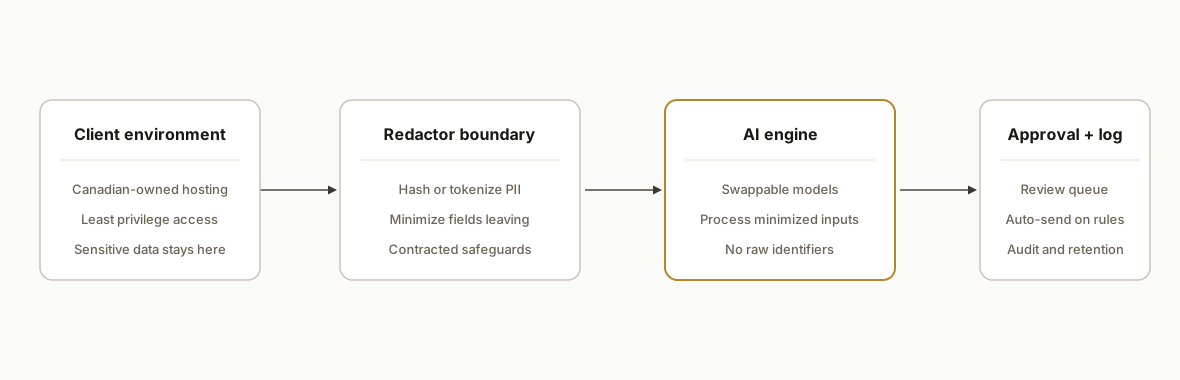
We implement the same four-layer pattern whether the workflow is voice, email, back-office, or reporting: classify data by sensitivity. keep sensitive data on Canadian infrastructure you control. minimize and redact what leaves. gate external output with a human when needed.
- Client environment in Canada: your primary data lives in your tenant. That can be a client-owned cloud account in a Canadian region or a workstation or server onsite. We favor client ownership and least privilege.
- Data boundary and redactor: inputs are classified and fields marked sensitive. Sensitive fields do not leave the boundary. Non-sensitive context can be shared under a Data Processing Addendum with safeguards.
- AI engine and vendor adapters: models and APIs are swappable. We treat providers as processors and send only minimized inputs. When a provider lacks a Canadian region, we use redaction, tokenization, or deterministic transforms so no raw identifiers are exposed.
- Human-in-the-loop and logging: customer-facing actions pass through a review queue unless rules are met. Every decision is logged with who approved, when, and what changed.
Statistic: Over half of Canadian businesses reported using cloud computing services by 2021, so Canadian-resident infrastructure and vendor governance are now standard procurement topics rather than edge cases (Statistics Canada, Canadian businesses and cloud computing, 2021 release).
Step-by-step: how to build it
1) Classify your data and set the boundary
Decide what is sensitive under BC PIPA. Create a simple data map: systems, fields, and purposes. Mark fields that must never leave your boundary.
Data Map v1
System: CRM
Fields: first_name (personal), last_name (personal), email (personal), phone (personal), notes (sensitive if medical/financial), lead_source (non-sensitive)
Boundary rule: personal and sensitive fields never leave client infrastructure. Use lead_source and anonymized aggregates for external AI hints.
Key gotcha: do not let exceptions creep in through convenience exports. Your data map is the source of truth for processors and contractors.
2) Choose hosting that you control in Canada
Run stateful components on client-owned infrastructure with Canadian residency where practical. For lighter workflows, run on a workstation or a locked laptop onsite.
# Example: create a private git remote and store env locally
mkdir vancouver-automation && cd vancouver-automation
git init
printf "PII_REDACTION=on\nHUMAN_APPROVAL=required\nLOG_RETENTION_DAYS=365\n" > .env
chmod 600 .env
Key gotcha: do not assume a vendor has a Canadian region. If they do not, keep PII inside your boundary and send only minimized context plus IDs you can map back server-side.
3) Enforce row-level access and least privilege
Use role-based access and row-level policies so operators see only what they must.
-- PostgreSQL example: enable RLS and limit access
ALTER TABLE customers ENABLE ROW LEVEL SECURITY;
CREATE POLICY p_read_own ON customers
  FOR SELECT USING (current_setting('app.role', true) = 'agent' AND assigned_to = current_user);
CREATE POLICY p_admin_all ON customers
  FOR ALL USING (current_setting('app.role', true) = 'admin');
Key gotcha: set the application role on every request. Policies are only as strong as the session variable you actually set.
4) Redact and tokenize before any external processing
Build a deterministic redactor so vendors never receive raw identifiers.
// Minimal JavaScript redactor
const crypto = require('crypto');
function hash(value) {
  return crypto.createHash('sha256').update(String(value)).digest('hex').slice(0, 16);
}
function redact(input) {
  return {
    name_hash: hash(input.first_name + ':' + input.last_name),
    email_hash: hash(input.email),
    phone_hash: hash(input.phone),
    // pass only non-sensitive context
    lead_source: input.lead_source,
    intent_text: input.intent_text?.slice(0, 800)
  };
}
Key gotcha: do not send free-form notes unfiltered. Notes often contain the very data you meant to keep inside the boundary.
5) Add a human-approval queue for outbound messages
Gate customer-facing actions unless confidence and rules pass. Keep the queue simple so approvals are fast.
Approval rules v1
Auto-send: only if sentiment = positive, category = transactional, and no PII placeholders remain.
Else: route to Approvals with summary and one-click edit.
Escalate: legal or financial claims always escalate.
Key gotcha: audit why you approved or edited. The log is what proves judgment was applied when it mattered.
6) Log, retain, and delete on schedule
Keep one append-only action log. Set retention and stick to it.
CREATE TABLE action_log (
  id bigserial primary key,
  ts timestamptz default now(),
  actor text not null,
  action text not null,
  target text,
  details jsonb
);
-- nightly deletion window
DELETE FROM action_log WHERE ts < now() - interval '365 days';
Key gotcha: coordinate deletion windows with your support team. Do not delete the one record they need for an audit next week.
7) Contract for safeguards and cross-border processing
Use a Data Processing Addendum that binds processors to PIPA-level safeguards, breach notice timelines, and deletion on termination.
DPA excerpt
Processor will: (a) process personal information only for documented purposes, (b) apply administrative, technical, and physical safeguards appropriate to BC PIPA, (c) notify Controller of any incident without undue delay, (d) delete or return personal information at end of engagement.
Key gotcha: keep a current vendor inventory with contacts and the exact data they process. You will need it during an incident.
Where it gets complicated
- Public vs private sector rules: BC PIPA governs private organizations. Public bodies are under FOIPPA, which has different rules and exceptions. Many SMEs do not fall under FOIPPA. If you serve public bodies, align to their procurement and privacy requirements explicitly.
- Cross-border processing under Canadian law: Federal PIPEDA applies to interprovincial and international transfers while BC PIPA is recognized as substantially similar for private sector activity within BC. Cross-border processing is permitted with safeguards and accountability. The practical effect: your contracts and controls matter as much as your region choice.
- Vendor defaults are rarely safe: default regions and logging can export more data than you expect. We have seen preview toggles enable extra telemetry. Always pin regions and disable nonessential analytics when possible.
- Shadow mode is not optional: let the system run without sending to customers for a week or two. Measure false positives and surprises. Every successful production deployment we shipped in Vancouver ran a shadow period before touching a live inbox or phone line.
- Human cadence on social and voice: if a workflow touches Meta properties or cold calling, the safety bar is behavioral. We run human-cadence sessions, strict caps, and abort checkpoints to avoid platform risk. The safest data posture does not help if a platform bans your sender for automation fingerprints.
Statistic: The Office of the Privacy Commissioner of Canada states that organizations may transfer personal information to a third party for processing, including across borders, provided they use contractual or other means to provide comparable protection, which is why DPAs and vendor governance are part of every build (OPC, Guidelines for processing personal data across borders).
What this actually changes
For Vancouver SMEs, this approach let us ship production automations without compromising privacy posture. In practice we delivered:
- Onsite or Canadian-resident hosting for stateful parts, with minimized context to external processors
- A single approval queue that protected brand and legal risk while keeping teams fast
- Logs and deletion schedules that made internal audits and customer questions easy to answer
Outcome: teams stopped exporting spreadsheets and pasting into tools, and they kept sensitive data under their control while getting the speed gains from AI on the parts of the workflow where it is safe. The pattern scales from email drafting to report generation and back-office reconciliation because the same gates apply.
Statistic: BC PIPA requires organizations to protect personal information with reasonable security arrangements appropriate to the sensitivity of the information, which is why we emphasize classification and least privilege first, not just tools selection (OIPC BC: Guide to PIPA for businesses and organizations).
Frequently asked questions
What does BC PIPA require for Vancouver small businesses using AI?
BC PIPA applies to private sector organizations and requires consent for collection, use, and disclosure, plus reasonable safeguards proportional to sensitivity. There is no blanket data-localization rule for private organizations, so the focus is accountability and protection. We design boundaries, redaction, contracts, and logs to meet that standard.
Do I need Canadian data residency for AI automation to be compliant?
Not strictly for private sector PIPA compliance. Residency helps reduce exposure and simplifies procurement, but Canadian residency is one lever among several. If a vendor lacks a Canadian region, we keep PII inside your boundary, send only minimized inputs, and bind the vendor to safeguards through a DPA.
Can an AI automation agency work onsite in Vancouver?
Yes. We have delivered onsite and client-owned builds where stateful components run on a workstation or server you control. This is common when a team wants a fast start without committing to new infrastructure or when residency and access controls are paramount.
We are a small business. Is an AI automation agency worth it?
If the workflow is high volume or high time per run, yes. We start with one job where a finished result obviously saves hours and run it in shadow mode first. The controls in this guide keep risk bounded so you get speed and compliance together rather than choosing one.
Which niches are most profitable for AI automation agencies in 2026?
We see strong demand in property management, professional services, home services, healthcare administration, ecommerce ops, and credit or lending operations. The common thread: repetitive document and messaging work with clear rules and measurable outcomes. Those niches fund quickly and tolerate human-approval gates well.
How fast can a Vancouver AI automation go live?
A scoped first workflow typically ships in one to two weeks, including a shadow period. Onsite or client-owned hosting adds a day for environment setup. Most of the time goes into data classification, approvals, and logging rather than model prompts.
If you need an AI automation agency in Vancouver that can work onsite and keep sensitive data inside a Canadian boundary, this is the pattern we already run. See our related piece on choosing the best AI automation agency in Vancouver, review our custom AI integration approach, and when you are ready to scope your first workflow, book a 15 minute call.
Curious what this would actually save you?
Put real numbers to it. The ROI calculator estimates the hours and dollars an automation like this returns, in about a minute.
Calculate your automation ROI