
An AI receptionist breaks even at low volumes when it reliably turns a few missed calls into booked work. For small teams or after-hours only, the math hinges on recovered calls and gross margin per job, not on replacing a full-time receptionist. In this post we share the calculator we use, the architecture we deploy, and the guardrails that kept our live voice agents safe in production; for the fuller answer, see our AI receptionist ROI comparison.
AI receptionist automation is: a phone front door that answers, qualifies, and routes calls with configurable warm transfers and on-brand scripts, priced by usage. The outcome to measure is recovered revenue from calls that would have otherwise gone to voicemail.
The problem it solves
If you get fewer than ~300 calls a month, you probably do not have a dedicated receptionist. Calls roll to a shared mobile or to voicemail, and after-hours coverage is spotty (and if most inbound is support, see our AI receptionist ROI for support).
| Manual handling | Automated AI receptionist |
|---|---|
| Missed calls go to voicemail. Someone returns calls next day. | Answers every time, on-brand, in seconds with warm-transfer rules. |
| After-hours coverage depends on who notices the phone. | After-hours only mode answers nights and weekends, leaves business-hours to humans. |
| Inconsistent qualification. Notes live in texts. | Structured questions capture name, reason, urgency, and next step in your CRM. |
| No routing logic. Everything rings one phone. | Rules route new sales vs service, VIPs, and emergencies to different paths. |
| Hard to measure what you missed. | Usage and outcomes logged, so you see recovered calls and booked work. |
Two data points anchor the ROI: 80 percent of callers sent to voicemail do not leave a message, so they disappear unless you reach them back quickly (Forbes, eVoice survey) [https://www.forbes.com/sites/theyec/2013/10/03/dont-let-voicemail-kill-your-business/]. Google reports that 61 percent of mobile users call a business during the purchase phase, which means phone reachability is a revenue channel, not a courtesy [https://www.thinkwithgoogle.com/consumer-insights/consumer-trends/click-to-call/].
What answering every call is worth
Move the sliders to your own numbers. The defaults are only an example business, not client data.
Your own estimate. Most callers who reach voicemail call the next business on the list.
Revenue from callers you stop losing each year
$124,800
25 a week × 52 × 40% × 30% × $800
- New customers a year
- 156
- 25 × 52 × 40% × 30%
How the automation works
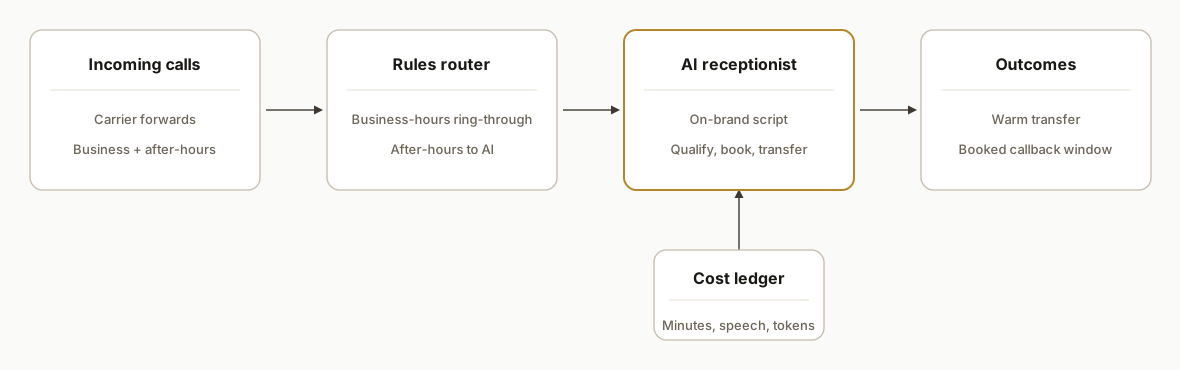
Our low-volume pattern keeps it simple: your carrier forwards calls to an orchestration endpoint. A rules engine decides whether to use the AI receptionist or ring-through to a human. The agent handles greeting, qualification, and booking prompts, with optional warm transfer. Every turn is logged for cost and outcomes.
- Ingress and rules: Calls land in a thin router. Business-hours calls can ring your team first. After-hours go straight to the AI. Holidays and per-day overrides live in a config file.
- AI receptionist engine: Conversational runtime with on-brand script, deterministic guardrails for booking and disallowed topics, and warm-transfer prompts.
- Warm transfer and escalation: Agent offers to transfer when the script calls for it. If no one picks up, it records a concise summary and promises a callback window.
- Cost and outcome ledger: We tally telephony minutes, speech in and out, and model tokens to a monthly ledger so break-even is visible.
Step-by-step: how to build it
We run this as a thin Node service with explicit toggles for after-hours and a cost ledger. Here is the skeleton we deploy.
1) Route after-hours calls to the agent
Answer-first: detect schedule and route to AI only when configured. Keep business-hours ring-through unchanged.
// server.js
import express from "express";
import dayjs from "dayjs";
import tz from "dayjs/plugin/timezone.js";
import utc from "dayjs/plugin/utc.js";
import { buildTwiML, aiReceptionist } from "./voice.js";
dayjs.extend(utc); dayjs.extend(tz);

const app = express();
app.use(express.urlencoded({ extended: false }));

const cfg = {
  tz: "America/Los_Angeles",
  hours: { start: 8, end: 17 },           // 08:00, 17:00 local
  days: [1,2,3,4,5],                      // Mon, Fri
  holidays: new Set(["2026-12-25"])      // ISO dates
};

function isBusinessHours(now = dayjs().tz(cfg.tz)) {
  if (!cfg.days.includes(now.day())) return false; // Sunday=0
  if (cfg.holidays.has(now.format("YYYY-MM-DD"))) return false;
  const h = now.hour();
  return h >= cfg.hours.start && h < cfg.hours.end;
}

app.post("/voice", async (req, res) => {
  if (isBusinessHours()) {
    // Ring-through to your team first, failover to AI if no answer
    return res.type("text/xml").send(buildTwiML({ mode: "ring_then_ai" }));
  }
  const twiml = await aiReceptionist({ from: req.body.From, to: req.body.To });
  res.type("text/xml").send(twiml);
});

app.listen(3000);
Key gotcha: honor local time zones and holiday overrides. Daylight saving changes trip naive hour math.
2) Keep scripts deterministic and short
Answer-first: use a fixed outline with allowed intents and booking rules. Do not let the model improvise beyond those.
// script.js
export const SCRIPT = {
  greeting: "Thanks for calling {brand}. How can I help today?",
  intents: ["new_lead", "existing_customer", "emergency", "other"],
  disallowed: ["legal_advice", "medical_advice", "pricing_commitments"],
  booking: {
    enabled: true,
    collect: ["name", "callback", "reason", "preferred_time"],
    confirm: "I will pass this to {team}. Expect a callback {window}."
  },
  transfer: {
    enabled: true,
    when: ["emergency", "vip"],
    no_answer: "I could not reach the on-call. I logged your details for priority callback."
  }
};
Short prompts reduce latency and cost. A consistent disallowed list prevents risky statements.
3) Warm transfer with safe fallbacks
Answer-first: attempt transfer, cap ring time, then fall back to a clear promise and a logged summary.
// voice.js
import { SCRIPT } from "./script.js";

export function buildTwiML({ mode }) {
  // Build XML to ring your team first, else hand back to AI
  const xml = `<?xml version="1.0" encoding="UTF-8"?>
<Response>
  <Dial timeout="18">+15551234567</Dial>
  <Say>Connecting you to our assistant.</Say>
  <Redirect method="POST">/ai</Redirect>
</Response>`;
  return xml;
}

export async function aiReceptionist(ctx) {
  // Pseudocode: run agent turn loop, then maybe transfer
  const transcript = [];
  let outcome = { type: "summary", payload: {} };
  // ... collect details, classify intent, decide transfer
  return `<?xml version="1.0" encoding="UTF-8"?>
<Response>
  <Say>Thanks. I have your details. Our team will call you shortly.</Say>
  <Hangup />
</Response>`;
}
Do not spin in loops when a transfer fails. Cap attempts and exit cleanly.
4) Log usage for ROI and guard costs
Answer-first: keep a cost ledger per call so break-even is measurable and overage risks are visible.
// cost-ledger.js
export class CostLedger {
  constructor(rates) {
    this.rates = rates; // { telephonyPerMin, sttPerMin, ttsPerChar, llmPerToken }
    this.rows = [];
  }
  track(row) { this.rows.push({ ts: Date.now(), ...row }); }
  monthly() {
    const s = this.rows.reduce((a,r) => {
      a.telephonyMin += r.telephonyMin||0;
      a.sttMin += r.sttMin||0;
      a.ttsChars += r.ttsChars||0;
      a.llmTok += r.llmTok||0;
      return a;
    }, { telephonyMin:0, sttMin:0, ttsChars:0, llmTok:0 });
    const cost = s.telephonyMin*this.rates.telephonyPerMin
               + s.sttMin*this.rates.sttPerMin
               + s.ttsChars*this.rates.ttsPerChar
               + s.llmTok*this.rates.llmPerToken;
    return { usage: s, cost: Number(cost.toFixed(2)) };
  }
}
We pause or degrade gracefully if vendor quotas are near limits. That saved a live voice system from silent overage billing in production.
5) Put the ROI math in your config
Answer-first: model your own break-even so non-technical owners can see it.
// roi.js
// Labelled example estimates. Replace with your real numbers.
export function breakEven({ callsPerMonth, answerRate, recoveryRate, grossMarginPerJob, avgCallsPerJob, monthlyCost }) {
  const reachable = callsPerMonth * (1 - answerRate);     // calls that would hit voicemail
  const recovered = reachable * recoveryRate;             // calls AI captures
  const jobs = recovered / avgCallsPerJob;                // calls per booked job
  const gross = jobs * grossMarginPerJob;                 // recovered gross margin
  const net = gross - monthlyCost;                        // contribution after cost
  return { jobsNeeded: Math.ceil(monthlyCost / grossMarginPerJob), gross, net };
}

// Example: 220 calls, answerRate 0.7, recovery 0.35, margin $250, 2 calls/book, cost $300
console.log(breakEven({ callsPerMonth:220, answerRate:0.7, recoveryRate:0.35, grossMarginPerJob:250, avgCallsPerJob:2, monthlyCost:300 }));
This is intentionally simple. The point is to anchor a decision: how many additional jobs per month must the agent secure to break even.
Where it gets complicated
After-hours only is a feature, not a hack. Build explicit business-hours routing with holiday and exception support. Daylight saving changes and ad hoc office closures must not leak calls.
Transfers must fail safe. On-call numbers change, ring times vary, and humans miss calls. We cap ring time, retry once, then summarize and promise a callback window. Infinite transfer loops are expensive and frustrating.
Quota and overage protection matters. Some vendors keep serving while billing overage. We shipped live guards that pause or degrade when quotas are close. In one production voice system, this prevented unexpected overage spend.
Names, addresses, and account numbers need confirmation patterns. Speech errors compound. We confirm spellings and read-backs for critical fields, then email or log the structured data to your CRM so humans can verify quickly.
Recording and consent policy is non-optional. Announce recording and route sensitive topics to a human. State rules vary. Keep your prompts and policies consistent.
Google's research shows that 61 percent of mobile users call during the purchase process, which is exactly when misroutes and bad transfers burn opportunities [https://www.thinkwithgoogle.com/consumer-insights/consumer-trends/click-to-call/]. We treat routing and consent as first-class concerns, not afterthoughts.
What this actually changes
For small teams under ~300 calls a month, the AI receptionist pays back as an after-hours specialist that turns a handful of otherwise-lost calls into booked work. In our deployments, the decision rarely came down to replacing a person. It came down to capturing two to five incremental jobs per month, which covered usage costs and then some. The lever is not minutes saved. It is revenue recovered from calls that would have died in voicemail.
Two external anchors support the model: most callers do not leave voicemails, so missed calls are usually missed revenue (Forbes: 80 percent) [https://www.forbes.com/sites/theyec/2013/10/03/dont-let-voicemail-kill-your-business/]. Responding quickly raises conversion odds dramatically. Firms that contacted leads within an hour were almost seven times more likely to qualify them than those who waited over an hour (Harvard Business Review) [https://hbr.org/2011/03/the-short-life-of-online-sales-leads].
Frequently asked questions
Is an AI receptionist worth it if we get fewer than 300 calls a month?
Yes when it recovers a few missed calls that would have hit voicemail. Use a simple model: break even equals monthly cost divided by gross margin per job. If your margin is $250 and the monthly bill is $300, two additional booked jobs cover it. The volume threshold is lower than most owners expect.
Can we set it up for after-hours only?
Yes. That is our default for low volume. Business-hours calls still ring your team first. Nights and weekends go straight to the AI with warm-transfer rules. Holidays and exceptions live in config so operations can toggle without code changes.
How do you prevent wrong answers or bad bookings?
We run short, on-brand scripts with a disallowed-topics list and deterministic booking prompts. The agent never makes pricing promises. It confirms names and numbers and routes edge cases to a human. Every turn is logged for review and retraining.
What does this cost monthly?
Usage drives cost: telephony minutes, speech in and out, and model tokens. Low-volume, after-hours deployments typically cost less than staffing or live per-minute answering for similar coverage. The right way to decide is to model your own calls, margin, and a conservative recovery rate.
How long does it take to go live?
We ship these in days, not months. After-hours only is the fastest path: one routing change, scripts, warm-transfer numbers, and the cost ledger. Complex CRMs or custom scheduling can add time. We stage shadow runs before flipping live.
What do we need to provide?
Your on-brand greeting and FAQs, the on-call numbers, desired business-hours schedule and holidays, and where to log outcomes. If you want bookings, provide the approved windows and who confirms them.
If you are weighing an after-hours AI receptionist for a small team, we have shipped this exact pattern in production. See our deeper cost comparison in AI Receptionist vs Human: Cost Break-Even and our service details under AI voice agents. Or book a short call and we will run your numbers together.
- Services: /services#ai-voice-agents
- Related post: /blog/ai-receptionist-vs-human-cost-breakeven
- Book a call: /book
Sources
- 1.Don't let voicemail kill your businessforbes.com
- 2.Click to call consumer research (Think with Google)thinkwithgoogle.com
- 3.The Short Life of Online Sales Leadshbr.org
Curious what this would actually save you?
Put real numbers to it. The ROI calculator estimates the hours and dollars an automation like this returns, in about a minute.
See your options