
Here is how we build the AlayaCare integration: it accepts inbound referrals through the official Intake channel, provisions client and service records, triggers caregiver scheduling on assignment or shift changes, and sends HIPAA-safe family status updates without exposing health details. It fits home care operators that want speed-to-care and auditability. This guide explains exactly how we wired it, the caveats we hit, and how you can replicate it safely.
AlayaCare API integration is the practice of connecting AlayaCare's External REST API, Intake messaging, and Marketplace event streams to your own systems so referrals, schedules, and notifications flow automatically.
The problem it solves
Manual intake and scheduling in home care looks like this: a coordinator reads a referral email or portal entry, re-keys demographics, creates a line of service, calls or texts caregivers to fill the visit, and finally messages the family. It is slow, error-prone, and hard to audit. A missed handoff means delayed care. A copied health detail in the wrong channel becomes a compliance risk.
| Step | Manual workflow | Automated with AlayaCare API |
|---|---|---|
| Referral capture | Read an email. Copy data into AlayaCare. | Post Intake message once. Client and service are created by AlayaCare. |
| Eligibility and flags | Coordinator skims attachments. | Rules engine tags priority from Intake payload. |
| Scheduling trigger | Phone calls and texts to caregivers. | Event or Scheduler API change triggers assignment routines. |
| Family update | Free-form SMS or email with PHI risk. | Templated, HIPAA-safe status update using non-health fields only. |
| Audit trail | Scattered messages and sticky notes. | Centralized logs from Intake to assignment to outbound notifications. |
According to IBM's 2023 Cost of a Data Breach Report, healthcare breaches averaged 10.93 million dollars per incident, the highest of any sector (source: https://www.ibm.com/reports/data-breach). Reducing re-keying and keeping PHI out of messaging channels is not just good hygiene. It is material risk reduction.
How the automation works
At a high level: referrals enter through AlayaCare's Intake channel to create the client and a line of service. We subscribe to Marketplace events or poll the Scheduler area to detect assignment and timing changes. A rules layer translates those events into caregiver routing tasks and family-safe notifications. For bulk or accounting-grade outputs we consume CSV flat files from S3 when available.
- External REST API: Tenant-scoped base path with HTTP Basic auth using an AlayaCare public and private key. We use the Clients, Employees, and Scheduler areas for reads and controlled writes where supported.
- Intake referrals: The only supported path to create services programmatically. We publish Intake messages to the inbound queue so AlayaCare creates the client, contact, and line of service.
- Marketplace events: Token-based auth to regional endpoints. We consume async events via AWS SNS where configured to react to schedule changes without polling.
- Flat-file exports: CSV files over S3 with AES256 at rest, plus SNS signals when files land. Useful for reconciliations and downstream reporting.
- HIPAA-safe notifier: A small service that builds family updates from non-health fields only, aligning with AlayaCare's guidance that outbound event queues exclude health data.
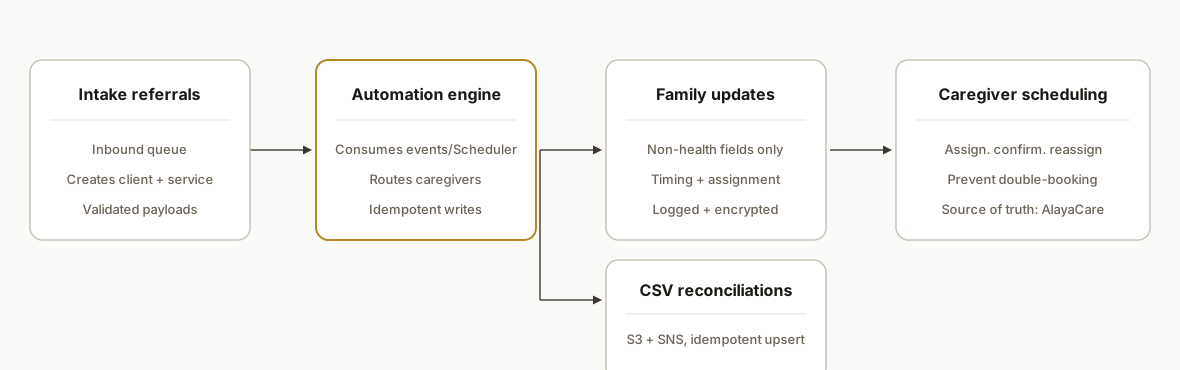
What AlayaCare actually supports: referral intake, client lifecycle, care plans
Short answer: AlayaCare supports programmatic referral intake that creates clients and services, it models the client lifecycle inside the platform, and it stores care plans in the clinical module. Automations can orchestrate the first two directly and reference the third safely without moving clinical content.
- Referral intake: Supported through the official Intake channel. You submit an Intake message and AlayaCare creates the client, primary contact, and line of service according to your configured programs and rules. We used this as the single entry point so nothing is re-keyed.
- Client lifecycle: AlayaCare represents states like referral received, active, scheduled, on hold, and discharged through program enrollment, scheduling state, and tags or flags. We drive lifecycle transitions from Intake to first scheduled visit using Marketplace events or Scheduler polling.
- Care plans: Authored and maintained in AlayaCare's clinical area. Outbound event streams exclude health details by design. Our automations reference only non-health metadata available in events or exports and leave plan content stored in AlayaCare. For reporting needs, we rely on flat-file exports delivered over S3.
If you want a deeper comparison across home care systems, we applied the same intake-to-lifecycle pattern in our WellSky ClearCare integration write-up: /blog/wellsky-clearcare-integration-automation. For messaging design that stays compliant and on-brand, see our guide on AI customer response automation: /blog/ai-customer-response-automation. For smarter data ownership choices that keep you flexible, read our decision guide: /blog/ai-business-decisions-own-data.
Practical mappings we used in production
- Referral to client record: Intake message becomes a client with a primary contact and a line of service.
- Triage flags: We map priority from referral fields into tags that the routing engine reads.
- Lifecycle checkpoints: Referral created, service created, first visit scheduled, first visit completed. Each checkpoint triggers downstream tasks.
- Family communication: Status updates use only non-health fields like schedule window, assignment state, and caregiver first name.
What referral intake, client lifecycle, and care plan management does AlayaCare support?
Answer first: Intake creates clients and services, lifecycle states can be automated with events or Scheduler reads, and care plans stay in AlayaCare's clinical area. We orchestrate around care plans without moving PHI.
At-a-glance support matrix
| Area | Supported via | What you can automate | Notes |
|---|---|---|---|
| Referral intake | Intake channel | Create client, contact, line of service from a single message | We treat Intake as the only entry point for new services |
| Client lifecycle | External API reads plus Marketplace events or Scheduler polling | Transition from referral to scheduled to completed. Tagging, routing, notifications | We keep AlayaCare as source of truth for schedule state |
| Care plan management | In-platform clinical module | Reference non-health metadata for notifications and routing context | Do not export clinical notes via events. Use flat-file exports for reporting when provisioned |
What you cannot do
- Create services through standard REST: use Intake for service creation.
- Stream clinical notes in events: outbound events exclude health data by design.
- Self-provision Marketplace topics: coordinate enablement and keep a polling fallback.
Referral intake: supported path and practical checks
Answer first: use Intake as the single entry point to create clients and lines of service, then attach routing rules to the resulting records.
- Treat Intake as authoritative: avoid parallel client creation paths that cause duplicates.
- Validate before publish: normalize phones, postal codes, and address lines so downstream matching works.
- Carry a dedupe token: include a stable reference from your source system so retries do not create duplicates.
- Contract-test the payload: pin the expected Intake shape and fail in CI if a field drifts.
- Map program and priority: translate referral source fields into your AlayaCare programs and tags so scheduling logic is deterministic.
Related: if you want after-hours coverage tied to the same Intake triggers, see how we design an AI voice receptionist for overflow: /blog/ai-voice-receptionist-after-hours-overflow.
Client lifecycle: states and triggers you can drive
Answer first: drive the path from referral to first scheduled visit from events when provisioned, or by polling Scheduler if events are not available.
- State progression: create clear checkpoints like referral created, visit scheduled, visit completed and attach tasks to each.
- Triggers: consume Marketplace events where enabled for near real time. Poll Scheduler on a short cadence as a fallback.
- Idempotency: key your actions by visit and caregiver so retries never double-book or notify twice.
- SLA timers: track time between Intake and first scheduled visit using your own watermark, then alert when thresholds are crossed.
- Source of truth: never override schedule state locally. Read, decide, then write back only what the API supports.
If you need a primer on standing up reliable voice interactions tied to schedule state, this setup guide helps: /blog/how-to-set-up-an-ai-voice-receptionist.
Care plans: manage in AlayaCare, orchestrate around them
Answer first: keep care plan content in AlayaCare and orchestrate tasks around non-health metadata exposed in events or exports.
- Notifications: build family messages from non-health details like schedule window and assignment status only.
- Context for routing: use service type or other non-health metadata available in events or flat-file exports to influence caregiver selection.
- Reporting: consume CSV exports over S3 when provisioned for downstream analytics and reconciliations.
- Compliance posture: do not transmit or store diagnoses, clinical notes, or plan text in your automations.
For another platform with the same pattern, compare our WellSky ClearCare approach: /blog/wellsky-clearcare-integration-automation.
Step-by-step: how to build it
1) Authenticate to the External API with HTTP Basic
Answer first: AlayaCare's External API uses your tenant domain and HTTP Basic with a public and private key. We keep keys in a secrets manager and compose Basic auth per request.
// Node.js example: External API auth and a guarded GET
import fetch from "node-fetch";

const TENANT = process.env.ALAYACARE_TENANT; // e.g., example.alayacare.ca
const PUB = process.env.ALAYACARE_PUBLIC_KEY;
const PRIV = process.env.ALAYACARE_PRIVATE_KEY;

function basicAuth() {
  const token = Buffer.from(`${PUB}:${PRIV}`).toString('base64');
  return `Basic ${token}`;
}

export async function acGet(areaPath) {
  const url = `https://${TENANT}/ext/api/v2/${areaPath}`; // areaPath: Clients|Employees|Scheduler/...
  const res = await fetch(url, { headers: { Authorization: basicAuth() }});
  if (!res.ok) throw new Error(`AlayaCare ${res.status} ${await res.text()}`);
  return res.json();
}
What tripped us up was environment drift: staging and production tenants each have their own key pairs. We pin keys per environment and assert the expected hostname before every call.
2) Send Intake referral messages to create client and service
Answer first: services cannot be created via standard REST. Referrals are the supported method to create services, so we publish Intake messages to the inbound queue.
// Example Intake message payload construction (shape depends on your setup)
const intakeMsg = {
  referralSource: "Hospital A",
  client: {
    firstName: "Alex",
    lastName: "Smith",
    primaryPhone: "+1-555-0100",
    address: { line1: "123 King St", city: "Toronto", postalCode: "M5H 2N2" }
  },
  contact: { name: "Jordan Smith", relation: "Spouse", phone: "+1-555-0101" },
  lineOfService: { program: "Personal Support", priority: "High" },
  notes: "Referral via discharge planner. Preferred mornings."
};

// Publish to your configured Intake queue (AWS SDK example)
import { SQSClient, SendMessageCommand } from "@aws-sdk/client-sqs";
const sqs = new SQSClient({ region: process.env.AWS_REGION });
await sqs.send(new SendMessageCommand({
  QueueUrl: process.env.ALAYACARE_INTAKE_QUEUE_URL,
  MessageBody: JSON.stringify(intakeMsg)
}));
We validate against AlayaCare's intake guide and maintain a contract test so a schema change fails fast in CI instead of in production.
3) Consume Marketplace events or poll Scheduler for triggers
Answer first: for near real time, consume Marketplace events via SNS when enabled. Where events are not provisioned, poll the Scheduler area on a cadence.
// SNS subscription confirm + event handler (Express)
app.post("/alayacare/events", async (req, res) => {
  const msgType = req.get("x-amz-sns-message-type");
  const body = req.body;
  if (msgType === "SubscriptionConfirmation") {
    await fetch(body.SubscribeURL); // confirm subscription
    return res.status(200).end();
  }
  if (msgType === "Notification") {
    const event = JSON.parse(body.Message);
    // e.g., schedule-assignment-changed (exact topics are provisioned per account)
    await handleScheduleEvent(event);
    return res.status(200).end();
  }
  res.status(400).end();
});

// Fallback: poll Scheduler area for changes since a watermark
const since = new Date(Date.now() - 5 * 60 * 1000).toISOString();
const delta = await acGet(`Scheduler/changes?since=${encodeURIComponent(since)}`);
Note: Marketplace subscriptions are not self-serve. We coordinated enablement by email per AlayaCare's guidance.
4) Route assignments and guard against double-booking
Answer first: when an event indicates an assignment need, we select eligible caregivers and idempotently write back or notify, with a dedupe key on visit and caregiver.
# Python: select caregivers and prevent duplicate work
from hashlib import sha1

seen = set()

def key(visit_id, caregiver_id):
    return sha1(f"{visit_id}:{caregiver_id}".encode()).hexdigest()

for visit in pending_visits:
    eligible = match_caregivers(visit, caregivers)
    for cg in eligible:
        k = key(visit.id, cg.id)
        if k in seen: continue
        seen.add(k)
        enqueue_assignment_attempt(visit, cg)
We treat AlayaCare as the source of truth for schedule state and keep our routing stateless beyond a short-lived dedupe cache, which kept retries safe.
5) Send HIPAA-safe family status updates
Answer first: build messages only from non-health data because outbound event queues exclude client health details. Families get timing and assignment status, never diagnoses or clinical notes.
function toFamilyUpdate(event) {
  // Whitelist non-health fields only
  const safe = {
    clientName: event.client?.displayName,
    visitStart: event.visit?.startTime,
    visitEnd: event.visit?.endTime,
    caregiverFirstName: event.caregiver?.firstName,
    status: event.status // e.g., Assigned, Confirmed, En Route
  };
  return `${safe.clientName}: ${safe.status}. ` +
         `Window ${new Date(safe.visitStart).toLocaleTimeString()}, ${new Date(safe.visitEnd).toLocaleTimeString()}. ` +
         (safe.caregiverFirstName ? `Caregiver: ${safe.caregiverFirstName}.` : "");
}
We log every outbound message with hashed identifiers and redact at the edge. Storage at rest uses AES-GCM with rotation, and access is limited to the automation service.
6) Process flat-file CSV exports from S3 for reconciliations
Answer first: for accounting and EVV reconciliations, consume CSV exports over S3 with event notifications to kick off processing.
# AWS Lambda: S3 ObjectCreated handler for CSV exports
import csv, boto3

def handler(event, context):
    s3 = boto3.client('s3')
    bucket = event['Records'][0]['s3']['bucket']['name']
    key = event['Records'][0]['s3']['object']['key']
    obj = s3.get_object(Bucket=bucket, Key=key)
    rows = csv.DictReader(obj['Body'].read().decode('utf-8').splitlines())
    for row in rows:
        upsert_reconciliation(row)  # idempotent write
We treat file arrivals as eventual-consistency signals. A simple idempotent upsert prevents duplicate entries if SNS retries.
Where it gets complicated
- You cannot create services via standard REST: Referrals are the supported method to create services. We moved all programmatic provisioning into the Intake channel and validated payloads against the intake guide.
- Marketplace subscriptions are not self-serve: You must coordinate enablement by email. We built a fallback poller against Scheduler so scheduling triggers still run if events are delayed.
- Outbound events exclude health data: That is a feature, not a bug. We designed our family-update layer to rely only on non-health fields and kept PHI out of transport.
- No public Zapier/Make app we could rely on: We did not find an official connector. AlayaCare markets its own Connector product. We integrated directly with the External API, Intake, and AWS SQS/SNS to avoid vendor lock-in.
- Environment sprawl: Regional Marketplace base URLs and tenant domains differ. We pinned environment variables per tenant and asserted hostnames to avoid cross-posting.
What this actually changes
For a home care operator, this removed re-keying from referral to service creation, cut the time to first caregiver contact, and standardized family messaging into a safe template. The change is structural: the Intake channel becomes the single source of truth, events drive actions, and messaging flows from non-health data by design. Healthcare leads the world in breach costs at an average of 10.93 million dollars per incident in 2023 (IBM: https://www.ibm.com/reports/data-breach). Keeping PHI out of status updates and reducing manual copy-paste meaningfully lowers exposure while improving speed-to-care.
Frequently asked questions
Does AlayaCare have an official API?
Yes. The External REST API lives under your tenant domain and uses HTTP Basic with a public and private key. Areas include Clients, Employees, Scheduler, Tasks, Files, and Clinical. The Marketplace also exposes regional endpoints with token-based auth and SNS-style events.
How do you create services through the API?
You do not via standard REST. Referrals are the supported method for creating services. We publish Intake messages to the inbound queue so AlayaCare creates the client, contact, and line of service according to the intake guide.
Can I get real-time webhooks from AlayaCare?
The Marketplace supports async eventing via SNS. Subscriptions are not self-serve, so you coordinate enablement by email. Where events are not provisioned, polling the Scheduler area on a short cadence is a practical fallback.
Is there a Zapier or Make.com integration for AlayaCare?
We did not find a public Zapier or Make app to rely on. AlayaCare offers its own Connector no-code product. We integrate directly with the External API, Intake, and SQS/SNS so you are not gated by third-party app coverage.
How do you keep family updates HIPAA-safe?
We only use non-health data from outbound events: timing, assignment state, and caregiver first name where appropriate. No diagnoses or clinical notes. Messages are templated, logged with hashed identifiers, encrypted at rest, and access-controlled.
What referral intake, client lifecycle, and care plan management does AlayaCare support?
Intake: supported and used to create client and service. Lifecycle: supported through program enrollment, scheduling state, and events or Scheduler polling. Care plans: authored in AlayaCare and not moved. We reference only non-health metadata and use flat-file exports for reporting when provisioned.
How long does this take to implement?
We start with Intake and one scheduling trigger so you see value quickly, then expand to more programs and notifications. Timeline depends on event access and mapping scope. The pattern above lets you ship a usable first slice, then iterate.
If you operate on AlayaCare and want referrals to create themselves, caregivers to be routed automatically, and families to get compliant updates, we have already built the pattern end-to-end. See our broader workflow automation services at /services#workflow-automation, learn how we evaluate voice stacks in /blog/ai-voice-agents-actually-work, and why rollouts fail in /blog/why-90-percent-of-automation-projects-fail. When you are ready to scope your build, book a call at /book.
Want us to build this for you?
Nine questions, about 90 seconds. You see the revenue it is costing you, then pick a time. No pitch.
Get your free assessment