
We built and shipped a SedonaOffice to QuickBooks bridge that moves alarm invoices, RMR adders, service tickets, and credits into accounting automatically. In production it runs nightly, dedups by document number, queues credits when a period is closed, and keeps the sync reversible.
SedonaOffice API integration is the process of using SedonaAPI 2.0 and export files to pull billing data out of SedonaOffice and post the mapped invoices, payments, and credits into QuickBooks without manual re-entry.
The problem it solves
Most alarm companies still re-key SedonaOffice invoices into QuickBooks or wait on monthly exports. The pain shows up at month-end: double entry, missed credits when the Sedona period is closed, and ticket charges that never hit accounting.
- AP time compounds. The Bureau of Labor Statistics reports the median pay for bookkeeping, accounting, and auditing clerks at roughly $23 per hour in recent years (BLS OES, occupational profile). Even a few hours of re-entry per week adds up.
| Step | Manual workflow | Automated workflow |
|---|---|---|
| Gather billing | Run reports, export Excel, email files | API pull or watched export runs on a schedule |
| Prep invoices | Copy-paste into QuickBooks lines | Transform to QuickBooks schema centrally |
| Credits | Retry when period opens, hope it posts | Queue if period closed, post when safe |
| Ticket charges | Reconcile by hand | Include on the same nightly pass |
| Re-runs | Risk duplicates | Idempotent write with a ledger |
How the automation works
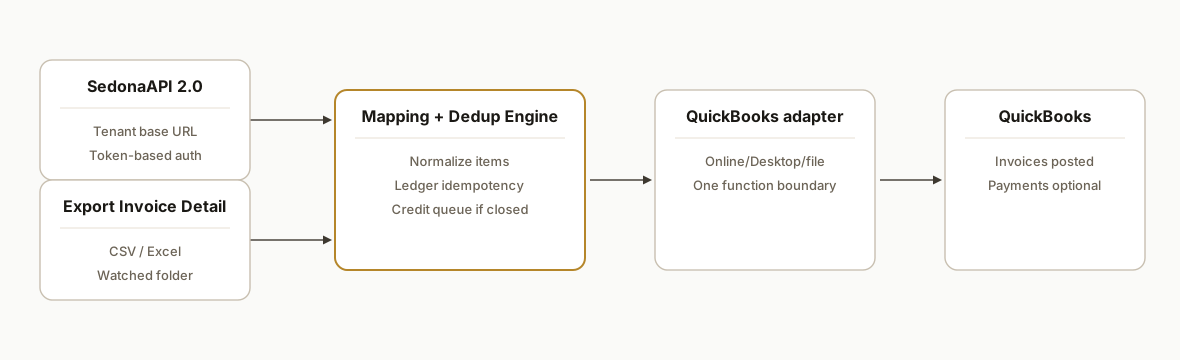
The architecture is simple on purpose: tenant-hosted SedonaAPI 2.0 for primary reads, a CSV export fallback when an endpoint is unavailable, a mapping and dedup engine, then a QuickBooks writer. We kept QuickBooks calls swappable so the same core handles Desktop or Online with a different adapter.
- SedonaOffice data layer: We read SedonaAPI 2.0 on a tenant-specific base URL, using token-based auth per the admin docs. When a report is better as a file, we ingest Export Invoice Detail from a watched folder.
- Billing mapper: Normalizes Sedona items into a minimal invoice structure. We preserve document numbers and customer keys for idempotency and traceability.
- Dedup ledger: A SQLite table records every pushed document number and a hash of line items. Re-runs become no-ops unless content changes.
- QuickBooks adapter: One function boundary that posts an invoice to your QuickBooks stack or stages a file for the accountant, depending on your edition and policy.
- Credit guard: If a period is closed in SedonaOffice, credit posts via API can fail. We catch and queue those, then replay when the period opens.
Step-by-step: how to build it
1) Discover your tenant API and set config
Answer first: SedonaAPI 2.0 is tenant-hosted with a base URL like https://sedonaapi.yourdomain.tld. We store the base URL, a token source, and a watched export folder for CSV fallbacks.
# .env
SEDONA_BASE_URL=https://sedonaapi.example.com
SEDONA_TOKEN_TYPE=Bearer            # confirm exact scheme with your tenant docs
SEDONA_ACCESS_TOKEN=***             # rotate via your chosen auth flow
EXPORT_WATCH_DIR=/var/sedona/exports
QB_MODE=online                       # or desktop, or file
Gotcha: the API uses token-based auth, but the exact header format depends on your tenant's setup. Confirm the header name and scheme in your SedonaAPI 2.0 portal before hard-coding it.
2) Write a small Sedona client with safe headers
Answer first: centralize header building so you can swap auth without touching business code.
// lib/sedona.js
import fetch from "node-fetch";

const base = process.env.SEDONA_BASE_URL;

function sedonaHeaders() {
  const t = process.env.SEDONA_ACCESS_TOKEN;
  const typ = process.env.SEDONA_TOKEN_TYPE || "Bearer";
  if (!t) throw new Error("Missing Sedona token");
  return {
    // Confirm exact header name with your tenant portal
    Authorization: `${typ} ${t}`,
    "Content-Type": "application/json"
  };
}

export async function getSedona(path) {
  const res = await fetch(`${base}${path}`, { headers: sedonaHeaders() });
  if (!res.ok) throw new Error(`Sedona GET ${path} ${res.status}`);
  return res.json();
}
Gotcha: some updates in SedonaWeb 2.0 require PUT for dispatch-related changes. Use the verb the doc calls for, not a POST.
3) Add a CSV fallback for Export Invoice Detail
Answer first: when an endpoint is not exposed for your report, ingest the product's own export. We watch a folder and parse CSVs.
// lib/csv.js
import fs from "fs";
import path from "path";
import { parse } from "csv-parse/sync";

export function readLatestExport(dir) {
  const files = fs.readdirSync(dir).filter(f => f.endsWith(".csv"));
  if (!files.length) return [];
  const latest = files.map(f => ({ f, t: fs.statSync(path.join(dir, f)).mtimeMs }))
    .sort((a,b) => b.t - a.t)[0].f;
  const text = fs.readFileSync(path.join(dir, latest), "utf8");
  return parse(text, { columns: true, skip_empty_lines: true });
}
Gotcha: SedonaDashboard and billing reports export to Excel or CSV. Standardize headers in one place and version your parser when reports change.
4) Map Sedona rows to a QuickBooks-ready invoice
Answer first: build a minimal schema and keep your mapping explicit and testable.
// lib/map.js
export function toInvoice(row) {
  return {
    docNo: row.InvoiceNumber,
    txnDate: row.InvoiceDate,
    customerRef: row.MasterAccount || row.CustomerName,
    memo: row.Description || "",
    lineItems: [{
      sku: row.ItemCode,
      desc: row.ItemDescription,
      qty: Number(row.Quantity || 1),
      rate: Number(row.UnitPrice || row.Amount)
    }]
  };
}
Gotcha: credits often omit line-level detail unless the payload is built correctly on create. Preserve item detail in your data model so credits render as intended downstream.
5) Make writes idempotent with a ledger
Answer first: never post the same document twice. Record a content hash keyed by document number.
-- schema.sql
CREATE TABLE IF NOT EXISTS ledger (
  doc_no TEXT PRIMARY KEY,
  hash   TEXT NOT NULL,
  status TEXT NOT NULL,
  last_posted_at TEXT NOT NULL
);
// lib/ledger.js
import crypto from "crypto";
import Database from "better-sqlite3";
const db = new Database("state.db");
db.exec(fs.readFileSync("schema.sql","utf8"));
export function shouldPost(inv) {
const hash = crypto.createHash("sha1").update(JSON.stringify(inv)).digest("hex");
const row = db.prepare("SELECT hash FROM ledger WHERE doc_no = ?").get(inv.docNo);
return { ok: !row || row.hash !== hash, hash };
}
export function record(inv, hash, status) {
db.prepare(`INSERT INTO ledger(doc_no, hash, status, last_posted_at)
VALUES (?,?,?,datetime('now'))
ON CONFLICT(doc_no) DO UPDATE SET hash=excluded.hash, status=excluded.status, last_posted_at=excluded.last_posted_at`).run(inv.docNo, hash, status);
}Gotcha: ledger-first prevents duplicates when you re-run backfills or when a previous job died mid-flight.
6) Post to QuickBooks behind a single adapter boundary
Answer first: keep the QuickBooks call swappable and test it with a dry-run first.
// lib/qb.js
export async function postInvoice(inv) {
  if (process.env.QB_MODE === "file") {
    // write to a staging file for accountant import
    return { ok: true, id: `file:${inv.docNo}` };
  }
  // Online/Desktop adapters live here. Use your official SDK and OAuth config.
  // Do not hard-code a vendor endpoint; inject it.
  return { ok: true, id: `qb:${inv.docNo}` };
}
Gotcha: SedonaOffice positions itself as a full accounting platform. If you must push to QuickBooks, you are building a bridge. Keep the adapter isolated so accounting can switch destinations without a rebuild.
Where it gets complicated
- Credits during a closed period: Posting credits through the API fails when the accounting period is not open. We queue those operations and replay when finance opens the period instead of retrying blindly.
- Missing line detail on credits: Credits created via the API can hide item detail unless the payload carries it correctly. We populate and test credit items explicitly so downstream PDFs and accounting views match policy.
- HTTP verbs matter for dispatch updates: SedonaWeb 2.0 calls that touch dispatch expect PUT. Using the wrong verb returns confusing errors. We codify verbs per operation to avoid regressions.
- No off-the-shelf Zapier/Make: There is no official Zapier or Make connector listed for SedonaOffice. We rely on the REST API and product exports, not third-party glue, so the integration is portable across tenants.
- File export drift: Product exports change. We version parsers and pin mapping tests so a column rename does not silently mis-post amounts.
What this actually changes
For a regional alarm company on this pattern, the re-entry loop disappeared. Invoices and ticket charges landed in QuickBooks nightly, credits were safe-queued when the Sedona period was closed, and accounting could switch the final destination without touching the mapper.
One reason it pencils out: even a conservative hour or two of weekly re-entry at typical clerk wages is recurring overhead. The U.S. Bureau of Labor Statistics reports median pay for bookkeeping, accounting, and auditing clerks in the low 20 dollars per hour range, so eliminating manual re-keying returns capacity immediately. Source: https://www.bls.gov/ooh/business-and-financial/bookkeeping-accounting-and-auditing-clerks.htm
Frequently asked questions
Does SedonaOffice have an API we can use?
Yes. SedonaAPI 2.0 is a tenant-hosted REST API with active release notes and setup docs. The base URL is tenant-specific. Auth is token-based per the docs. Confirm the exact header scheme in your tenant portal before wiring it.
Is there a SedonaOffice Zapier or Make.com connector?
We have not found an official Zapier or Make.com connector listed by the vendor. Our production builds use the REST API and product exports instead of third-party connectors so the integration remains portable across tenants.
How do you prevent duplicate invoices in QuickBooks?
We key every write on the Sedona document number and a content hash. On a re-run, if the hash has not changed we skip the write. If content changed, we update the record and log the prior state for traceability.
What happens to credits when the accounting period is closed in SedonaOffice?
API credit posts can fail when the period is not open. We detect that case, move the record to a retry queue, and replay when finance opens the period. The main run still completes and posts other documents.
Can this work without API access?
Yes. We built a CSV fallback that ingests Export Invoice Detail and other exports. The same mapper and dedup logic applies, so you can run file-only and switch to API later without changing downstream accounting.
How long does it take to implement?
A typical first deployment lands in 2 to 3 weeks: one week for data discovery and mapping, one for build, and the remainder for shadow-mode validation. File-only builds are often faster because tenant API coordination is lighter.
If you need a SedonaOffice to QuickBooks bridge that runs quietly every night, we already built and shipped this pattern. See our broader workflow automation services at /services#workflow-automation, read how we handle accounting integrations in /blog/automate-quickbooks-bank-imports, and if you want us to scope your tenant, /book a short call.
Want us to build this for you?
Nine questions, about 90 seconds. You see the hours it is costing you, then pick a time. No pitch.
Get your free assessment