
We built a TrackTik integration that takes guard incident reports as they happen, pushes them into a client facing portal, and turns billable events into invoice line items based on contract rules. This is for security and guard companies that want real time visibility for clients and clean billing without manual re keying. The guide below shows how it works and how to build it safely.
TrackTik API integration is the practice of using TrackTik's REST API, Events Subscriptions, and export channels to move operational data into your own systems for portals, analytics, and billing.
The problem it solves
Security operators often export incident PDFs or CSVs and then re type hours into billing. That forces back and forth email with clients, errors in invoices, and late reconciliations. TrackTik already captures the source of truth in the field. The missing piece is getting it into a portal clients can see and a billing layer that applies your contract rules automatically.
| Task | Manual process | Automated with TrackTik API |
|---|---|---|
| Client visibility to incidents | Email PDFs weekly, ad hoc screenshots | Live portal list with search, filters, and attachments |
| Billing from incidents and patrols | Re key time from reports into invoices | Map report types to billable activities, auto add invoice lines |
| Stakeholder notifications | CC clients from email when something happens | Events Subscriptions post to webhook, notify just the right stakeholders |
| Backfills and audits | Pull exports on demand and reconcile by hand | Scheduled CSV pulls with immutable ledger and diff reports |
Harvard Business Review reports that 81 percent of customers try to handle matters themselves before reaching out to a live representative. Source: https://hbr.org/2017/01/kick-ass-customer-service. A portal fed by TrackTik data meets that expectation while cutting support back and forth.
How the automation works
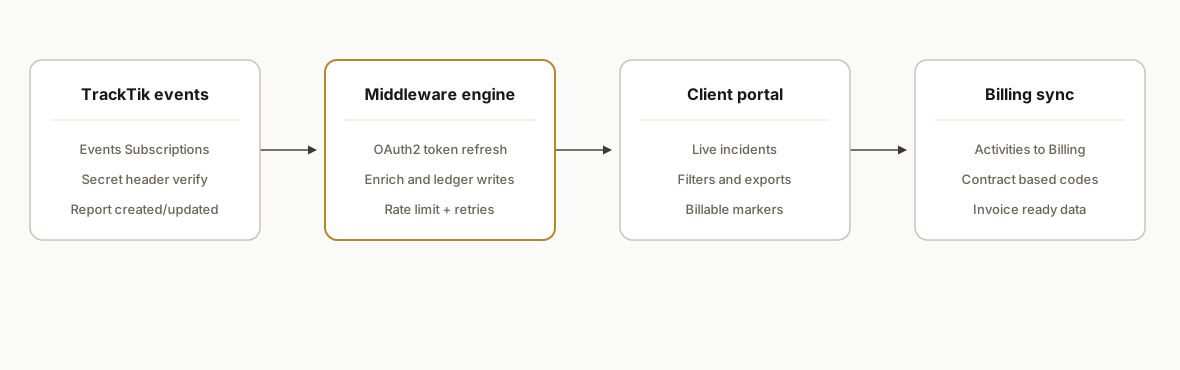
We rely on TrackTik's Events Subscriptions to push incident and report events to our middleware. The middleware enriches the payload with site and client context, writes an immutable ledger, renders the client portal UI, and posts matching billable activities to TrackTik's billing surface according to your configured contracts and preferences. For historical backfills or audits, we use CSV or XLSX exports from Operation Reports and Data Lab.
- Events Subscriptions webhook: TrackTik calls our HTTPS endpoint in real time when new reports are created or updated. We verify the shared secret header and queue processing.
- OAuth2 token handling: We obtain access tokens using OAuth2 and refresh them as needed. TrackTik refresh tokens are single use, so the middleware rotates them carefully.
- Enrichment and rules: We resolve the site, post, and client account, apply contract rules, and compute billable activity quantities. The ledger stores the raw JSON and the derived line items.
- Client portal: A Next.js UI reads from the ledger and shows incidents, attachments, and billable markers to the client with filters by site, severity, and time.
- Billing sync: For qualified events, we post billable activities to TrackTik Billing so invoices can be generated from configured billing settings.
- Orchestrator choice: If you prefer a light runtime instead of a full custom service, see our comparison of Make versus n8n versus Apps Script at /blog/make-vs-n8n-vs-gas.
Step-by-step: how to build it
1) Create an Events Subscription to your webhook
Configure an Events Subscription in TrackTik to fire on report and incident creation. Set a shared secret header for verification and point it at your HTTPS endpoint.
// Express webhook receiver
import express from "express";
import crypto from "crypto";

const app = express();
app.use(express.json({ limit: "2mb" }));

function verifySignature(req, secret) {
  const received = req.header("x-tracktik-signature");
  const computed = crypto
    .createHmac("sha256", secret)
    .update(JSON.stringify(req.body))
    .digest("hex");
  return crypto.timingSafeEqual(Buffer.from(received || ""), Buffer.from(computed));
}

app.post("/webhooks/tracktik", async (req, res) => {
  if (!verifySignature(req, process.env.TRACKTIK_WEBHOOK_SECRET || "")) {
    return res.status(401).send("bad sig");
  }
  // Queue for processing to avoid webhook timeouts
  await queue.enqueue("incident", { payload: req.body, receivedAt: Date.now() });
  res.status(202).send("queued");
});

app.listen(process.env.PORT || 3000);
Key gotcha: TrackTik can send bursts. Always queue and ack quickly to avoid retries.
2) Handle OAuth2 and single use refresh tokens
TrackTik uses OAuth2 with refresh tokens. Refresh tokens are single use. Obtain a new access token by POSTing to the access token endpoint with grant type refresh token, then store the returned refresh token for the next exchange.
import fetch from "node-fetch";

async function refreshToken({ domain, clientId, clientSecret, refreshToken }) {
  const url = `https://${domain}/rest/oauth2/access_token`;
  const resp = await fetch(url, {
    method: "POST",
    headers: { "Content-Type": "application/x-www-form-urlencoded" },
    body: new URLSearchParams({
      grant_type: "refresh_token",
      client_id: clientId,
      client_secret: clientSecret,
      refresh_token: refreshToken,
    }),
  });
  if (!resp.ok) throw new Error(`token refresh failed ${resp.status}`);
  const json = await resp.json();
  // Persist both tokens; do not reuse the old refresh token
  await tokenStore.save({
    accessToken: json.access_token,
    refreshToken: json.refresh_token,
    expiresAt: Date.now() + json.expires_in * 1000,
  });
  return json.access_token;
}
Gotcha: refresh once per process cycle. Parallel refreshes will burn otherwise valid refresh tokens.
3) Write an immutable incident ledger and enrichment
Store the raw webhook payload and a normalized record with site, post, and client. Use append only writes so audits are trivial.
-- incidents_ledger
CREATE TABLE incidents_ledger (
  id BIGSERIAL PRIMARY KEY,
  event_id TEXT NOT NULL,
  occurred_at TIMESTAMPTZ NOT NULL,
  client_id TEXT NOT NULL,
  site_id TEXT NOT NULL,
  severity TEXT,
  category TEXT,
  billable BOOLEAN DEFAULT FALSE,
  bill_code TEXT,
  quantity NUMERIC,
  raw JSONB NOT NULL
);
CREATE UNIQUE INDEX ON incidents_ledger (event_id);
Enrichment rule example: a Category of After hours dispatch maps to bill code ADH with quantity 1.0.
4) Build the client portal surface
Render the enriched records for authenticated client users with search and export. Keep attachments proxied from your store.
// Next.js server component sketch
import { sql } from "@vercel/postgres";

export default async function Incidents({ searchParams }) {
  const rows = await sql`
    SELECT occurred_at, site_id, severity, category, billable, bill_code, quantity
    FROM incidents_ledger
    WHERE client_id = ${searchParams.client}
    ORDER BY occurred_at DESC
    LIMIT 100
  `;
  return (
    <main>
      <h1>Incidents</h1>
      <table>
        <thead><tr><th>Date</th><th>Site</th><th>Category</th><th>Billable</th></tr></thead>
        <tbody>
          {rows.rows.map(r => (
            <tr key={r.occurred_at + r.site_id}>
              <td>{new Date(r.occurred_at).toLocaleString()}</td>
              <td>{r.site_id}</td>
              <td>{r.category}</td>
              <td>{r.billable ? `${r.bill_code} x ${r.quantity}` : "No"}</td>
            </tr>
          ))}
        </tbody>
      </table>
    </main>
  );
}
Design note: show billable markers in the portal so clients understand invoices before they arrive.
5) Post billable activities to TrackTik Billing
When a record is marked billable, post the activity to TrackTik Billing so it is available for invoicing under your configured billing preferences. Use your tenant's REST API surface documented under your portal domain.
// Wrapper function for billing sync, endpoint path is tenant documented
async function postBillableActivity({ domain, accessToken, payload }) {
  const url = `https://${domain}/rest/v1/...billing...`; // consult your tenant docs
  const resp = await fetch(url, {
    method: "POST",
    headers: { Authorization: `Bearer ${accessToken}`, "Content-Type": "application/json" },
    body: JSON.stringify(payload),
  });
  if (!resp.ok) throw new Error(`billing sync failed ${resp.status}`);
  return resp.json();
}

// Example derived line
await postBillableActivity({
  domain: process.env.TRACKTIK_DOMAIN!,
  accessToken,
  payload: {
    client_id: rec.client_id,
    site_id: rec.site_id,
    code: rec.bill_code,
    quantity: rec.quantity,
    occurred_at: rec.occurred_at,
    memo: `Auto from incident ${rec.event_id}`,
  },
});
Gotcha: respect API limits. Default page size is 100 with a maximum of 1000 per request, and TrackTik can return 429 after heavy bursts.
6) Backfill or audit via CSV or XLSX exports
For history loads or audits, pull Operation Reports as CSV or XLSX, then merge into the ledger. CSV is recommended for large datasets.
# Python CSV ingest
import csv, psycopg

with open("operation_reports.csv", newline="") as f, psycopg.connect(dsn) as conn:
    rdr = csv.DictReader(f)
    with conn.cursor() as cur:
        for row in rdr:
            cur.execute(
              """
              INSERT INTO incidents_ledger(event_id, occurred_at, client_id, site_id, severity, category, billable, bill_code, quantity, raw)
              VALUES(%s,%s,%s,%s,%s,%s,%s,%s,%s,%s)
              ON CONFLICT (event_id) DO NOTHING
              """,
              [row["ID"], row["Date"], row["Client"], row["Site"], row["Severity"], row["Category"], False, None, None, row]
            )
Note the bulk PDF export hard limit of 800 reports. Use CSV or XLSX for anything large.
TrackTik webhooks setup checklist
If your near term goal is real time incident visibility, this is the practical checklist we followed on a production deployment:
- Create an Events Subscription for report and incident create or update events. Point it at a TLS HTTPS URL you control.
- Set a shared secret. Verify it on every request before queuing. Reject unauthenticated calls with 401.
- Acknowledge fast. Return 202 after enqueue. Never run enrichment in the webhook thread.
- Make processing idempotent. Deduplicate by a stable event identifier in your ledger so replays do not double bill.
- Treat retries as normal. Implement exponential backoff on your side and do not log duplicates as errors.
- Store raw and derived. Keep the original JSON plus normalized fields for audits and downstream billing.
- Exercise failure paths. Kill token refresh temporarily and confirm your job picks up once a new token is issued.
- Smoke test end to end. Send a signed test payload to your webhook to validate signature, queuing, and ledger writes.
// Local test sender to validate your webhook signature path
import crypto from "crypto";
import fetch from "node-fetch";

const secret = process.env.TRACKTIK_WEBHOOK_SECRET;
const payload = { id: "evt_test_123", type: "report.created", occurred_at: new Date().toISOString() };
const sig = crypto.createHmac("sha256", secret).update(JSON.stringify(payload)).digest("hex");

await fetch("https://your-domain.com/webhooks/tracktik", {
  method: "POST",
  headers: { "Content-Type": "application/json", "x-tracktik-signature": sig },
  body: JSON.stringify(payload),
});
For a related security operations pattern using upstream webhooks and a middleware fan out, see our write up on alarm workflows at /blog/alarm-monitoring-software-api-integration.
Events or exports: when to use which
You likely need both. We wire webhooks for immediacy and exports for completeness and audits.
| Need | Use Events Subscriptions | Use CSV or XLSX exports |
|---|---|---|
| Client sees incidents within seconds | Yes | No |
| Backfill the last quarter | No | Yes |
| Reconcile billable exceptions | Sometimes, with portal filters | Yes, build diff reports against the ledger |
| Attach to BI dashboards | Sometimes via the ledger | Yes, batch into your warehouse first |
This pattern mirrors what we do in other dispatch platforms. If you plan to feed a BI tool, our Towbook to Power BI guide shows the warehouse and modeling approach at /blog/towbook-to-power-bi-reporting.
Where it gets complicated
- Refresh tokens are single use: TrackTik refresh tokens are consumed when used. If two workers refresh at once, one will fail and you can strand the session. Centralize refresh and cache access tokens with expiry.
- Rate limits and timeouts: Default page size is 100, max 1000 per request, and about 4000 requests over five minutes can trigger 429. The gateway timeout is 30 seconds. Batch reads, implement backoff, and avoid long running queries on huge datasets.
- CSV schema is fixed: Operation Reports CSV and XLS exports use fixed schemas. Do not rely on header renames to propagate. Version your parsers and add column presence checks.
- PDF bulk limits: Bulk PDF exports cap at 800 reports. For auditors who want full archives, deliver zipped CSV plus a portal view, not a single PDF bundle.
- Mobile draft nuances: On the mobile app, multiple report drafts cannot be kept simultaneously and navigating away can lose unsaved content. Expect the occasional partial and handle updates from Events Subscriptions.
- Zapier or Make availability: TrackTik leans on API and webhooks. If there is no native app in your integrator, use HTTP and Webhooks modules to connect. If you are choosing an orchestrator, our comparison may help at /blog/make-vs-n8n-vs-gas.
McKinsey estimates that in about 60 percent of occupations, at least 30 percent of activities could be automated. Source: https://www.mckinsey.com/featured-insights/employment-and-growth/a-future-that-works-automation-employment-and-productivity. Guard operations have a large administrative surface, so even a narrow incident to billing automation moves the needle.
What this actually changes
For a mid sized guard company, this removed manual re entry from incident logs to invoices and ended weekly PDF email threads with clients. In production, dispatch sees incidents in the portal seconds after submission, clients filter by site or severity, and billing has consistent line items tied to contract codes without spreadsheet gymnastics. The value is structural: the field captures once, and everything downstream updates by itself.
Frequently asked questions
Does TrackTik have an official API?
Yes. Each tenant exposes REST API documentation at your portal domain under rest v1. Authentication uses OAuth2 and the platform supports refresh tokens. We browse endpoints once authenticated at the tenant docs URL.
Can TrackTik push incidents to my system in real time?
Yes. Use Events Subscriptions to configure webhooks that call your HTTPS endpoint when report events occur. We verify a shared secret header and enqueue processing to avoid retries.
How do you handle rate limits and pagination?
TrackTik defaults to 100 items per page and allows up to 1000 per request, with about 4000 requests over five minutes risking a 429. We batch reads, back off on 429s, and avoid long running calls that could hit the 30 second gateway timeout.
What is the best way to load history and audits?
Use CSV or XLSX exports from Operation Reports or Data Lab for large backfills. PDF bulk exports cap at 800, and CSV has a fixed schema, so we version our parsers and deduplicate by a stable event ID.
Can this create invoice lines automatically?
Yes. We derive billable activities from incidents using your contract rules, then post those activities via the REST API so invoices can be generated from TrackTik Billing. We do not hard code endpoints. We follow the tenant documented billing surface.
Is there a Zapier or Make app for TrackTik?
TrackTik emphasizes API and webhooks. If a native app is not available in Zapier or Make, we integrate with their HTTP and Webhooks modules and keep the heavy lifting in our middleware.
If you want incidents flowing to a client portal and clean invoices without re keying, we have this running in production for a guard company and can adapt it to your contracts and sites. See our related post on bridging older security platforms in our SedonaOffice to QuickBooks write up at /blog/sedonaoffice-api-integration-to-quickbooks, explore more in our services under /services#custom-ai-integration, read how we integrate alarm monitoring software at /blog/alarm-monitoring-software-api-integration, and if you want to scope your build, book a 15 minute call at /book.
Want us to build this for you?
Nine questions, about 90 seconds. You see the hours it is costing you, then pick a time. No pitch.
Get your free assessment