
We built an AppFolio to Power BI pipeline that keeps a single, refreshable dataset current for portfolio reporting. In production it runs on either path: AppFolio's plan-gated Stack APIs when the client has API access, or scheduled CSV report emails when they do not. We queue requests with exponential backoff, normalize property filters, and feed a Power BI Dataflow or dataset with incremental refresh.
AppFolio to Power BI integration is the process of extracting AppFolio operational data on a schedule and shaping it into a Power BI model that refreshes reliably without manual exports.
This guide is for property managers who want a durable BI dataset that updates on its own. It covers the architecture, step-by-step build, the gotchas we hit, and how we handle refresh limits and unknowns safely.
The problem it solves
You can export AppFolio reports manually, then copy and paste them into Power BI every week. That works until the portfolio grows, filters drift, or someone is on vacation and reports do not land in the model.
| Workflow | Manual process | Automated pipeline |
|---|---|---|
| Data access | Log in to AppFolio. Click Actions. Export CSV for each report. | API fetch or scheduled CSV emails land in a secured drop zone automatically. |
| Property scoping | Re-apply filters each time. Risk of mixing entities. | Stored mappings by property or group. Deterministic partitioning. |
| Data prep | Clean headers. Fix date and currency. Stitch files. | Normalizer enforces schema, types, and partitions by date and report. |
| Power BI refresh | Refresh on desktop. Publish. Hope it sticks. | Dataflow or dataset refresh runs on a schedule with incremental windows. |
| Errors and limits | Silent mismatches. No audit trail. | Retry with backoff, file ledger, and alerting when inputs drift. |
Power BI scheduled refresh supports up to 8 refreshes per day on Pro and up to 48 per day on Premium (per Microsoft docs: https://learn.microsoft.com/power-bi/connect-data/refresh-data#scheduled-refresh). That is enough to keep an AppFolio dataset fresh without manual exports when the upstream is automated.
How the automation works
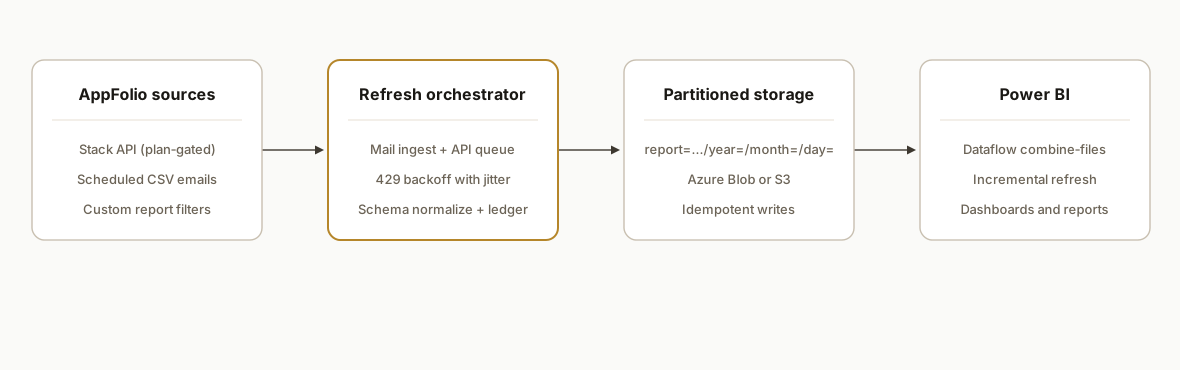
We run two equivalent ingestion paths and the same shaping layer. The pipeline selects the path you are entitled to: Stack APIs when your plan includes API access, or scheduled report emails otherwise. Both land normalized files in object storage that a Power BI Dataflow reads.
- Access path selector: AppFolio Stack APIs exist and are plan-gated by subscription tier. Plus includes read only. Max includes read/write. If API access is not enabled, we rely on scheduled report emails that deliver CSVs.
- Ingestion layer: For email: a secure mailbox rule and an attachment ingestor drop files into object storage with deterministic names. For API: a small worker with queued requests and exponential backoff for 429s.
- Normalizer: Every file passes through the same schema mapper: column rename, type casting, date bucketing, and a unique file ledger to prevent double loads.
- Storage: Partitioned folders by report, year, month, and day. This keeps Power BI combine-files and incremental refresh simple and fast.
- Power BI Dataflow or dataset: A Power Query M template combines partitions, applies types, and pushes a model with incremental refresh parameters.
Step-by-step: how to build it
1) Choose the AppFolio access path and scope your reports
Pick API or email based on your plan. AppFolio's pricing page confirms: Plus includes AppFolio API read only and Max includes read/write (https://www.appfolio.com/pricing). List the exact reports you want in Power BI and how often you need them. For email paths, confirm you can schedule those reports to CSV.
Key gotcha: treat large property groups with care. Keep a documented mapping of properties to groups so BI filters align with investor or fund views.
2) Secure a mailbox and a storage drop zone
Create a dedicated mailbox and a folder such as AppFolio/Reports. Add a transport rule that moves AppFolio report-delivery messages into that folder. Stand up an object store bucket for raw files. We prefer Azure Blob for native Power BI and Azure integration.
A minimal Azure Function that saves matching CSV attachments:
# Function: Save CSV attachments from a secured mailbox to Azure Blob
# Triggers: Timer (e.g., every 5 minutes). Uses MS Graph to read a specific folder.
import os, io, time, random
import requests
from azure.storage.blob import BlobServiceClient

GRAPH = "https://graph.microsoft.com/v1.0"
TENANT_ID = os.environ["TENANT_ID"]
CLIENT_ID = os.environ["CLIENT_ID"]
CLIENT_SECRET = os.environ["CLIENT_SECRET"]
MAIL_USER = os.environ["MAIL_USER"]  # reports@yourdomain.tld
MAIL_FOLDER = os.environ.get("MAIL_FOLDER", "AppFolio/Reports")
BLOB_URL = os.environ["BLOB_URL"]     # connection string or URL
CONTAINER = os.environ.get("CONTAINER", "appfolio-raw")

# OAuth helper
def get_token():
    resp = requests.post(
        f"https://login.microsoftonline.com/{TENANT_ID}/oauth2/v2.0/token",
        data={
            "client_id": CLIENT_ID,
            "client_secret": CLIENT_SECRET,
            "scope": "https://graph.microsoft.com/.default",
            "grant_type": "client_credentials",
        },
        timeout=30,
    )
    resp.raise_for_status()
    return resp.json()["access_token"]

# Main handler
def main(mytimer):
    token = get_token()
    headers = {"Authorization": f"Bearer {token}"}

    # Resolve the folder ID
    f = requests.get(
        f"{GRAPH}/users/{MAIL_USER}/mailFolders", headers=headers, timeout=30
    ).json()
    folder = next((x for x in f.get("value", []) if x["displayName"] == MAIL_FOLDER.split("/")[-1]), None)
    if not folder:
        return

    # List messages with attachments
    url = f"{GRAPH}/users/{MAIL_USER}/mailFolders/{folder['id']}/messages?$filter=hasAttachments eq true"
    msgs = requests.get(url, headers=headers, timeout=30).json().get("value", [])

    blob = BlobServiceClient.from_connection_string(BLOB_URL)
    container = blob.get_container_client(CONTAINER)
    container.create_container(exist_ok=True)

    for m in msgs:
        mid = m["id"]
        atts = requests.get(f"{GRAPH}/users/{MAIL_USER}/messages/{mid}/attachments", headers=headers, timeout=30).json()
        for a in atts.get("value", []):
            if a.get("contentType", "").lower() == "text/csv":
                name = a["name"].lower().replace(" ", "-")
                path = f"report={name}/year={m['receivedDateTime'][:4]}/month={m['receivedDateTime'][5:7]}/{m['receivedDateTime'][:10]}_{name}"
                container.upload_blob(name=path, data=io.BytesIO(bytes(a["contentBytes"], "utf-8")), overwrite=False)
Gotcha for email paths: there is no official webhook documented for report delivery. Plan for polling and idempotent saves so late arrivals do not double-load.
3) Add a normalizer that enforces schema and prevents duplicates
As files land, rewrite headers and ensure types so Power BI combines them cleanly. Store a file-hash ledger so reprocessed files do not create duplicates.
import csv, hashlib
from datetime import datetime

REMAP = {
  "Property Name": "property_name",
  "Unit": "unit",
  "Tenant": "tenant",
  "Amount": "amount",
  "Date": "date"
}

seen = set()  # back with durable storage in production

def normalize_row(row: dict):
    out = {}
    for k, v in row.items():
        key = REMAP.get(k, k).strip().lower().replace(" ", "_")
        out[key] = v.strip() if isinstance(v, str) else v
    if "amount" in out:
        out["amount"] = float(str(out["amount"]).replace(",", "").replace("$", ""))
    if "date" in out:
        out["date"] = datetime.fromisoformat(str(out["date"]).split(" ")[0])
    return out

def dedupe_key(blob_path: str, body: bytes):
    return hashlib.sha256(blob_path.encode() + body).hexdigest()
Key decision: write normalized outputs to partitioned folders: report=rent-roll/year=YYYY/month=MM/day=DD. This keeps Power BI fast when combining files.
4) If you have API access, queue requests and back off on 429s
AppFolio publishes Stack APIs for entities like Properties, Units, Tenants, and Work Orders. Public pages confirm the surface and plan gating, but do not document a public base URL, auth scheme, or rate limits. Build generic retry and queuing logic.
// Generic fetch with exponential backoff and jitter for 429s or 5xx
async function backoffFetch(url, opts = {}, attempt = 0) {
  const res = await fetch(url, opts);
  if (res.status === 429 || res.status >= 500) {
    const base = Math.min(60_000, 500 * Math.pow(2, attempt));
    const sleep = base + Math.floor(Math.random() * 250);
    await new Promise(r => setTimeout(r, sleep));
    return backoffFetch(url, opts, attempt + 1);
  }
  if (!res.ok) throw new Error(`HTTP ${res.status}`);
  return res.json();
}
Treat property filters defensively. Documentation mentions filters such as PropertyGroupIds and LastUpdatedAtFrom, but does not state limits. Chunk long ID lists and break reads into stable time windows.
5) Build the Power BI Dataflow or dataset with combine-files and types
Point Power BI at your normalized storage path. Use a single M query that combines partitioned CSVs and assigns stable types.
let
  Source = AzureStorage.Blobs("https://youraccount.blob.core.windows.net/appfolio-norm"),
  Filtered = Table.SelectRows(Source, each Text.StartsWith([Folder Path], "/appfolio-norm/report=rent-roll/")),
  Csvs = Table.SelectRows(Filtered, each Text.EndsWith([Name], ".csv")),
  GetFile = (fn as text) => let
    File = AzureStorage.Contents("https://youraccount.blob.core.windows.net/appfolio-norm/" & fn),
    Csv = Csv.Document(File, [Delimiter=",", Encoding=65001, QuoteStyle=QuoteStyle.Csv]),
    Promoted = Table.PromoteHeaders(Csv, [PromoteAllScalars=true])
  in Promoted,
  AddTables = Table.AddColumn(Csvs, "Data", each GetFile([Folder Path] & [Name])),
  Expanded = Table.ExpandTableColumn(AddTables, "Data", {"property_name","unit","tenant","amount","date"}, {"property_name","unit","tenant","amount","date"}),
  Typed = Table.TransformColumnTypes(Expanded, {{"property_name", type text}, {"unit", type text}, {"tenant", type text}, {"amount", type number}, {"date", type date}})
in
  Typed
If you are using a dataset with incremental refresh, add the RangeStart and RangeEnd parameters and filter on date accordingly. Incremental refresh reduces processing time on larger portfolios.
// Parameters
RangeStart = #datetime(2024, 1, 1, 0, 0, 0);
RangeEnd   = DateTime.LocalNow();

// After combining, filter by date
FilteredRows = Table.SelectRows(Typed, each [date] >= Date.From(RangeStart) and [date] < Date.From(RangeEnd));
Power BI OneDrive and SharePoint sources auto refresh approximately every hour when files change (Microsoft: https://learn.microsoft.com/power-bi/connect-data/refresh-data#one-drive-refresh). For Azure Blob, use scheduled refresh and set the cadence to your operational needs within your capacity limits.
6) Configure refresh and add basic monitoring
- Set scheduled refresh per dataset. Pro allows up to 8 daily. Premium allows up to 48 daily.
- Add a lightweight monitor: an hourly check that yesterday's partitions exist for every report. Alert if missing.
- Keep a small landing-zone dashboard: file counts by day, last refresh status, most recent API error.
Where it gets complicated
Plan gating matters for design. AppFolio's pricing confirms API access is gated by plan: Plus read only. Max read/write. If you are on Plus, design for read only or use the report-email path. If you upgrade to Max, keep writeback rules explicit and tested.
No public rate-limit guidance. We found no public AppFolio 429 semantics. Our API workers use a queue with exponential backoff and jitter. Assume you will hit 429s under bursty loads and plan retries without blocking your whole refresh window.
Property filters are not fully documented. Public pages reference filters like PropertyGroupIds and LastUpdatedAtFrom but do not state cardinality or maximum list lengths. Chunk long lists, and prefer deltas by updated-at ranges over giant one-shot pulls.
Email is a delivery channel, not an integration primitive. There is no official webhook documentation for report delivery. Emails can arrive late or be batched. Make the ingestor idempotent, hash the body, and do not rely on message timestamps as the only truth.
Schema drift shows up in BI first. Column labels can change in a new custom report template. Enforce a mapping layer and log unknown columns so you can catch drift before a refresh fails silently.
Power BI refresh limits are real. Pro is 8 refreshes per day. Premium is 48. If you need higher frequency, widen your incremental window and wire API deltas to minimize per-refresh work instead of pushing the schedule higher.
What this actually changes
For a property management team running weekly owner updates and monthly portfolio reviews, this turns AppFolio into a continuously refreshed BI dataset without manual exports. The team gets one model that reflects the latest data partitions and a documented mapping of properties to investor or fund views. Refresh runs on a schedule with queuing, retries, and schema checks, so a single late report or a brief rate-limit event does not break Monday morning dashboards.
Power BI allows up to 8 scheduled refreshes per day on Pro and up to 48 on Premium (source: Microsoft docs linked above). That sets a practical cap. Inside that limit, the pipeline shape is what makes the result reliable: idempotent ingestion, normalization, and partitioning before the Dataflow.
Frequently asked questions
Does AppFolio have an API I can use with Power BI?
Yes. AppFolio Stack APIs exist and are plan-gated. The public pages confirm read-only access on Plus and read/write on Max, but do not document a public base URL, auth scheme, or rate limits. We integrate safely by building a queue with exponential backoff and by chunking reads. When API access is unavailable, we use scheduled CSV report emails.
Can I build this without AppFolio API access?
Yes. Many teams schedule AppFolio custom reports to deliver CSV by email. We ingest attachments from a secured mailbox, normalize them, and load them into Power BI via a Dataflow or dataset. This path works well when you only need read access and consistent refresh windows.
How often can my Power BI model refresh?
Power BI Pro allows up to 8 scheduled refreshes per day. Premium capacity allows up to 48. That is normally enough for portfolio reporting. We design incremental refresh so only the recent partitions are processed while older data remains cached for performance.
How do you prevent duplicates when reports arrive twice?
We compute a digest per file and maintain a unique file ledger. The normalizer enforces deterministic output filenames and partitions. If a duplicate arrives, the ingestor skips it without touching the dataset.
Can this run in near real time?
Use the API path with a queued fetch if you need tighter loops, then schedule the dataset within your Power BI limits. Email-based pipelines are bound by mail delivery and the dataset schedule, so they are typically near hourly or a few times per day. For most portfolio dashboards this is sufficient.
How long does it take to stand up?
A constrained first slice is usually quick: one or two reports, a secured mailbox, a normalizer, and one Dataflow. Adding more reports is incremental. The gating item is confirming which AppFolio path you can use and aligning filters to your investor or property-group views.
If you want a durable AppFolio to Power BI dataset without babysitting exports, we have shipped this in production with both API and email paths. See our AppFolio API guide for broader platform context and limits in AppFolio API Integration Guide and Limits. If you need help scoping or want us to build it end to end, read our custom AI integration service and then book a 20-minute call.
Sources
- 1.Data refresh in Power BIlearn.microsoft.com
- 2.Property Management Software Pricingappfolio.com
Want us to build this for you?
Nine questions, about 90 seconds. You see the revenue it is costing you, then pick a time. No pitch.
See your options