
AppFolio integrations in production follow two paths: use AppFolio's partner-facing Stack APIs when your plan and access allow it, or run scheduled Report Builder exports as CSV into an ingestion address and process those files into your data store such as BigQuery on a schedule and CRM. We ship both patterns. The decision comes down to plan gating, legal limits, and operational reliability.
AppFolio API integration is the practice of moving AppFolio data into your stack with a plan-aware mix of partner APIs and scheduled CSV exports, while preserving property scoping, idempotency, and monitoring.
If you run property operations and need AppFolio data outside the UI, this guide explains what is publicly known, what is intentionally not documented, and the workarounds we deploy so your team gets reliable downstream data without babysitting exports.
The problem it solves: how do we get AppFolio data into our systems without breaking things?
Many teams still forward CSVs by email, re-key numbers into a CRM, or wait on an analyst to compile weekly packets. Scheduled reports get missed. Property scoping drifts. A new owner wants portfolio-level visibility through an owner-equivalent report workflow and the spreadsheet breaks. The net result: hours per week spent wrangling the same data instead of acting on it.
| Manual workflow | Automated workflow |
|---|---|
| Log into AppFolio, run reports, download CSVs, forward by email | AppFolio scheduled exports deliver CSVs to an ingestion inbox or storage every day |
| Someone applies property filters each time | Property scoping enforced via Property Groups or a maintained mapping table |
| Analysts copy numbers into CRM or dashboards | Parser normalizes CSVs, dedupes, and upserts into a database and CRM |
| No audit trail, easy to miss a run | Monitored pipeline with idempotency ledger and alerts |
How does an AppFolio integration work when details are gated?
We treat AppFolio as a plan-gated source. The architecture branches early: Stack or Database API if your account permits and the partner connection is available, or scheduled CSV exports if not. Either way, a normalization layer, an idempotent upsert, and a monitoring loop make the integration safe to operate.
- Acquisition layer: AppFolio Stack APIs when your plan and partner access allow it, or Scheduled Report Builder exports sent to an ingestion address or storage bucket. AppFolio's site confirms these APIs exist for partners, but auth specifics and base URLs are not public. When APIs are unavailable, scheduled CSV is the common pattern documented by vendors.
- Property scoping: Use Property Groups inside AppFolio to constrain report scope, or maintain a mapping table externally and filter downstream. Third-party guidance consistently relies on Property Groups for reliable scoping.
- Normalization: Convert CSV headers to a stable schema, type fields, and capture a source fingerprint for dedupe and audit.
- Idempotent upsert: Compute a stable key per record and write with conflict handling so replays never double-insert.
- Monitoring and backpressure: Log every file and record count, cap daily volume to respect AppFolio terms on bulk operations, and alert on drift.
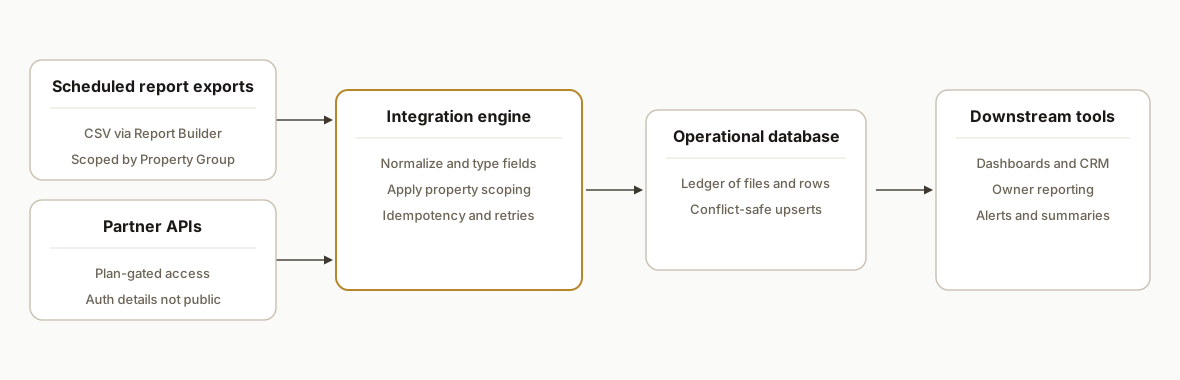
Step-by-step: how do we build this safely without undocumented assumptions?
1) Choose the access path: partner API or scheduled reports
Answer-first: if you do not have confirmed partner API access on your plan, use scheduled CSV exports. AppFolio lists Stack APIs for partners, and a separate Database API on the Max plan, but auth flow and base URLs are not public. When access is uncertain, we start with scheduled Report Builder exports and flip to APIs later if your account permits.
Decision checklist
- Do you have AppFolio partner access with a documented connection from AppFolio? If yes: evaluate API path.
- Are you on Property Manager Max with Database API access provisioned? If yes: evaluate API path.
- Otherwise: configure Report Builder scheduled exports to an ingestion address.
Key gotcha for this step: do not assume request parameters or rate limits. Treat unknowns as constraints until partner docs are in hand.
2) Configure scheduled exports to an ingestion inbox
Answer-first: schedule CSV exports per report, pre-filtered by Property or Property Group, delivered to an automation inbox we control. Many vendors document this approach.
Report Builder setup
- Create or choose the report.
- Apply filters: Property or Property Group per your scope.
- Schedule: daily or weekly at off-peak hours.
- Delivery: send CSV to ingestion@yourdomain.tld (a monitored mailbox) or to a storage drop.
Apps Script pulls the attachments and saves them to Drive with a stable name we can parse.
// Code: Google Apps Script: pull AppFolio CSV attachments by label
function ingestAppFolioEmails() {
  const label = GmailApp.getUserLabelByName('appfolio/report');
  const threads = label.getThreads(0, 50);
  const folder = DriveApp.getFolderById('YOUR_DRIVE_FOLDER_ID');
  threads.forEach(t => t.getMessages().forEach(m => {
    m.getAttachments({includeInlineImages: false, includeAttachments: true})
     .filter(a => (/\.csv$/i).test(a.getName()))
     .forEach(att => folder.createFile(att.copyBlob()).setName(`${new Date().toISOString()}__${att.getName()}`));
  }));
}
Key gotcha for this step: email deliverability matters. Use a dedicated inbox and label rule so exports do not get lost in a human mailbox.
3) Normalize CSVs and apply property scoping downstream
Answer-first: standardize headers, types, and scope. We maintain a Property Group mapping table in Sheets so downstream filters remain stable even if group names evolve.
// Code: Apps Script: normalize rows and map to property groups
function normalizeCsv(fileId) {
  const file = DriveApp.getFileById(fileId);
  const rows = Utilities.parseCsv(file.getBlob().getDataAsString());
  const [header, ...data] = rows;
  const idx = Object.fromEntries(header.map((h,i)=>[h.trim().toLowerCase(), i]));
  const map = getPropertyGroupMap(); // { property_code: group }
  return data.map(r => ({
    property_code: r[idx['property']],
    group: map[r[idx['property']]] || 'UNMAPPED',
    unit: r[idx['unit']],
    tenant: r[idx['tenant']],
    balance: Number(r[idx['balance']]) || 0,
    as_of: file.getName().slice(0,10) // naive example
  }));
}

function getPropertyGroupMap() {
  const sh = SpreadsheetApp.openById('YOUR_SHEET_ID').getSheetByName('PropertyGroups');
  const vals = sh.getDataRange().getValues().slice(1);
  const out = {};
  vals.forEach(([property_code, group]) => out[String(property_code).trim()] = String(group).trim());
  return out;
}
Key gotcha for this step: column names in CSVs change. Use header-name lookups, not hard-coded column indexes.
4) Upsert idempotently into your database and CRM
Answer-first: compute a stable key per record and write in small batches with conflict handling; for a concrete build, see AppFolio to Postgres: how to automate a reliable sync.
// Code: Node.js example: chunked upsert with idempotency key
import pg from 'pg';
import crypto from 'crypto';
const { Pool } = pg;
const db = new Pool({ connectionString: process.env.DATABASE_URL });

function idKey(r) {
  return crypto.createHash('sha256').update(`${r.property_code}|${r.unit}|${r.as_of}`).digest('hex');
}

export async function upsertRows(rows) {
  const client = await db.connect();
  try {
    await client.query('begin');
    for (const chunk of chunked(rows, 500)) {
      const values = chunk.flatMap(r => [idKey(r), r.property_code, r.unit, r.tenant, r.balance, r.as_of]);
      const placeholders = chunk.map((_,i)=>`($${i*6+1},$${i*6+2},$${i*6+3},$${i*6+4},$${i*6+5},$${i*6+6})`).join(',');
      await client.query(
        `insert into appfolio_ledger(id_key, property_code, unit, tenant, balance, as_of)
         values ${placeholders}
         on conflict (id_key) do update set balance = excluded.balance, tenant = excluded.tenant`,
        values
      );
    }
    await client.query('commit');
  } catch (e) {
    await client.query('rollback');
    throw e;
  } finally {
    client.release();
  }
}
Key gotcha for this step: respect AppFolio's terms that discourage bulk actions that impact performance. Even on CSV paths, cap daily volume and sleep between downstream API calls.
5) Monitor health and drift
Answer-first: log every file, row count, and last successful write. Alert when a day is missing or counts fall outside expected ranges.
// Code: simple health row write in Apps Script
function logHealth(fileName, count) {
  const sh = SpreadsheetApp.openById('YOUR_SHEET_ID').getSheetByName('Health');
  sh.appendRow([new Date(), fileName, count, 'OK']);
}
Key gotcha for this step: CSV schemas change during quarter closes. Build a detector that flags new headers and fails closed until mapped.
6) If partner APIs are enabled, phase them in behind the same interface
Answer-first: when your AppFolio partner connection is live, implement a source adapter behind the same normalization interface. Keep auth and base URLs in secrets and do not publish endpoint assumptions.
// Code: TypeScript: swappable source adapter interface
export interface AppFolioSource {
  fetchReport(name: string, since?: string): Promise<Array<Record<string,unknown>>>;
}

export class CsvSource implements AppFolioSource { /* ...reads Drive CSVs... */ }
export class PartnerApiSource implements AppFolioSource { /* ...calls partner API per docs provided to you... */ }
Key gotcha for this step: treat rate limits and filter semantics as unknowns until documented by AppFolio for your connection. Implement retries with jitter and a circuit breaker.
Where it gets complicated
Plan-gated access. AppFolio positions partner Stack APIs for integrations and offers a Database API on the Max plan. The technical docs and auth details are not public. In practice, many customers use scheduled CSV exports until partner access is confirmed.
No official Zapier or Make listing. There is no officially listed AppFolio app in Zapier or Make. Integrations rely on generic Webhooks or HTTP modules, or a custom service, which is why we standardize on an ingestion inbox plus a parser.
Property scoping lives in Property Groups. Most third-party guidance relies on Property Groups to bound which properties sync. We mirror that in code and keep a Group mapping table because group names and membership change.
Filter semantics on APIs are not publicly documented. Some teams assume per-property request parameters exist. Without public docs, you should pre-filter via scheduled reports or filter downstream from a broader pull when using APIs under a partner agreement.
CSV drift is normal. Report Builder columns and labels change, especially around monthly closes. Header-based mapping and drift alerts keep you from silently mis-typing balances.
Operational limits apply even with APIs. AppFolio's terms discourage bulk extracts or imports that impact performance. Rate limits are not publicly documented. We cap batch sizes and sleep between calls by default.
Zapier AppFolio integration: how we bridge it today
Answer-first: there is no official AppFolio app in Zapier. The practical path is to trigger Zaps from scheduled CSV exports. Either parse the CSV inside Zapier, or normalize upstream with Apps Script and post rows to a Zapier Catch Hook for routing to CRM or ticketing.
Three working patterns we run in production:
- Email Parser by Zapier: AppFolio scheduled emails arrive at the parser inbox. The Zap parses rows and creates tasks or tickets. Fast to stand up. Suited for light payloads.
- Apps Script to Zapier Catch Hook: Gmail and Drive handle CSV storage and normalization. We call the Zapier webhook with a clean JSON row, then Zapier fans out to CRM, Slack, or help desk.
- Database to Zapier: write normalized rows to a narrow fact table. Trigger a Zap on a webhook fired by your app when new rows land, then action downstream. Useful when you need idempotency and retries outside Zapier.
Example: post normalized rows to a Zapier Catch Hook for downstream CRM task creation.
// Apps Script: send normalized rows to a Zapier Catch Hook
function sendToZapier(rows) {
  const hook = 'https://hooks.zapier.com/hooks/catch/XXXXXXX/XXXXXXXX/';
  rows.forEach(r => {
    const payload = {
      id_key: `${r.property_code}|${r.unit}|${r.as_of}`,
      property_code: r.property_code,
      unit: r.unit,
      tenant: r.tenant,
      balance: r.balance,
      as_of: r.as_of,
      group: r.group
    };
    const res = UrlFetchApp.fetch(hook, {
      method: 'post',
      contentType: 'application/json',
      payload: JSON.stringify(payload),
      muteHttpExceptions: true
    });
    // Optional: inspect res.getResponseCode() and log to Health
  });
}
Guardrails we keep with Zapier:
- Dedupe: include an id_key and use Zapier's built-in dedupe or store a seen set in Zapier Storage.
- Rate: batch or delay steps to avoid task bursts when multiple reports drop at once.
- Schema drift: validate fields upstream before posting to the hook so the Zap does not break on header changes.
If you prefer a Zapier alternative, see our comparisons in Make vs n8n vs Google Apps Script and our overview of tools to connect your apps. For another no-listing Zapier pattern, see how we bridge gaps in EZLynx Zapier integration.
Zapier AppFolio integration: step-by-step without a listed app
Answer-first: route scheduled CSVs through Gmail or Drive, normalize with Apps Script, then post JSON rows to a Zapier Catch Hook that creates CRM tasks or tickets. Here is a minimal, shippable recipe.
- Gmail filter and label.
- Create a label: appfolio/report.
- Create a filter to auto-label AppFolio report emails. Example:
from:"no-reply@appfolio.com" subject:("CSV" OR "Report") has:attachment filename:csv-
Ingestion script.
- Use the ingestAppFolioEmails script above to save CSVs to Drive with a timestamped prefix.
-
Normalization and scoping.
- Use the normalizeCsv function to map headers, types, and Property Group.
-
Zapier flow.
- Trigger: Webhooks by Zapier: Catch Hook.
- Step: Storage by Zapier: Get. Key: id_key. If exists, stop.
- Step: CRM action: Create Task or Ticket. Map fields from the hook payload.
- Step: Storage by Zapier: Set. Key: id_key to mark as processed.
-
Posting rows.
- Call sendToZapier with each normalized row.
-
Monitoring.
- Append to a Health tab on every run and alert when counts fall outside expected ranges.
When volume grows, move the dedupe and retries out of Zapier and into your database-first pipeline. Then use Zapier as a fan-out from your curated fact table. If you are BI-forward, plug the same table into AppFolio to Power BI and keep your operational Zap slim.
Which tool should you use for AppFolio workflow integration?
Answer-first: pick the tool that matches your volume and control needs. Start simple, then graduate as volume grows.
- Zapier: fastest for notifications and light CRM creates. Best when Email Parser can extract what you need or when you can post to a Catch Hook. Not ideal for heavy file handling or large batches.
- Make.com: strong routers and iterators, good for multi-branch flows and richer transformations. No official AppFolio app, so use HTTP modules, storage, and email ingestion. See our notes in Make vs n8n vs Google Apps Script.
- Google Apps Script: ideal for Gmail and Sheets centric pipelines. Low cost, easy to monitor, runs on a timer. We often pair it with Zapier or Make for downstream actions.
- Custom service: Node or Cloud Run when you need strict idempotency, higher throughput, or a warehouse sink first. Point your BI and Zaps at the curated table.
For end-to-end patterns across AR, owner comms, and ops, see our AppFolio workflow integration guide.
Does AppFolio have a developer API and how do you get access?
Answer-first: yes, but access is provisioned. AppFolio exposes Stack APIs for partners and a Database API on the Property Manager Max plan. Auth details, base URLs, scopes, and rate policies are not publicly documented. You confirm access with your AppFolio account team and a partner-enabled connection.
How we verify access in week 1:
- Confirm your plan and any signed partner agreements in writing.
- Ask your rep to enable the specific integration and share the private docs for your connection.
- Identify data domains you need first: leases, tenants, properties, work orders, balances, or report extracts.
- Clarify operational policies: permitted frequency, expected volumes, and support contacts for incidents.
If access is pending, we ship the scheduled-report pipeline first. When AppFolio provisions your partner connection, we swap the source behind the same normalization interface and keep scoping, idempotency, and monitoring unchanged.
AppFolio integrations you can ship now
You do not need partner API access to deliver value. These are reliable CSV-first builds we have shipped, then upgraded to partner APIs when available:
- Automate rent roll distribution: scheduled rent roll exports delivered and tracked with scoping by Property Group. See how to automate AppFolio rent roll distribution.
- Push maintenance work orders to a ticket queue: convert work order reports into structured tickets for routing and SLAs. See how we sync AppFolio work orders to a ticketing queue, and explore our workflow integration guide for owner comms and AR.
- Surface delinquency risk to sales or collections: parse delinquency reports and trigger tasks or sequences in your CRM. See our guide to automating AppFolio delinquency reporting.
- Automate core financials to BI: balance sheet and income statement refreshes on schedule. See automate AppFolio balance sheet reports and automate AppFolio income statement reports.
Each follows the same pattern in this post: scoped scheduled exports, normalization, idempotent upsert, and monitored delivery to your CRM or BI.
Developer checklist for an AppFolio API integration
If you own the build, this is the short list we use in production:
- Treat AppFolio as plan-gated until partner docs arrive. No assumptions about endpoints or filters.
- Encapsulate the source: CSV adapter first, partner API adapter later behind the same interface.
- Scope upstream with Property Groups, and mirror a mapping table downstream for stability.
- Map by header names. Diff headers on every file and fail closed on drift.
- Use idempotency keys per natural unique: property, unit, as_of or equivalent.
- Respect volume policies: chunk writes, add jittered retries, and add a circuit breaker.
- Log everything: file receipt, row counts, last-seen timestamps, and schema changes.
- Prove backfill and replay paths in a staging dataset before going live.
How to integrate AppFolio with Power BI or Google Sheets
Answer-first: land AppFolio reports in a structured Sheet, or a database table that your BI refreshes on schedule. We often start with Sheets for speed, then point Power BI at the same curated table. If you prefer a database target, our guide to AppFolio to Postgres: how to automate a reliable sync covers a production-ready pattern, and you can follow a BigQuery pipeline for scheduled warehouse loads.
- For a Sheets-first path: see our step-by-step in AppFolio to Google Sheets automation. It covers tab structure, schema control, and refresh.
- For BI: see AppFolio to Power BI integration automation. It explains scheduled refresh and incremental patterns once your normalized table is stable.
Example: append normalized rows into a dedicated tab that Power BI reads.
// Apps Script: write normalized rows to a Sheet tab consumed by BI
function writeToSheet(rows) {
  const sh = SpreadsheetApp.openById('YOUR_SHEET_ID').getSheetByName('Fact_AppFolio');
  const header = ['id_key','property_code','unit','tenant','balance','as_of'];
  if (sh.getLastRow() === 0) sh.appendRow(header);
  const out = rows.map(r => [
    Utilities.computeDigest(Utilities.DigestAlgorithm.SHA_256, `${r.property_code}|${r.unit}|${r.as_of}`)
      .map(b=>('0'+(b&0xFF).toString(16)).slice(-2)).join(''),
    r.property_code, r.unit, r.tenant, r.balance, r.as_of
  ]);
  sh.getRange(sh.getLastRow()+1, 1, out.length, header.length).setValues(out);
}
Key tip: keep your BI-facing tab narrow and typed. Put raw CSV dumps in a separate staging area, then publish a clean fact table for dashboards.
AppFolio workflow integration: connect reports to CRM tasks and tickets
Answer-first: convert scheduled report rows into events your systems act on; for payables, see automating vendor invoices into AppFolio bills, and for end-to-end patterns see our workflow integration guide. Common examples: delinquency rows become CRM tasks, work orders become tickets, guest cards become leads.
Typical routing patterns we ship:
- Delinquency to CRM tasks: create tasks with due dates and owner by Property Group.
- Work orders to ticketing: open tickets with SLAs and category based on issue type.
- Guest cards to CRM: create leads and assign follow up. See our build to automate AppFolio guest cards to a CRM.
- Owner statements distribution: route PDFs and summaries to owners by portfolio. See our notes in automate AppFolio owner statements.
- Vacancy and GPR exposure: push vacancy and GPR extracts to marketing and revenue ops. See automate AppFolio vacancy and GPR reporting.
Example: post a task payload to a webhook your CRM exposes. Replace the URL with your CRM's webhook endpoint and map fields you control.
// Apps Script: turn rows into CRM tasks via webhook
function pushTasks(rows) {
  rows.filter(r => r.balance > 0).forEach(r => {
    const payload = {
      title: `Delinquency: ${r.tenant} ${r.unit}`,
      due_date: r.as_of,
      property_code: r.property_code,
      amount: r.balance,
      group: r.group
    };
    UrlFetchApp.fetch('https://hooks.example-crm.test/tasks', {
      method: 'post',
      contentType: 'application/json',
      payload: JSON.stringify(payload),
      muteHttpExceptions: true
    });
  });
}
Operational guardrails we keep in production: dedupe with an idempotency key in the payload, cap per-run creates, and log response codes for retries.
What this actually changes
For property management teams, this turns a weekly copy-paste job into a reliable feed your analysts and owners can trust. In production we shipped this pattern as a scheduled-report pipeline first, then flipped to partner APIs when available, and kept property scoping tied to Property Groups so portfolio views stayed correct.
One external datapoint: knowledge workers spend an estimated 28 percent of the workweek on email according to McKinsey, which is why removing email attachment handling alone pays back quickly. Source: https://www.mckinsey.com/industries/technology-media-and-telecommunications/our-insights/the-social-economy
If you want a concrete example of the downstream layer, our AppFolio investor reporting build shows how normalized data becomes templated weekly notes: see How to Automate AppFolio Investor Reporting and how to automate owner-equivalent reports.
Frequently asked questions
Does AppFolio have an official API?
Yes: AppFolio promotes Stack APIs for partners and a separate Database API on the Property Manager Max plan. Auth flow, base URLs, and scopes are not publicly documented. Access depends on your plan and partner enablement.
What AppFolio plan do I need for API access?
The Database API is positioned for Max plan customers, and Stack APIs are exposed through partner programs. If you do not have a confirmed partner connection, plan for scheduled CSV exports first and upgrade later when access is provisioned.
Is there a Zapier or Make integration for AppFolio?
No official AppFolio app appears in Zapier or Make directories. The practical approach uses generic Webhooks or HTTP modules, or a custom service. Many vendors document scheduled report exports as the supported integration path.
How do I set up a Zapier AppFolio integration without an app?
Schedule CSV reports to a dedicated inbox, save files to Drive, normalize with Apps Script, then post each row to a Zapier Catch Hook. In the Zap: dedupe with Storage by Zapier on id_key, create the CRM task or ticket, then mark the id_key as processed. This runs reliably without any listed AppFolio app.
Can I filter by property when integrating?
Yes via scheduled reports: configure filters by Property or Property Group before scheduling. For partner APIs, per-property filtering is not publicly documented, so test against your provisioned connection and be ready to filter downstream if the API returns broader data.
Can this run in near real time?
Scheduled CSV exports are periodic by design. We typically run daily or hourly pulls. Real-time behavior depends on your provisioned partner API capabilities. Without webhooks, do not promise sub-minute syncs.
What does this cost monthly?
Infrastructure for the CSV path is low: Google Apps Script, Sheets, and Drive cover ingestion and control. The primary cost is the build and ongoing monitoring. If you add AI summaries, model usage is usually in the low dollars per month at typical weekly cadences.
Can a non-developer set this up?
You can schedule reports without a developer. A reliable, idempotent integration with monitoring, backfills, and downstream upserts is an engineering project. We often ship the CSV path first because it avoids plan-gated API unknowns.
If you are weighing AppFolio partner APIs versus a scheduled-report pipeline, we have built both patterns. See our services, read the related post on automating AppFolio investor reporting and vendor invoice automation, and if you want a scoped plan for your account, book a 15 minute call.
Curious what this would actually save you?
Put real numbers to it. The ROI calculator estimates the hours and dollars an automation like this returns, in about a minute.
Calculate your automation ROI