
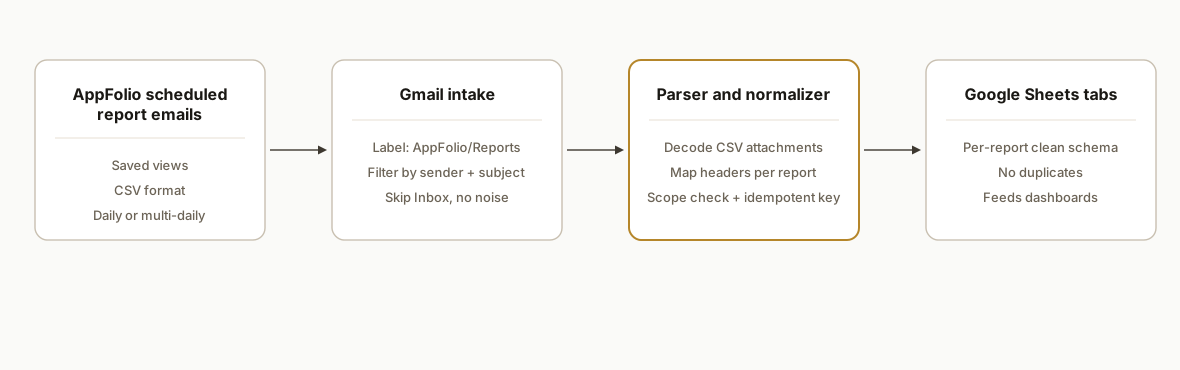
We automate AppFolio report exports into Google Sheets by scheduling saved reports to email CSVs to a controlled inbox. A Google Apps Script ingests attachments, normalizes headers, verifies property scoping, and upserts into per-report tabs without duplicates. If you run property management reporting, this guide shows exactly how we built and shipped it in production.
AppFolio to Google Sheets automation is: scheduled CSV report emails from AppFolio feeding a parser that cleans and writes rows into a structured Google Sheet on a reliable cadence.
The problem it solves
You can download AppFolio reports and paste them into Sheets, but it does not scale. Teams lose hours to manual exports, column drift between reports, and accidental duplicates when a report is re-run. Some filters do not behave the same across reports, so trusting a filename is risky. We replaced the manual cycle with a scheduled email feed and a parsing pipeline that enforces clean, deduped data.
| Process | Manual exports | Automated to Sheets |
|---|---|---|
| Getting data | Log in, run saved report, download CSV | AppFolio emails CSV on a schedule to a parsing inbox |
| File handling | Save locally, rename, upload | Gmail label routes to a script. No local files |
| Schema consistency | Headers drift, per-report columns differ | Header map per report. Enforced schema in Sheets |
| Deduplication | Easy to double-paste a day | Idempotent keys per day and property prevent dupes |
| Filter correctness | Hard to notice when a filter was ignored | Parser verifies scope in-row before commit |
| Run cadence | When someone remembers | Daily or multiple times per day, hands-free |
How the automation works
We lean on the most reliable surface available without partner-level access: AppFolio scheduled report emails in CSV format. There is no official Zapier or Make app at the time of writing. AppFolio's Stack APIs exist but access is partner-gated and the public docs do not disclose auth or base URL details, so this build uses scheduled CSVs via email as the stable bridge into Sheets. For context on Stack access paths and constraints, see our notes in AppFolio API access and integration 2026 and the AppFolio integration guide and limits.
- AppFolio Scheduled Reports: Operators save a report with the desired filters and schedule it to email a CSV at set times. This is the dependable, no-API bridge many partners document.
- Gmail intake: A dedicated alias and label capture report emails. Filters key on sender and subject to keep the inbox clean.
- Parser and normalizer (engine): A Google Apps Script project reads labeled messages, parses CSV attachments, maps headers per report, validates property scoping from the rows, and computes a deterministic dedupe key before writing.
- Sheets sink: Each report type has its own tab with a locked schema. The pipeline writes only clean, non-duplicate rows and appends an ingestion log for audit.
- Operational guardrails: Subject-line versioning, file checksum comparison, and a staging sheet protect against reruns, DST timing quirks, and column drift.
Which integration exports tenant and owner data to Google Sheets?
There is no official Zapier or Make app for AppFolio. The integration that works in production is: schedule the exact tenant and owner reports you need in AppFolio to email CSVs, route them by Gmail label, then use Apps Script to parse, dedupe, and write into separate Tabs: Tenants and Owners. That gives you reliable, auditable Sheets without partner API access.
Which AppFolio reports should you schedule for tenants and owners?
- Tenants: Rent Roll or a Tenant Directory style report. Configure consistent filters by portfolio or property group. Keep this feed dedicated to occupancy and contact fields you actually use.
- Owners: Owner Statements or an Owner List style report. Use a separate schedule from tenants. If you need payout figures for finance or communications, schedule an owner distributions report as a second owner feed.
Keep tenant and owner emails on distinct subjects so Gmail routing and downstream header maps stay stable.
How do you map and dedupe tenants and owners in one pipeline?
Extend the same Apps Script to detect subjects and normalize into separate tabs. Use token-based header discovery for owner fields so a column rename does not break your job.
// Extend the config with tenants and owners
const CFG = {
  GMAIL_LABEL: 'AppFolio/Reports',
  REPORTS: {
    // Tenants: uses explicit header strings we validated in our portfolio
    tenant_feed: {
      subject: 'Tenant Directory - East Portfolio',
      tab: 'tenants_raw',
      headerMap: {
        'Property Name': 'property_name',
        'Unit': 'unit',
        'Tenant Name': 'tenant_name',
        'Move-in Date': 'move_in_date',
        'Rent': 'rent',
        'Email': 'tenant_email'
      },
      keyFields: ['property_name', 'unit', 'tenant_name', 'move_in_date']
    },
    // Owners: discover columns by tokens so minor label changes do not break
    owner_feed: {
      subject: 'Owner List - East Portfolio',
      tab: 'owners_raw',
      tokenMap: {
        owner_name: ['owner', 'name'],
        owner_email: ['email'],
        property_name: ['property'],
        portfolio: ['portfolio'],
        distribution_amount: ['distribution', 'amount']
      },
      keyFields: ['owner_name', 'property_name']
    }
  }
};

function normalizeWithTokens(rows, tokenMap) {
  const header = Object.keys(rows[0] || {});
  const lower = header.map(h => h.toLowerCase());
  const find = tokens => lower.findIndex(h => tokens.every(t => h.includes(t)));
  const idx = Object.fromEntries(Object.entries(tokenMap).map(([to, tokens]) => [to, find(tokens)]));
  return rows.map(r => Object.fromEntries(Object.entries(idx).map(([to, i]) => [to, i >= 0 ? r[header[i]] : ''])));
}

function processMessage(msg) {
  const subject = msg.getSubject();
  const entry = Object.values(CFG.REPORTS).find(r => subject.includes(r.subject));
  if (!entry) return;
  msg.getAttachments({mimeType: 'text/csv'}).forEach(att => {
    const csv = Utilities.parseCsv(att.getDataAsString());
    const objs = toObjects(csv);
    const norm = entry.headerMap
      ? normalizeRows(objs, entry.headerMap)
      : normalizeWithTokens(objs, entry.tokenMap);
    const withKeys = norm.map(r => ({...r, _ingested_at: new Date(), _key: makeKey(r, entry.keyFields)}));
    appendObjects(entry.tab, withKeys);
  });
}
Scope guardrails still apply: verify each row belongs to the intended portfolio before committing to curated tabs.
Need payouts or statements for owners?
If finance needs owner payouts in Sheets, schedule an owner distributions style report as a separate feed and curate it into an Owners Distributions tab. We then join Owners and Distributions by owner and property for downstream statements or notices. For downstream statement workflows, see Automate AppFolio Owner Statements and Automate AppFolio Owner Distributions.
Step-by-step: how to build it
How do you schedule AppFolio reports to email CSVs?
Save the report with your desired filters, then use AppFolio's Scheduled Reports to email the CSV to a controlled alias. Use specific subjects like "Rent Roll Daily - East Portfolio" so downstream filters stay stable. The key gotcha: treat each report as its own feed. Column sets differ, so avoid mixing them into one tab.
How do you route those emails reliably in Gmail?
Create a label, for example AppFolio/Reports. Add a filter that matches the AppFolio sender and a unique subject token, then apply the label and skip the inbox.
Matches: from:(no-reply@appfolio.com) subject:("Rent Roll Daily - East Portfolio")
Action: Apply label "AppFolio/Reports". Skip Inbox. Never send to Spam.
Gotcha: if the subject changes, your filter breaks. Version your subject lines intentionally and update filters in lockstep.
How do you set up the Google Apps Script parser?
Create a container-bound script on the target Google Sheet, then add configuration. We store report-specific header maps and the Gmail label in constants.
// Code.gs
const CFG = {
  GMAIL_LABEL: 'AppFolio/Reports',
  REPORTS: {
    rent_roll: {
      subject: 'Rent Roll Daily - East Portfolio',
      tab: 'rent_roll_raw',
      headerMap: {
        'Property Name': 'property_name',
        'Unit': 'unit',
        'Tenant Name': 'tenant_name',
        'Move-in Date': 'move_in_date',
        'Rent': 'rent'
      },
      keyFields: ['property_name', 'unit', 'tenant_name', 'move_in_date']
    }
  }
};
Gotcha: keep header maps per report. Report-by-report CSVs rarely share identical headers.
How do you parse attachments and write to a staging sheet?
Fetch recent labeled messages, read attachments, parse CSV, normalize headers, and push rows to a staging tab. Compute a deterministic hash for idempotency.
function runIngest() {
  const label = GmailApp.getUserLabelByName(CFG.GMAIL_LABEL);
  const threads = label.getThreads(0, 50); // last 50 threads
  threads.forEach(th => th.getMessages().forEach(msg => processMessage(msg)));
}

function processMessage(msg) {
  const subject = msg.getSubject();
  const report = Object.values(CFG.REPORTS).find(r => subject.includes(r.subject));
  if (!report) return;

  msg.getAttachments({mimeType: 'text/csv'}).forEach(att => {
    const csv = Utilities.parseCsv(att.getDataAsString());
    const rows = toObjects(csv);
    const norm = normalizeRows(rows, report.headerMap);
    const withKeys = norm.map(r => ({...r, _ingested_at: new Date(), _key: makeKey(r, report.keyFields)}));
    appendObjects(report.tab, withKeys);
  });
}

function toObjects(csv) {
  const [hdr, ...data] = csv;
  return data.filter(r => r.length && r.join('').trim().length)
    .map(r => Object.fromEntries(hdr.map((h,i) => [h, r[i] ?? ''])));
}

function normalizeRows(rows, headerMap) {
  return rows.map(r => {
    const o = {};
    Object.entries(headerMap).forEach(([from, to]) => o[to] = (r[from] ?? '').toString().trim());
    return o;
  });
}

function makeKey(row, fields) {
  const raw = fields.map(f => (row[f] ?? '')).join('|');
  return Utilities.base64EncodeWebSafe(Utilities.computeDigest(Utilities.DigestAlgorithm.SHA_256, raw)).slice(0, 16);
}

function appendObjects(tabName, objs) {
  const ss = SpreadsheetApp.getActive();
  const sh = ss.getSheetByName(tabName) || ss.insertSheet(tabName);
  const headers = Object.keys(objs[0]);
  if (sh.getLastRow() === 0) sh.appendRow(headers);
  const rng = sh.getRange(sh.getLastRow() + 1, 1, objs.length, headers.length);
  rng.setValues(objs.map(o => headers.map(h => o[h] ?? '')));
}
Gotcha: batch writes with setValues. Writing cell by cell will hit quotas and be slow.
How do you enforce dedupe and verified scope before committing to your final tab?
Create a second step that moves rows from staging to a curated tab only if the key is new and the row passes a simple scope check. For example, verify that property_name belongs to the intended portfolio for this feed.
function curateRentRoll() {
  const src = sheet('rent_roll_raw');
  const dst = sheet('rent_roll');
  const srcData = readObjects(src);
  const existing = new Set(readObjects(dst).map(r => r._key));

  const allowedProps = new Set(['Eastwood', 'Linden Court']); // scope guard for this feed
  const adds = srcData.filter(r => !existing.has(r._key) && allowedProps.has(r.property_name));

  if (!adds.length) return;
  writeAppend(dst, adds);
}

function sheet(name){ return SpreadsheetApp.getActive().getSheetByName(name);}
function readObjects(sh){
  const rng = sh.getDataRange().getValues();
  if (rng.length < 2) return [];
  const [hdr, ...rows] = rng;
  return rows.map(r => Object.fromEntries(hdr.map((h,i) => [h, r[i]])));
}
function writeAppend(sh, objs){
  const headers = Object.keys(objs[0]);
  if (sh.getLastRow() === 0) sh.appendRow(headers);
  sh.getRange(sh.getLastRow()+1,1,objs.length,headers.length).setValues(objs.map(o => headers.map(h=>o[h])));
}
Gotcha: never trust a filter string alone. Verify scope from the content before committing.
How do you run it automatically?
Add two time-based triggers: one that runs runIngest every 15 minutes during business hours, and one that runs curate functions after each ingest. The person who installs the triggers owns them and their quotas, so decide ownership up front.
Triggers:
- runIngest: Every 15 minutes, 6am, 8pm local
- curateRentRoll: Every 15 minutes, offset by 2 minutes
Gotcha: daylight savings affects scheduled email times. Your ingest runs should be frequent enough to catch early or late arrivals without creating duplicates.
Turn this into Google Sheets automated reports and dashboards
Once the curated tabs are clean, build an automated reporting layer inside the same spreadsheet or on a separate viewer-friendly file. We ship a summary tab generated by Apps Script so operators never touch formulas.
// Summarize monthly rent by property into a "report_summary" tab
function buildSummary() {
  const ss = SpreadsheetApp.getActive();
  const src = ss.getSheetByName('rent_roll');
  const out = ss.getSheetByName('report_summary') || ss.insertSheet('report_summary');
  const rows = readObjects(src);
  const byProp = {};
  rows.forEach(r => {
    const prop = r.property_name || 'Unknown';
    const rent = Number(r.rent || 0);
    byProp[prop] = (byProp[prop] || 0) + rent;
  });
  const data = Object.entries(byProp).map(([prop, total]) => [prop, total]);
  out.clear();
  out.appendRow(['Property', 'Total Rent']);
  if (data.length) out.getRange(2, 1, data.length, 2).setValues(data);
}
Schedule buildSummary after curate jobs. Feed this summary tab to Looker Studio via the Google Sheets connector for charts and portfolio rollups. If you plan to scale past Google Sheets into a warehouse, see our AppFolio to BigQuery reporting sync. If you distribute reports by email, see our approach to downstream sharing in Automate AppFolio Rent Roll Distribution. For a similar Sheets-first pipeline outside real estate, see Jackrabbit Class to Google Sheets Automation.
Send curated rows to Drip or Autopilot Journeys from Sheets
If marketing wants lifecycle triggers, route approved rows from the curated tab into your email platform. Most tools in this class, including Drip and Autopilot Journeys with Google Sheets, accept data through one of three bridges: a CSV import, a native Google Sheets connector in an integration tool, or a generic webhook. We pick the lightest bridge your stack already uses; for Drip specifics, see sync Drip with Sheets.
- CSV: export the curated tab daily and import using the platform's uploader. Good for batch updates.
- Integration tool: use a Google Sheets new-row trigger, then the platform's official app if available. No custom code.
- Webhook: post a minimal JSON payload to a workflow webhook. Use a deterministic key to prevent duplicates.
Example: post new or changed tenants to a webhook URL maintained by your marketing tool or integration layer.
function pushToWebhook() {
  const url = 'https://example.com/webhook'; // replace with your integration's webhook URL
  const src = SpreadsheetApp.getActive().getSheetByName('rent_roll');
  const rows = readObjects(src);
  const payload = rows.map(r => ({
    key: r._key, // idempotency key
    email: r.tenant_email || '',
    property: r.property_name,
    unit: r.unit,
    event: 'tenant_synced'
  }));
  const options = {
    method: 'post',
    contentType: 'application/json',
    payload: JSON.stringify({records: payload})
  };
  UrlFetchApp.fetch(url, options);
}
Safe patterns when pushing to marketing tools:
- Use an idempotency key based on business fields so retried sends do not create duplicates.
- Gate sends on basic validation: email present, portfolio in scope, opted-in if you track consent.
- Start with a sandbox list or a test tag. Promote to production lists after verification.
If your campaign stack is CRM-centric, we often route this same curated feed into CRM first. See how we handle cleaned datasets and campaign automations in Automate GoHighLevel CRM with Make.
Where it gets complicated
- Partner-gated API surface: AppFolio Stack APIs exist but are not broadly self-serve. Without partner access, the scheduled email CSV path is the pragmatic bridge for Sheets. We built the parser to be durable on that surface rather than depending on unpublished endpoints.
- Per-report column drift: AppFolio reports are report-by-report. Columns differ and labels can change. Keep a headerMap per report and refuse writes when headers do not match expected sets until you update the map.
- Property scoping varies: Treat scoping as a data validation problem. Our pipeline checks row content against an allowlist per feed and falls back to per-property saved reports when a broad filter produces bleed-through.
- Duplicate prevention: Scheduled emails and reruns can resend the same day. Use a deterministic key built from business fields plus an optional file checksum to make writes idempotent.
- Email ops details: Subject lines change and DST shifts delivery times. Version your subjects and keep ingest frequent, but commit guarded by idempotency and scope checks.
What this actually changes
In production, this eliminated manual downloads and paste errors and gave operators a live Sheet they could pivot or feed into Looker Studio. It also made reconciliations simple because every row carried an ingestion key and timestamp. As context on the cost of manual work: McKinsey estimated knowledge workers spend about 1.8 hours a day searching for and gathering information, roughly 19 percent of their time. Reducing manual exports meaningfully cuts into that drag. Source: https://www.mckinsey.com/industries/technology-media-and-telecommunications/our-insights/the-social-economy
Frequently asked questions
What integration helps export tenant and owner data to Google Sheets?
Schedule AppFolio tenant and owner reports to email CSVs, route by Gmail label, then parse and dedupe with Google Apps Script into separate Tenants and Owners tabs. There is no official Zapier or Make app. For API paths and limits, see our AppFolio integration guide and limits.
Does AppFolio have an official API I can use for Sheets?
AppFolio Stack APIs exist, but access is partner-gated and there is no publicly documented self-serve base URL or auth scheme. For Google Sheets, the dependable path is Scheduled Reports by email in CSV format, then parsing with Apps Script.
Is there a Zapier or Make app for AppFolio?
There is no official AppFolio app listed in Zapier or Make directories. You can still automate by using email triggers in those tools or the generic HTTP app where appropriate. We prefer Google Apps Script for this pattern because it keeps the whole pipeline in Google's stack.
Can I filter by property group in the export?
You can save reports in AppFolio with filters and schedule those saved views. Because filter behavior and column sets vary by report, our pipeline verifies scope from row content and, when needed, switches to per-property saved reports to keep feeds clean.
How often can this sync run?
As often as you schedule reports. Daily is common. If you need multiple drops per day, schedule multiple saved reports and let the parser dedupe by key. True real-time requires a different integration surface.
How do I connect this to Drip or Autopilot Journeys?
Use one of three bridges: a CSV import, a Google Sheets trigger in an integration tool paired with the platform's official app if available, or a generic webhook that receives JSON. We recommend starting with a test list and idempotency keys before promoting to production audiences; for a walkthrough, see syncing Drip and Google Sheets and see integrating Autopilot Journeys with Sheets.
What does this cost to run monthly?
Google Apps Script and Google Sheets are free within generous limits. Gmail is included in Google Workspace. The primary cost is initial engineering time. Ongoing costs are negligible unless you add third-party tools.
Can a non-developer set this up?
A non-developer can schedule the reports and set Gmail filters. The parser and normalization steps require a developer. We ship this as a template with header maps per report so operators only manage configuration, not code.
If you want this running against your AppFolio saved reports, we have shipped this exact pipeline and can adapt the header maps to your portfolio in days. See our related AppFolio builds in How to Automate AppFolio Investor Reporting. For downstream distribution, see Automate AppFolio Rent Roll Distribution. For a general Sheets pipeline pattern, see Jackrabbit Class to Google Sheets Automation. For broader document pipelines, see our services. To scope yours, book a 15-minute call.
Want us to build this for you?
Nine questions, about 90 seconds. You see the hours it is costing you, then pick a time. No pitch.
Get your free assessment