
We built and shipped a renewal and contact sync for an independent insurance agency running Applied Epic: Epic schedules Excel reports to a dedicated mailbox, our service ingests the attachments, normalizes accounts and policies, and updates the CRM with renewal timelines and marketing triggers. In production it maintains reliable renewal tasks and campaigns without manual exports.
Definition: Applied Epic renewal sync automation is a report-driven bridge that turns Epic account and policy exports into live CRM records and dated renewal follow-ups.
If you manage renewals in Applied Epic but need contacts and expiring policies synced into your CRM and marketing, this guide shows the exact architecture we shipped, how to build it, and where Epic's integration limits require pragmatic workarounds.
The problem it solves
Agencies live on renewals, but Epic is not the CRM or the marketing engine. Without a bridge, producers export spreadsheets, copy data into the CRM, and guess who is due in 120, 90, 60, or 30 days. That creates duplicate contacts, late outreach, and stale pipelines. We saw primary email vs. alternate email inconsistencies and no reliable downstream trigger for renewal sequences when the team forgot a weekly export.
| Step | Manual process | Automated process |
|---|---|---|
| Get data | Staff runs Epic reports, exports Excel, emails files | Epic schedules reports to an integration mailbox daily |
| Parse | Someone cleans columns and de-dupes | Parser normalizes rows and keys contacts by email or account ID |
| Identify renewals | Filter expiring in 120 or 90 days by hand | Engine computes date windows and updates CRM tasks and fields |
| Update CRM | Bulk import or copy-paste, error-prone | Idempotent upserts to contacts, companies, policies, and renewals |
| Trigger marketing | Manual list uploads | Lists and journeys update automatically per window |
Consultants note that Epic's reporting can export to Excel and be scheduled via email, which is exactly the surface we leverage for outbound sync. Third-party CRM tools that integrate with Epic publicly describe scheduled-report driven sync, which implies there is no general-purpose outbound webhook stream for contacts and policies.
How the automation works
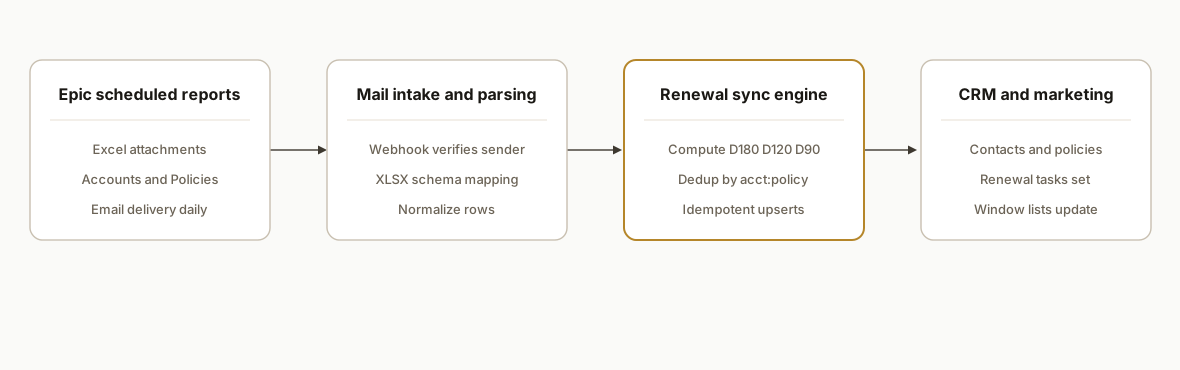
We design around Epic's practical outbound path: scheduled Excel reports via email. An intake webhook captures the messages, we parse and normalize columns, then upsert into the CRM and marketing tools with renewal timelines.
- Epic scheduled reports: Epic's report engine delivers Excel attachments on a set cadence to a specific mailbox. We configure Account and Policy views with the exact columns marketing and CRM need.
- Mail intake and parsing: A mailbox rule forwards to an HTTPS webhook. The service verifies sender, extracts .xlsx attachments, and loads rows with a schema map per agency.
- Renewal sync engine (accent): The engine computes renewal windows, deduplicates by keys, sets next-touch dates, and writes to the CRM. It records checksums for idempotency.
- CRM and marketing outputs: Contacts and companies get upserted. Policies attach by custom objects or deal records depending on the CRM. Renewal-window lists update for journeys.
Step-by-step: how to build it
Step 1: Configure Applied Epic scheduled reports
Create two report templates in Epic: Accounts and Policies. Include columns your downstream tools need: Account ID, Account Name, Primary Email, Phone, Address, Producer, Policy Number, Line, Carrier, Effective Date, Expiration Date, Status, Premium. Filter Policies for expirations within the next 180 days. Schedule both to email as Excel attachments to an integration mailbox daily.
Key gotcha: primary email vs alternates vary by tenant and report design. Keep your downstream mapping flexible.
Epic report name: Policies: Upcoming 180 Days
Columns: account_id, account_name, primary_email, policy_number, line, carrier, effective_date, expiration_date, status, premium, producer
Delivery: Email to: integration@youragency-mailbox.com, Format: Excel (.xlsx), Schedule: Daily 06:00 local
Step 2: Provision a mailbox and HTTPS intake
Use a dedicated mailbox. Either forward to an inbound-email webhook provider or subscribe to the mailbox via Microsoft Graph. We used an HTTPS endpoint that validates sender and DKIM, then streams attachments to the parser.
// pages/api/inbound-email.ts
import type { NextApiRequest, NextApiResponse } from "next";
import crypto from "crypto";

export default async function handler(req: NextApiRequest, res: NextApiResponse) {
  if (req.method !== "POST") return res.status(405).end();
  // Simple shared-secret HMAC verification
  const sig = req.headers["x-inbound-signature"] as string;
  const ok = crypto.timingSafeEqual(
    Buffer.from(sig || ""),
    Buffer.from(crypto.createHmac("sha256", process.env.INBOUND_SECRET!)
      .update(req.body.raw || JSON.stringify(req.body))
      .digest("hex"))
  );
  if (!ok) return res.status(401).json({ error: "bad signature" });

  const attachments = extractXlsxBuffers(req.body);
  await queueForParsing(attachments);
  return res.status(202).json({ queued: attachments.length });
}
Gotcha: mailbox rules that inline attachments or convert to links will break parsing. Send real .xlsx files.
Step 3: Parse Excel and normalize columns
Load worksheets with a tolerant map. Agencies label columns differently, and Epic exports can shift header text when reports are edited. Keep a per-tenant schema registry rather than hard-coded indices.
import * as XLSX from "xlsx";

type Row = Record<string, string>;
const map = {
  accountId: ["account_id", "acct id", "account#"],
  email: ["primary_email", "email", "e-mail"],
  expiration: ["expiration_date", "expires", "exp date"],
  policyNumber: ["policy_number", "policy#"],
  line: ["line", "lob"],
};

export function parseWorkbook(buf: Buffer): Row[] {
  const wb = XLSX.read(buf, { type: "buffer" });
  const ws = wb.Sheets[wb.SheetNames[0]];
  const raw = XLSX.utils.sheet_to_json<Row>(ws, { defval: "" });
  return raw.map((r) => ({
    accountId: pick(r, map.accountId),
    email: pick(r, map.email).toLowerCase().trim(),
    expiration: new Date(pick(r, map.expiration)),
    policyNumber: pick(r, map.policyNumber),
    line: pick(r, map.line),
  }));
}

function pick(r: Row, candidates: string[]): string {
  for (const c of candidates) if (r[c] != null && String(r[c]).trim() !== "") return String(r[c]);
  return "";
}
Gotcha: Excel dates can arrive as serials or ISO strings depending on the export. Normalize to Date objects early and time zone consistently.
Step 4: Compute renewal windows and de-duplicate
We key de-duplication on account plus policy number, and use a content checksum to ensure idempotent upserts across replays and re-sends.
import crypto from "crypto";

export type RenewalWindow = "D180" | "D120" | "D90" | "D60" | "D30" | "EXPIRED" | "OTHER";

export function windowFor(date: Date, today = new Date()): RenewalWindow {
  const d = Math.ceil((date.getTime() - today.getTime()) / 86400000);
  if (d <= 0) return "EXPIRED";
  if (d <= 30) return "D30";
  if (d <= 60) return "D60";
  if (d <= 90) return "D90";
  if (d <= 120) return "D120";
  if (d <= 180) return "D180";
  return "OTHER";
}

export function checksum(row: unknown): string {
  return crypto.createHash("sha1").update(JSON.stringify(row)).digest("hex");
}
Gotcha: treat status changes as new work. A policy that moves from quoted to bound should advance tasks even if the window label is unchanged.
Step 5: Upsert into the CRM and attach renewal tasks
Keep the CRM adapter separate from parsing. Upsert Company and Contact first. Then attach a Policy record or a Deal with custom fields for line, carrier, effective, and expiration. Finally, set renewal tasks or update lifecycle fields for marketing journeys.
// pseudo-CRM adapter
export async function upsertPolicyWithRenewal(p: {
  accountId: string; email: string; policyNumber: string; line: string; expiration: Date; window: string;
}) {
  const companyId = await crm.upsertCompany({ externalId: p.accountId });
  const contactId = await crm.upsertContact({ email: p.email, companyId });
  const policyId = await crm.upsertCustomObject("policy", {
    companyId, contactId,
    externalId: `${p.accountId}:${p.policyNumber}`,
    fields: { policyNumber: p.policyNumber, line: p.line, expiration: p.expiration.toISOString() }
  });
  await crm.ensureTask({
    ownerFromProducer: true,
    subject: `Renewal: ${p.line} ${p.policyNumber} ${p.window}`,
    dueDate: taskDateFor(p.window, p.expiration),
    linkTo: policyId,
  });
  await marketing.updateLists({ email: p.email, window: p.window });
}
Gotcha: some CRMs cap custom object names or do not natively support a Policy object. Fall back to Deals or a child object under Company, but keep external IDs stable.
Step 6: Make it idempotent and observable
Store one ledger row per attachment and per parsed policy. Record source message IDs, attachment filenames, and content checksums. On every run, skip rows whose checksum has already been applied. Emit metrics for attachment count, parsed rows, inserts, updates, and skips.
create table if not exists ledger (
  id bigserial primary key,
  source_msg_id text not null,
  attachment_name text not null,
  row_key text not null,
  checksum text not null,
  applied_at timestamptz not null default now(),
  unique(source_msg_id, row_key, checksum)
);
Gotcha: scheduled-report driven flows are batch by nature. Show operators what arrived today versus yesterday and what changed.
Step 7: Build a controlled backfill
Backfills can overwhelm marketing automation if you promote thousands of contacts into a journey at once. Add a dry-run mode and a throttle that limits first-time window assignments per day.
# dry-run a 10k-row backfill to see counts only
SYNC_MODE=dryrun MAX_PROMOTIONS=250 node scripts/backfill.js ./exports/policies_2026-06.xlsx
Gotcha: enforce MAX_PROMOTIONS in code. An environment variable is not a safety unless the code refuses to run without it.
Where it gets complicated
API access is licensed and custom-auth: Applied documents that Epic API access requires an SDK or API license and uses a custom authentication method. There is no public base URL to target. Expect a longer setup path if you pursue direct API access.
No official low-code connector to point and click: As of late June 2026 we could not locate an official Applied Epic app listed in the public Zapier or Make directories. Plan for report-based sync or a vetted middleware that already holds Epic certification rather than assuming a turnkey connector exists.
Field-level gaps vs what staff see on screen: Some data visible in Epic is not API exposed. Integrators use hybrid approaches or RPA for gaps. In a report-driven flow, solve with additional columns or secondary reports, not with assumptions in code.
Primary email only and schema drift: Vendors note that scheduled-report based syncs often rely on primary email and that column layouts vary by tenant and report. Build a tolerant header map and a secondary key like account ID to avoid orphaned records.
Batch latency is a feature and a risk: Email-delivered reports are not real time. Marketing SLAs must align to daily or twice-daily cadence. Do not promise instant updates unless you have a parallel path.
What this actually changes
For the agency we shipped this for, the system replaced weekly manual exports with a daily zero-touch sync. Producers now see renewal tasks at 120, 90, 60, and 30 days, and marketing journeys promote contacts automatically into the right window list. The value is structural: Epic remains the system of record, but your CRM becomes the engagement surface that stays fresh without human copy-paste.
One retention fact underlines why this matters: increasing customer retention by 5 percent can lift profits by 25 to 95 percent, per Bain and Company. Renewal discipline is retention in an insurance business, so getting every expiring policy into timed follow-ups pays back quickly.
Source: https://www.bain.com/insights/achieving-breakthrough-service/
Frequently asked questions
Does Applied Epic have an official API I can use?
Applied states that Epic exposes APIs, but access requires an SDK or API license and uses a custom authentication method. There is no publicly documented base URL or self-serve developer signup. Many teams start with scheduled reports for outbound sync while evaluating licensed API access.
Can I connect Applied Epic to Zapier or Make directly?
We could not locate an official Applied Epic app in Zapier or Make's public directories as of June 27, 2026. In practice, agencies use scheduled Excel reports plus a parser, or they hire a middleware vendor with certified Epic access. Avoid assuming a turnkey low-code connector exists.
Is real-time sync possible from Epic to my CRM?
Plan for batch by default. Epic's report engine can schedule emails daily or multiple times per day. If you later obtain licensed API access and confirm the endpoints you need, you can move specific updates closer to real time, but the safe baseline is scheduled-report cadence.
How do you prevent duplicates and overwriting the wrong contact?
Use stable external IDs and checksums. We key records on account ID plus policy number, and only update a contact if the checksum of the incoming row differs from the last applied version. Primary email alone is not reliable across all tenants.
What does this cost each month to run?
The batch path is lightweight. You are paying for a mailbox or inbound-email webhook, a small compute service, and standard CRM API usage. There is no Epic-side runtime fee for scheduled emails. The main cost is the one-time build, plus modest hosting.
Can a non-technical owner set this up?
Configuring Epic reports and scheduling them is non-technical. Building the intake, parser, idempotent CRM upserts, and backfill safety is engineering work. Most agencies hire the build once, then self-manage report columns and schedules going forward.
If you need contacts and renewals flowing from Epic into your CRM and journeys without manual exports, we already built this pattern. See how we approach similar closed-platform gaps in our AMS360 guide at /blog/ams360-api-integration-crm-marketing-sync. For broader CRM automation capabilities, visit /services#crm-automation. When you are ready, book a working session at /book.
Want us to build this for you?
Nine questions, about 90 seconds. You see the hours it is costing you, then pick a time. No pitch.
Get your free assessment