
An AMS360 to HubSpot integration works by pulling agency data out of AMS360 via its Web Service API or scheduled CSV and AL3 exports, mapping it to a clean CRM schema, and upserting contacts, companies, policy records, renewal dates, and activities into HubSpot on a schedule. We built and shipped this for an independent insurance agency so producers and account managers could work renewals and service from one CRM.
AMS360 to HubSpot integration is: a scheduled or API-driven pipeline that normalizes AMS360 customers and policies into CRM records with dedupe keys, renewal timelines, and traceable activities.
If you run AMS360 but sell and service in HubSpot, this guide shows how the bridge works, the exact steps to build it, and where the gotchas are.
The problem it solves
You can export AMS360 data, but there is no out-of-the-box HubSpot connector and no public Zapier app. Producers end up working from stale spreadsheets. Account managers re-key policy facts into the CRM. Renewal chasing sits in email threads. Duplicates creep in because there is no stable cross-system key. Nothing triggers when a renewal window opens.
| Manual AMS360 to CRM | Automated AMS360 to HubSpot |
|---|---|
| Ad hoc CSV downloads and copy paste into HubSpot. | Scheduled pull from AMS360 API or scheduled CSV and AL3 feeds into a normalizer. |
| No shared dedupe rule, duplicates multiply. | Composite dedupe keys: customer number plus policy number per effective term. |
| Renewals tracked in individual inboxes. | 30, 60, 90 day renewal tasks auto created and assigned. |
| Producers and service see different truth. | One CRM record per insured, linked policies, activities, and next touch. |
| Error prone and slow. | Idempotent upserts with logs and drift alerts. |
How the automation works
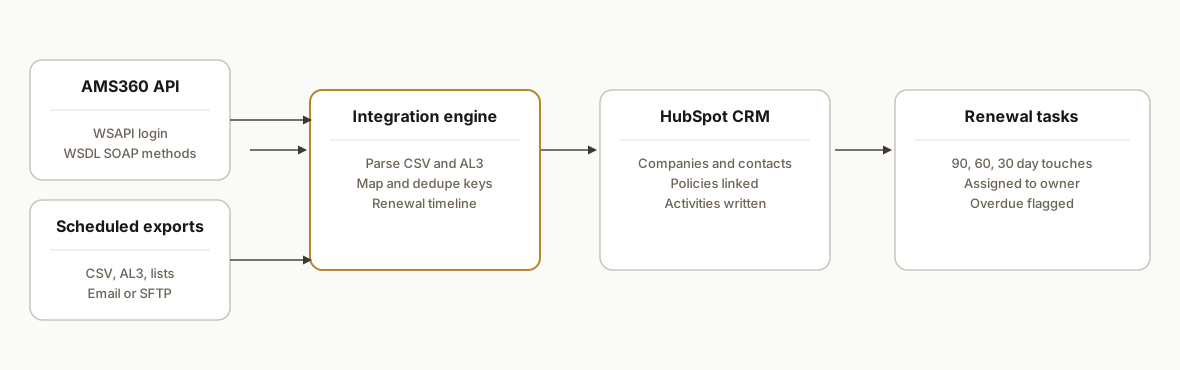
The architecture has two acquisition paths into one integration engine. When an agency has AMS360 Web Service API access, we use it. When it does not or when a dataset is not exposed in the API, we schedule exports the product already supports and parse them. A mapper derives stable keys and renewal timelines, then a CRM writer performs upserts and creates activities.
- AMS360 data sources: Two inputs: the Web Service API using a WSAPI login ID and password, or scheduled exports that AMS360 supports today: reports to CSV via email, Custom Data Exporter files, Data Schedule Export lists, and Single Transaction Export for AL3. The export route is how we start when SDK access is pending.
- Integration engine: A small service that watches an inbox or SFTP for AMS360 exports, or calls the API under an integration account. It validates files, parses CSV or AL3, and batches normalized records into a queue.
- Schema mapper and dedupe: A mapping layer produces clean CRM shapes: Company, Contact, Policy, and Activity. It computes composite keys like customer number plus policy number plus term start to guarantee idempotency.
- Renewal timeline and tasks: The engine derives renewal dates from policy effective and expiration dates, then schedules CRM tasks at 90, 60, and 30 day offsets and flags overdue items.
- CRM writer: A rate limited writer performs upserts and creates activities. It records a state ledger so re-runs do not duplicate anything.
Step-by-step: how to build it
Step 1: Decide your AMS360 acquisition path
Pick the fastest safe start: use AMS360 Web Service API if your tenant has the SDK agreement and a WSAPI login ready. Otherwise, schedule exports AMS360 already supports: reports to CSV via email, Custom Data Exporter files, Data Schedule Export lists for objects like vehicles and certificate holders, or Single Transaction Export to AL3.
# Example: dedicated inbox for scheduled AMS360 CSV exports
# Create an IMAP-only credential, read-only, for the integration
# AMS360: schedule reports to a distribution list that includes this inbox

# ENV
IMAP_HOST=imap.yourmail.com
IMAP_USER=ams360-exports@yourdomain.com
IMAP_PASS=app-password-here
EXPORT_SENDER=noreply@your-agency.com
Key point: API access requires a separate SDK agreement and an integration login. If that is not ready, start with scheduled CSV so the CRM team can benefit while legal finishes the SDK paperwork.
Step 2: Parse incoming AMS360 files safely
For exports, poll the inbox on a fixed cadence and only accept attachments from the expected sender and report names. For AL3, use a proven parser or a vendor library. Normalize everything to a single internal schema before mapping to CRM objects.
# inbox_watcher.py
import email, imaplib, csv, io, time
from email.header import decode_header

IMAP_HOST = os.getenv("IMAP_HOST")
IMAP_USER = os.getenv("IMAP_USER")
IMAP_PASS = os.getenv("IMAP_PASS")
EXPORT_SENDER = os.getenv("EXPORT_SENDER")

def fetch_csv_attachments():
    m = imaplib.IMAP4_SSL(IMAP_HOST)
    m.login(IMAP_USER, IMAP_PASS)
    m.select("INBOX")
    typ, data = m.search(None, '(UNSEEN FROM "%s")' % EXPORT_SENDER)
    for num in data[0].split():
        typ, msg_data = m.fetch(num, '(RFC822)')
        msg = email.message_from_bytes(msg_data[0][1])
        for part in msg.walk():
            if part.get_content_type() == 'text/csv':
                name = part.get_filename()
                buf = io.StringIO(part.get_payload(decode=True).decode('utf-8-sig'))
                yield name, list(csv.DictReader(buf))
    m.logout()
Gotcha: AMS360 CSV columns differ by export surface. Normalize headers in code rather than hardcoding positions.
Step 3: Map AMS360 records to a clean CRM schema
Derive a stable dedupe key and a single internal shape for Company, Contact, Policy, and Activity. Keep the AMS360 customer number and policy number as first class fields to debug and to support reversibility.
// mapper.js
export function mapCustomer(row) {
  return {
    company: {
      key: `ams360:customer:${row.CustomerNumber}`,
      name: row.CustomerName,
      domain: row.Email?.split('@')[1] || null,
      sourceSystem: 'AMS360',
      sourceId: row.CustomerNumber
    },
    contacts: [{
      key: `ams360:contact:${row.CustomerNumber}:${row.Email || row.Phone}`,
      firstName: row.FirstName,
      lastName: row.LastName,
      email: row.Email || null,
      phone: row.Phone || null,
      role: row.Role || 'Insured',
      sourceSystem: 'AMS360'
    }]
  };
}

export function mapPolicy(row) {
  const key = `ams360:policy:${row.CustomerNumber}:${row.PolicyNumber}:${row.EffectiveDate}`;
  return {
    key,
    customerKey: `ams360:customer:${row.CustomerNumber}`,
    policyNumber: row.PolicyNumber,
    carrier: row.Carrier,
    line: row.LineOfBusiness,
    effectiveDate: row.EffectiveDate,
    expirationDate: row.ExpirationDate,
    premium: row.AnnualizedPremium ? Number(row.AnnualizedPremium) : null
  };
}
Tip: keep keys human readable. It makes reconciliation and log triage much faster.
Step 4: Derive renewal timelines and tasks
Compute days until expiration and schedule tasks at 90, 60, and 30 day marks. Flag overdue renewals for immediate action. Keep the schedule logic in one place so it is easy to tune per line of business.
// renewals.ts
import { differenceInCalendarDays, parseISO, subDays } from 'date-fns';

type RenewalPlan = { when: string; label: string }[];

export function planRenewals(expirationISO: string): RenewalPlan {
  const exp = parseISO(expirationISO);
  return [90, 60, 30].map(d => ({
    when: subDays(exp, d).toISOString(),
    label: `${d}-day renewal touch`
  }));
}

export function daysUntil(expirationISO: string): number {
  return differenceInCalendarDays(parseISO(expirationISO), new Date());
}
Guardrail: only create tasks once per policy per offset. Store a sent key like ams360:policy:...:renewal:60d in your state ledger.
Step 5: Upsert to the CRM with idempotency and backoff
Write to HubSpot using a single upsert function per object type with optimistic retry and rate limit backoff. If your team has not finalized the exact CRM field names, route through a small field mapper so you can change CRM fields without touching business logic.
// writer.js
async function upsertCompany(company) {
  // Map internal fields to your CRM fields here
  const payload = mapToCrmCompany(company);
  // Send to your CRM's company upsert endpoint
  // Respect 429s with exponential backoff
}

async function upsertContact(contact, companyId) {
  const payload = mapToCrmContact(contact, companyId);
  // Send to your CRM's contact upsert endpoint
}

async function createRenewalTask(companyId, policy, planItem) {
  const payload = mapToCrmTask(companyId, policy, planItem);
  // Send to your CRM's task creation endpoint
}
Key detail: maintain a state table keyed by your composite keys. Upserts check the state before creating anything. Writers record success and the external CRM ID so later updates become true updates, not creates.
Step 6: Reconciliation, alerts, and drift checks
Every run should produce a reconciliation log: counts per object created or updated, duplicate keys suppressed, and any rows dropped due to validation issues. Email the summary and store the detailed log so ops can self serve.
-- state.sql
CREATE TABLE IF NOT EXISTS sync_state (
  key TEXT PRIMARY KEY,
  external_id TEXT,
  last_hash TEXT,
  last_synced_at TIMESTAMP DEFAULT now()
);

CREATE TABLE IF NOT EXISTS sync_log (
  id BIGSERIAL PRIMARY KEY,
  run_id TEXT,
  level TEXT,
  key TEXT,
  message TEXT,
  created_at TIMESTAMP DEFAULT now()
);
Add a drift checker that compares a random sample of CRM records against the latest AMS360 export to catch mapping regressions.
Where it gets complicated
SDK access is gated. AMS360's Web Service API requires a separate SDK agreement and a WSAPI login with entity level permissions. That slows starts and demands a clear plan B: scheduled exports.
No public webhooks documented. We did not find public documentation for event or webhook support. The design uses scheduled pulls. Near real time can be approximated by increasing cadence, but do it with rate and inbox controls.
API writes can bypass standard processing. AMS360's own docs warn that its Web Service API can bypass standard processing. Treat it as a data surface, not a button pusher, and test for any missed in app side effects.
Exports are partial by object. Data Schedule Export covers specific lists like vehicles, drivers, and certificate holders, not full fidelity policy records. Expect mapping gaps and plan to combine multiple exports or AL3 where needed.
AL3 is finicky. Single Transaction Export to ACORD AL3 is structured but strict. Field interpretation varies by partner. Use a hardened AL3 parser and unit tests on your sample set before trusting it in production.
Identity and dedupe are the hard part. Customer names and domains are unreliable in commercial lines. Anchor dedupe on AMS360 customer and policy numbers plus term dates, not human readable strings.
What this actually changes
For the agency we shipped, producers opened HubSpot and saw one insured per company, linked to active and prior term policies, with a 90 60 30 day renewal radar and assigned tasks. Service had activities tied to the right account without re keying. Operations got a daily reconciliation summary instead of a spreadsheet chase.
If you are weighing the value of timely CRM handoffs, Harvard Business Review found that firms that tried to contact potential customers within an hour were nearly 7 times as likely to qualify a lead as those that waited longer, and more than 60 times as likely as companies that waited 24 hours or more. Source: https://hbr.org/2011/03/the-short-life-of-online-sales-leads
Frequently asked questions
Does AMS360 have an official API?
Yes. AMS360 exposes a Web Service API that is enabled per tenant with entity level permissions. Access requires a Web Service SDK agreement and a WSAPI login ID and password that you configure in AMS360. The documentation references WSDL and SOAP web methods.
Is there a native AMS360 to HubSpot connector?
We did not find an official HubSpot connector. Vertafore offers AMS360 Connect for Salesforce. In our builds we bridge to HubSpot using the AMS360 Web Service API when available or by scheduling supported exports like CSV and AL3 when SDK access is pending.
Can this sync run in real time?
AMS360's public help does not document webhooks. We run on a schedule. For near real time, shorten the cadence while keeping rate controls and inbox safety checks. The design keeps idempotency so more frequent runs do not create duplicates.
What AMS360 permissions are required?
For the Web Service API route you need the SDK agreement in place and a WSAPI login configured with the entity level permissions required for the data you intend to read. For exports, you need access to schedule the relevant reports and datasets.
How do you prevent duplicates in HubSpot?
We derive composite keys: customer number plus policy number plus term start for policies, and customer number plus a contact handle for people. We keep a state ledger of prior upserts, hash payloads to detect changes, and only write when the hash differs.
How long does an AMS360 to HubSpot integration take?
Most agencies ship the first phase in a few weeks. API ready tenants go faster. Export based starts add mapping work but let producers use HubSpot sooner. The exact effort depends on the lines of business, the datasets you want, and how much historic backfill you need.
If you want a single source of truth in HubSpot while staying on AMS360, we have already built and shipped this bridge. See our related post on the broader AMS360 API integration and our CRM automation services. When you are ready to scope, book a 15 minute call.
Want us to build this for you?
Nine questions, about 90 seconds. You see the hours it is costing you, then pick a time. No pitch.
Get your free assessment