
We built and shipped a production integration for an independent insurance agency that generates ACORD packets automatically and keeps customer and policy data in sync with their CRM and marketing stack. The system uses AMS360's official integration surfaces when available and falls back to scheduled CSV exports where APIs are gated, so daily work does not stall on manual rekeying.
Definition: AMS360 API integration is the practice of connecting Vertafore AMS360's data surfaces to external systems so customer, policy, and activity data flow into CRMs and downstream automations without manual export and rekey.
The problem it solves
Insurance teams were toggling between AMS360 eForms and a separate CRM. Certificates and updates lived in email. Marketing lists were stale because AMS360 data never flowed out cleanly. ACORD forms typed directly on eForms did not feed the underlying records, so staff retyped the same facts into the CRM.
| Manual process | Automated system |
|---|---|
| Download scheduled reports, save attachments, import CSV into CRM every week | Mailbox listener ingests AMS360 scheduled CSVs continuously and upserts records into CRM minute by minute |
| Hand fill ACORD 25/125 from scattered fields | ACORD PDFs pre-filled from canonical data, rendered to PDF, and shared via CRM links |
| Build campaigns off old lists | CRM stays current from AMS360 data so segments and journeys are always fresh |
| Chase down typos and duplicates | Deterministic keys and an idempotent upsert ledger prevent double records |
If you run AMS360 and want ACORD packets out and contacts flowing into your CRM without manual work, this guide shows exactly how the production system runs and how to build it safely.
How the automation works
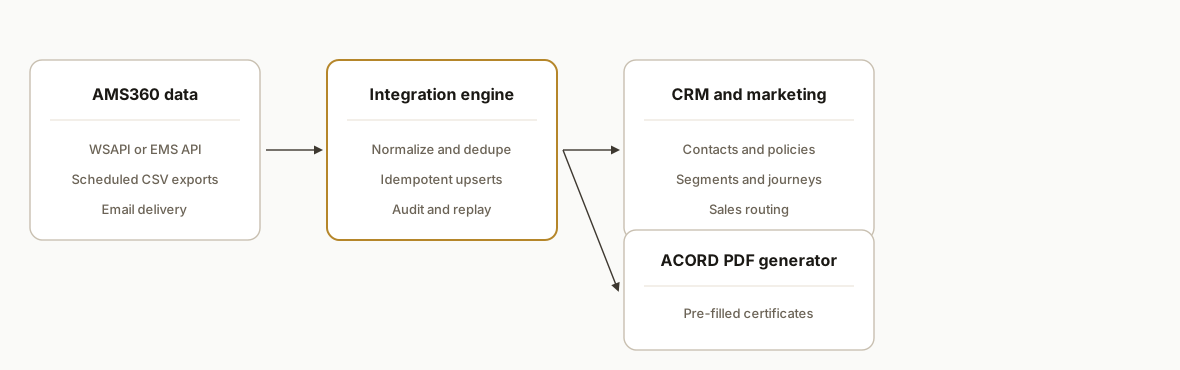
We design the integration as a two-lane highway: lane one uses official AMS360 APIs under the agency's SDK agreement. Lane two uses scheduled CSV exports delivered by email for entities that are not yet exposed or while access is pending. ACORD forms are generated outside AMS360 from canonical data to avoid retyping, then attached back to the client record in the CRM.
- AMS360 integration surface: Vertafore documents a Web Service API that requires a Web Service SDK agreement and a WSAPI user with scoped permissions. Release notes also reference REST EMS endpoints. We only call documented surfaces the client is contractually enabled for. When access is not in place, we rely on scheduled CSV exports delivered by email.
- CSV ingest and normalization: AMS360 can export reports to CSV and schedule delivery to email. We ingest those attachments, validate headers, and map fields into a normalized contact and policy shape.
- Idempotent upsert to CRM: We compute stable dedup keys, write to a state ledger, and upsert to the CRM. This supports marketing segments and sales routing without duplicates.
- ACORD form generator: Since data typed directly on eForms is saved to the form only and does not flow back to customer or policy records, we generate ACORD PDFs from the canonical record and store the output with the CRM deal or contact.
- Audit and replay: All inputs are archived. Every transformation is logged with a hash so we can replay a day or a single customer safely.
New: does AMS360 support ACORD forms and remote team access?
Answer first: yes on ACORD, and remote team access is best delivered by syncing AMS360 data to a cloud CRM with role based permissions.
- ACORD forms: AMS360 provides eForms, but data typed on eForms does not back populate records. We fill ACORD 25 and 125 from canonical data, render PDFs, and attach them to CRM records so everyone sees the same source of truth.
- Remote team access: instead of provisioning more AMS360 seats or exposing your network, we mirror the minimum AMS360 data your producers and CSRs need into your CRM. Access is controlled by SSO and roles. Files are stored in secure object storage and linked from the CRM.
- Certificates and applications: producers can request new COIs from the CRM. The generator pulls canonical coverage data and returns a ready to send PDF without rekeying.
If you are evaluating platforms and also run NowCerts or HawkSoft in parts of your book, see how we handle COIs in our NowCerts certificate automation and renewal reminders in our HawkSoft renewal reminder integration.
Which AMS supports ACORD forms and remote team access?
Answer first: most modern AMS platforms handle ACORD eForms. The remote team outcome is best delivered by syncing AMS data to a CRM with SSO and roles. You likely do not need to switch from AMS360 to get ACORD automation and secure remote access.
- Keep AMS360: use API or Scheduled Reports to keep your CRM current, then generate ACORD PDFs from the canonical record.
- When to consider switching: if your org is all-in on Salesforce and wants the official Salesforce path, evaluate AMS360 Connect for Salesforce first. For a broader view across systems, read our insurance agency management API guide.
- Mixed AMS environments: we run the same pattern for other stacks. See our Applied Epic renewal sync and the EZLynx Zapier gap bridge to understand options before you replatform.
Remote team access pattern: how we exposed AMS360 data safely
Answer first: keep AMS360 as the system of record, then project the right slice into your CRM and data hub for remote roles.
- Identity and SSO: enforce SSO on the CRM with SAML or OIDC. Do not put AMS360 credentials in automations.
- Least privilege: map AMS360 fields to a minimal CRM schema. Exclude SSNs and bank data. Restrict file links to read only.
- File delivery: store rendered ACORD PDFs in object storage with private buckets. Share signed URLs or CRM file objects, not raw public links.
- Audit: write every incoming CSV or API response to append only storage with checksums. Log every outbound CRM write with the source hash and template version.
- Network posture: the mailbox listener, API lane, and CRM live on hardened cloud infra. Remote staff never need VPN access to reach AMS360.
This pattern kept producers and account managers productive from anywhere while AMS360 remained locked down.
Buyer checklist: ACORD support and remote access
Answer first: decide, then build. Use this 7 point checklist to greenlight the work.
- Confirm ACORD forms needed this quarter: 25, 125, and any carrier specific riders that require human review.
- Pick your CRM as the remote access front end. Enforce SSO and roles.
- Choose your AMS360 lane: Scheduled Reports now, API lane when the SDK agreement and WSAPI user are live.
- Lock a header contract for every report and version it.
- Stand up idempotent upserts with a replayable ledger.
- Store PDFs in private object storage. Share signed links only.
- If data residency matters, review our guide on Canadian data residency for AI and automation.
Field checklist: ACORD 25 and 125 fills without retyping
Answer first: decide on a stable field contract, then map once.
Core fields we mapped in production for ACORD 25 certificates and 125 applications:
- Insured: legal name, DBA, mailing address, contact email and phone
- Producer: agency name, address, phone, license number where applicable
- Policy: carrier, NAIC where present, policy number, line of business, effective and expiration dates, status
- Coverages: liability limits per occurrence and aggregate, property limits, auto symbols if applicable
- Holder: certificate holder name and address, project or location reference, special terms text
Keep a template version in your ledger. When ACORD updates a form, you will know which maps to adjust.
Which ACORD forms can we auto-fill today?
Answer first: ACORD 25 and ACORD 125 are in scope with the data AMS360 already holds. The same pattern applies to adjacent forms when your exports expose the required fields.
What we shipped in production:
- ACORD 25: insured and producer identity, policy identifiers, coverage limits, holder details, and special wording sections filled from canonical records.
- ACORD 125: commercial application sections for insured details and policy metadata filled from normalized contact and policy tables.
What still needs human review:
- Endorsement specific language and bespoke additional insured text. We expose merge fields for these so an account manager can confirm wording before send.
- Carrier specific nuances. Pin your template version and run a two person check when a carrier revises a requirement.
If you handle similar work in another AMS, compare our renewal and certificate patterns in Applied Epic renewal sync and our EZLynx Zapier gap bridge.
Remote producers on mobile: what the workflow looks like
Answer first: producers and CSRs work from the CRM app with live policy context and one tap certificate requests.
Typical flow we run in production:
- Open the account in the CRM app and see current policies, renewal dates, and traits that came from AMS360.
- Tap Request COI. The CRM posts a request to the generator with the insured, policy, holder, and coverage context.
- The generator renders an ACORD 25 PDF from canonical data, uploads to secure storage, and attaches a link to the CRM record.
- Share the link or email the PDF directly from the CRM. Access is controlled by roles and signed URLs, not by opening AMS360.
If you are quantifying impact, see our primer on measuring value in automation ROI explained.
AMS360 API vs Scheduled Reports: which path and when
Answer first: start with Scheduled Reports for speed, then add the API lane when SDK access is approved. Use AMS360 Connect for Salesforce if your entire workflow lives inside Salesforce.
Decision guide we follow with clients:
- You are on Salesforce and accept standard objects: evaluate AMS360 Connect for Salesforce.
- You are on HubSpot or a mixed stack, or you need ACORD generation and CDP traits: build a custom sync. Keep the CSV lane live during procurement to ship value now.
- You have strict change control: pin report headers and add the API lane behind a feature flag once the WSAPI user is ready.
For a broader landscape across agency systems, read our insurance agency management API guide.
Step-by-step: how to build it
1) Set up AMS360 lanes: WSAPI or Scheduled Reports
Answer first: enable the official API if you have the SDK agreement and a WSAPI user. Otherwise schedule CSV reports to an intake mailbox.
Vertafore documents that the Web Service API requires an SDK agreement and WSAPI credentials with scoped entity permissions. When the client's access was pending, we configured Scheduled Reports to send CSVs to an automation mailbox.
AMS360 setup checklist
- WSAPI: confirm SDK agreement signed. Create WSAPI user with minimal entity scope.
- CSV lane: schedule the required reports to CSV. Set frequency daily. Recipient: intake@yourdomain.com.
- Include clear column headers in exports. Avoid PDF for data feeds.
Key gotcha: treat webhooks as a gap. AMS360 documentation does not confirm outbound webhooks, so design for polling or scheduled delivery.
2) Build the mailbox listener and CSV mapper
Answer first: ingest emailed CSV attachments and map them to your canonical schema.
We run a small Node service that polls IMAP, extracts CSV attachments, validates headers, and writes normalized rows to Postgres.
// imap-listener.js
import Imap from 'imap';
import { simpleParser } from 'mailparser';
import { parse } from 'csv-parse/sync';
import pg from 'pg';

const imap = new Imap({ user: process.env.IMAP_USER, password: process.env.IMAP_PASS, host: process.env.IMAP_HOST, tls: true });
const pool = new pg.Pool({ connectionString: process.env.DATABASE_URL });

function toCanonical(row) {
  return {
    external_id: row.CustomerID || row.ClientCode,
    name: row.CustomerName,
    email: row.PrimaryEmail?.toLowerCase() || null,
    phone: row.Phone,
    address: `${row.Addr1 || ''} ${row.City || ''} ${row.State || ''} ${row.Zip || ''}`.trim(),
    policy_number: row.PolicyNumber || null,
    line: row.LineOfBusiness || null,
    effective_date: row.EffectiveDate || null
  };
}

async function save(rows) {
  const client = await pool.connect();
  try {
    await client.query('BEGIN');
    for (const r of rows) {
      await client.query(
        `INSERT INTO intake_contacts(external_id, name, email, phone, address, policy_number, line, effective_date)
         VALUES($1,$2,$3,$4,$5,$6,$7,$8)
         ON CONFLICT (external_id) DO UPDATE SET name=EXCLUDED.name, email=EXCLUDED.email, phone=EXCLUDED.phone, address=EXCLUDED.address, policy_number=EXCLUDED.policy_number, line=EXCLUDED.line, effective_date=EXCLUDED.effective_date`,
        [r.external_id, r.name, r.email, r.phone, r.address, r.policy_number, r.line, r.effective_date]
      );
    }
    await client.query('COMMIT');
  } finally { client.release(); }
}

imap.once('mail', () => {/* noop: IDLE keeps firing */});
imap.once('ready', () => {
  imap.openBox('INBOX', false, () => {
    imap.on('mail', () => {
      const f = imap.seq.fetch('1:*', { bodies: '', struct: true });
      f.on('message', (m) => {
        m.on('body', async (stream) => {
          const mail = await simpleParser(stream);
          for (const att of (mail.attachments || [])) {
            if (att.filename?.toLowerCase().endsWith('.csv')) {
              const records = parse(att.content.toString('utf8'), { columns: true, skip_empty_lines: true });
              const rows = records.map(toCanonical);
              await save(rows);
            }
          }
        });
      });
    });
  });
});
imap.connect();
Key gotcha: enforce header contracts per report. If AMS360 staff edit a layout, reject with a clear error and alert ops.
3) Add the WSAPI or EMS API path when enabled
Answer first: when the agency enables API access, create a second lane that pulls entities directly.
Vertafore's Web Service API is SOAP based and requires the SDK agreement and a WSAPI user. Release notes also show REST EMS endpoints for some entities. We configure the client's allowed surface and keep base URLs and auth in environment variables. Do not hardcode any endpoint names you cannot verify in the client's docs.
// soap-wsapi.js
import soap from 'soap';

export async function fetchAmsEntities(wsdlUrl, creds, params) {
  const client = await soap.createClientAsync(wsdlUrl);
  client.addHttpHeader('Authorization', 'Basic ' + Buffer.from(creds.user + ':' + creds.pass).toString('base64'));
  // Call permitted operations only, as documented for this tenant
  // Example shape: const [resp] = await client.SomeEntityGetAsync(params);
  // return resp?.SomeEntityGetResult || [];
}
Key gotcha: API access is not self-serve. Coordinate the SDK paperwork and WSAPI user creation with the client's AMS admin before writing any code.
4) Make upserts idempotent and CRM agnostic
Answer first: compute a deterministic dedup key and write to a ledger before touching the CRM.
We use external_id as the truth and fall back to an email plus name hash. Each upsert writes to a ledger table first, then pushes to the CRM. This lets us replay any day and prevents double-sends.
-- schema.sql
CREATE TABLE IF NOT EXISTS upsert_ledger (
  key text PRIMARY KEY,
  sha256 text NOT NULL,
  seen_at timestamptz NOT NULL DEFAULT now()
);

CREATE TABLE IF NOT EXISTS intake_contacts (
  external_id text PRIMARY KEY,
  name text, email text, phone text, address text,
  policy_number text, line text, effective_date date
);
// crm-upsert.js
import crypto from 'crypto';
import fetch from 'node-fetch';
import pg from 'pg';
const pool = new pg.Pool({ connectionString: process.env.DATABASE_URL });
function dedupKey(r) {
return r.external_id || crypto.createHash('sha256').update((r.email || '') + '|' + (r.name || '')).digest('hex');
}
async function seenBefore(client, key, sha) {
const res = await client.query('SELECT sha256 FROM upsert_ledger WHERE key=$1', [key]);
if (!res.rowCount) return false;
return res.rows[0].sha256 === sha;
}
export async function upsertToCRM(row) {
const client = await pool.connect();
try {
const key = dedupKey(row);
const sha = crypto.createHash('sha256').update(JSON.stringify(row)).digest('hex');
if (await seenBefore(client, key, sha)) return { status: 'skip' };
await client.query('BEGIN');
await client.query('INSERT INTO upsert_ledger(key, sha256) VALUES($1,$2) ON CONFLICT (key) DO UPDATE SET sha256=EXCLUDED.sha256, seen_at=now()', [key, sha]);
// Replace with your CRM call. Keep provider-agnostic.
await fetch(process.env.CRM_BASE_URL + '/contacts', {
method: 'POST',
headers: { 'Authorization': `Bearer ${process.env.CRM_TOKEN}`, 'Content-Type': 'application/json' },
body: JSON.stringify(row)
});
await client.query('COMMIT');
return { status: 'upsert' };
} catch (e) {
await client.query('ROLLBACK');
throw e;
} finally { client.release(); }
}Key gotcha: some CRMs throttle bursts. Batch in small chunks and back off on 429s.
5) Generate ACORD PDFs from canonical data
Answer first: fill ACORD forms from your normalized record, not from eForm typing.
Vertafore notes that data typed directly on eForms is saved to the form only and does not flow back to customer or policy records. We generate ACORD PDFs from canonical data and attach them in the CRM.
// acord-fill.js
import { PDFDocument } from 'pdf-lib';
import fs from 'fs/promises';

export async function renderAcord25(cert) {
  const pdfBytes = await fs.readFile('./templates/ACORD_25.pdf');
  const pdfDoc = await PDFDocument.load(pdfBytes);
  const form = pdfDoc.getForm();
  form.getTextField('InsuredName').setText(cert.insuredName);
  form.getTextField('Addr1').setText(cert.address1);
  form.getTextField('City').setText(cert.city);
  form.getTextField('State').setText(cert.state);
  form.getTextField('Zip').setText(cert.zip);
  form.getTextField('ProducerName').setText(cert.producerName);
  // ... map remaining fields from canonical policy coverage data
  form.flatten();
  return await pdfDoc.save();
}
Key gotcha: keep templates versioned. When ACORD updates a form, a field map drift will break fills. Add a template version column to your ledger.
6) Attach outputs and route to marketing
Answer first: store the PDF and refresh segments instantly.
We upload the rendered PDFs to secure object storage and write the link to the CRM record. On the marketing side we push lifecycle flags and policy attributes as traits into journeys so that coverage change or renewal segments stay fresh.
// attach-and-traits.js
import { S3Client, PutObjectCommand } from '@aws-sdk/client-s3';
import fetch from 'node-fetch';

const s3 = new S3Client({ region: process.env.AWS_REGION });

export async function attachPdfAndTag(contactId, pdfBytes) {
  const key = `acord/${contactId}/${Date.now()}.pdf`;
  await s3.send(new PutObjectCommand({ Bucket: process.env.BUCKET, Key: key, Body: pdfBytes, ContentType: 'application/pdf' }));
  await fetch(`${process.env.CRM_BASE_URL}/contacts/${contactId}/files`, { method: 'POST', headers: { Authorization: `Bearer ${process.env.CRM_TOKEN}`, 'Content-Type': 'application/json' }, body: JSON.stringify({ url: `s3://${process.env.BUCKET}/${key}`, label: 'ACORD Certificate' }) });
  await fetch(`${process.env.CDP_URL}/identify`, { method: 'POST', headers: { 'Content-Type': 'application/json', Authorization: `Bearer ${process.env.CDP_TOKEN}` }, body: JSON.stringify({ userId: contactId, traits: { hasActivePolicy: true } }) });
}
Key gotcha: store PII cautiously. Never put SSNs or full account numbers into marketing systems.
Which AMS360 reports should you schedule for CRM sync
Answer first: start with customer and policy exports that include stable identifiers and renewal signals. Keep headers fixed and versioned.
Practical starter set by data type:
- Customers and contacts: client code or customer ID, customer name, primary email, phone, address lines, city, state, zip, producer or CSR.
- Policies: policy number, line of business, carrier, effective date, expiration date, named insured, status, premium amount if present.
- Activities or renewals: activity date, activity type, related client code, related policy number.
Lock a header contract so downstream mappings do not break if someone edits a scheduled layout.
Example header contract v1
CustomerID,CustomerName,PrimaryEmail,Phone,Addr1,City,State,Zip,Producer,PolicyNumber,LineOfBusiness,Carrier,EffectiveDate,ExpirationDate,Status,Premium
Tip: send each entity type as its own CSV. Single-purpose files are easier to validate and replay than wide mixed reports.
AMS360 to HubSpot or Salesforce: Connect vs custom integration
Answer first: use AMS360 Connect for Salesforce when you want the official Salesforce path. Choose a custom build when you need non Salesforce CRMs, ACORD generation, CDP traits, or cross stack logic.
What we have seen work in production:
- Use Connect for Salesforce when your workflows live entirely in Salesforce and you accept the standard mappings and objects.
- Use a custom integration when you run HubSpot or another CRM, want ACORD PDFs generated automatically, or need a marketing CDP and data warehouse in the loop.
- Keep a CSV lane as a fallback during procurement so value ships before SDK access is live.
If you are running HubSpot, see our related walkthrough on AMS360 to HubSpot integration. For a market level view across agency systems, read our insurance agency management API guide and how we handle renewals in other stacks, for example the Applied Epic renewal sync playbook. If part of your book sits on EZLynx, here is the EZLynx Zapier gap and how to bridge it.
Security checklist for AMS360 integrations
Answer first: minimize access, isolate data, and prove every write with logs.
- Access scope: WSAPI user with least privilege. Separate read and write identities.
- Transport and storage: TLS enforced. Encrypt at rest in your database and object storage. No CSV forwarding to humans.
- PII minimization: only sync the fields you need for CRM and marketing. Never push SSNs or full account numbers into campaigns.
- Secrets and keys: store in a secrets manager. Rotate keys and tokens on a fixed cadence.
- Logging and replay: append only intake logs and a replayable upsert ledger. Include template versions for ACORD fills.
If your compliance program includes data residency controls, read our perspective on AI automation and Canadian data residency.
Where it gets complicated
API access is gated. Vertafore's Web Service API requires an SDK agreement and a WSAPI user with scoped permissions. Plan for a CSV lane first so value ships while paperwork runs.
Two surfaces, two behaviors. Release notes show REST EMS endpoints while WSAPI is SOAP based. We observed behavior differences in how records created by one surface affected the other. Keep each lane's assumptions isolated in code.
eForms do not back-populate. Vertafore documents that data typed directly on forms is saved to the form only and does not flow back to customer or policy records. Build from a canonical data model and treat eForms as output, not as your system of record.
No webhooks confirmed. Without documented outbound webhooks, the safe posture is scheduled email delivery or polling. Handle dedup and late-arriving updates.
Column drift and schedule edits. Scheduled Reports are editable by humans. A renamed column will silently shift a CSV. Lock headers with a contract and alert on mismatch before any write.
Segmentation and deliverability. Pushing stale or over-broad segments will burn sender reputation. Use renewal windows and coverage changes to tighten journeys. For patterns that keep programs stable under change, see why 90 percent of automation projects fail.
What this actually changes
In production this removed rekeying from ACORD packet creation and kept the CRM fresh enough that marketing did not have to ask for manual list pulls. The integration is resilient to API gating because the CSV lane delivers value on day one and the API lane turns on as soon as the SDK agreement and WSAPI user are live.
One external anchor: knowledge workers spend about 20 percent of their time searching for information across tools, according to McKinsey research. Consolidating AMS360 data into a CRM reduces that hunt so reps can act faster. Source: https://www.mckinsey.com/capabilities/people-and-organizational-performance/our-insights/the-social-economy
Frequently asked questions
Does AMS360 have an official API?
Yes. Vertafore documents a Web Service API that requires a Web Service SDK agreement and a WSAPI user with scoped permissions. Recent release notes also reference REST EMS endpoints. Base URLs and auth details are tenant specific, so we configure them from the client's documentation rather than guessing.
Can I use Zapier or Make to integrate AMS360?
We did not find an official Zapier or Make connector. Vertafore offers AMS360 Connect for Salesforce as an official path. In our builds, we either use the documented API surfaces or scheduled CSV exports to bridge data into the CRM and CDP.
Can the system auto-fill ACORD forms?
Yes. We generate ACORD PDFs from the canonical data model and store the files with the CRM record. Vertafore notes that typing into eForms does not flow back to records, so we do not rely on manual entry for data integrity.
How do you prevent duplicates in the CRM?
We compute a deterministic key per record, write to an upsert ledger, then call the CRM. If the payload hash has not changed since the last write, we skip the upsert. This prevents double-sends and allows safe replays.
What if we cannot get API access approved right away?
We start with the CSV lane using AMS360 Scheduled Reports sent to a dedicated mailbox. The listener ingests attachments and upserts to the CRM. When the SDK agreement is complete and WSAPI credentials are active, we add the API lane without changing downstream contracts.
I am looking for an AMS that supports ACORD forms and remote team access. Should I switch platforms?
Not necessarily. You can keep AMS360 as your core system and layer this integration to automate ACORD and give remote staff secure CRM access to live data. Platform migrations are costly. We deliver the remote access outcome with less risk by syncing what teams need into your CRM and data hub.
Can remote staff log in to AMS360 directly from outside the office?
We do not recommend expanding direct AMS access. Keep AMS360 locked down, then expose the minimum needed fields and files in your CRM with SSO, roles, and signed file links. This supports producers and CSRs on mobile without widening your AMS attack surface.
Closing this out: if you want ACORD packets and current CRM segments without rekeying, we have shipped this integration and can adapt it to your AMS360 setup. See our broader scope of work under CRM automation, review our AMS360 to HubSpot integration details and our insurance agency management API guide, read how we bridged another closed insurance system in our related post on EZLynx's Zapier gap and how to bridge it, then book a 15-minute call.
Want us to build this for you?
Nine questions, about 90 seconds. You see the hours it is costing you, then pick a time. No pitch.
Get your free assessment