
Automating Google review replies works by watching your Google Business Profile for new reviews, drafting an on-brand response with AI, and then routing it: clearly positive reviews can post on their own, while anything negative or low-star is held for a human to approve before it ever goes public. Replies are posted through the Google Business Profile API accounts.locations.reviews reply endpoint, which is the same interface Google exposes for programmatic review management. Done this way, every review gets a timely, on-brand reply without someone logging in daily, and without an AI ever firing a tone-deaf response at an angry customer. If you are a local business or a multi-location operator drowning in reviews you know you should answer but never get to, this guide covers how the automation is built and where it has to be handled carefully.
Three ways to automate Google review replies
| Method | Best for | Limitation |
|---|---|---|
| Zapier or Make template | A single location that wants a quick, low-code notify-and-draft flow | Thin sentiment handling, tends to treat every review the same, easy to accidentally auto-post to a bad review |
| Off-the-shelf reply SaaS | Multi-location brands that want a packaged reputation tool with a dashboard | You inherit its brand voice and its rules, and most optimize for auto-replying to positives |
| Custom build with an approval queue for negative reviews | Businesses that want speed on positives and a human gate on anything sensitive | Costs more up front and needs Google Business Profile API access to be provisioned |
The custom build is the one we ship, because the approval queue for negative reviews is the differentiator: it is the exact place the template and the cheap SaaS both cut the corner.
The problem it solves
Responding to reviews is not optional anymore. In BrightLocal's most recent Local Consumer Review Survey, 89 percent of consumers say they expect businesses to respond to reviews, and they expect it quickly, with 81 percent expecting a reply within a week and a growing share wanting one the same or next day. A review that sits unanswered for two weeks reads, to the next prospect scrolling your profile, like you do not care.
The trouble is that responding well, to every review, fast, forever, is a grind nobody on the team owns. So it happens in bursts and then stops. The five-star reviews that deserve a warm thank-you get ignored, and the one-star review that needs a careful, human response sits there as the first thing a prospect sees. The work is repetitive enough to beg for automation and sensitive enough that naive automation makes it worse.
That is the real tension. You can fully automate replies to reviews, but you should not, because the one place full automation fails is the exact place it matters most: a negative review. An AI that auto-posts "Thanks so much for your feedback, we appreciate you!" under a furious one-star complaint is a screenshot waiting to go viral. The right build automates the volume and protects the edge cases.
| Task | Manual | AI-assisted with a human gate |
|---|---|---|
| Positive reviews answered | When someone remembers | On-brand reply, posts on its own |
| Negative reviews handled | Often the slowest to get a reply | Drafted instantly, held for a human |
| Response time | Days to never | Minutes for positives |
| Tone and brand voice | Varies by who is typing | Consistent, tuned to your brand |
| Risk of an embarrassing reply | Human error under pressure | A person clears anything sensitive |
The automation replaces the daily review-answering chore for the easy ones and gives you a fast, safe queue for the ones that need judgment.
What automating one manual process is worth
Move the sliders to your own numbers. The defaults are only an example business, not client data.
Revenue the freed hours could earn each year
$41,600
8 hrs a week × 52 × $100
- Cost of errors and rework each year
- $6,000
- $500 a month × 12
- Staff cost of doing it by hand each year
- $14,560
- 8 hrs a week × $35/hr × 52 weeks
- Hours handed to the system each month
- 35 hrs
- 8 hrs a week × 52 ÷ 12
How the automation works
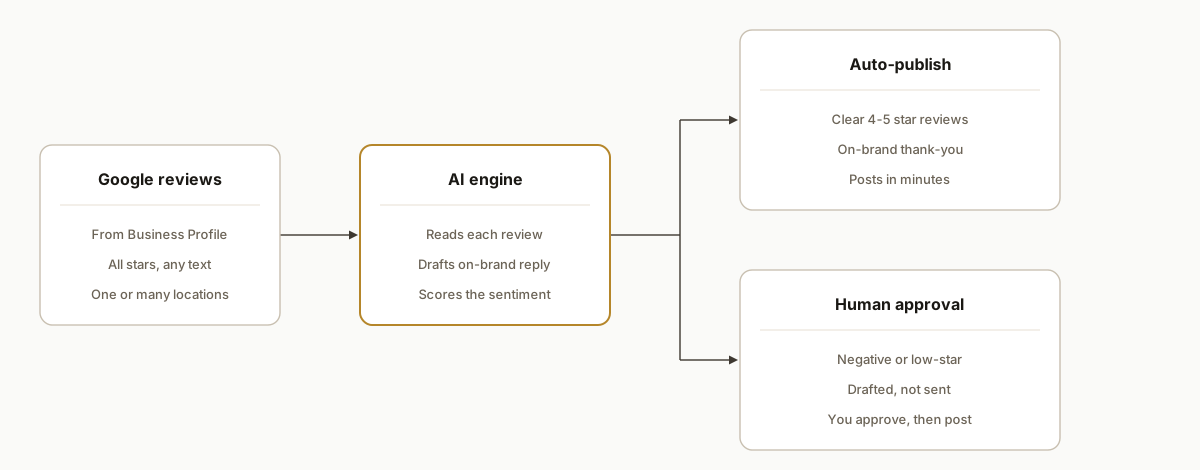
The system watches your Google Business Profile, drafts a reply to every new review, and routes it by sentiment. Positives flow through; negatives stop for a human. You stay in control of exactly the reviews where control matters.
- Google Business Profile. The source. New reviews are pulled as they arrive, across one location or many, including the star-only reviews with no text.
- The AI engine. The drafter. It reads each review, scores the sentiment and rating, and writes a reply in your brand voice, not a generic template.
- Sentiment routing. The safety valve. Clearly positive reviews are cleared to post automatically. Anything negative, low-star, or ambiguous is flagged.
- Human approval queue. The gate. Flagged reviews land in a queue with the AI's draft attached, so a person approves, edits, or rewrites before anything is published.
- Publish and log. Approved and auto-cleared replies post back to Google, and every action is logged so you can see what went out and what is waiting.
Step-by-step: how to build it
Step 1: Get access to the Google Business Profile API
This is the first real hurdle, so plan for it. Reading and replying to reviews programmatically goes through the Google Business Profile API, and Google gates access behind an approval process you have to apply for. Until that is granted, the alternative is a vetted third-party reputation platform that already holds API access. Either way, you do not just call an endpoint on day one.
Step 2: Pull new reviews on a schedule
Once you have access, poll for new reviews per location on a short interval, and keep a record of which review IDs you have already handled so you never reply twice. Capture the rating, the text (if any), the reviewer, and the timestamp.
const reviews = await gbp.listReviews(locationId);
const fresh = reviews.filter((r) => !alreadyHandled.has(r.reviewId));
Step 3: Score the sentiment and rating
Before drafting anything, decide which path a review is on. A simple, reliable rule combines the star rating with an AI read of the text, because a 4-star review with an angry comment is not actually positive.
const route =
  review.starRating >= 4 && sentiment(review.comment) !== "negative"
    ? "auto"
    : "human-review";
Step 4: Draft the reply in your brand voice
Give the AI your tone, a few do-and-do-not rules, and the review, and have it draft a specific reply that references what the customer actually said. The difference between an answer that helps and one that hurts is specificity. "Thank you for the kind words about Dana on our install team" beats "Thanks for your feedback" every time.
Step 5: Route negatives to a human, always
This is the rule that makes the whole thing safe to run. Any review that is low-star, negative, or ambiguous goes to an approval queue with the draft attached. A person reads it, decides whether to approve, edit, or handle it personally, and only then does anything post. The AI does the drafting; a human owns the publish on anything sensitive.
Step 6: Auto-publish the clear positives
Reviews that pass the positive test get their reply posted automatically, so a happy customer hears back in minutes and your profile shows a business that is present and responsive. These are the high-volume, low-risk replies that should not need a human.
Step 7: Log everything and handle multiple locations
Write every action to a log (a sheet or a dashboard) so you can audit what posted and what is waiting on approval, and scope the whole pipeline per location so a multi-location brand runs one system, not ten.
Where it gets complicated
API access is a gate, not a given. The Google Business Profile API requires an approval process, and quotas apply once you are in. This is the step that surprises people who assume reputation automation is a quick webhook. Budget time for the application, or build on a platform that already has access.
Never auto-send to a negative review. This is the single rule that cannot bend. The reputational downside of one auto-posted, tone-deaf reply under a one-star review dwarfs the convenience of automating it. Sentiment routing with a hard human gate on anything below the positive threshold is what separates a safe system from a liability.
Generic replies are worse than none. If every response is a reworded "thank you for your feedback," customers and prospects notice, and it reads as automated in the bad way. The drafting has to pull specifics from the review and stay in a consistent brand voice, which is a prompt-engineering and tuning problem, not a toggle.
Google's policies are real and the replies are permanent. Responses are public, attached to your business forever, and subject to Google's content policies. The system has to respect those, avoid anything that looks like incentivizing or gaming reviews, and treat every published reply as a permanent, public statement from the brand.
Star-only reviews and languages. Plenty of reviews have a rating and no text, which still deserve a short, appropriate reply. And a real local business gets reviews in more than one language. Both are easy to forget and both show up in the first week of real traffic.
What this actually changes
The honest version: you could build this yourself, and plenty of agencies sell it as "reputation management." Most of what they sell is the easy 80 percent, auto-replying to the positives. The value, and the risk, is all in the other 20 percent.
What a properly built system changes is that no review sits unanswered, and no sensitive review gets a careless answer. Every happy customer hears back in minutes, in your voice. Every unhappy customer's review lands in front of a human fast, with a draft already written, so the response is quick and considered instead of slow and panicked. Your Google profile, which is often the first thing a prospect sees before they ever reach your site, shows a business that is present, consistent, and human where it counts. Given that most consumers now expect a response and expect it soon, that consistency is the difference between a profile that converts a searcher and one that quietly loses them.
The reason to have it built rather than bought off a shelf is that the off-the-shelf version optimizes for the demo, the auto-replies, and treats the negative-review gate as an afterthought. The negative-review gate is the entire point.
Frequently asked questions
Is it against Google's policy to use AI to respond to reviews?
No. Google does not prohibit using AI to help write review responses. What its policies govern is the content of the reply (no abusive, fake, or incentivizing language) and the authenticity of the reviews themselves (you cannot gate, fake, or buy reviews). Using AI to draft a genuine, on-brand response to a real review is fine, and keeping a human on anything sensitive keeps you well inside the lines.
Can you fully automate Google review responses?
You can, but you should not for negative reviews. Automating replies to clearly positive reviews is safe and high-value. Auto-posting to negative or ambiguous reviews is where automation backfires, because a tone-deaf reply under a one-star complaint does real reputational damage. The right design auto-handles positives and routes everything sensitive to a human with a draft ready, which keeps the speed without the risk.
Does responding to Google reviews help local SEO?
Responding does not directly change rankings the way a keyword does, but Google has publicly encouraged businesses to respond to reviews, and review signals are part of local ranking. The bigger effect is on conversion: most consumers expect a response, and a profile that answers reviews promptly and well earns more trust from the searcher who is comparing you to the business next door. Trust on the profile is what turns a local searcher into a call.
How fast should you respond to a review?
Faster than you think. Consumer surveys show most people expect a reply within a week, and an increasing share expect it the same or next day. Automating the positive replies gets those answered in minutes, and routing negatives to a fast human queue means even the hard ones are handled in hours, not the days or weeks that manual, when-someone-remembers responding usually takes.
What does review automation cost, and should I build or buy it?
Off-the-shelf reputation tools charge a monthly per-location fee and mostly automate the easy positive replies. A custom build costs more up front but is tuned to your brand voice, owns the negative-review gate properly, and connects to the rest of your systems. If you have a handful of locations and want it done right and safely, a custom build pays off. If you just want auto-thank-yous, a cheap tool will do, with the caveat that the cheap tool is exactly the one that will eventually auto-reply to an angry customer.
Can it handle multiple locations?
Yes, and that is where it earns its keep. The pipeline is scoped per location, so one system watches every profile, drafts in a consistent brand voice across all of them, and routes each location's negative reviews to the right person. A multi-location brand runs one automation instead of asking ten managers to each remember to check their reviews.
Plenty of people offer review management as a service, and most of it is the easy part. The hard part, the part that protects you, is the human gate on the reviews that matter and a brand voice that does not read like a bot. If you would rather not build or babysit that yourself, that is exactly what we build. See how we approach workflow automation, read the related piece on automating customer responses, or book a 20-minute call and we will tell you in the first five minutes whether automating your review responses is worth it for your business.
Sources
- 1.LCRS 2026: Study Shows Reviews Matter More Than Everbrightlocal.com
Want us to build this for you?
Nine questions, about 90 seconds. You see the revenue it is costing you, then pick a time. No pitch.
See your options