
Soft pull credit dispatch automation works by intercepting the lead emails your clients already send, extracting the applicant fields with an AI parser, and firing bureau API calls without anyone touching a keyboard. A fully operational system handles every incoming application in under ten seconds, stores a signed-consent PDF on demand, and logs every bureau response to a searchable dashboard. If you run a credit-pull service and your clients refuse to swap their lead forms, this guide covers the exact system we built to make that constraint disappear.
This post summarizes our production deployment for Soft Pull Solutions (SPS), a credit-bureau reseller/aggregator, and how the same architecture applies to similar providers.
The problem it solves
Credit pull service companies sit between two stubborn parties. On one side, lenders who have spent months integrating their own lead forms into their CRMs and will not change them. On the other side, credit bureaus that require a specific payload shape and a static IP to even reach their APIs.
The manual alternative is grim. When a new application comes in by email, someone copies the name and address into a bureau portal, downloads the report, renames the file, and uploads it somewhere the account manager can find it. Each step takes three to five minutes. With ten clients each submitting five leads a day, that is roughly 250 minutes of copy-paste work daily, and the work compounds as client volume grows.
The bigger risk is consistency. Manual data entry produces typos. A mistyped mailing address returns a no-hit from TransUnion. Nobody knows whether the no-hit is a real no-hit or a transcription error. The lending decision gets delayed. The applicant moves on.
| Task | Manual workflow | Automated system |
|---|---|---|
| Extract name, address from email | Human reads and types | GPT-5-mini parses on webhook receipt |
| Time to bureau dispatch | Minutes to hours | Under 10 seconds |
| Handles any email format | Requires consistent form | Works across unstructured body text |
| Bureau API error visibility | Invisible | Logged per call with HTTP status |
| Consent PDF generation | Manual fill-and-sign | On-demand server-side render |
| Scales with volume | Hire more data entry staff | Flat cost per call |
The automation replaces the human copy-paste loop between client email and credit bureau API.
How the automation works
The system is a webhook service that receives inbound emails, runs them through an AI extraction layer, stores the parsed fields, and dispatches bureau calls in parallel. The client never changes their lead form. They add one email alias to the CC or BCC line.
- CloudMailin. The email ingestion layer. CloudMailin provisions a subdomain (for example,
leads.yourdomain.com) with custom MX records and converts every inbound email into an HTTP POST to your webhook endpoint. It forwards the raw body, headers, and attachments as a structured JSON payload. - The webhook endpoint. A Next.js API route that receives the CloudMailin payload, verifies a shared secret in the query string, and hands the raw email body to the parser.
- GPT-5-mini field extractor. The AI layer. It receives the raw email body as a string and returns a structured JSON object with the core applicant fields: full name, mailing address, date of birth, SSN or last-four digits, phone, email. Crucially, it handles unstructured body text, Q&A formats, and forwarded email chains without needing a fixed template.
- Supabase. The persistence layer. The parsed submission, raw email body, and every individual field value are stored before any bureau call fires. If a bureau call fails, the data is safe and the call is retryable from the dashboard.
- Bureau dispatcher. Fires parallel API calls to Microbilt (TransUnion, Experian, Equifax) and Agility Credit (TransUnion, Experian, Equifax) based on each client's configuration. Each call logs its outcome to an
activity_logstable. - The dashboard. A login-gated Next.js app showing per-client configuration, submission history, bureau call outcomes, and on-demand consent PDF download.
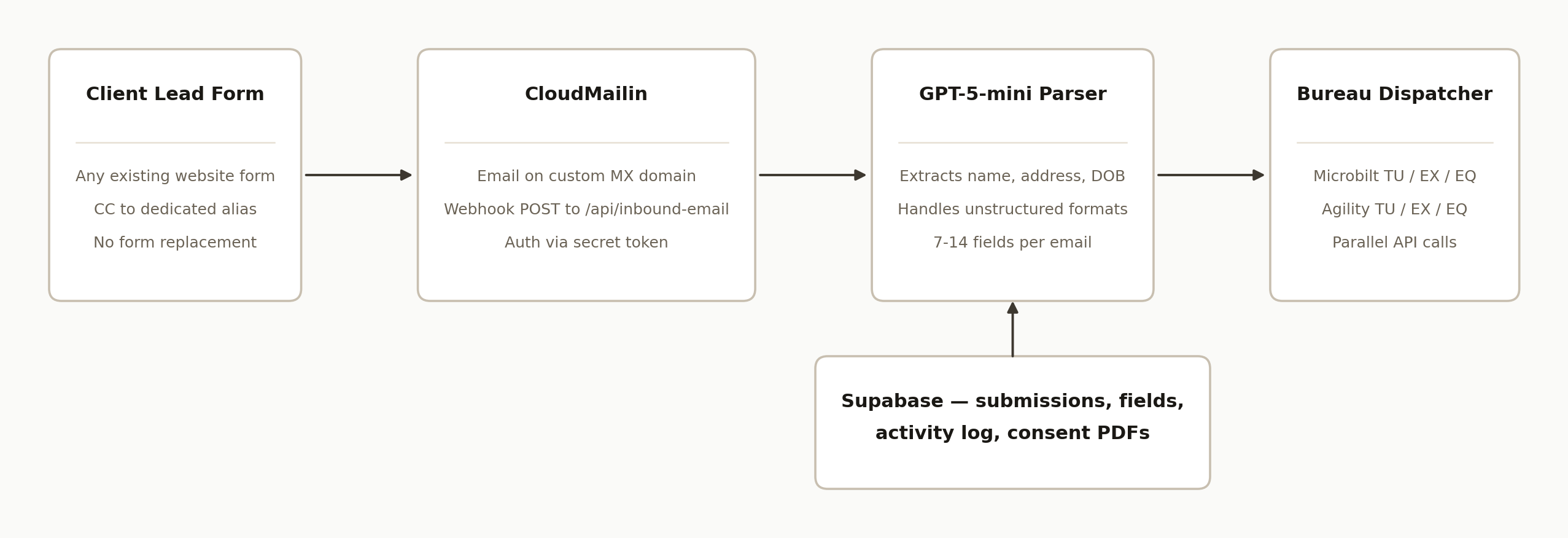
Step-by-step: how to build it
Step 1: Set up CloudMailin and point MX records at your domain
Create a CloudMailin account and provision an address on your custom domain, for example client1@leads.yourdomain.com. CloudMailin requires you to add two MX records to your DNS provider:
MX  10  client1.cloudmailin.net
MX  20  client2.cloudmailin.net
Set the CloudMailin target URL to your webhook endpoint with a shared secret in the query string:
https://your-app.vercel.app/api/inbound-email?secret=your_long_random_token
The secret check in your webhook should be the first thing that runs. Reject anything that does not match before touching the payload.
Gotcha: CloudMailin sends the email body in multiple formats (plain, HTML, and sometimes as a part[] array). Parse whichever is present. In practice, auto-generated CRM notification emails arrive as plain text, which is the easiest to extract from.
Step 2: Parse the email body with GPT-5-mini
The AI extraction layer is a single API call with a tight system prompt. The key is returning a validated Zod schema so malformed responses fail loudly instead of silently writing bad data to Supabase.
import { z } from "zod";

const SubmissionSchema = z.object({
  first_name: z.string().optional(),
  last_name: z.string().optional(),
  email: z.string().email().optional(),
  phone: z.string().optional(),
  address: z.string().optional(),
  city: z.string().optional(),
  state: z.string().optional(),
  zip: z.string().optional(),
  dob: z.string().optional(),
  ssn: z.string().optional(),
});

async function parseEmail(rawBody: string) {
  const completion = await openai.chat.completions.create({
    model: "gpt-4o-mini",
    messages: [
      {
        role: "system",
        content: `Extract loan applicant fields from the email body below.
Return ONLY valid JSON matching the schema. Use null for missing fields.
Schema: first_name, last_name, email, phone, address, city, state, zip, dob, ssn.`,
      },
      { role: "user", content: rawBody },
    ],
    response_format: { type: "json_object" },
  });
  const raw = JSON.parse(completion.choices[0].message.content ?? "{}");
  return SubmissionSchema.parse(raw);
}
Gotcha for soft pulls: a soft pull only requires name and mailing address. SSN and DOB are not required to get a result from TransUnion or Experian. Do not fail the dispatch because SSN is missing. A large share of your client emails will not include it, and the bureau will return a result anyway.
Step 3: Store the submission in Supabase before dispatching
Write the parsed fields to Supabase before any bureau call fires. This is non-negotiable. Bureau calls can fail for infrastructure reasons that have nothing to do with the applicant data. You want the data safe before spending API credits.
const { data: submission } = await supabase
  .from("submissions")
  .insert({
    client_id: clientId,
    raw_email_body: rawBody,
    first_name: parsed.first_name,
    last_name: parsed.last_name,
    address: parsed.address,
    // ... other fields
  })
  .select()
  .single();

// Store full Q&A pairs for audit
await supabase.from("submission_fields").insert(
  Object.entries(parsed).map(([key, value]) => ({
    submission_id: submission.id,
    field_name: key,
    field_value: value ?? "",
  }))
);
Log a received entry to activity_logs immediately. If the webhook dies before dispatching, the log lets you replay from the dashboard.
Step 4: Authenticate with Microbilt correctly
Microbilt's official documentation shows a POST /OAuth/Token endpoint with HTTP Basic auth. That endpoint issues a token that passes gateway authentication but fails at the API product layer with keymanagement.service.InvalidAPICallAsNoApiProductMatchFound on every bureau path.
The working endpoint is POST /OAuth/GetAccessToken with credentials in the JSON body:
const tokenResponse = await fetch("https://api.microbilt.com/OAuth/GetAccessToken", {
  method: "POST",
  headers: { "Content-Type": "application/json" },
  body: JSON.stringify({
    client_id: process.env.MICROBILT_CLIENT_ID,
    client_secret: process.env.MICROBILT_CLIENT_SECRET,
  }),
});
const { access_token } = await tokenResponse.json();
Then, when calling the bureau endpoints, include Accept: application/json. Without it, Microbilt's API gateway returns a 404 on every path because it cannot content-negotiate the response format.
const report = await fetch("https://api.microbilt.com/TransUnion/GetReport", {
  method: "POST",
  headers: {
    Authorization: `Bearer ${access_token}`,
    "Content-Type": "application/json",
    Accept: "application/json",
  },
  body: JSON.stringify({ /* applicant fields */ }),
});
Both issues exist regardless of which SDK or library you use. If you hit NoApiProductMatchFound, you are using the wrong OAuth endpoint.
Step 5: Route Agility Credit calls through a static-IP proxy
Agility Credit requires IP allowlisting. Vercel functions run on a dynamic IP pool, so every call from Vercel gets blocked. The fix is a thin proxy service on a platform that provides a static egress IP.
We ran a Node.js pass-through on Railway (Hobby plan, $5/month). Railway assigns a static egress IP. You add that IP to Agility's allowlist once, and all future calls route through it.
// agility-proxy/server.js
const express = require("express");
const { createProxyMiddleware } = require("http-proxy-middleware");

const app = express();

// Auth middleware
app.use((req, res, next) => {
  if (req.headers["x-proxy-secret"] !== process.env.PROXY_SECRET) {
    return res.status(401).json({ error: "Unauthorized" });
  }
  next();
});

app.use(
  "/",
  createProxyMiddleware({
    target: process.env.AGILITY_TARGET_URL, // https://api.agilitycredit.net
    changeOrigin: true,
  })
);

app.listen(3000);
Critical: Agility's production URL is api.agilitycredit.net (.net), not api.agilitycredit.com (.com). The .com domain hits a different AWS API Gateway with no matching routes. You will get 403 Invalid key=value pair if you use .com, not a helpful error. The correct host is in Agility's PRD documentation at section 302.
Step 6: Dispatch in parallel and log every outcome
Fire all configured bureau calls concurrently and write an activity log row for each one. Your dashboard needs to show whether a specific call returned api_success, a no_hit, or an API error, per call.
const bureauCalls = [];

if (clientConfig.microbilt_tu) bureauCalls.push(callMicrobilt("TransUnion", submission));
if (clientConfig.microbilt_ex) bureauCalls.push(callMicrobilt("Experian", submission));
if (clientConfig.agility_tu)   bureauCalls.push(callAgility("TransUnion", submission));
// ... etc.

const results = await Promise.allSettled(bureauCalls);

for (const result of results) {
  await supabase.from("activity_logs").insert({
    submission_id: submission.id,
    bureau: result.status === "fulfilled" ? result.value.bureau : "unknown",
    status: result.status === "fulfilled" ? "api_success" : "api_error",
    response_body: result.status === "fulfilled"
      ? JSON.stringify(result.value.data)
      : result.reason?.message,
  });
}
Write a pull_skipped log row when a client has no bureaus configured or the address field is missing. Without it, silently skipped submissions look identical to processed ones in the dashboard.
Step 7: Generate consent PDFs server-side with the SSN decrypted
If you store SSNs at rest, store them encrypted (AES-256-GCM). The PDF consent document needs the plaintext SSN, which means decryption must happen server-side in a server action, not client-side where the key would be exposed.
// src/lib/consent-pdf-action.ts  (server action, runs in Node)
"use server";
import { decryptSSN } from "@/lib/crypto";

export async function generateConsentPdfBase64(submissionId: string) {
  const { data: submission } = await supabase
    .from("submissions")
    .select("*")
    .eq("id", submissionId)
    .single();

  const plaintextSSN = submission.ssn ? decryptSSN(submission.ssn) : "";
  return renderPDFToBase64({ ...submission, ssn: plaintextSSN });
}
The plaintext SSN never leaves the server as a data value. It is baked into PDF bytes on the server and returned as a base64 string for the authenticated user's browser to download.
Where it gets complicated
Microbilt's OAuth endpoint is undocumented in the way that matters. The published spec advertises /OAuth/Token with HTTP Basic auth. That endpoint exists and returns a valid-looking token, but that token fails every bureau path with an obscure API product error. The actual working endpoint is discoverable by reading reference implementations, not the official docs. Budget time for this if you are integrating Microbilt from scratch.
Agility's trial Railway account expired silently. When the proxy service goes down, every Agility call from Vercel returns a 404 from Railway's edge, not from Agility. The error message is {"message":"Application not found"}, which looks like an Agility API error but is actually a Railway "no running service" response. You will spend significant time looking at the wrong layer. Add a proxy health check endpoint and a startup alert.
Bureau toggle mismatches cause silent no-pulls. If a client has a bureau enabled in your config but the bureau's API credentials are incomplete or in sandbox mode, the call will fail or return a sandbox response. The submission will look complete in the dashboard because the fields are there, but the bureau result will be missing. Explicit pull_skipped and api_error log statuses with human-readable reasons prevent this from surfacing as a support ticket two weeks later.
Email format variation is real and continuous. The initial clients' emails all had a predictable Q&A structure. Subsequent clients sent forwarded CRM notifications with different field names, HTML-only bodies, or extra context blocks. GPT-5-mini handles the variation, but you need to test each new client's actual email format before going live. Keep a folder of real sample emails for regression testing.
The soft pull requirement for address is often wrong on the client side. Several clients sent emails with name, email, and phone but no mailing address because that is what their form collected. TransUnion and Experian both require a mailing address for a soft pull. Adding a pull_skipped reason that explicitly says "missing mailing address" and surfacing it in the dashboard tells the client exactly what to fix in their form, without a back-and-forth support thread.
Real-world results
We built this for Soft Pull Solutions, a credit-bureau reseller/aggregator that resells soft-pull bureau access to mortgage brokers and alternative lenders. Their clients ranged from small independent brokers using basic contact forms to mid-size shops with dedicated CRM systems. None wanted to change how their lead forms worked.
Within the first week of beta access, 14 lender clients had self-configured their accounts on the dashboard and added the email alias to their lead flows. Applications started arriving from real lead submissions, and the parser extracted 7 to 14 fields cleanly across formats that were not tested during development. The previous workflow for each application was a shared inbox, a copy-paste into the bureau portal, and a reply email with the report attached. That workflow took between 5 and 15 minutes per application. The automated system handles it in under 10 seconds.
The structural value is not just speed. Because every bureau call writes an activity log row with the HTTP status, request payload, and response body, the company now has a complete audit trail of every pull. When a client asks why a report came back as a no-hit, the answer is in the log rather than in a manual investigation.
Frequently asked questions
What is the difference between a soft pull and a hard pull?
A soft pull is a credit inquiry that does not affect the applicant's credit score. Hard inquiries appear on the applicant's credit report and can lower their score. Soft pulls are used for pre-qualification, background screening, and lead verification. The applicant's consent form should specify that the pull is a soft inquiry, and most bureau APIs offer separate endpoints for each type.
Does the applicant need to provide their SSN for a soft pull?
No. Soft pulls from TransUnion and Experian require name and mailing address. SSN and date of birth are not required and in many workflows are not collected at all. If SSN is present in the email, the parser extracts and encrypts it for consent-form purposes. If it is absent, the dispatcher routes the call using name and address only.
Can the same email-parsing system handle different lead form layouts?
Yes, with caveats. GPT-5-mini handles unstructured text well and tolerates format variation across clients. The practical limit is emails that contain no applicant data at all, for example a bare notification that says "a new lead was submitted, view it here." A webhook or form-direct integration is more reliable for those clients.
How do you prevent the same lead from being pulled twice if the client forwards the email?
Deduplication against Supabase on a combination of email and phone before dispatching is the most reliable approach. You can also add a last-submitted-at column per client-and-phone combination and skip any submission that arrived within a configurable window.
What does this system cost to run per month?
The main costs are CloudMailin (starts free up to 200 messages, paid tiers from $9/month), GPT-5-mini (roughly $0.0001 per email parse at current pricing), bureau API fees (credit-bureau-specific, typically $0.50 to $2.00 per pull depending on bureau and volume), and the Railway proxy ($5/month on Hobby). Infrastructure excluding bureau fees runs under $20/month at moderate volume.
Can a non-technical team configure new clients without touching code?
Yes, if you build a client management dashboard. In our implementation, each new client is a database row with a bureau toggle per bureau and fields for the API credentials specific to that client. Adding a new client is a form submission in the dashboard, with no code deployment required.
The same pattern applies anywhere lead data arrives as email rather than through a direct webhook. If you run a lending platform, a debt settlement service, or any business where clients send applicant data by CC-ing an address, we can tell you in the first five minutes whether your setup maps to this architecture. The lender automation work we do is covered under our document automation services, and if you want to see an analogous build in the lending space, the Forward Funding AI underwriting case study covers a bank-statement extraction and decisioning pipeline that followed similar architectural principles. Book a 15-minute call to scope it.
Want us to build this for you?
Nine questions, about 90 seconds. You see the hours it is costing you, then pick a time. No pitch.
Get your free assessment