
Make.com fleet patching automation works by reading each scenario's blueprint through the Make API, applying a targeted JSON transform only where required, writing back at a controlled pace with exponential backoff, and keeping a per-scenario rollback. In production it let us upgrade 231 scenarios across ~70 clients with zero failures while receipts and bank extractions kept running.
If you manage dozens of Make.com scenarios in an accounting firm or internal ops team, this guide covers the exact pattern we shipped: the audit, the diff-first transformer, the rate limiter, the rollback, and the monitoring that proves nothing broke.
Definition: a surgical patcher is a diff-first updater that edits only the needed fields inside each automation's blueprint, paced under platform limits, and with a one-click rollback for every write.
The problem it solves
Answer first: manual edits do not scale beyond a handful of scenarios. When one upstream tool, field name, or prompt changes, you need a repeatable way to update hundreds of blueprints without pausing operations or introducing silent breaks. The surgical patcher pattern replaces hand-edits and bulk-overwrites with safe, targeted changes.
An accounting and bookkeeping firm we support ran ~231 Make.com scenarios across about 70 QuickBooks Online clients. Two families of flows drove the fleet: bank-statement ingestion and receipt extraction. A vendor change in PDF conversion and an improved receipt-extraction prompt meant every scenario needed edits. Manually opening 200 plus scenarios, finding the right module, changing a few fields, and hoping nothing else shifted would have taken days and guaranteed misses.
The work is simple but relentless. The patch must be exact. It must not disturb unrelated modules or connections. It must not double-trigger a fetch loop. That is what the surgical patcher does.
| Manual vs automated patching | Manual edits in Make UI | Surgical patcher automation |
|---|---|---|
| Scope control | Click and hope you found the right module | JSON diff targets exact module and fields only |
| Safety | No rollback beyond undo in UI | Per-scenario pre-write backup and one-click restore |
| Pace | Human-speed, easy to skip scenarios | Rate limited writes with backoff and logs for all IDs |
| Consistency | Inconsistent field naming and typos | Deterministic transform applied identically across fleet |
| Monitoring | Ad-hoc spot checks | Central log with before and after diff plus health pings |
How the automation works
Answer first: the system inventories scenarios, snapshots blueprints, runs a pure function that returns a minimal patch, applies it under a write pace with exponential backoff, and writes a log row. If anything errors, it restores from the snapshot. A final health check scenario validates a sample run per family.
- Make.com Public API: The source of truth. We list scenarios, fetch each blueprint JSON, and write back updates via token-authenticated REST. The API exposes per-scenario blueprint read and write endpoints.
- Surgical transformer: A pure function that takes a blueprint JSON and returns a minimally changed JSON. It finds the target module by app and key, updates only the intended fields, and leaves everything else untouched.
- Write governor: A rate limiter that paces writes around 800 ms with exponential backoff on 429 or 5xx. This stays safely under Make's operational limits.
- Rollback store and log: Before any write we persist the original blueprint. Every operation logs scenario ID, diff summary, status, and timestamp. Rollbacks simply re-apply the snapshot.
- Health checks: Two validation scenarios, one per family: bank vs receipts. Each runs a minimal sample to confirm modules still emit expected shapes.
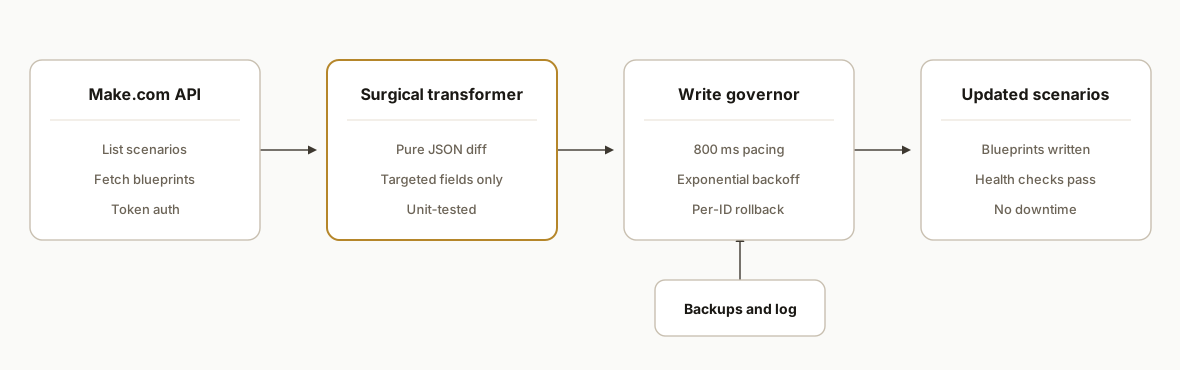
Step-by-step: how to build it
Step 1: List scenarios and snapshot blueprints
Answer first: start by enumerating all scenarios in the target team or folder, then fetch and persist each blueprint as your rollback snapshot. Do not write anything yet. This gives you a perfect restore point per scenario.
// Node 18+
const BASE = "https://api.make.com/v2"; // Make Public API base
const TOKEN = process.env.MAKE_TOKEN!;   // Personal access token

async function getJson(url: string) {
  const r = await fetch(url, { headers: { Authorization: `Token ${TOKEN}` } });
  if (!r.ok) throw new Error(`${r.status} ${r.statusText}`);
  return r.json();
}

async function listScenarios() {
  const data = await getJson(`${BASE}/scenarios`);
  return data; // array with id, name, team, etc.
}

async function getBlueprint(id: string) {
  return await getJson(`${BASE}/scenarios/${id}/blueprint`);
}

// snapshot all
const scenarios = await listScenarios();
for (const s of scenarios) {
  const bp = await getBlueprint(s.id);
  await fs.promises.writeFile(`./backups/${s.id}.json`, JSON.stringify(bp));
}
Gotcha: some tenants organize by folders or naming conventions. Filter your list first, or you risk touching sandboxes you do not intend to patch.
Step 2: Write a pure transformer for the exact module change
Answer first: build one pure function that finds the module to change and returns a new blueprint with exactly those fields edited. No side effects, no API calls inside. This lets you unit-test the patch on real blueprints saved from production.
// Example: swap a PDF conversion module vendor and tweak an AI prompt
interface Blueprint { root: { modules: any[] } }

function patchBlueprint(bp: Blueprint): { next: Blueprint, changed: boolean } {
  let changed = false;
  const next = structuredClone(bp);
  for (const m of next.root.modules) {
    // Identify by app + key to avoid brittle index-based edits
    if (m.app === "pdf_converter" && m.name === "Convert file") {
      m.app = "native_pdf";                // new vendor
      m.parameters.engine = "native";      // switch engine
      changed = true;
    }
    if (m.app === "openai" && m.parameters?.prompt) {
      // Improve receipt extraction prompt, keep determinism
      m.parameters.prompt = m.parameters.prompt.replace(
        /extract line items[\s\S]*?as text/,
        "extract line items with exact amounts and dates, no guesses, return JSON matching the schema"
      );
      m.parameters.response_format = {
        type: "json_schema",
        json_schema: { name: "Receipt", schema: { type: "object", properties: { total: { type: "number" }, date: { type: "string" } }, required: ["total","date"] } }
      };
      changed = true;
    }
  }
  return { next, changed };
}
Gotcha: do not identify modules by array index. Always target by a stable app key and a module name you set yourself in the UI.
Step 3: Add a write governor with exponential backoff
Answer first: Make writes must be paced. We used an ~800 ms base delay and exponential backoff on 429 and 5xx, with a max of 5 retries. This kept the run stable and avoided API cold shoulders.
async function putBlueprint(id: string, bp: Blueprint) {
  const url = `${BASE}/scenarios/${id}/blueprint`;
  const body = JSON.stringify(bp);
  let attempt = 0;
  while (true) {
    const r = await fetch(url, {
      method: "PUT",
      headers: {
        Authorization: `Token ${TOKEN}`,
        "Content-Type": "application/json"
      },
      body
    });
    if (r.ok) return true;
    if (![429, 500, 502, 503, 504].includes(r.status) || attempt >= 5) {
      throw new Error(`Write failed ${r.status} on ${id}`);
    }
    const delay = Math.min(12000, 800 * Math.pow(2, attempt++));
    await new Promise(res => setTimeout(res, delay));
  }
}
Gotcha: a lapsed third-party subscription can make downstream modules fail silently later. Your patcher writing successfully does not mean the scenario will run. Add health checks.
Step 4: Run in dry-run mode and log a diff
Answer first: before any writes, run the transformer on every blueprint and compute a diff summary. Write a CSV or Sheet row per scenario with status DRY and the high-level changes. This is your approval list.
function summarizeDiff(before: Blueprint, after: Blueprint) {
  // Keep it simple: count modules changed by app
  const changes: Record<string, number> = {};
  after.root.modules.forEach((m, i) => {
    const b = before.root.modules[i];
    if (JSON.stringify(m) !== JSON.stringify(b)) {
      changes[m.app] = (changes[m.app] || 0) + 1;
    }
  });
  return Object.entries(changes).map(([app, n]) => `${app}:${n}`).join(";");
}

for (const s of scenarios) {
  const before = JSON.parse(await fs.promises.readFile(`./backups/${s.id}.json`, "utf8"));
  const { next, changed } = patchBlueprint(before);
  const summary = changed ? summarizeDiff(before, next) : "none";
  await appendCsv("log.csv", [s.id, s.name, "DRY", summary, new Date().toISOString()]);
}
Gotcha: do not trust a visual diff for large blueprints. Summaries by app plus sample human reviews scale better.
Step 5: Apply the patch with per-scenario rollback
Answer first: when approved, write each updated blueprint and keep a copy of the original next to your logs. If any write or post-patch health check fails, re-apply the snapshot immediately and continue.
for (const s of scenarios) {
  const path = `./backups/${s.id}.json`;
  const before = JSON.parse(await fs.promises.readFile(path, "utf8"));
  const { next, changed } = patchBlueprint(before);
  if (!changed) { await appendCsv("log.csv", [s.id, s.name, "SKIP", "no-change", new Date().toISOString()]); continue; }

  try {
    await putBlueprint(s.id, next);
    await appendCsv("log.csv", [s.id, s.name, "PATCHED", summarizeDiff(before, next), new Date().toISOString()]);
  } catch (e) {
    // rollback
    await putBlueprint(s.id, before);
    await appendCsv("log.csv", [s.id, s.name, "ROLLED_BACK", String(e), new Date().toISOString()]);
  }
  await new Promise(res => setTimeout(res, 800)); // base pacing
}
Gotcha: health checks should run before and after a small patch batch, not after the whole fleet. That limits blast radius if something slips through.
Step 6: Validate bank vs receipt flows separately
Answer first: we kept separate transformers and health checks for bank-statement intake and receipt extraction. The modules and failure modes differ enough that a single patcher creates risk. Split them.
// Two entry points that share the same write governor and logger
async function patchBankScenarios() { /* transformer A + health A */ }
async function patchReceiptScenarios() { /* transformer B + health B */ }

await patchBankScenarios();
await patchReceiptScenarios();
Gotcha: native-PDF conversion produced cleaner text for totals and dates than a pure OCR hop. Prompts that relied on OCR noise broke less once we standardized on native where possible.
Where it gets complicated
Answer first: the complexity is not the write. It is scoping the patch, keeping idempotency, and defending against silent failures. These are the specifics that mattered in production.
- Native PDF beats OCR for amounts and dates: We saw fewer misreads once we standardized on native PDF conversion before extraction. This reduced prompt complexity and removed brittle regex cleanups.
- Silent vendor lapses cause real runs to fail later: A lapsed PDF-conversion subscription created green writes but red runs. Add a health scenario that exercises the whole path, not just the API write.
- Infinite re-fetch loops are easy to introduce: One mishandled paging response retriggered the poller in a loop. We added guard keys and a last-seen marker in the data store to cap fetches.
- Bank and receipt flows are cousins, not twins: The structures diverge enough to merit separate transformers and health checks. Trying to make one do both invited edge-case bugs.
- Write pacing is part of correctness: We paced around 800 ms with exponential backoff. Faster bursts produced intermittent 429s and partial writes. Correctness includes finishing the whole fleet without retries piling up.
Real-world results
A bookkeeping firm managing roughly 70 QuickBooks Online clients ran this pattern across about 231 Make.com scenarios. We applied 512 targeted patches with zero failures while live bank and receipt flows continued to run. The per-scenario rollback snapshots were never needed in anger, but they bought the confidence to move quickly.
Why this matters: the value is structural. The next time a vendor updates an endpoint, a field changes name, or a better extraction prompt emerges, the team runs the same patcher with a new pure transformer and repeats the process without a fire drill. For context on scale in this ecosystem: Intuit reports over 8 million QuickBooks Online subscribers globally, which is a large surface where standardized automations pay back quickly. Source: Intuit FY2025 Q2 earnings materials, QuickBooks Online subscriber count https://investors.intuit.com.
Frequently asked questions
Does Make.com have an official API for blueprints and scenarios?
Yes. Make exposes a public REST API that lets you list scenarios, fetch a scenario's blueprint JSON, and write an updated blueprint. Authentication is a token in the Authorization header. We use read, diff, write, and snapshot per scenario to keep changes safe and reversible.
What Make.com plan do you need to run this?
Any plan with API access and enough operations to run your health checks works. The patcher itself does not consume scenario operations. Only your validation scenarios do. You also need a personal access token or service token with rights to read and write blueprints in the target team or folder.
How do you prevent duplicates or infinite loops after a patch?
Idempotency keys and last-seen markers in the data store. We include a guard inside polling modules that stops reprocessing when a cursor or checksum matches. Health checks exercise paging and stop criteria specifically to catch accidental loop triggers before a full rollout.
Can this run in real time or only in batches?
Patching runs as a batch by design. Your business scenarios keep running in real time while the patcher moves through the fleet. We write in small batches with pacing and backoff, then run health checks per batch so production flows are not paused.
What does this cost to run monthly?
The patcher is a small Node service you run on a workstation or a low-cost host. The Make API itself does not bill per call, but you should respect rate limits to avoid errors. The only recurring cost is whatever runtime you choose and any vendor subscriptions your scenarios depend on.
Can a non-developer set this up without coding?
Not safely at fleet scale. You can hand-edit a few scenarios in the UI. For 50 to 200 plus, you want a coded transformer, a write governor, and a rollback plan. The pure-function patcher is what keeps changes small, testable, and reversible.
If you run Make.com at accounting-firm scale and want this pattern implemented, we built and shipped it on a live fleet with 512 safe patches and separate bank vs receipt flows. See how we think about tool choice in our comparison post and in our Make vs n8n page. Or go straight to our automation services and read our adjacent build on QuickBooks bank imports. When you are ready, book a 15-minute call. We will tell you in the first five minutes whether your setup maps to this pattern.
Related comparison
Make vs n8n: which to actually use
Want us to build this for you?
Nine questions, about 90 seconds. You see the hours it is costing you, then pick a time. No pitch.
Get your free assessment