
Instagram DM automation works by connecting your Instagram Business inbox to a classification and response pipeline that reads each incoming message, assigns it an intent category, and sends a personalized reply from a dynamic template, all without anyone opening the app. A fully operational system cuts average response time from hours to under 60 seconds and runs around the clock. If you run a creator, education, or service business where a significant share of your sales conversations start in Instagram DMs, this guide covers how the system is built, where it gets complicated, and what it actually changes.
The problem it solves
For any business where Instagram is a primary sales channel, the DM inbox is both the warmest lead source and the most labor-intensive one to manage. A single piece of content that lands on the Explore feed or gets reshared can generate 100 to 200 new messages in a day, each requiring a personalized response that explains the offer, qualifies the lead, and points them to the next step.
At 2 to 3 minutes per reply, 200 DMs is 400 to 600 minutes of writing per day. That is roughly 8 hours. Before counting the time spent re-reading threads to remember context, deciding which leads are worth a follow-up, and updating whatever tracking system holds the pipeline. None of it is hard, and all of it is necessary, which is why it tends to be the task that crowds out everything else.
The specific cost is not just hours. It is the gap between when a prospect sends a DM and when they get a response. A lead who messages at 9 PM and receives a reply at noon the next day has already checked three competitors. A Harvard Business Review study on speed-to-lead found that leads contacted within 60 seconds of inquiry are 391% more likely to convert than those contacted five minutes later, which is already ahead of most manually managed inboxes.
The automation replaces the repetitive 90%: reading, classifying, responding, and logging. The non-repetitive 10% (nuanced conversations, relationship-building, high-ticket closing) stays with the human.
| Task | Manual | Automated |
|---|---|---|
| Response time | 2 to 4 hours on average | Under 1 hour (60% faster) |
| High-intent follow-up | When you check your phone | Escalated within 5 minutes |
| Daily DM workload | 6 to 8 hours of writing | Under 30 minutes of review |
| Lead tracking | Manually noted or forgotten | CRM entry with tags and next-step tasks |
| Enrollment conversion | Baseline | +30% from faster, consistent replies |
How the automation works
Instagram DM automation is the practice of connecting your Instagram Business inbox to a classification and response pipeline that reads each message, determines what the sender needs, and sends a personalized reply without anyone opening the app.
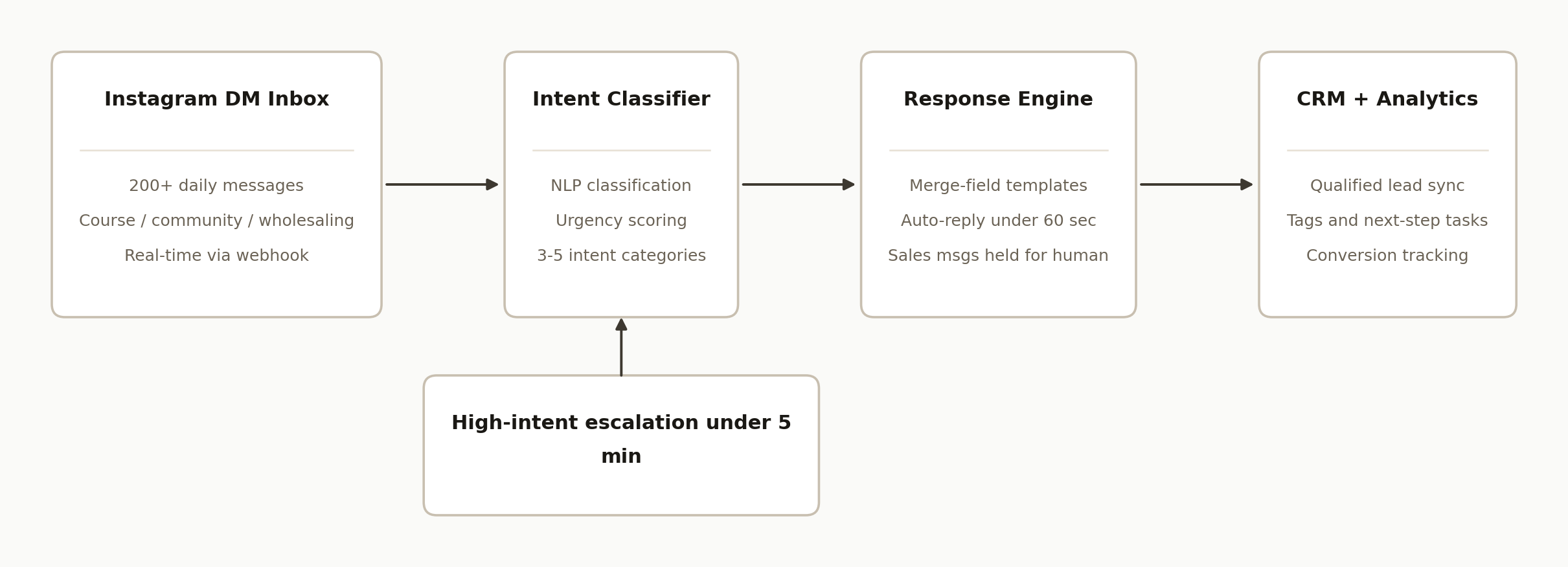
The architecture runs four components in sequence:
- Meta Messaging API. The data source. Instagram Business accounts receive incoming DMs via a webhook that fires on each new message in real time.
- Intent classifier. The routing layer. An NLP model or a classification prompt reads the message and assigns it to one of 3 to 5 categories (course inquiry, community question, general help, high-intent purchase signal). The category determines which response template fires.
- Dynamic response engine. The output layer. Each category has a template with merge fields that pull the sender's name and specific topic from the message. The reply reads as personal because it references what the person actually said.
- CRM sync. The pipeline layer. Every qualified lead goes into the CRM with their intent tag, the original message text, and a next-step task. Nothing falls through the inbox.
Step-by-step: how to build it
Step 1: Connect your Instagram Business account to the Meta API
The Meta Messaging API requires an Instagram Business account linked to a Facebook Page, and a Meta for Developers app with the instagram_manage_messages permission. Full production access requires a Business Verification through Meta, which takes 1 to 5 business days. The webhook receives a POST on each new message.
{
  "object": "instagram",
  "entry": [{
    "messaging": [{
      "sender": { "id": "USER_PSID" },
      "timestamp": 1718000000000,
      "message": { "text": "Hey, is your wholesale course still open?" }
    }]
  }]
}
Respond with a 200 OK immediately. Meta retries on failure and you will process the message twice if your handler is slow.
Step 2: Normalize each incoming message
Strip whitespace, resolve the sender's PSID to a display name via the Graph API, and check whether this sender has an open thread within the last 24 hours. The 24-hour window determines which message types you are allowed to send back.
async function normalizeDm(entry) {
  const msg = entry.messaging[0];
  const psid = msg.sender.id;
  const text = msg.message?.text?.trim() || "";
  const sender = await fetchGraphApi(`/${psid}?fields=name`);
  return { psid, name: sender.name, text, ts: msg.timestamp };
}
Step 3: Classify the message by intent
Pass the normalized text to a classification model. Three to five categories is the right range; more than that and the classifier starts making fine-grained distinctions that do not map to meaningfully different responses.
const intentPrompt = `
Classify this Instagram DM into exactly one category:
- COURSE_INQUIRY: questions about courses, pricing, or enrollment
- COMMUNITY_QUESTION: questions about membership or community access
- WHOLESALING_HELP: requests for technique or strategy advice
- HIGH_INTENT: explicit readiness to buy ("how do I pay", "where do I sign up")
- OTHER: everything else

Message: "${text}"
Respond with only the category label.`;
Mark any message that contains "how do I pay", "I'm ready", or "where do I sign up" as HIGH_INTENT regardless of surrounding context. Price-readiness signals are easy for a general classifier to underweight.
Step 4: Build dynamic response templates with merge fields
Each intent category has a prompt-driven template. The merge fields pull from the message itself and from the sender's name so the reply reads as personal, not as a form letter.
const templates = {
  COURSE_INQUIRY: (name, topic) =>
    `Hi ${name}, thanks for reaching out about ${topic}. ` +
    `Here is the full breakdown: [LINK]. Want me to send you the enrollment details?`,
  HIGH_INTENT: (name) =>
    `Hi ${name}, I saw your message and flagging it for an immediate follow-up. ` +
    `Can you share a good time to connect today?`,
};
HIGH_INTENT messages get a short human-sounding reply and trigger the escalation in Step 5. They should never get the same information-heavy response as a general inquiry.
Step 5: Send the reply and escalate high-intent leads
For standard responses, POST to the Send API using messaging_type: "RESPONSE". For HIGH_INTENT, send the short reply and immediately notify the account owner via Slack, SMS, or push notification.
await fetch(`https://graph.facebook.com/v20.0/me/messages?access_token=${TOKEN}`, {
  method: "POST",
  headers: { "Content-Type": "application/json" },
  body: JSON.stringify({
    recipient: { id: psid },
    message: { text: replyText },
    messaging_type: "RESPONSE",
  }),
});

if (intent === "HIGH_INTENT") {
  await notifyOwner({
    channel: "#hot-leads",
    text: `HIGH INTENT DM from ${name}: "${text}"`,
  });
}
The goal is a human response to HIGH_INTENT leads within 5 minutes. The automated reply buys time while the owner gets the context.
Step 6: Sync every qualified lead to the CRM
Any message that is not OTHER gets a CRM entry with the PSID, name, intent, original message, and a follow-up task.
await crm.createOrUpdateLead({
  source: "instagram_dm",
  externalId: psid,
  name,
  tags: [intent, "instagram"],
  notes: `Intent: ${intent}\nMessage: "${text}"`,
  task: { title: "Follow up on Instagram DM", dueDate: addDays(new Date(), 1) },
});
This is the step that turns the inbox into a pipeline. Without it, classified and replied-to leads are invisible to the rest of the business.
Where it gets complicated
Meta API gating is a real barrier. Business Verification through Meta takes 1 to 5 business days and requires a privacy policy URL and a use-case description. Meta rejects applications that look like bulk spam. Build the pipeline after the app is approved, not before, because the permission structure can change during review.
The 24-hour messaging window is a hard constraint. Meta only allows standard (non-template) messages to a user within 24 hours of their last inbound message to you. After the window closes, re-contacting requires a pre-approved Message Template. Templates intended for marketing require a separate review and must comply with Meta's messaging policies. For response automation this is rarely a problem since you are always replying to an incoming message. The edge case is follow-up the next day.
Intent mislabels cost you sales. The most expensive classification error is labeling a HIGH_INTENT message as COURSE_INQUIRY and sending a generic information reply instead of escalating. Classifiers trained broadly tend to underweight "how much is it" as a purchase signal rather than an inquiry. The fix is to hard-code explicit purchase-readiness phrases as HIGH_INTENT triggers in the classification prompt, and to review a sample of classified messages weekly until the accuracy stabilizes.
Merge field failures are visible. A message that says "hi" or "?" provides nothing for the template to reference. The template needs a graceful fallback for low-context messages: a short neutral reply ("Hey [name], thanks for reaching out. What can I help you with?") is better than a broken template that exposes its own syntax.
Account risk from unsolicited outreach. Instagram's automated messaging policy prohibits sending bulk messages to users who have not initiated contact. The architecture described here is response-based, which is permitted. What triggers flags and account restrictions is using automation to message followers or commenters who never DMed you first. Keep the system strictly reactive.
Real-world results
A wholesale real estate educator fielded 200+ Instagram DMs per day across three intent categories: course enrollment questions, community membership inquiries, and hands-on wholesaling help requests. At 2 to 3 minutes per reply, that volume translated to 8+ hours of inbox management daily, 2,160 hours a year. Measured against the content, coaching, and sales work the same time could have generated, the annual opportunity cost came to $172,800.
After deploying the classification and response pipeline on Make.com with NLP intent tagging, DM-to-enrollment conversion increased 30%. Average response time dropped from a 4-hour average to under 1 hour, a 60% improvement. The 2,160 hours of inbox work per year was replaced by a short daily review of escalated HIGH_INTENT leads. The content and coaching work that had been crowded out by DM management became schedulable again.
The reason the conversion number moved is straightforward: high-intent leads stopped waiting. The system identified "how do I enroll" messages at 11 PM on a Sunday and surfaced them for human response within 5 minutes instead of the next morning, when the buyer had moved on. The HBR speed-to-lead research cited in the case study puts a 391% conversion lift on sub-60-second response versus a few-minute delay. The automation did not close the sale. It put the right person in front of the right lead at the moment the lead was ready.
Frequently asked questions
Does Instagram have an official API for automating DMs?
Yes. The Meta Messaging API gives Instagram Business accounts programmatic access to incoming DMs via webhooks and allows replies through the Send API. Access requires a Meta for Developers app with instagram_manage_messages permission and a completed Business Verification. Personal and creator accounts do not have Messaging API access.
Does my account need to be a Business account?
Yes. API access to Instagram DMs is restricted to Instagram Business accounts linked to a Facebook Page. Creator accounts are not eligible. You can switch from a creator account to a business account in Instagram's account-type settings without losing your content or following.
How do you prevent the automation from getting your account flagged?
Only send messages as direct responses to inbound DMs (use messaging_type: "RESPONSE"). Instagram's policy permits automated replies to messages a user already sent you. What triggers flags is sending the same message to users who followed you or commented on a post without DMing first. The system described here is strictly reactive.
Can the system handle voice messages or image shares?
The Meta Messaging API supports text natively and receives attachments (images, audio, sticker IDs) as typed objects. Voice notes come through as audio attachment objects. For non-text messages, the safe default is to classify them as OTHER, skip the auto-reply, and log them for human review. Responding to a voice note with a text template reads as tone-deaf. A future extension can transcribe voice messages and run them through the same classifier.
What does it cost to run per month?
The main costs are the automation platform (Make.com starts around $9 per month, scaling with operation count) and AI inference for classification and response generation (a few cents per message at current pricing). At 200 DMs per day, roughly 6,000 messages per month, AI API costs run $5 to $20 depending on model and prompt length. The Meta Messaging API is free for standard response use cases.
Can a non-developer set this up?
The Meta API integration and intent classification setup require a developer for the initial build. Template updates and routing rule adjustments in Make.com are manageable by a non-developer once the pipeline is running. Expect 10 to 20 hours of developer time for the initial integration, depending on CRM complexity.
If Instagram DMs are a meaningful part of your sales motion and you are still handling them manually, the pattern above is how to change that. See the full case study with the real numbers from a creator running 200+ DMs per day. Learn more about workflow automation, or book a 15-minute call and we will tell you in the first five minutes whether your inbox volume maps to this pattern.
Want us to build this for you?
Nine questions, about 90 seconds. You see the hours it is costing you, then pick a time. No pitch.
Get your free assessment