
Nonprofit grant automation works by feeding a funder's guidelines and questions into a processing pipeline that retrieves relevant context from your own awarded grants, then drafts every narrative section in your organization's voice. A system built on Google Apps Script, GPT-5 Mini, and Claude Sonnet can take a funder URL or PDF as input and return a complete application draft, ready for staff review, in the time it would normally take to read the funder guidelines once.
This is the system we built and run in production for Play Forever, a youth-sports nonprofit operating across the Greater Toronto Area, Waterloo, and Victoria. If you run a nonprofit and your grant writing happens manually, one application at a time, this guide covers how the system is architected, what makes AI-generated grant copy credible instead of generic, and where most implementations stall.
The problem it solves
Nonprofits apply for grants by reading funder guidelines, mapping the program's work to funder priorities, drafting narrative responses to specific questions, and assembling a submission package with financials, letters of support, and program summaries. For a small organization without a dedicated grant writer, this process consumes 2 to 4 days per application. For a staff member handling it on top of other responsibilities, it takes longer.
The challenge is that every grant is structurally different. One funder wants a two-page letter of inquiry. Another wants an eight-question application with word limits per section. A third wants a logic model and a three-year budget narrative. Each one requires starting from scratch, even when the underlying program being described is identical.
The result is that small nonprofits apply to fewer grants than they qualify for, not because the work is not worth it, but because the staff capacity is not there to write 20 tailored applications a year. The organization leaves eligible funding on the table.
An AI grant writing system does not replace the human judgment about which grants to pursue. It replaces the blank-page drafting work after that decision is made, so the same staff capacity can cover three times as many applications.
How the automation works
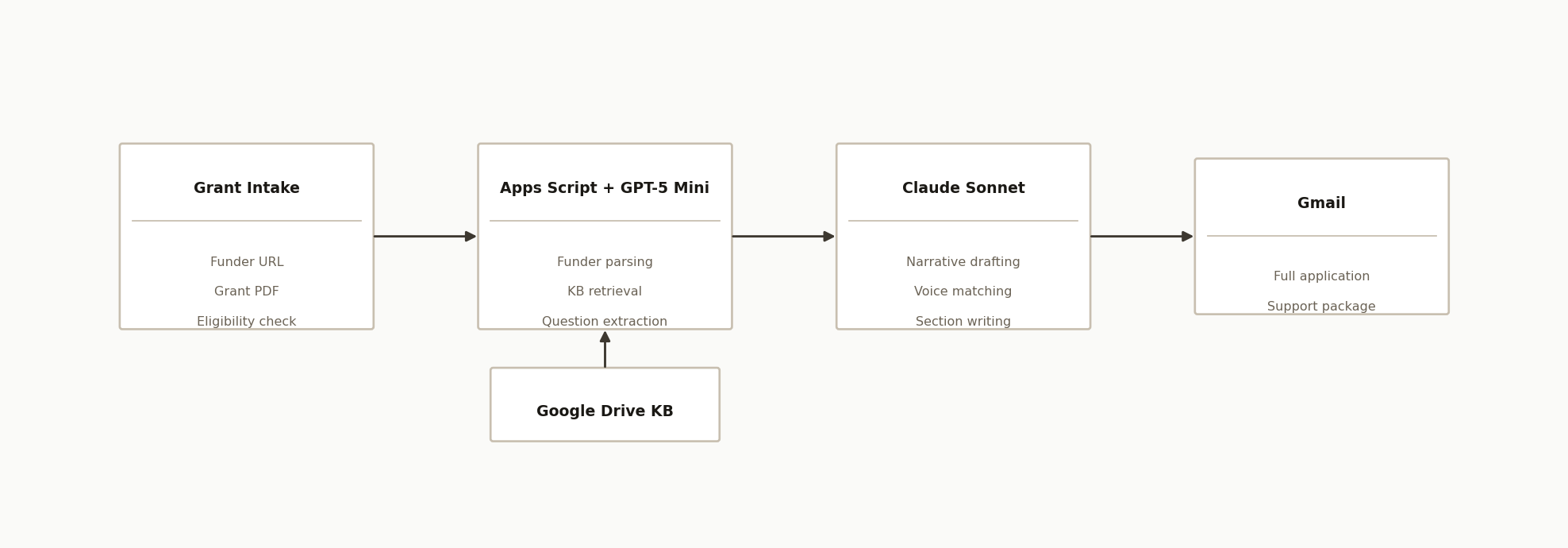
The system has four layers working in sequence:
-
Grant intake -- the entry point. Staff submit a funder URL or upload a grant PDF through a Vercel dashboard. The intake step extracts the funder's requirements: deadline, eligibility criteria, word limits per section, and every question the application asks.
-
Apps Script + GPT-5 Mini -- the processing layer. A Google Apps Script pipeline parses the funder guidelines, queries a Google Drive knowledge base of the organization's own awarded grants and program documents, retrieves the most relevant passages for each question, and structures the context before passing it to the drafting model. GPT-5 Mini handles everything in this layer: parsing, retrieval, classification, scoring.
-
Claude Sonnet -- the drafting layer. Once the structured context is ready, Claude Sonnet writes each narrative section. It has access to how the organization described similar programs in past awarded grants, what language resonated with funders, and what the organization's documented outcomes look like. The model drafts to the specific word limit and question framing, not to a generic template.
-
Gmail delivery -- the output. The complete draft, formatted section by section, lands in the grants inbox alongside a support package that notes which parts of the knowledge base each section drew from.
The knowledge base is built once and grows over time. Every awarded grant the organization uploads makes future drafts more accurate. Every declined application, if analyzed, teaches the system what framing did not land.
Step-by-step: how to build it
Step 1: Build the knowledge base in Google Drive
Create three Drive folders and populate them before writing any code:
- Org docs -- mission statement, program descriptions, annual reports, logic models, impact data, demographic served, board list, audited financials.
- Awarded grants -- full submitted applications for every grant the organization has won. These are the highest-signal training examples. The funder liked this language. Use it.
- Sample PDFs -- funder guidelines for grants you are currently pursuing, as reference material for the intake parser.
Share all three folders with the Apps Script service account. The system reads these at runtime when it retrieves context for a new application.
The depth of this knowledge base is the primary predictor of output quality. An organization with 12 awarded grants in the KB will get meaningfully better drafts than one with 2.
Step 2: Set up the Google Sheet as the control layer
Create a Sheet with seven tabs:
| Tab | Purpose |
|---|---|
| Grants | Application pipeline: one row per grant opportunity, with status |
| KB Cache | Indexed excerpts from Drive folders, refreshed by script |
| Prompts | System prompts for each drafting stage, editable without code deploy |
| Settings | API keys, folder IDs, email addresses, model switches |
| Logs | Per-run execution log with timestamps and errors |
| Narratives | Generated draft sections, one column per question |
| Support Packages | Assembled submission packages for review |
The Prompts tab is where ongoing tuning happens. When a draft misses the organization's voice, staff edit the prompt cell, not the code. No redeploy required.
The Settings tab holds the dual-model configuration:
model_mini         = gpt-5-mini
model_claude       = claude-sonnet-4-20250514
use_openai_only    = FALSE
dev_mode           = TRUE
notification_email = grants@yourorganization.org
Set dev_mode = TRUE during setup so emails go to a test address rather than a funder inbox.
Step 3: Write the funder parser
The intake script runs when staff submit a funder URL or PDF. It needs to extract:
- Organization name and program name
- Application deadline
- Eligibility criteria
- Funding amount and geographic restrictions
- Every question with its word or character limit
For URL-based intake, use UrlFetchApp.fetch() in Apps Script to retrieve the page and pass the HTML to GPT-5 Mini with a structured extraction prompt:
function parseFunderPage(url) {
  const html = UrlFetchApp.fetch(url).getContentText();
  const prompt = `Extract grant application details as JSON:
{
  "funder_name": "",
  "program_name": "",
  "deadline": "",
  "amount": "",
  "eligibility": [],
  "questions": [{"number": 1, "text": "", "word_limit": null}]
}

Page content:
${html.slice(0, 12000)}`;

  return callGptMini(prompt);
}
For PDF intake, convert the file to text first using DriveApp.getFileById() and Apps Script's PDF text extraction, then pass it through the same prompt.
Step 4: Build the knowledge base retrieval
The retrieval step scores each KB excerpt against each grant question and returns the top passages. A simple TF-IDF approach in Apps Script works at the scale most nonprofits operate:
function retrieveRelevantContext(question, kbExcerpts, topN = 5) {
  const scoringPrompt = `Score each passage from 0-10 for relevance to this grant question:
Question: "${question}"

Passages:
${kbExcerpts.map((e, i) => `[${i}] ${e.text.slice(0, 500)}`).join('\n\n')}

Return JSON: [{"index": 0, "score": 7}, ...]`;

  const scores = callGptMini(scoringPrompt);
  return scores
    .sort((a, b) => b.score - a.score)
    .slice(0, topN)
    .map(s => kbExcerpts[s.index]);
}
This is not semantic vector search. For a nonprofit with a knowledge base of 20 to 100 documents, it does not need to be. The GPT-5 Mini call costs fractions of a cent and the retrieval accuracy is sufficient for the drafting step that follows.
Step 5: Draft the narrative sections with Claude Sonnet
For each question, assemble a structured prompt that includes the question text, word limit, retrieved context passages, and the organization's documented outcomes. Pass this to Claude Sonnet:
function draftSection(question, wordLimit, context, orgProfile) {
  const prompt = `You are writing a grant application section for ${orgProfile.name},
a ${orgProfile.type} that ${orgProfile.mission}.

Grant question: "${question.text}"
Word limit: ${wordLimit ?? 'none specified'}

Relevant context from past awarded grants and program documents:
${context.map(c => c.text).join('\n\n---\n\n')}

Write the response in the organization's voice.
Draw on the specific outcomes and language in the context above.
Do not use generic nonprofit boilerplate.
Return only the narrative section text.`;

  return callClaude(prompt);
}
The context passages are doing the critical work here. Without them, Claude drafts generic text. With them, it drafts text that reflects the specific outcomes, populations served, and framing that has worked for this organization before.
Step 6: Assemble and deliver the package
Once all sections are drafted, a final Apps Script function assembles them into the Narratives tab, formats them for the submission platform's structure, and emails the full package to the grants inbox with a note on word counts and which KB passages informed each section.
Set dev_mode = FALSE only after a full end-to-end test with a real grant opportunity confirms the output meets the quality bar your staff would actually submit.
Where it gets complicated
Drafting quality depends entirely on the knowledge base, not the models. If the org docs folder contains only a vague mission statement and one program description, the system will produce competent but generic text. The knowledge base needs specificity: outcome numbers, populations, geography, past funder relationships. Organizations that have not previously documented their results in writing will need to do that work before the automation helps.
PDF intake varies by funder portal. Some funders publish machine-readable PDFs with clean text. Others publish scanned images or portal-rendered PDFs where Apps Script cannot extract structured text reliably. For those, the intake step requires a manual question upload to the Grants tab rather than automated parsing. Build the manual path first and treat automated parsing as an enhancement.
Word limit adherence requires iteration. Claude Sonnet is not perfectly accurate on word counts. A 250-word limit section may come back at 310 words. The simplest fix is a post-draft trimming prompt: pass the over-length response back to the model with an explicit "cut to exactly 250 words without losing the key evidence" instruction. Budget two calls per section for final applications.
Dual-model switching for API outages. Both OpenAI and Anthropic have periodic availability issues. A use_openai_only flag in the Settings tab lets the system fall back to GPT-5 for narrative drafting when the Anthropic API is unavailable. The output quality drops slightly, but the system stays operational. This is not a theoretical edge case for organizations running on lean infrastructure.
Prompt tuning is ongoing, not one-time. The first draft from a new knowledge base will be about 70% of the way to what the organization would submit. Staff will have notes. The feedback loop is: edit the relevant Prompts tab cell, re-run the section, compare. Most organizations converge on a stable prompt set after 3 to 5 real applications.
Grant portals do not accept AI-formatted Word documents. Most funders want text pasted into an online form, not a submitted file. The system's job is to produce the section text, not a submission-ready document. Staff still do the submission click-through, which also gives them a natural review moment.
Real-world results
A youth recreation nonprofit in Toronto used this system to automate its grant drafting pipeline across multiple funder types: municipal recreation grants, provincial youth programs, and private foundation applications. The organization seeded the knowledge base with 7 awarded grants and had the system fully operational within two weeks of the initial build.
For Play Forever, the primary shift was not speed, though draft generation runs in minutes instead of days. The bigger change was coverage. Staff previously applied to the grants they had time to write. With the drafting work automated, the intake step became the constraint. The organization could evaluate twice as many opportunities in the same time, apply to the ones that fit, and let the system handle the prose.
The knowledge base grows with each cycle. Awarded grants get added back as new examples. Declined applications, once reviewed for feedback, inform prompt adjustments. The system gets better at this organization's voice the longer it runs.
Frequently asked questions
Does AI grant writing produce generic text that funders can detect?
It depends on what the model has access to. A prompt with only a generic mission statement produces generic text. A prompt grounded in the organization's specific awarded grants, documented outcomes, and program language produces text that reads like the organization wrote it, because it draws on the language that worked before. Funders screen for authenticity of mission fit, not writing style. A well-grounded AI draft addresses mission fit accurately because it is built from evidence of past fit.
What does the system need from the organization to get started?
Three things: a Google Drive folder with past awarded grant applications (the more the better, minimum 3), a current program description with specific outcome data, and an eligibility checklist of what the organization qualifies for. The technical setup takes a few days. The knowledge base population takes longer, especially for organizations that have not previously collected their awarded grants in one place.
What grant types work best with this system?
Program grants with narrative questions work best, which is most foundation, government, and corporate philanthropy applications. Capital campaigns, endowment appeals, and relationship-driven major donor asks are not suited to this system. The more structured the funder's question set, the more precisely the system can target each section.
Can this run on a nonprofit's own Google account without a developer?
The initial setup requires someone who can write Google Apps Script and configure API connections. Ongoing operation, including adding new grants to the knowledge base, adjusting prompts, and submitting new opportunities, is designed to be handled by non-technical staff. The Sheet interface is the operational UI. No code changes are needed after the initial build.
What does it cost to run monthly?
The primary cost is API usage. GPT-5 Mini is priced at fractions of a cent per call and handles the parsing, retrieval scoring, and classification steps. Claude Sonnet handles only the narrative drafting calls, typically 5 to 10 per application. At 20 applications per month, API costs run under $30. Google Apps Script, Google Drive, and Gmail are free within standard Workspace limits.
How do you prevent the system from submitting drafts directly to funders?
The dev_mode setting routes all email output to an internal review address until explicitly flipped to FALSE. Even in production mode, the system delivers drafts to an internal grants inbox for staff review. There is no automated submission path. Every application goes through a human review step before the organization touches the funder portal.
If your nonprofit is leaving eligible funding on the table because grant applications take too long to write, we have built and deployed this exact system for Play Forever, a youth-sports nonprofit running multiple funder types in parallel. Book a 20-minute call and we will tell you in the first five minutes whether your knowledge base is ready to seed the system or what you need to collect first. See also our custom AI integration service for a full breakdown of what this kind of build involves.
Want us to build this for you?
Nine questions, about 90 seconds. You see the hours it is costing you, then pick a time. No pitch.
Get your free assessment