
AppFolio investor reporting automation works by connecting AppFolio's REST API to a scheduled Google Apps Script that fetches weekly property data, passes it through an AI summarizer, and emails formatted meeting notes directly to each investor. A fully operational system can generate notes for 10 or more weekly meeting types across multiple investor portfolios without any manual input.
This walkthrough reflects our production deployment for Iron Age Investments, a property management and investor reporting firm.
If you are a property manager running regular investor meetings, this guide covers how the system is built, what it takes to set it up, and where most implementations get complicated.
The problem it solves
Iron Age Investments, running multiple investor relationships, typically spent 3 to 5 hours a week writing meeting prep notes. For each recurring meeting (leasing reviews, maintenance walkthroughs, asset management check-ins) someone has to pull data from AppFolio, figure out which investors it applies to, write a readable summary, and send it.
Multiply that across 12 recurring weekly meetings and three investor entities and you have 36 individual notes per week. Every week. With no tooling to help.
The work is not hard. It is just relentlessly manual. The same reports, the same structure, the same formatting decisions, repeated until someone builds a system to handle it.
How the automation works
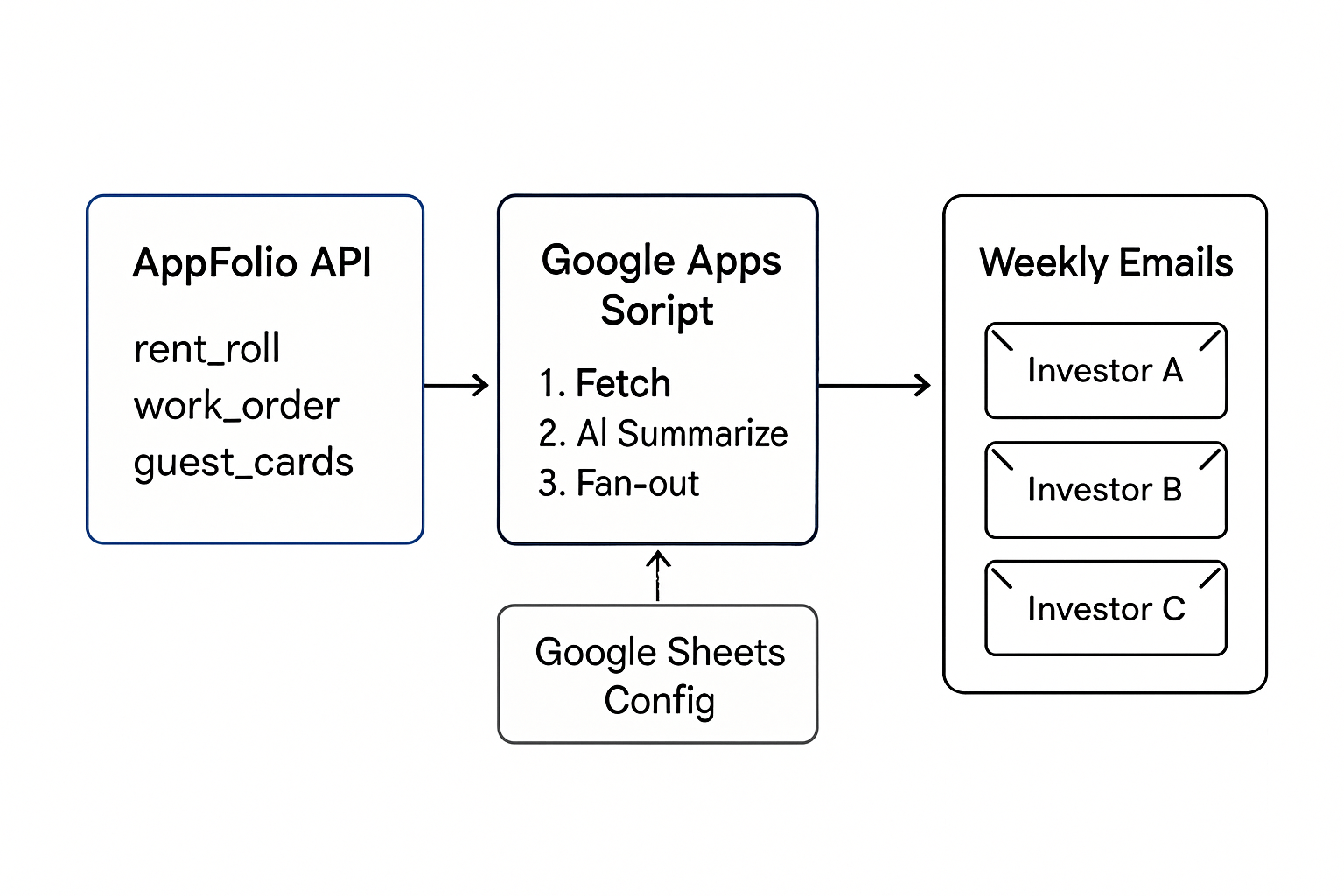
The architecture has five components working together:
-
AppFolio REST API: the data source. AppFolio exposes a v1 REST API on Property Manager Plus and higher plans. It covers most operational reports: rent roll, vacancy, work orders, guest cards, delinquency, unit turn detail, gross potential rent, income statement, and balance sheet.
-
Google Apps Script: the automation engine. A container-bound script attached to a Google Sheet handles fetching, processing, and sending. A time-based trigger fires every Monday morning.
-
Google Sheets: configuration and logging. A structured spreadsheet holds your investor list (with their associated property IDs or property groups), your meeting schedule, and a log of every note generated.
-
An AI summarization layer: the conversion step. Raw API data is structured but not readable. A GPT prompt converts the JSON into a plain-language meeting note, grouped by property, that an investor can actually read in two minutes.
-
Gmail delivery: per-investor output. Each investor gets exactly the note relevant to their portfolio. No manual routing.
Step-by-step: how to build it
Step 1: Enable AppFolio API access
AppFolio API access is managed at the account level. Log into your AppFolio portal, go to Settings, and look for the API section. You will need to generate a client ID and client secret. AppFolio uses HTTP Basic Auth on all v1 API requests.
The base URL follows the pattern https://yoursubdomain.appfolio.com/api/v1/. Your subdomain is the one you use to log in.
Step 2: Set up the Google Sheet
Create a new Google Sheet with five tabs: Config, Investors, Meetings, Property Groups, and Log.
Config holds global settings: your AppFolio subdomain, API credentials (stored as Script Properties, not in cells), a Drive folder ID for archiving notes, and sender display name.
Investors holds one row per investor: name, email, and either a list of AppFolio property IDs (comma-separated) or a Property Group name.
Meetings holds one row per recurring meeting: name, day of week, the AppFolio report IDs to pull (comma-separated), and a frequency column (weekly or monthly).
Property Groups maps group names to property ID lists (useful when investors own a named portfolio rather than a flat ID list).
Log is written automatically on every run. Each row records the meeting name, investor, week label, status (OK, PARTIAL_OK, or ERROR), and any error messages.
Step 3: Write the AppFolio fetch function
In Apps Script, write a function that accepts a report type and an array of property IDs, constructs the API URL, and returns the parsed JSON.
function fetchAppFolioReport(reportId, propertyIds) {
  const base = `https://${getConfig().subdomain}.appfolio.com/api/v1/reports/${reportId}.json`;
  const params = propertyIds.map(id => `property_ids[]=${id}`).join("&");
  const url = params ? `${base}?${params}` : base;
  const options = {
    headers: { Authorization: "Basic " + Utilities.base64Encode(
      getConfig().clientId + ":" + getConfig().clientSecret
    )}
  };
  const resp = UrlFetchApp.fetch(url, options);
  return JSON.parse(resp.getContentText()).results;
}
This handles the authenticated request and returns the results array. You will want to add retry logic and error capture around it. AppFolio occasionally returns 429s under load.
Step 4: Map investors to property IDs
Read the Investors tab, resolve Property Group names to their ID arrays from the Property Groups tab, and build a per-investor map: { investorName: [propertyId1, propertyId2, ...] }.
This mapping drives the fan-out. For each meeting, you loop over investors, fetch the reports filtered to their property IDs, and generate one note per investor.
Step 5: Build the AI summarization step
Pass the raw report data to the OpenAI API with a structured prompt. The prompt should specify the meeting type, instruct the model to write in past tense as a recap, and tell it to group observations by property.
function summarizeReport(meetingName, reportData) {
  const payload = {
    model: "gpt-4o-mini",
    messages: [{
      role: "system",
      content: "You write concise weekly meeting notes for a real estate fund manager. Write in past tense. Be factual. Do not invent dollar amounts or tenant names not present in the data."
    }, {
      role: "user",
      content: `Meeting: ${meetingName}\n\nData:\n${JSON.stringify(reportData)}`
    }]
  };
  // ... fetch call to OpenAI API
}
At current token rates, a full weekly run across 12 meetings costs under $0.15 in API fees.
Step 6: Set the weekly trigger
In Apps Script, go to Triggers and create a time-based trigger on your main run function. Set it to fire weekly on Monday mornings, in the timezone your investors expect.
One important note: the user who installs the trigger owns it. The script runs as that user and sends email from their Gmail account. If you want a display name like "Iron Age Reporting" to appear as the sender, pass a name parameter to GmailApp.sendEmail. A true send-as alias requires that the alias be configured in Gmail settings first.
Where it gets complicated
The six steps above are the skeleton. Here is what adds the real development hours.
Property group resolution. AppFolio does not expose a property groups API endpoint. If your investors are organized into named groups (which is the right approach for multi-entity funds), you need to maintain that mapping manually in your Sheet and keep it in sync as properties move between groups.
Fund-wide reports break per-investor fan-out. AppFolio's balance_sheet and income_statement endpoints do not support property ID filtering. Passing property_ids[] parameters is accepted but silently ignored. The API returns fund-wide data regardless. Any meeting that pulls these reports cannot produce a per-investor note without post-processing. You have two options: send a consolidated fund-wide note to one recipient, or switch to filterable reports like rent_roll and owner_statements for investor-level breakdowns.
Error handling at the report level, not the meeting level. If a meeting pulls four report types and one returns a 400, a naive implementation throws on the first failure and generates nothing. A production system needs per-report try or catch so that partial data still produces a PARTIAL_OK note rather than a silent failure.
Monthly vs weekly frequency. Some meetings (delinquency reviews, for example) should only run on the first Monday of the month. A simple date check on getDate() <= 7 works, but you need this logic in place before adding monthly meetings or they will fire every week.
Trigger ownership for shared Sheets. If the Sheet is owned by one Google account but the trigger is installed under another, future credential issues can silently break the weekly run. Establish clear ownership before handing off to a client.
AppFolio custom reporting: what you can and cannot automate
Buyers often ask for AppFolio custom financial reporting. Here is the line between possible and not directly possible in v1.
- Per-investor financials: use
owner_statementssince it supports property filtering. Fan out by property IDs for each investor, then aggregate the sections you actually present in meetings. - Fund-wide financials:
income_statementandbalance_sheetreturn fund-wide data. Keep these as consolidated summaries or pair them with investor-levelowner_statementsfor detail. - Custom KPIs: compute in your Sheet after pulling API data. Examples: lease conversion rate from guest cards, delinquency rate from delinquency totals over GPR, work order aging buckets from work orders.
Example: roll up owner statements for a single investor into a concise totals block.
function rollupOwnerStatements(statements) {
  const out = { income: 0, expenses: 0, net: 0 };
  statements.forEach(s => {
    out.income += Number(s.summary?.income_total || 0);
    out.expenses += Number(s.summary?.expense_total || 0);
  });
  out.net = out.income - out.expenses;
  return out;
}
If you want a deeper dive on what the API exposes and its limits, see our practical overview in AppFolio: API integration guide and limits. For investor-level financials specifically, our build notes in automating owner statements for investors show the exact fan-out pattern. Fund summaries are covered in our notes on automating the income statement report and automating the balance sheet report.
AppFolio report customization: how we shape the exact KPIs
When teams ask for AppFolio report customization, what they want is consistent investor-ready KPIs that do not exist as a single stock report. We implement this with a thin transform layer and scheduled outputs.
- Data in: pull filterable operational reports you trust for investor views, then persist the raw JSON alongside a normalized row set in your Sheet.
- Transform: compute KPIs in code or formulas. Examples: delinquency rate, guest card to lease conversion, work order SLA hit rate, unit turn cycle time.
- Output: send investor notes, plus publish the same metrics to a dashboard or report pack.
Two practical paths:
- Keep it lightweight in Sheets. Use our investor-mapping structure and formulas for rollups, then publish a Looker Studio dashboard. If you prefer a warehouse and BI: see our guide to connect AppFolio to Power BI.
- If you need durable history and cross-period comparisons at scale, stream to a database or warehouse on a schedule. We cover simple patterns in sync AppFolio to Google Sheets on a schedule and warehouse options in AppFolio to BigQuery reporting sync.
Minimal example: compute delinquency rate per property after fetching delinquency and gross_potential_rent_enhanced.
function calcDelinquencyRate(row) {
  const due = Number(row.total_due || 0);
  const gpr = Number(row.gpr || 0);
  return gpr > 0 ? +(due / gpr).toFixed(4) : 0;
}
How to automate capital call and distribution notices with AppFolio Investment Manager
Real-world flow that works today even when direct investment-manager endpoints are not available in your stack: use a single source of truth for amounts and allocations, then generate notices and track acknowledgments.
Implementation pattern we ship:
- Source amounts. Use your accounting output for capital calls and distributions as the source of truth. If your AppFolio data export covers the needed fields for allocations, join it. If not, maintain a validated Sheet tab for each event with investor, percentage, and amount.
- Compose notices. Merge the numbers into a consistent email template and a PDF attachment if required. We generate PDFs from a Google Doc template when a signed or archived artifact is needed.
- Send and log. Use Gmail to send to each investor, CC internal stakeholders, and log status in the Sheet for audit.
- Track responses. Record opens or replies in a Status column. If you need a dashboard view, pipe the log to a BI tool.
Example: minimal Gmail merge from a Sheet row.
function sendNotice(row) {
  const subject = `[Action] ${row.EventType}: ${row.PropertyName}`;
  const body = `Hello ${row.InvestorName},\n\n` +
    `${row.EventType} amount: $${row.Amount} due ${row.DueDate}.\n` +
    `Your allocation: ${row.AllocationPct}%. Reference: ${row.ReferenceId}.\n\n` +
    `Reply to confirm receipt.`;
  GmailApp.sendEmail(row.Email, subject, body, { name: getConfig().senderName });
}
For distribution workflows that pair emails with owner paperwork and statements, see our notes on automate AppFolio owner distributions. The same logging structure used in investor notes keeps capital events auditable.
Capital call PDFs: generate and attach a one-page notice
When an attachment is required, we fill a Google Docs template and attach a PDF to the same email send. This keeps notices consistent, printable, and archived.
function createPdfFromTemplate(row) {
  const templateId = getConfig().docTemplateId; // store in Script Properties
  const copy = DriveApp.getFileById(templateId)
    .makeCopy(`Notice - ${row.EventType} - ${row.InvestorName}`);
  const doc = DocumentApp.openById(copy.getId());
  const body = doc.getBody();
  body.replaceText('{{INVESTOR_NAME}}', row.InvestorName);
  body.replaceText('{{EVENT_TYPE}}', row.EventType);
  body.replaceText('{{AMOUNT}}', String(row.Amount));
  body.replaceText('{{DUE_DATE}}', row.DueDate);
  body.replaceText('{{REFERENCE_ID}}', row.ReferenceId);
  doc.saveAndClose();
  return DriveApp.getFileById(copy.getId())
    .getAs('application/pdf')
    .setName(copy.getName() + '.pdf');
}

function sendNoticeWithPdf(row) {
  const pdf = createPdfFromTemplate(row);
  const subject = `${row.EventType} for ${row.PropertyName}`;
  const body = `Hello ${row.InvestorName},\n\nPlease see the attached ${row.EventType} notice.\n` +
               `Allocation: ${row.AllocationPct}%  Amount: $${row.Amount}  Due: ${row.DueDate}`;
  GmailApp.sendEmail(row.Email, subject, body, {
    name: getConfig().senderName,
    attachments: [pdf]
  });
}
If you also publish investor KPIs alongside capital notices, pair this with the rent roll or delinquency pulls described below. Our field guide to automating the AppFolio delinquency report and the rent roll distribution pattern shows the exact filters we use.
AppFolio API access and documentation: what to expect
Teams often search for AppFolio API access and developer documentation. Here is the practical path we follow on client builds:
- Eligibility: the v1 REST API is available on Property Manager Plus and higher plans.
- Enablement: an AppFolio admin enables API access in Settings and generates a client ID and secret. All requests use HTTP Basic Auth.
- Docs location: documentation is provided inside your AppFolio account under the API section. If you do not see it, ask your AppFolio CSM to enable API access for your org.
- Working limits: not every report supports property filtering. We cover limits and workarounds in our hands-on AppFolio API access and limits guide. For a checklist-style walkthrough, see our 2026 AppFolio API access and integration guide.
If you are mapping processes beyond reporting, see our AppFolio workflow integration guide for patterns that connect AppFolio data to CRMs and internal ops.
AppFolio API quick start: access, base URL, first request
The fastest way to validate access is a single filtered report call using Basic Auth.
curl -u CLIENT_ID:CLIENT_SECRET \
"https://YOUR_SUBDOMAIN.appfolio.com/api/v1/reports/rent_roll.json?property_ids[]=12345"- Replace CLIENT_ID and CLIENT_SECRET with the credentials generated in AppFolio Settings.
- Replace YOUR_SUBDOMAIN with the one you use to log in.
- A successful response is JSON. In our Apps Script examples we read the
resultsarray for processing.
From there, move the call into Apps Script and wrap it with retry logic. If you need a deeper integration path into BI or a database, start lightweight in Sheets, then graduate to AppFolio to Postgres sync.
Portfolio reporting automation in AppFolio: a repeatable template
For buyers searching for portfolio reporting automation, this is the repeatable system we ship:
- Ingest schedule: weekly pull of filterable operational reports plus monthly pull of fund-wide financials.
- Investor mapping: property IDs per investor or group, stored in a Sheet for non-technical updates.
- Transform layer: derived KPIs computed in code or formulas, then snapshotted for period-over-period comparisons.
- Outputs: investor emails, archived JSON and PDFs, and an optional BI feed.
When you outgrow Sheets as a system of record, stream the same payloads to Postgres for durable history and joins across entities. We break down that path in AppFolio to Postgres database sync.
AppFolio developer API: gaps we bridge in production
Searches for AppFolio developer API and documentation reflect a real gap: some day-to-day needs are not first-class API features. What we do in production:
- No property groups endpoint: maintain groups in a Sheet and resolve to property IDs at run time.
- Financial report filters:
income_statementandbalance_sheetignore property filters. Pair withowner_statementsfor investor detail and keep fund-wide summaries separate. - Webhook-lite behavior: if you need near-real-time, schedule more frequent pulls of small deltas and de-duplicate in your sink. Sheets is fine to start. Warehouses work better at scale.
For a broader view of connecting AppFolio to external tools and BI, start with connect AppFolio to Power BI.
Google Apps Script UrlFetchApp 429s: how we handle rate limits
Near-miss searches often come from teams hitting 429 Too Many Requests in Apps Script, including when fetching data from real estate sites. The production fix is a disciplined retry policy with exponential backoff, optional respect for Retry-After, and jitter so parallel calls do not synchronize and fail again.
function fetchWithBackoff(url, options, maxAttempts = 6) {
  let attempt = 0;
  let waitMs = 500; // start at 0.5s
  while (attempt < maxAttempts) {
    try {
      const resp = UrlFetchApp.fetch(url, options);
      const code = resp.getResponseCode();
      if (code === 429 || code >= 500) throw new Error("retryable:" + code);
      return resp;
    } catch (e) {
      attempt++;
      if (attempt >= maxAttempts) throw e;
      const retryAfter = (e && typeof e.toString === "function" && /retry-after:(\d+)/i.test(e.toString()))
        ? Number(RegExp.$1) * 1000
        : null;
      const jitter = Math.floor(Math.random() * 250);
      Utilities.sleep((retryAfter || waitMs) + jitter);
      waitMs = Math.min(waitMs * 2, 8000); // cap at 8s
    }
  }
}
Add caching for known-unchanged responses, keep batch sizes small, and space calls with Utilities.sleep when you are looping. If you must fetch many small resources, prefer grouping with server-side filters when available rather than many one-off requests.
AppFolio data automation and reporting beyond email
Email notes are the start. In production we also:
- Append investor-level snapshots to a Google Sheet for quarter-over-quarter comparisons.
- Archive JSON payloads per meeting in Drive with a week label for auditability.
- Push selected metrics to a warehouse for BI. A lightweight approach is exporting weekly CSVs to a Looker Studio dashboard.
These extensions use the same fetch functions and investor mapping you already built, so maintenance stays low while reporting options expand.
Real-world results
Iron Age Investments, a real estate and property management firm, running this system across three investor entities and 12 weekly meeting types eliminated roughly 4 hours of manual note-writing per week. The system generates 30 to 36 notes every Monday morning (one per investor per applicable meeting) each tailored to that investor's specific property portfolio.
The setup took about a week of development time, including the property group resolution layer, per-report error handling, and the per-investor fan-out fix for fund-wide meetings. The Google Sheet configuration interface means the client can add investors, change meeting schedules, and adjust report mappings without touching the code.
You can see the full case study in our AppFolio investor distribution case study.
Frequently asked questions
Does AppFolio have an official API?
Yes. AppFolio's v1 REST API is available on Property Manager Plus and higher subscription plans. Access is enabled through the AppFolio admin settings and uses HTTP Basic Auth with a client ID and secret.
Which AppFolio reports can you pull via the API?
The most useful for investor reporting are rent_roll, guest_cards, unit_turn_detail, work_order, delinquency, gross_potential_rent_enhanced, owner_statements, balance_sheet, and income_statement. Most support property ID filtering. Balance sheet and income statement do not. For a practical pattern with rent roll, see rent roll distribution automation.
Can you filter AppFolio reports by investor or property group?
For most reports you can pass property_ids[] parameters to filter by specific properties. For balance_sheet and income_statement, AppFolio's v1 API ignores property filters and always returns fund-wide data. Per-investor financial summaries from those reports require a different approach, such as switching to owner_statements which does support property filtering.
Where do I find AppFolio API documentation and request access?
Documentation is available inside your AppFolio account under the API section once an admin enables API access. If the API option or docs are missing, contact your AppFolio CSM to enable access for your organization. Our guide to API access and limits outlines the process we follow.
Can we automate capital call and distribution notices without Investment Manager?
Yes. We run a Sheets plus Gmail workflow: validated amounts and allocations in a Sheet, optional PDF from a Docs template, then individualized sends with audit logging. This mirrors Investment Manager workflows when direct endpoints are not in your stack.
How do you prevent Apps Script 429 errors from breaking a run?
Use exponential backoff with jitter, honor any Retry-After header if present, and keep request batches small. Wrap each report fetch in try or catch so one failure results in a PARTIAL_OK meeting note rather than a full stop. The sample fetchWithBackoff function above is what we ship.
How much does this cost to run monthly?
Infrastructure costs are effectively zero. Google Apps Script and Google Sheets are free within generous usage limits. The only recurring cost is OpenAI API usage for the summarization step, which runs under $5 per month for most weekly cadences. Development time for the initial build is the primary cost.
Can a property manager set this up without a developer?
The setup requires working knowledge of Google Apps Script and REST APIs. Most property managers commission the initial build from a developer and then self-manage ongoing configuration through the Google Sheet interface, which requires no code changes.
If you are running AppFolio and spending hours each week on investor reporting, we have built this exact system for a fund with 12 weekly meetings and multiple investor entities. Book a 20-minute call and we will tell you in the first five minutes whether your setup maps to this pattern or needs something different. See also our AppFolio API integration guide and limits, our field-tested AppFolio workflow integration patterns, and how to sync AppFolio to Postgres for reporting. For help scoping or delivery, see our services: /services#workflow-automation. When you are ready, book a call.
Related comparison
AppFolio vs Buildium: which to actually use
Want us to build this for you?
Nine questions, about 90 seconds. You see the hours it is costing you, then pick a time. No pitch.
Get your free assessment