
Amazon ASIN matching automation works by searching Amazon for every product in your catalog, pulling the candidate listings, and running a strict code-matching engine that picks the one ASIN that is genuinely the same product. A fully operational system can work through a 30,000-SKU catalog at roughly 900 products a day, unattended, instead of the months a person would spend pasting titles into the Amazon search bar.
This post summarizes our production deployment for DealerShop USA, an automotive parts distributor and GPO, on a 30,000-SKU catalog.
If you run a distribution or reseller business that needs to map an internal product list to Amazon listings, this guide covers how the system is built, where the matching logic earns its keep, and the production problems that show up at real catalog scale.
The problem it solves
The core problem is identity. You have a SKU in your own system, and somewhere on Amazon there is a listing for the exact same physical product. Finding it by hand means searching, reading a page of near-identical results, and deciding which one is the genuine article and not a knockoff, a multipack, or the wrong size.
For DealerShop USA, an automotive parts distributor and GPO, this is brutal. A catalog of automotive shop supplies is full of items that look identical in a search result and differ only by a model number or a manufacturer part number buried in the listing. A worker matching these by hand gets through a few hundred a week on a good week, and the error rate climbs as attention fades. Across a 30,000-SKU catalog, that is a multi-month project that is out of date by the time it finishes.
It gets worse, because Amazon is full of generic listings that copy a real brand's model number into their title. A naive title search will confidently return a counterfeit or aftermarket part as the top result. Matching the wrong listing is more expensive than not matching at all, because now your pricing and inventory decisions are anchored to a product that is not yours.
The automation replaces the entire manual search-and-judge loop with a system that searches every SKU, scores every candidate against the real product code, and refuses to match anything it cannot defend.
Here is the difference in practice:
| Manual matching | Automated matching | |
|---|---|---|
| Throughput | A few hundred SKUs per week | About 900 SKUs per day, unattended |
| Basis for the match | Eyeballing the title | Exact model and part number equivalence |
| Counterfeit risk | High, knockoffs rank well | Filtered out before the pick |
| Auditability | None, it is a human judgment call | Every row gets a score and a written reason |
| Cost at 30,000 SKUs | Months of labor | A few weeks of compute, no attention |
How the automation works
The system is a pipeline. Each SKU flows from your catalog into an Amazon search, the candidates land in a staging sheet, and a deterministic matcher decides the winner. The whole thing runs inside a Google Sheet so the operator never leaves a spreadsheet.
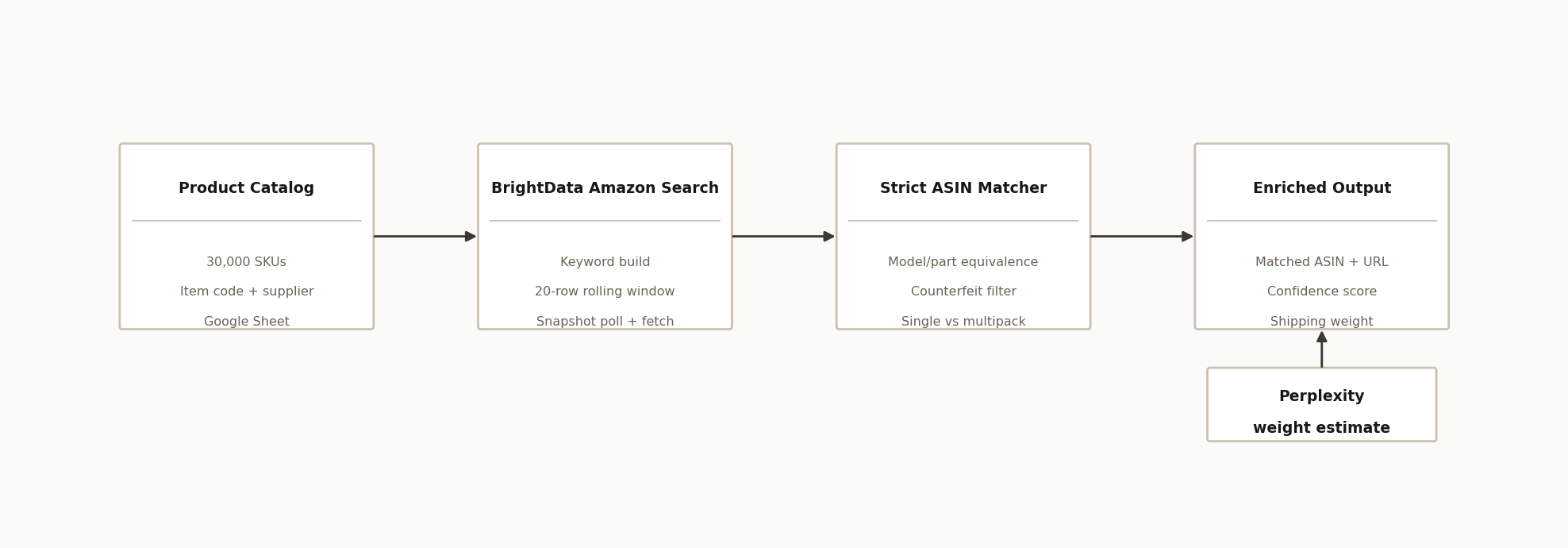
The architecture has four parts plus a weight layer:
-
The product catalog (Google Sheet). One row per SKU, with the item description, the internal item code, the product group, and the supplier name. This is both the input and the place results get written back.
-
BrightData Amazon dataset API. The search engine. Rather than scraping Amazon directly and fighting bot protection, the system triggers a BrightData "discover by keyword" job against its Amazon products dataset and collects structured results, including the model number and part number from each product details section.
-
A Google Apps Script continuous runner. The orchestration engine, bound to the Sheet. It builds a search keyword for each row, triggers the search, polls the job, fetches the results, and hands them to the matcher. It runs a rolling window of 20 rows at a time so many searches are in flight at once.
-
The strict ASIN matcher. A deterministic, no-LLM engine that compares each candidate's model and part numbers to the target code through a series of passes, applies a counterfeit filter, and writes the winning ASIN, the source URL, a confidence score, and a plain-language reason.
-
A Perplexity weight layer. A separate pass that estimates shipping weight from the product's material and dimensions, because marketplace weight fields are notoriously unreliable for freight math.
Step-by-step: how to build it
Step 1: Build a clean search keyword
You cannot search Amazon with your raw internal description. It often carries price tokens, internal abbreviations, and a group prefix on the item code. The first step strips those down to something Amazon will actually match.
function buildKeyword(title, itemCode) {
  // Drop "$" price tokens, keep the descriptive words
  const cleanTitle = String(title).replace(/\$/g, "").trim();
  return `${cleanTitle} ${itemCode}`.trim();
}
The item code itself usually needs the product-group prefix removed first, so that a code like 3M00-7100 searches as 7100. Getting this normalization right is most of the battle, because the code is what the later matching passes key on.
Step 2: Trigger an Amazon search through BrightData
For each row, fire a keyword discovery job and store the returned snapshot ID. The snapshot is the handle you poll and then download.
function triggerAmazonSearch(keyword) {
  const url = "https://api.brightdata.com/datasets/v3/trigger"
    + "?dataset_id=" + DATASET_ID
    + "&type=discover_new&discover_by=keyword&limit_per_input=150";
  const resp = UrlFetchApp.fetch(url, {
    method: "post",
    contentType: "application/json",
    headers: { Authorization: "Bearer " + BD_API_KEY },
    payload: JSON.stringify([{ keyword }]),
    muteHttpExceptions: true,
  });
  return JSON.parse(resp.getContentText()).snapshot_id;
}
Step 3: Poll and fetch with a rolling window
Searches are asynchronous, so the runner keeps up to 20 of them in flight, polls each snapshot for completion, and downloads the results into a staging tab when one is ready. The rolling window is what makes 900 SKUs a day possible, because the script is never idle waiting on a single slow search.
When results arrive, each candidate is flattened into a lean row: ASIN, title, URL, brand, manufacturer, model number, and part number. Those last two fields are the ones the matcher lives on.
Step 4: Run the strict matching passes
This is the heart of the system, and it deliberately uses no language model. Code matching is a problem where determinism beats cleverness, because you want the same input to always produce the same, explainable output. The matcher normalizes every code and runs a cascade of passes, from strict to forgiving.
// Uppercase, strip everything but letters and digits
const norm = (s) => String(s).toUpperCase().replace(/[^A-Z0-9]/g, "");

function isExactMatch(candidate, target) {
  const t = norm(target);
  const model = norm(candidate.model_number);
  const part = norm(candidate.part_number);
  return (model && model === t) || (part && part === t);
}
If the exact pass finds nothing, later passes handle real-world messiness: a size suffix (93-256-XL against 93256), a numeric core match (digits only), and a vendor-prefix match (AJX-A910 against A910). Only if a code looks strong enough does it fall back to a careful, boundary-aware substring check. Each pass carries its own confidence score, so a perfect code match reads 100 and a substring fallback reads 90.
Step 5: Filter out counterfeit and generic listings
A code match is necessary but not sufficient, because a generic seller can stamp a real model number onto a knockoff. Before accepting a match, the system checks the brand and title for the tells of an aftermarket listing.
function looksCounterfeit(candidate, supplier) {
  const brand = String(candidate.brand).toLowerCase();
  const title = String(candidate.title).toLowerCase();
  const isGeneric = ["generic", "unbranded", "unknown", ""].includes(brand);
  const knockoff = /(replacement for|compatible with|aftermarket|fits)/.test(title);
  // A generic brand on a part that should carry a real manufacturer is the signal
  return (isGeneric && Boolean(supplier)) || (knockoff && isGeneric);
}
Genuine listings are preferred. A suspect listing is not silently dropped, it is kept as a fallback but penalized to a low score and flagged in the reason, so a human can review the handful that had no clean option.
Step 6: Run a second search when the first comes up empty
When no candidate matches, the system does not give up. It triggers a second search with the manufacturer name prepended to the keyword, which often surfaces the genuine listing that a generic-flooded first search buried. This single retry recovers a meaningful slice of the catalog that a one-shot search would have marked unmatched.
Step 7: Estimate the shipping weight
Matched products still need a trustworthy shipping weight, and the marketplace weight field cannot be trusted for freight. A separate pass sends the product to Perplexity with a methodology prompt that estimates weight from material, dimensions, and pack quantity, then classifies the answer as Confirmed, Estimated, or Inferred. It runs at roughly $0.006 per product and always returns a number in pounds, even when it has to reason from the product type alone.
Where it gets complicated
The seven steps are the skeleton. The development hours go into surviving scale.
The six-minute execution limit. Google Apps Script kills any single execution at six minutes. A job that needs to grind through thousands of rows has to schedule a safety-net trigger before it starts work, so that when Google pulls the plug the run resumes itself a minute later instead of orphaning. Without this, the runner dies silently a few hundred rows in.
Google's daily urlfetch quota. Every API call counts against a per-account daily limit on outbound requests. Hit it and Google throws an exception that, if treated as a normal error, makes the runner stampede through every remaining row marking each one failed. The system has to detect the quota signature specifically and stop gracefully so the rows are retried the next day, not burned.
BrightData bandwidth and token limits. Data providers meter you. A token can expire mid-run and an account can exhaust its bandwidth quota, both of which surface as opaque HTTP errors. The runner has to treat these as pause-and-retry conditions rather than per-row failures.
Spreadsheet throttling. Reading cells one at a time across thousands of rows trips Google's "Service Spreadsheets failed" throttling. The fix is to batch-read the whole sheet into memory once per slice and write back through a cache, which turns hundreds of API calls into one.
Counterfeits that copy real codes. As above, a generic listing carrying a genuine model number will pass a naive code match. The brand-and-title filter is what stops your catalog from being silently mapped to knockoffs.
Marketplace weights are wrong often enough to matter. Amazon and Walmart weight fields include packaging, list the wrong unit, or are simply blank. For anything where freight cost depends on weight, estimating from material and dimensions is more reliable than trusting the listing, which is why the weight layer exists at all.
Real-world results
DealerShop USA, an automotive parts distributor and GPO, ran this system across a catalog of roughly 30,000 SKUs. In production it processed about 900 products a day and as many as 500 in a single sitting, matching each SKU to its Amazon ASIN with a written reason and confidence score on every row.
The structural value is not just the speed, it is that the output is auditable. Because the matcher is deterministic, every decision can be explained and re-run, and the small fraction of rows that only had a suspect or no match are flagged for a human rather than guessed. The counterfeit filter means the catalog is mapped to genuine listings, not the aftermarket parts that dominate the search results. The operator runs the whole thing from a menu inside the Sheet, with no code to touch.
Frequently asked questions
Does Amazon have an API to match products by SKU?
Not directly. Amazon's APIs let you look up a listing if you already have its ASIN or UPC, but there is no official endpoint that takes your internal SKU and returns the matching listing. Matching means searching Amazon for each product and then deciding which result is genuinely the same item, which is the work this system automates.
How accurate is automated ASIN matching?
Accuracy depends almost entirely on the quality of the codes in your catalog. When a SKU carries a real manufacturer part or model number, deterministic matching on that code is highly reliable, because it is comparing identifiers rather than guessing from titles. The weak cases are products with no code, where the system falls back to careful title logic and flags low-confidence rows for human review.
What does it cost to run?
The infrastructure is cheap. Google Apps Script and Google Sheets are free within generous limits, the weight estimation runs around $0.006 per product, and the main variable cost is the data provider's per-record charge for the Amazon searches. For a one-time catalog match the dominant cost is the initial build, not the ongoing compute.
How do you avoid matching to counterfeit listings?
The matcher checks each candidate's brand and title for the markers of a generic or aftermarket listing, such as a "Generic" brand on a part that should carry a known manufacturer, or phrases like "replacement for" and "compatible with." Genuine listings are preferred, and any suspect match is penalized and flagged rather than accepted silently.
How long does it take to match 30,000 SKUs?
At a throughput of about 900 SKUs a day, a full 30,000-SKU catalog clears in roughly a month of unattended running, with the system resuming itself around Google's execution limits and daily quotas. That compares to several months of full-time manual work, and the automated version produces an audit trail the manual version cannot.
Can a non-developer run this?
The initial build requires a developer who knows Google Apps Script and the data provider APIs. Once it is built, day-to-day operation is a menu inside the Google Sheet: mark where to start, click run, and watch the results fill in. Most teams commission the build and then run and re-run it themselves with no code changes.
If you are sitting on a large product catalog that needs to be mapped to Amazon, we built this exact system for a distributor with a 30,000-SKU catalog. Book a 20-minute call and we will tell you in the first five minutes whether your catalog maps cleanly to this pattern or needs a different approach. You can also see our workflow automation services and recent case studies for more of what we build.
Want us to build this for you?
Nine questions, about 90 seconds. You see the revenue it is costing you, then pick a time. No pitch.
Get your free assessment