
Recruiting outreach automation works by watching job boards for companies that are actively hiring, finding the exact hiring manager behind each posting, and sending them a personalized email that pitches a matching candidate, all without a recruiter touching a keyboard. A fully operational system turns a live job posting into a verified, personalized outreach within hours of it going up.
This is the system we deployed for TalentTank, a recruiting and staffing agency, and the same pattern applies to any shop that places candidates off live requisitions.
If you run a recruiting or staffing agency and your team still finds clients by manually searching job boards and guessing at email addresses, this guide covers how the system is built, where the real value sits, and the parts that get complicated at scale.
The problem it solves
TalentTank, a recruiting and staffing agency, lives or dies on one thing: reaching the right hiring manager at the moment they have an open role. A job posting is the clearest buying signal there is. The company has a need, a budget, and a deadline. The problem is speed and volume. By the time a recruiter manually finds the posting, figures out who owns the hire, hunts down a real email, and writes something personal, the role is days older and a dozen other recruiters have already pitched.
Done by hand, a recruiter gets through maybe a few dozen of these a week, and most of those emails bounce or go to a generic info address that nobody reads. The work is not skilled work. It is searching, copying, guessing, and typing the same shape of email over and over.
The automation replaces that entire loop. It watches the job boards, identifies the human who owns each hire, confirms the email is real, and sends a pitch tied to a specific candidate the agency already has. The recruiter shows up only for the replies.
Here is the difference in practice:
| Manual recruiter prospecting | Automated outreach | |
|---|---|---|
| Coverage | A few dozen postings a week | Every relevant posting as it appears |
| Speed to contact | Days after the role is posted | Within hours |
| Contact accuracy | Guessed emails, generic inboxes | Apollo-matched, NeverBounce-verified |
| Personalization | Copy-paste template | A real candidate pitched per role |
| Recruiter's time | Searching and typing | Only the live conversations |
How the automation works
The system is a pipeline of four Make.com scenarios sharing one Google Sheet as the source of truth. Candidates go in one end, personalized pitches to verified hiring managers come out the other.
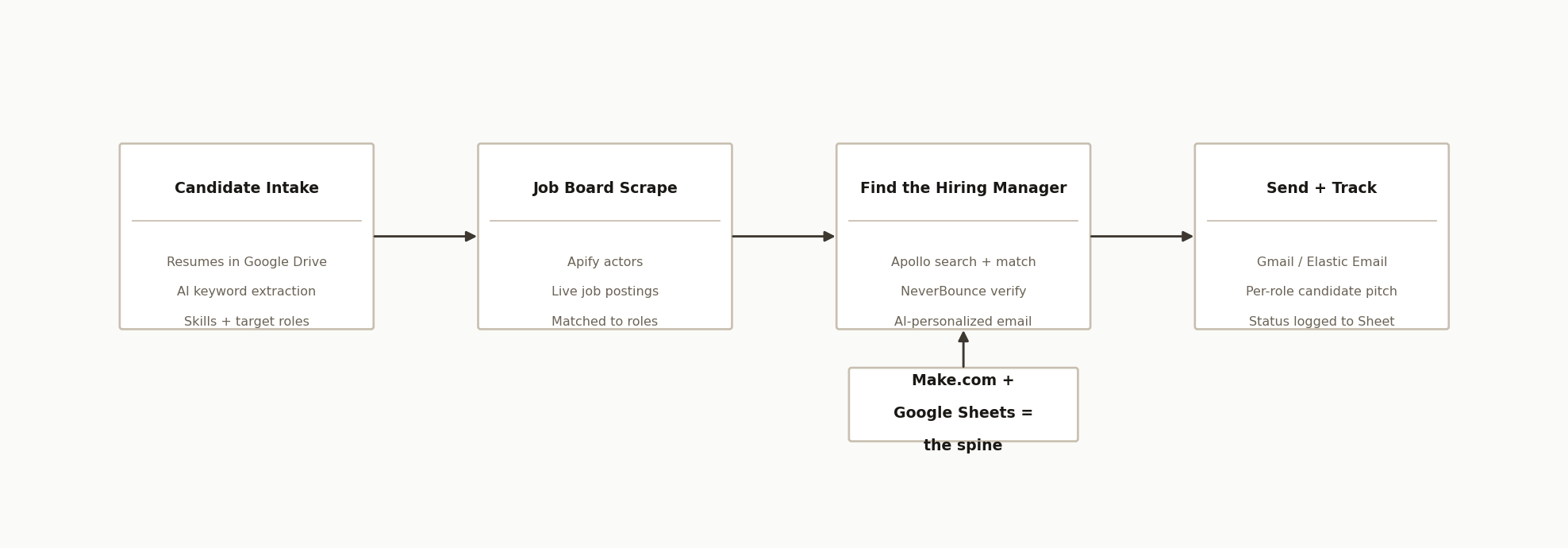
The architecture has four stages plus the spine:
-
Candidate intake (Google Drive + OpenAI). Resumes drop into a Drive folder. A scenario reads each one, and an OpenAI step extracts the structured signal that matters: skills, seniority, and the job titles this person should be pitched for. That becomes the search brief.
-
Job board scrape (Apify). An Apify actor scrapes job boards for live postings that match those target roles, pulling the company, the role, the job description, and the posting URL. These are companies that are hiring right now.
-
Find the hiring manager (Apollo + NeverBounce). For each posting, the system calls Apollo (
mixed_people/searchandpeople/match) to find the actual decision-maker at that company, their name, title, and email. NeverBounce then verifies the email so you are not sending into the void. An OpenAI step drafts a personalized message tied to the specific role and candidate. -
Send and track (Gmail / Elastic Email). A final scenario reads the rows marked valid, sends the email through Gmail or Elastic Email, and writes the status back to the Sheet so nobody gets emailed twice.
The Google Sheet plus Make.com is the spine. Every stage reads from and writes to the same sheet, which means the whole pipeline is observable, resumable, and editable by a non-technical operator.
Step-by-step: how to build it
Step 1: Turn resumes into a search brief
Point a Make.com scenario at a Google Drive folder with a watch trigger. When a resume lands, read the document and pass the text to OpenAI with a prompt that returns structured fields: target job titles, core skills, and years of experience. Write that to a "Candidates" tab. This is what tells the rest of the system which roles to hunt for.
The key is forcing structured output. Ask the model for the titles as a clean list, not prose, so the next stage can search on them directly.
Step 2: Scrape job boards for live roles
Use an Apify actor that scrapes the job boards your clients hire from. Feed it the target titles from step one. For each result, capture the company name, role title, job description, and posting URL, and write them to a "Jobs" tab. Schedule this to run on an interval so new postings are caught while they are fresh.
Step 3: Find the decision-maker with Apollo
For each new job row, call Apollo to find the person who owns the hire. A search call (mixed_people/search) narrows to the company and likely titles (hiring manager, talent acquisition, department head), and a match call (people/match) resolves the specific person and their email.
POST /v1/mixed_people/search
{
  "organization_ids": ["<apollo_company_id>"],
  "person_titles": ["hiring manager", "talent acquisition", "head of <department>"]
}
Apollo returns the contact, but you should never trust the email blindly, which is the next step.
Step 4: Verify the email before you ever send
Pass every Apollo email through NeverBounce. Only rows that come back valid move forward. This single step is the difference between a healthy sending domain and a blacklisted one. Mark each row Valid yes or no in the Sheet and filter on it downstream.
Step 5: Write the pitch with AI, not a template
For each valid contact, send the role, the job description, and the matching candidate's summary to OpenAI, and have it write a short, specific email. The angle that works: "I saw you are hiring for [role]. I have a [candidate summary] who fits. Worth a quick chat?" Store the subject and body in the Sheet so a human can skim before anything goes out.
Step 6: Send and log
A final scenario reads rows that are valid and not yet contacted, sends through Gmail or Elastic Email, and updates the status to sent. Logging the status back to the same row is what prevents double-sends and gives you a clean record of who was contacted, when, and about which role.
Where it gets complicated
The six steps are the skeleton. The engineering hours go into the parts that protect your reputation and your accuracy.
Email deliverability is the whole game. Sending verified emails is necessary but not sufficient. You still need warmed-up sending domains, sane daily volume limits, and a real unsubscribe path. The NeverBounce gate and the Gmail-or-Elastic split both exist to spread and protect sending.
Apollo finds the wrong person constantly if you let it. A naive search returns recruiters, salespeople, and interns at the same company. The title filters and the match step have to be tuned per client so you reach the actual hiring authority, not whoever Apollo ranks first.
Job boards fight scrapers. Postings change format, get reposted, and rate-limit aggressive scraping. The Apify layer needs retry logic and de-duplication so the same role posted on three boards does not become three emails to the same manager.
Matching a candidate to a role is judgment, not keyword overlap. The AI extraction makes this tractable, but a "Java developer" is not automatically right for every posting with "Java" in it. The prompt has to weigh seniority and role type, and borderline matches should be flagged for a human rather than auto-sent.
De-duplication across the whole pipeline. The same company can post multiple roles, and the same manager can own several. The Sheet has to be the single key that prevents one hiring manager from getting five emails in a week.
Real-world results
TalentTank reaches hiring managers at companies that are actively hiring, within hours of the role being posted, with a message that names the role and pitches a real candidate.
Here is the math, illustrative and rounded, since your numbers depend on your niche, your fees, and your follow-up. A recruiter working by hand reaches maybe 30 to 50 hiring managers a week. In an active niche, the automation can surface, verify, and draft outreach for several hundred relevant postings in that same week. A generic cold blast replies at roughly 1 to 3 percent; outreach tied to a real, matching candidate and a verified hiring manager commonly runs higher, in the 5 to 10 percent range. So 400 personalized, verified emails at an 8 percent reply is around 32 live conversations a week that a manual process would never have reached. With recruiting placement fees typically 15 to 25 percent of first-year salary, a single placement off those conversations is often worth $12,000 to $20,000, which is why the system tends to pay for itself many times over on a single hire.
The value is not just speed, it is that the output is auditable. Every contacted manager, the role, the candidate pitched, and the send status all sit in one Sheet. Nothing is sent to an unverified address, nobody is emailed twice, and a non-technical operator runs the whole thing from a spreadsheet. Treat the figures above as a first-pass estimate to decide whether a deeper look is worth it, not a guarantee.
Frequently asked questions
Can you automate recruiting outreach without getting flagged as spam?
Yes, if you respect deliverability. The system verifies every email with NeverBounce before sending, spreads volume across sending services, keeps messages short and specific to a real role, and includes an unsubscribe path. Spam complaints come from blasting generic templates to unverified lists, which is exactly what this avoids.
What does it cost to run?
The main variable costs are the data tools: an Apify plan for job board scraping, an Apollo plan for contact data, and NeverBounce credits for verification, plus a small amount of OpenAI usage for extraction and drafting. Make.com and Google Sheets are inexpensive. For most agencies it is a fraction of the cost of a single placement.
Why pitch a specific candidate instead of just offering recruiting services?
Because a named, relevant candidate is a reason to reply, not a sales pitch to ignore. "I have a senior nurse available in your area" lands differently than "we provide staffing solutions." Tying the outreach to a real person the agency already represents is what turns a job posting into a warm conversation.
Do I need Apollo, or can I use another data source?
Apollo is used here for contact search and email match, but the pattern works with other B2B data providers. The important part is the two-step approach: search to narrow to the right titles at the right company, then match to resolve the specific person and email, then verify before sending.
Can a recruiter run this without a developer?
The build requires someone who knows Make.com and these APIs. Once it is built, day-to-day operation is a spreadsheet: drop in resumes, review the drafted emails, and watch replies come in. Most agencies commission the build and then run it themselves with no code changes.
If your recruiting team is still finding clients by hand, we built this exact system for an agency: job board to verified hiring manager to personalized candidate pitch, fully automated. Book a 20-minute call and we will map what it would take for your desks and your job boards. You can also see our AI sales outreach service and recent case studies for more of what we build.
Want us to build this for you?
Nine questions, about 90 seconds. You see the revenue it is costing you, then pick a time. No pitch.
See your options