
Revver to CRM sync works by reading the documents out of Revver, parsing their contents, and writing a record into Pipedrive and HubSpot that holds the actual content, not just a link back. A live service does this on a schedule, embeds each email body directly on the company record, and collapses duplicates so the same document filed twice does not become two records. If your team uses Revver to store documents but has to keep clicking back into it from your CRM to read anything, this guide covers the sync service we built for Soft Pull Solutions, a sales and CRM integrations company.
This was a proof-of-concept demo we built, not a live deployment, showing how the approach applies directly to Soft Pull Solutions' Revver-to-Pipedrive and HubSpot workflow.
The problem it solves
Revver (formerly eFileCabinet) is a document-management system. It is where the files live. The CRM, Pipedrive or HubSpot, is where the team actually works a customer. The two do not talk, so the documents and the customer record sit in separate worlds.
The usual first attempt at bridging them, and the one we initially built, is to create a record in the CRM that links back to the document in Revver. It sounds fine and it is almost useless. To read anything, a person opens the company in the CRM, clicks the link, waits for Revver to load, finds the document, reads it, then comes back. Every single time. The integration technically exists, but it saved nobody anything, because the content is still a click away in another system.
What the team actually wants is to open the company record and see the document content right there. The email body, inline. The ability to preview or download without leaving the CRM. And because staff sometimes file the same email into Revver more than once, they want the CRM to recognize a duplicate and collapse it, not pile up three identical records.
| Capability | Link-only sync | Content-inline sync |
|---|---|---|
| See the document content | Click into Revver every time | Read it on the CRM record |
| Preview or download | In Revver, separately | From the CRM record |
| Same email filed twice | Two or three records | Collapsed to one |
| Where the team works | Bouncing between two systems | The CRM they already live in |
| Actual time saved | Almost none | The whole context switch |
The automation replaces the context switch into Revver with the content sitting where the team already is.
What keeping your systems in sync is worth
Move the sliders to your own numbers. The defaults are only an example business, not client data.
Revenue from deals that stop slipping each year
$100,800
80 a month × 12 × 5% × 70% × $3000
- Deals kept a year
- 34
- 80 × 12 × 5% × 70%
- Staff cost of doing it by hand each year
- $9,100
- 5 hrs a week × $35/hr × 52 weeks
- Hours handed to the system each month
- 22 hrs
- 5 hrs a week × 52 ÷ 12
How the automation works
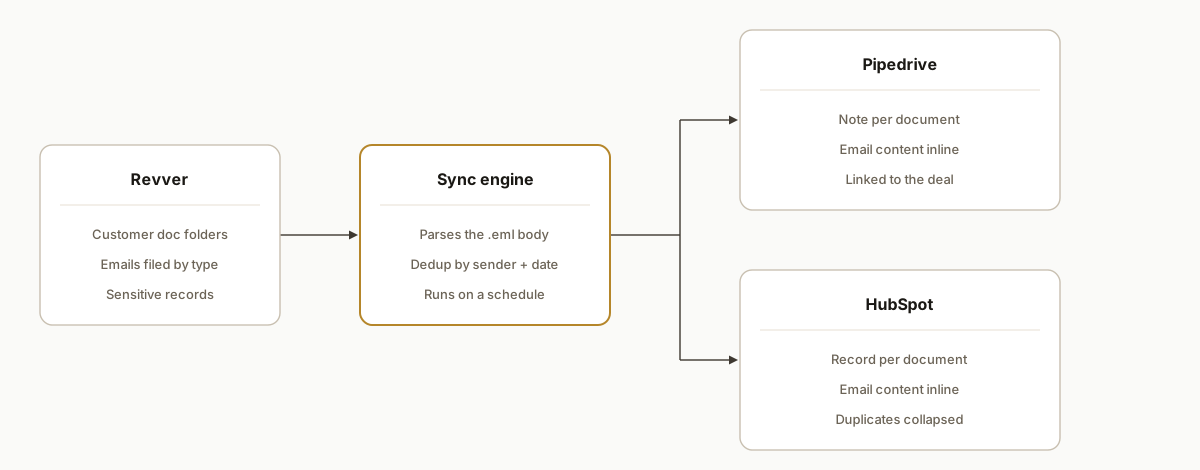
The service reads documents from Revver, parses them, and writes content-rich, de-duplicated records into both CRMs on a schedule. Revver stays the file store; the CRM becomes where the content is read.
- Revver. The document store. Emails arrive in Revver folders through its Outlook integration, and the team files each into the matching customer subfolder by type.
- Sync engine. The worker. A scheduled Node.js service walks the customer folders, finds new documents, parses the email files, and computes a duplicate key.
- Content extraction. The point of the whole thing. Each email file is parsed so the actual body text is pulled out and formatted, instead of just capturing a filename and a link.
- Pipedrive and HubSpot. The destinations. The service writes a record on the matching company, carrying the email content inline, and skips or collapses anything it recognizes as a duplicate.
Step-by-step: how to build it
Step 1: Walk the Revver folder structure
The service authenticates to Revver and traverses the customer folders, descending into the numbered subfolders the team files documents into. The key design choice is to make the set of target subfolders configurable, because which subfolders matter is a business rule that changes, not something to hard-code.
Step 2: Parse the email file, do not just link it
This is the step that separates a useful integration from a useless one. Each filed email is an .eml file. Parse it to pull out the sender, subject, date, and the body text, so you have real content to put on the record.
import { simpleParser } from "mailparser";

async function parseEml(buffer) {
  const mail = await simpleParser(buffer);
  return {
    from: mail.from?.text,
    subject: mail.subject,
    date: mail.date,
    body: mail.text || htmlToText(mail.html),
  };
}
Step 3: Compute a duplicate key
Staff file the same email more than once. Hash a stable combination (sender, subject, and date) into a key, and check it before creating a record, so a re-filed email updates or is skipped instead of creating a second copy.
import { createHash } from "crypto";

function dedupKey({ from, subject, date }) {
  return createHash("sha1").update(`${from}|${subject}|${date}`).digest("hex");
}
Step 4: Write the record with the content embedded
Create or update the record on the matching company in both CRMs, putting the parsed body into the note or a custom property so it is readable inline. Pipedrive takes it as a note on the organization; HubSpot takes it as a custom record associated with the company.
await pipedrive.addNote({ orgId, content: formatEmail(parsed) });
await hubspot.upsertRecord({ companyId, key: dedupKey(parsed), props: toHubspotProps(parsed) });
Step 5: Run it on a schedule with logging
Put the service on a scheduled run (a cron tick) on a small always-on host, and log how many documents it found, created, and skipped as duplicates each run. A Google Sheet works well as a human-readable run log, so anyone can confirm the sync is working without reading server logs.
Step 6: Backfill the history once
A new sync only catches new documents. Run a one-time backfill that walks the existing folders and creates records for everything already filed, so the CRM reflects the full history from day one, not just what arrives after launch.
Where it gets complicated
A link is not an integration. The biggest trap is shipping the version that just links back to Revver. It demos fine and helps no one, because the content is still a click away in another system. If the goal is to stop people leaving the CRM, the content has to be in the CRM. Build for inline content from the start, not as a v2.
Duplicate filing is the norm, not the exception. In a real back office, the same document gets filed more than once, by different people, on different days. Without a duplicate key, the CRM fills with near-identical records and the team stops trusting it. Dedup is not a nice-to-have here, it is what keeps the synced data usable.
Email parsing is messy. Email files come in plain text and HTML, with quoted threads, signatures, and forwarded chains. Pulling a clean, readable body out of that reliably takes more care than "grab the text," especially when you want the record to be pleasant to read rather than a wall of quoted history.
Two CRMs, two shapes. Pipedrive and HubSpot model data differently. The same document becomes a note in one and a custom record in the other, and the dedup and association logic has to work in both. Writing the parse once and the destination adapters separately keeps that manageable.
Sensitive documents. A financial-services back office handles records that are confidential by nature. The service reads from Revver and writes into the CRMs the business already trusts with that data, over authenticated connections, and never exposes content anywhere new. Keeping the data inside the existing trusted systems is part of the design, not an afterthought.
Real-world results
Soft Pull Solutions, a sales and CRM integrations company, files customer documents into Revver and works customers in Pipedrive and HubSpot. The first version that only linked back to Revver did not change anyone's day, because the content still lived a click away. We rebuilt it as a Node.js proof-of-concept that parses each document and puts the content directly on the company record in both CRMs, with duplicates collapsed.
The structural change is that the document content lives where the work happens. A team member opens the company and reads the email on the record, instead of opening the company, clicking into Revver, waiting, finding the file, and clicking back. The dedup means the record stays clean even though the same email gets filed more than once upstream.
The lesson worth taking from it is the one that shaped the rebuild: an integration that only moves a link is not really an integration. The value is in the content arriving where people already are, which is why the parsing step, not the connection, is the heart of this build.
Frequently asked questions
Does Revver have an API to integrate with a CRM?
Revver exposes programmatic access to its document store, which is enough to read documents and folder structure and build a sync to another system. It does not ship a native, content-aware Pipedrive or HubSpot integration, so to get document content (not just links) into your CRM, you build a service that reads from Revver, parses the files, and writes records into the CRM.
How do you get Revver document content into Pipedrive or HubSpot?
Read the document from Revver, parse it (for emails, parse the .eml to extract the body), then write a note or custom record on the matching company in the CRM with that content embedded. The important part is parsing the content rather than only storing a link, so the team can read the document inside the CRM instead of clicking back into Revver every time.
Why not just put a link to Revver in the CRM?
Because a link still forces the context switch the integration was supposed to remove. The team opens the CRM, clicks the link, waits for Revver, finds the file, and clicks back, every single time. Embedding the parsed content on the record is what actually saves time, and it is the difference between an integration people use and one they ignore.
How do you handle the same document being filed twice?
With a duplicate key. Hash a stable combination of sender, subject, and date, and check it before creating a record, so a re-filed email is recognized and collapsed instead of creating a second copy. In a real back office where staff file the same document more than once, this is what keeps the synced records clean and trustworthy.
What does this cost to run per month?
The sync runs as a small scheduled service on an inexpensive host, so the infrastructure cost is minor. The real return is the time the team stops spending bouncing into a separate document system to read something, multiplied across every customer interaction, plus a CRM that people actually trust because it is not full of duplicates.
Can a non-technical team set this up?
The CRM side (where notes and records live) is configurable in-house, but the sync service itself (Revver traversal, reliable email parsing, dedup, and writing into two different CRM data models) is real engineering. Most operations teams are better off having it built and monitored than maintaining a document-parsing service themselves.
If your team stores documents in Revver but keeps leaving the CRM to read them, the fix is content-inline sync, not another link. See how we approach document automation, read the related receipt extraction case study, or book a 20-minute call and we will tell you in the first five minutes whether your Revver and CRM setup can be bridged this way.
Want us to build this for you?
Nine questions, about 90 seconds. You see the revenue it is costing you, then pick a time. No pitch.
See your options