
We built a Yardi reporting integration that runs on the tools Yardi actually exposes: scheduled reports, file exports, and SFTP delivery. In production it ingests Voyager exports on a schedule, normalizes fixed and CSV formats, and loads a warehouse for dashboards and alerts. This guide shows how we do it and where it gets tricky.
Yardi reporting automation is: a scheduled file-based pipeline that uses Yardi Report Scheduler or Task Runner to generate exports, moves them via SFTP, and loads cleaned data into a database for BI and operational alerts.
The problem it solves
Most teams try to wire Yardi like a modern SaaS and hit walls. Yardi's integration posture is partner-gated and file-first. There is no public self-serve API onboarding for Voyager or Breeze, and there is no documented webhook stream. You get scheduler-driven reports, text or CSV files, and SFTP delivery. That is enough to automate reporting when you embrace it as a batch ETL instead of fighting for real time.
| Manual Yardi reporting | Automated Yardi reporting |
|---|---|
| Staff runs reports in the UI, downloads files, merges sheets in Excel, and emails owners weekly or monthly | Report Scheduler generates files on a schedule, our ingestor picks them up from SFTP, validates and normalizes, and loads a warehouse for dashboards and alerts |
| Fixed-width columns and header drift cause copy-paste errors | Deterministic parsers handle fixed-width and CSV, with schema versioning and tests |
| One-off spreadsheets with no lineage | Append-only staging, deduped upserts, and an audit log per load |
| Reports arrive at odd times, people forget | Cron and a queue enforce windows and retries, with Slack or email alerts on variance |
How the automation works
We do not assume a public API. We lean on Yardi's documented export and scheduling features, then build a robust post-export pipeline.
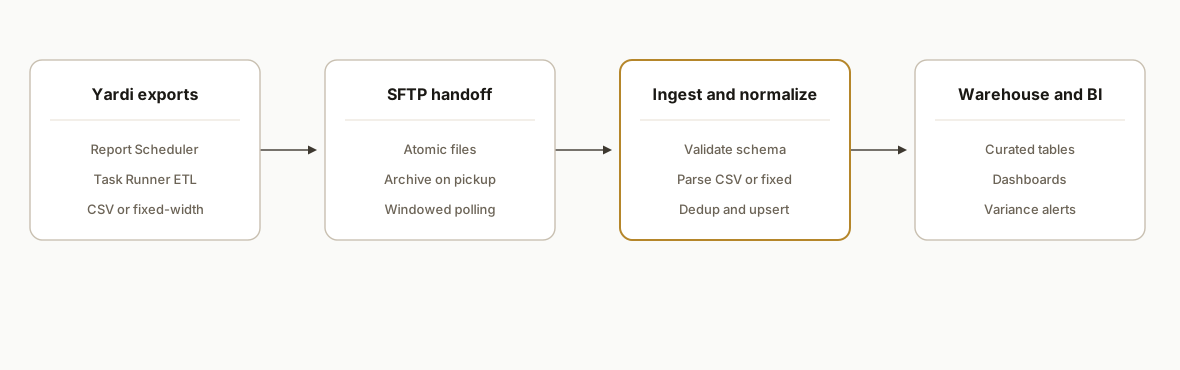
- Report generation: Yardi Voyager supports CSV, variable-length ASCII, and fixed-length text exports. Report Scheduler can run reports on a schedule, and Yardi Task Runner is used to automate or batch ETL jobs. The output lands in a folder or is sent via SFTP.
- Secure file movement: an SFTP drop is the handoff. We pull new files, verify naming and date windows, and quarantine anything out of spec.
- Parse and normalize: fixed-width layouts get schemas with explicit column widths. CSVs get column-name normalization and dtype maps. We enrich with property and chart-of-accounts dimensions outside of Yardi when needed.
- Load to a warehouse: we stage raw rows, dedup with composite keys, and upsert to curated tables for BI tools or finance packets.
- Alerts and BI: variance checks raise alerts, and dashboards refresh off the curated tables. If Yardi adds Data Connect or Replicate later, we can swap the source and keep the same downstream.
Step-by-step: how to build it
1) How do we schedule the Yardi exports?
Use Yardi's Report Scheduler to run the reports you need and deliver files to an SFTP location your IT team controls. If your environment uses Task Runner, have it generate and transfer the files on the same cadence. Name files predictably so we can validate windows.
Key gotcha: schedule late enough that overnight postings are included, and include the accounting entity or property range in the output to avoid cross-entity bleed.
Example report names and cadence
- rent_roll_yyyyMMdd.csv           daily 06:30
- delinquency_yyyyMMdd.txt        daily 06:35 (fixed-width)
- gl_trial_balance_yyyyMM.csv     monthly day 1 04:30
SFTP path: /exports/yardi/prod/
Filename policy: <report>_<entity>_<yyyymmdd>.ext
2) How do we pull files from SFTP safely?
We run a small Python job every 10 to 15 minutes during the window. It lists the SFTP directory, matches new files, atomically downloads, and moves processed files to an archive folder. We treat partial transfers as quarantined.
import os, re, time, hashlib
import paramiko
from pathlib import Path

SFTP_HOST = os.getenv("SFTP_HOST")
SFTP_USER = os.getenv("SFTP_USER")
SFTP_PKEY = os.getenv("SFTP_PKEY")
REMOTE_DIR = "/exports/yardi/prod"
ARCHIVE_DIR = "/exports/yardi/archive"
LOCAL_INBOX = "/data/inbox"
FILE_RE = re.compile(r"^(rent_roll|delinquency|gl_trial_balance)_.+\.(csv|txt)$")

def connect():
    key = paramiko.RSAKey.from_private_key_file(SFTP_PKEY)
    t = paramiko.Transport((SFTP_HOST, 22))
    t.connect(username=SFTP_USER, pkey=key)
    return paramiko.SFTPClient.from_transport(t)

def safe_get(sftp, remote_path):
    local_tmp = Path(LOCAL_INBOX) / (Path(remote_path).name + ".part")
    local_final = Path(LOCAL_INBOX) / Path(remote_path).name
    sftp.get(remote_path, str(local_tmp))
    # simple integrity guard: nonzero and stable size
    if local_tmp.stat().st_size == 0:
        raise RuntimeError("empty transfer")
    local_tmp.replace(local_final)
    return local_final

def main():
    sftp = connect()
    for fname in sftp.listdir(REMOTE_DIR):
        if not FILE_RE.match(fname):
            continue
        rpath = f"{REMOTE_DIR}/{fname}"
        lpath = safe_get(sftp, rpath)
        sftp.rename(rpath, f"{ARCHIVE_DIR}/{fname}")
        print("downloaded", lpath)
    sftp.close()

if __name__ == "__main__":
    main()
Gotcha: do not process files in place. Always download to .part, then rename. Treat zero-byte or mid-transfer files as quarantined.
3) How do we parse fixed-width and CSV exports?
Voyager exports include fixed-length text and CSV. We keep layout definitions in versioned JSON and use explicit widths. CSVs get dtype maps to prevent date and account code coercion.
import pandas as pd
from pandas.api.types import CategoricalDtype

# fixed-width layout for delinquency v1
FW_LAYOUT_V1 = {
    "widths": [10, 12, 30, 12, 12, 10],
    "cols":   ["property_id", "tenant_code", "tenant_name", "current", "over_30", "over_60"]
}

def parse_delinquency_fixed(path, layout=FW_LAYOUT_V1):
    df = pd.read_fwf(path, widths=layout["widths"], names=layout["cols"], dtype=str)
    for c in ["current", "over_30", "over_60"]:
        df[c] = (df[c].str.replace(",", "").str.strip().replace({"": "0"}).astype(float))
    df["load_date"] = pd.Timestamp.utcnow().date()
    return df

def parse_rent_roll_csv(path):
    dtypes = {
        "property_id": str,
        "unit": str,
        "tenant_code": str,
        "lease_start": str,
        "lease_end": str,
        "rent_amount": "float64"
    }
    df = pd.read_csv(path, dtype=dtypes, keep_default_na=False)
    # normalize headers
    df.columns = [c.strip().lower().replace(" ", "_") for c in df.columns]
    return df
Gotcha: fixed-width formats drift across environments. Version your layouts and add smoke tests that verify column sums and row counts by property.
4) How do we stage and upsert to a warehouse?
We load to staging tables 1:1 with the file, then upsert to curated tables with a composite key that matches how the report is identified in your finance process.
from sqlalchemy import create_engine, text
import pandas as pd

PG_DSN = os.getenv("PG_DSN")
engine = create_engine(PG_DSN)

def stage(df: pd.DataFrame, table: str):
    df.to_sql(table, engine, if_exists="append", index=False, method="multi", chunksize=1000)

UPSERT_SQL = """
insert into curated.rent_roll as t(
  property_id, unit, tenant_code, lease_start, lease_end, rent_amount, as_of
)
select property_id, unit, tenant_code, lease_start::date, lease_end::date, rent_amount, as_of::date
from staging.rent_roll
on conflict (property_id, unit, tenant_code, as_of)
  do update set
    lease_start = excluded.lease_start,
    lease_end   = excluded.lease_end,
    rent_amount = excluded.rent_amount,
    updated_at  = now();
"""

def upsert_curated():
    with engine.begin() as cx:
        cx.execute(text(UPSERT_SQL))
Gotcha: choose keys that match the accounting grain. For example, rent roll is usually keyed by property, unit, tenant, and as-of date. GL lines are keyed by org, period, account, subaccount, and source key.
5) How do we validate and alert on variance?
We run a set of checks after each load: row count by property, total balances by period, and monotonic trends where applicable. If something is off, we fail the run and notify.
-- example: total AR should equal the sum of aging buckets
select p.property_id,
       sum(current + over_30 + over_60) as calc_ar,
       sum(total_ar_reported)           as reported_ar
from curated.delinquency p
where as_of = current_date
group by 1
having sum(current + over_30 + over_60) != sum(total_ar_reported);
Gotcha: do not auto-correct mismatches from files. Alert and quarantine. The source of truth is the export.
6) How do we surface it to BI and packets?
Point your BI tool at the curated schema and assemble owner or asset packets from those tables. If Yardi Data Connect or Replicate is licensed later, we can swap the source and keep the same curated layer and visuals.
BI model
- curated.rent_roll             property, unit, tenant, rent
- curated.delinquency           property aging buckets per day
- curated.gl_trial_balance     org, period, account balances
- dims.property                 metadata and groupings
- dims.coa                      rollups and presentation names
Gotcha: keep presentation names outside the loader so accounting can change them without a deploy.
Where it gets complicated
- API access is gated. Yardi positions a Commercial API behind a partner program. There is no public developer portal with self-serve onboarding. When we needed read APIs, we engaged through the standard interface partnership path or stayed with file-based ETL.
- Real time is not the default. There is no documented webhook system. We design near real time with frequent scheduler runs where appropriate, or batch by day for finance-grade reliability.
- Fixed-width drift across tenants. We have seen delinquency and trial balance widths vary. We version column layouts and ship smoke tests so a silent drift does not poison the warehouse.
- Header and type drift in CSV. The same report can add or rename columns after a Yardi upgrade. We normalize known names, keep optional columns nullable, and alert on unexpected additions.
- SFTP hygiene matters. Atomic downloads and an archive move are mandatory. Processing files in place will eventually bite you.
- Month-end edge cases. Late postings and corrections require upserts, not inserts. We include a backfill window job for the first three business days after close.
What this actually changes
For a multifamily operator, this eliminated manual report runs and spreadsheet merges. Accounting and asset teams received daily dashboards and scheduled packets that reflected the same controlled source every time. The pipeline respected Yardi's supported surface and avoided brittle screen-scrapes or undocumented calls, so it kept running through upgrades.
One reason this matters: Gartner estimated that poor data quality costs organizations an average of 12.9 million dollars per year. Source: https://www.gartner.com/en/articles/what-is-data-quality
When exports flow on time, parse deterministically, and land in a curated model, downstream teams stop reconciling spreadsheets and start acting on consistent numbers.
Frequently asked questions
Does Yardi have an official API?
Yardi lists a Commercial API for exporting commercial data from Voyager that is generally accessed through its partner program. There is no public developer portal with self-serve onboarding. In our builds we either go through the partner path for read access or rely on scheduled file exports when an API is not in scope.
Can I connect Yardi to Zapier or Make?
Zapier has a native app for Yardi Kube. We have not seen native Zapier or Make apps for Voyager or Breeze. When a no-code connector is not available, we bridge with Report Scheduler, SFTP delivery, and a lightweight ETL service so your data still lands in Sheets, a warehouse, or your CRM.
Can this run in real time?
Yardi does not document webhooks. We design near real time by running the scheduler more frequently or by polling the SFTP drop within a window. For finance and owner packets, daily batch is often the right tradeoff. If your environment adds Data Connect or Replicate, we can tighten freshness without changing downstream models.
What does IT need to provide?
An SFTP endpoint or shared drop, service credentials, report definitions with their schedules, and outbound allowlists for the ETL host. We also align on filename policy, retention, and a safe place to archive processed files for audit.
How long does the first pipeline take to ship?
A typical first pipeline ships in two to four weeks: week 1 map reports and schedule, week 2 parser and staging, week 3 curated model and BI, week 4 variance checks and handoff. We start with one report family, then add others incrementally.
Can this push back into Yardi?
The automation here is read-oriented by design. When write-back is required, Yardi's official path emphasizes file-based ETL and partner interfaces. We scope that separately and only with supported methods.
If you are on Yardi and want reporting that arrives on time without manual spreadsheets, we have shipped this exact file-first integration for property managers. See our related deep dive on AppFolio's surface in our AppFolio API guide, then map the same approach to Yardi's scheduler. To discuss your environment and constraints, read our service notes at /services#custom-ai-integration, see also /blog/appfolio-api-integration-guide-and-limits, and book a call at /book.
Want us to build this for you?
Nine questions, about 90 seconds. You see the hours it is costing you, then pick a time. No pitch.
Get your free assessment