
An owner-equivalent automation: AppFolio schedules a CSV export for the owner-equivalent report to email. A serverless script ingests the attachment, normalizes rows per owner, generates a branded PDF packet, and emails it on a predictable cadence. This is for property managers who want investor-grade reporting without manual assembly. Below is exactly how we built it and the filter gotchas to avoid.
Owner-equivalent automation is the scheduled ingestion and transformation of AppFolio owner-level exports into per-owner packets that are delivered automatically by email.
The problem it solves
Automating AppFolio owner-equivalent reports removes the weekly grind of exports, merges, and email drafting. We turned scheduled CSV emails into per-owner packets and eliminated copy-paste errors, date misfilters, and missed sends.
Property teams usually run the owner-equivalent report, export to CSV or Excel, split by owner, paste charts into a packet, and email each stakeholder. Filters drift, last month's date sticks, and one missed send triggers follow-ups. The work is repetitive and breaks under volume.
| Manual | Automated |
|---|---|
| Click report, pick dates, pick properties, export to CSV | AppFolio schedules the export to a dedicated inbox label |
| Sort, split rows by owner, paste into a Doc | Script groups rows per owner and fills a template |
| Save PDFs to a folder with ad-hoc names | Deterministic Drive paths and filenames per owner and period |
| Write and send emails one by one | Gmail sends all packets with the same subject and body pattern |
| Fix mistakes after someone replies | Idempotent re-run with safeguards and comparison logs |
What it is worth: every owner sees their share, on time, without rework
Owner equivalent reports are where mistakes get expensive: the wrong share to the wrong owner is a trust problem, not a typo. Generating each report from one controlled owner mapping, on schedule, keeps the numbers right and the owners calm.
- Owner trust: shares come from one mapping, so the same owner never sees two different numbers.
- No rework: nobody rebuilds the report when an owner asks for last month.
- Room to grow: adding owners or entities adds no reporting work.
We run this pattern on live AppFolio data for Iron Age Investments, a real estate investment firm, where a weekly Apps Script composes each investor's notes from AppFolio reports with no exports. Their founder: "Jacky shipped exactly what was scoped, on time, and then proactively suggested the next three things we should automate."
What automated owner reporting is worth to your portfolio
Move the sliders to your own numbers. The defaults are only an example portfolio, not client data.
Owners rarely leave over one statement, but late, wrong or missing packets are a common reason they start shopping. Put in what you have actually seen.
Management fees at risk each year from owners who leave
$16,000
2 owners × (400 doors ÷ 60 owners) × $100 × 12 months
- Staff cost of month end packet assembly each year
- $8,400
- 60 owners × 20 min × $35/hr × 12 months
- Hours of month end assembly handed to the system each month
- 20 hrs
- 60 owners × 20 min ÷ 60
How the automation works
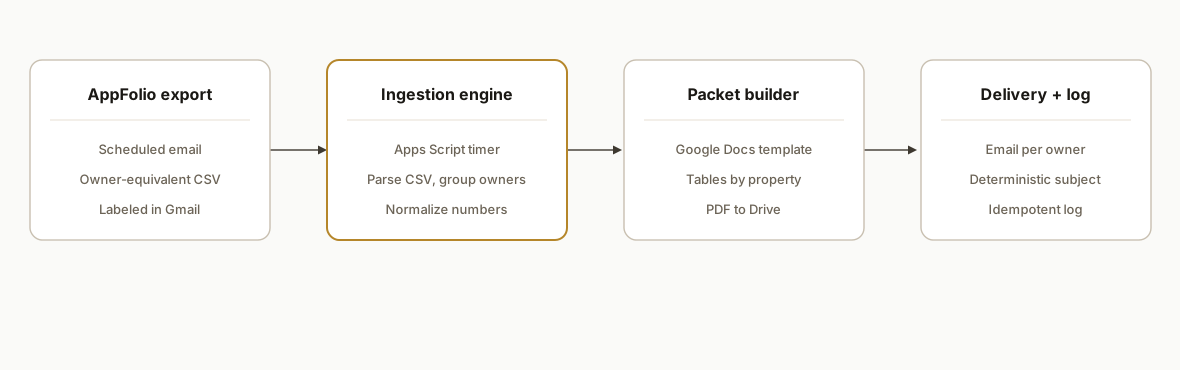
We rely on AppFolio's paperless workflow: schedule the owner-equivalent export to email. A serverless Google Apps Script watches a Gmail label, parses the CSV, builds per-owner sections into a branded Google Doc template, saves PDFs, and sends one email per owner. Where AppFolio Stack APIs exist we enrich owner metadata, gated by plan.
- AppFolio scheduled export: AppFolio supports going paperless with report exports by email. We configure an owner-equivalent export to a routing address and label the messages on receipt.
- Ingestion engine: A time-based Apps Script job finds new threads in the label, saves attachments, and parses CSV content into structured rows for the current period.
- Packet builder (template): A Google Docs template defines header, branding, and section layout. The script clones it per owner, replaces placeholders, and writes tables by property.
- Delivery and archive: The script saves a PDF to Drive using a deterministic path and emails the owner with a standard subject and body. A log sheet records each send and file IDs.
- Enrichment layer (optional): On AppFolio Stack plans, we enrich owner names or property display values using read APIs where available, mindful of plan gating: Plus read-only, Max read/write.
Step-by-step: how to build it
1) Schedule the AppFolio export to email
Create a recurring owner-equivalent export in AppFolio and send it to a dedicated inbox or alias. Add a unique subject token and apply a Gmail label via a filter so the ingestion job can target it cleanly.
Subject pattern: "AppFolio Export: Owner-Equivalent {{YYYY-MM}}"
Recipient: owner-reports+appfolio@yourdomain.com
Gmail filter: If From: no-reply@appfolio.com and Subject: AppFolio Export: Owner-Equivalent then Apply label: appfolio/owner-equivalent
Key gotcha: ensure the report's property and date filters match your period rules. Packets group by owner and show latest first in AppFolio, so older statements can be hidden if you expect per-property sorting by default.
2) Ingest attachments with Apps Script
Use a time-based trigger to fetch new CSV attachments from the label and store them in Drive with deterministic names. Parse rows into an in-memory array for transformation.
function ingestOwnerEq() {
  const LABEL = 'appfolio/owner-equivalent';
  const DEST  = DriveApp.getFolderById(PropertiesService.getScriptProperties().getProperty('DEST_FOLDER_ID'));
  const threads = GmailApp.search(`label:${LABEL} newer_than:7d has:attachment filename:csv`);
  for (const t of threads) {
    for (const m of t.getMessages()) {
      const atts = m.getAttachments({includeInlineImages: false, includeAttachments: true});
      for (const a of atts) {
        if (!/\.csv$/i.test(a.getName())) continue;
        const period = (m.getSubject().match(/(\d{4}-\d{2})/) || [null, 'unknown'])[1];
        const fname = `owner-equivalent-${period}-${Utilities.getUuid()}.csv`;
        DEST.createFile(a.copyBlob()).setName(fname);
        const rows = Utilities.parseCsv(a.getDataAsString());
        processRows(rows, period);
      }
    }
  }
}
Key gotcha: CSVs may include localized number formats. Normalize decimals and currency before aggregation to prevent subtle math errors.
3) Normalize and group by owner
Map column headers to stable keys, coerce numeric fields, and group rows by owner ID or owner name. Build a structure your packet builder can render in a consistent order.
function processRows(rows, period) {
  const [header, ...data] = rows;
  const col = Object.fromEntries(header.map((h, i) => [h.trim().toLowerCase(), i]));
  const owners = {};
  data.forEach(r => {
    if (!r.length) return;
    const owner = r[col['owner']] || r[col['owner name']];
    const property = r[col['property']] || r[col['property name']];
    const income = toNumber(r[col['total income']]);
    const expense = toNumber(r[col['total expenses']]);
    const net = income - expense;
    owners[owner] = owners[owner] || { period, owner, rows: [], totals: { income: 0, expense: 0, net: 0 } };
    owners[owner].rows.push({ property, income, expense, net });
    owners[owner].totals.income += income;
    owners[owner].totals.expense += expense;
    owners[owner].totals.net += net;
  });
  Object.values(owners).forEach(buildPacket);
}

function toNumber(x) {
  if (!x) return 0;
  return Number(String(x).replace(/[,\s]/g, '').replace(/\(([^)]+)\)/, '-$1')) || 0;
}
Key gotcha: decide the owner key. If you rely on display names, later merges will drift. Prefer a stable owner identifier if your export includes one.
4) Fill a Google Docs template and export PDF
Clone a Docs template, replace placeholders, and write a table for each owner's properties. Save a PDF to a deterministic Drive path per period and owner.
function buildPacket(group) {
  const tplId = PropertiesService.getScriptProperties().getProperty('DOCS_TEMPLATE_ID');
  const outRoot = DriveApp.getFolderById(PropertiesService.getScriptProperties().getProperty('PACKETS_ROOT_ID'));
  const ownerFolder = getOrCreateFolder(outRoot, group.owner);
  const doc = DocumentApp.openById(DriveApp.getFileById(tplId).makeCopy(`${group.owner} ${group.period}`, ownerFolder).getId());
  const body = doc.getBody();
  body.replaceText('{{PERIOD}}', group.period);
  body.replaceText('{{OWNER_NAME}}', group.owner);
  const table = body.appendTable([['Property', 'Income', 'Expenses', 'Net']]);
  group.rows.forEach(r => table.appendTableRow([r.property, asMoney(r.income), asMoney(r.expense), asMoney(r.net)]));
  body.appendParagraph('Totals').setHeading(DocumentApp.ParagraphHeading.HEADING3);
  body.appendParagraph(`Income: ${asMoney(group.totals.income)}  Expenses: ${asMoney(group.totals.expense)}  Net: ${asMoney(group.totals.net)}`);
  doc.saveAndClose();
  const pdf = DriveApp.getFileById(doc.getId()).getAs('application/pdf');
  const pdfName = `Owner-Equivalent_${group.owner}_${group.period}.pdf`;
  ownerFolder.createFile(pdf).setName(pdfName);
  queueEmail(group.owner, pdfName, pdf);
}

function getOrCreateFolder(parent, name) {
  const it = parent.getFoldersByName(name);
  return it.hasNext() ? it.next() : parent.createFolder(name);
}

function asMoney(n) { return Utilities.formatString('$%,.2f', n); }
Key gotcha: set explicit font and spacing in the template. Mixed defaults across Docs and PDF renderer can subtly shift table widths and push totals to a second page.
5) Email the packet with a deterministic subject
Send one email per owner with the PDF attached and a subject line that sorts well across months. Log the Drive file ID and message ID for audit.
function queueEmail(ownerName, fileName, blob) {
  const email = lookupOwnerEmail(ownerName); // implement from your roster
  const subj = `Owner Packet ${ownerName} : ${new Date().toISOString().slice(0,7)}`;
  const body = `Hi ${ownerName},\n\nAttached is your owner-equivalent packet for ${new Date().toISOString().slice(0,7)}.\n\nRegards,\nReporting`;
  GmailApp.sendEmail(email, subj, body, { attachments: [blob], name: 'Reporting Automation' });
  logSend(ownerName, subj, fileName, email);
}
Key gotcha: Gmail sends from the account that owns the trigger. If you need a specific From display name or alias, configure it in Gmail settings before automation or route through a service account.
6) Add idempotency and a run log
Guard against duplicates by hashing period plus owner and recording a key in a Log sheet. Before sending, check for an existing key and skip unless a forced rerun is requested.
function logSend(owner, subject, fileName, to) {
  const ss = SpreadsheetApp.openById(PropertiesService.getScriptProperties().getProperty('LOG_SHEET_ID'));
  const sh = ss.getSheetByName('Sends');
  const key = `${owner}::${subject}`;
  const rows = sh.getDataRange().getValues();
  if (rows.some(r => r[0] === key)) return; // already sent
  sh.appendRow([key, new Date(), owner, subject, fileName, to]);
}
Key gotcha: reruns should be explicit. Add a manual "Resend" function that appends a new row with a different key or uses a force flag to override the idempotency check.
Where it gets complicated
Plan gating is real. AppFolio's Stack APIs are plan-gated: Plus includes read-only API, Max includes read/write. Buyers expecting full CRUD on lower tiers get blocked. This is why we design the pipeline to work fully from scheduled email + CSV, with API enrichment optional.
Not every report has a corresponding API. Owner-equivalent exports are available, but universal API endpoints for every report are not. The reliable path is a scheduled email plus CSV attachment capture, then packet generation outside AppFolio.
Filter nuances surprise operators. Owner Portal reports require careful property and date selections. Packets are grouped by owner and latest first, which can hide older statements if teams expect a per-property default ordering. Bake these assumptions into your validation.
CSV shapes drift. Column headers can differ across accounts or over time. Always map by header name with tolerant matching and maintain a header-to-key dictionary in a config sheet.
Timezone and currency formatting. Email timestamps define your period cutoffs. Normalize timezones and currency formats before aggregation to avoid off-by-one or negative-in-parentheses parsing issues.
Frequently asked questions
Does AppFolio have an official API for this?
AppFolio promotes its Stack APIs publicly and they are plan-gated: Plus includes read-only and Max includes read/write. Owner-equivalent automation commonly uses scheduled email + CSV because not every report has a universal API endpoint.
Can I do this with Zapier or Make?
There is no official AppFolio Zapier app in the public directory. We build around scheduled email exports and a small serverless script. You can still use Make or Zapier for downstream steps if you ingest the attachment first.
How do you prevent duplicate emails to owners?
We create a deterministic key from the period and owner and store it in a log. The send function checks for that key before emailing. A manual force-resend path allows controlled reruns.
Can this enrich packets with owner metadata from AppFolio?
Yes when your plan exposes read APIs. We treat API enrichment as optional and keep the CSV ingestion as the primary path so plan gating or API changes never stop packet delivery.
What happens if AppFolio changes the CSV columns?
We map by header names with tolerant matching rather than fixed indexes. A config sheet holds aliases for common header variants, and the log flags unknown columns for review without breaking the full run.
If you run AppFolio and want owner-equivalent packets that send themselves, we have built and shipped this system. See our AppFolio API limits overview at /blog/appfolio-api-integration-guide-and-limits, or explore our document automation services at /services#document-automation. When you are ready, book a working session at /book and we will scope your exact flow.
Want us to build this for you?
Nine questions, about 90 seconds. You see the revenue it is costing you, then pick a time. No pitch.
See your options