
We built and shipped an AppFolio to Postgres sync that runs on a schedule. It takes either scheduled CSV report emails or the plan-gated AppFolio API when provisioned, lands the data into Postgres staging, validates it, and merges it into warehouse tables for BI. Property managers use it when CSV downloads are not enough and partner apps do not cover their reporting.
Definition: AppFolio to Postgres sync is an automated pipeline that extracts AppFolio report data on a schedule and loads it into a Postgres database ready for analytics.
The problem it solves
AppFolio's built-in CSV exports work for one-off analysis, but they do not produce a reliable dataset for BI. Teams copy files into spreadsheets, columns drift month to month, and re-sent reports create duplicates. There is no official Zapier or Make app that solves the end-to-end sync, so reporting breaks when a column header changes or someone misses a manual step.
| Workflow | Manual CSV handling | Automated AppFolio to Postgres |
|---|---|---|
| Data collection | Ad hoc CSV downloads or emailed attachments scattered in inboxes | Scheduled pull: report emails captured by an inbox robot or API pull when provisioned |
| Data quality | Header drift and accidental edits, hard to trace | Schema registry and column mapping, type checks and null guards |
| Duplicates | Re-runs stack rows silently | Idempotent loads with file digest and natural keys |
| History | Overwrites lose historical values | Slowly Changing Dimension merges preserve history |
| Monitoring | None or spot checks | Run logs, row counts, error alerts |
According to AppFolio's own materials, API access is plan-gated: Plus includes read-only API access and Max adds full database access through a read and write API (source: AppFolio IR filing and Max demo page). In practice, many teams are on plans without turnkey integrations, so they rely on scheduled CSV reports for downstream sync.
What it is worth: one reliable copy of your AppFolio data to build on
Every custom report, dashboard and integration gets easier once AppFolio data lives in your own database. A reliable sync replaces the exports people run by hand, and that time is worth the most when it goes to owners and new doors.
- Growth on the same team: export hours become capacity for new doors.
- Build once: every report and tool reads one database.
- Reliable: scheduled, logged syncs instead of ad hoc exports.
We run this pattern on live AppFolio data for Iron Age Investments, a real estate investment firm, where a weekly Apps Script composes each investor's notes from AppFolio reports with no exports. Their founder: "Jacky shipped exactly what was scoped, on time, and then proactively suggested the next three things we should automate."
What automating your AppFolio reporting is worth
Move the sliders to your own numbers. The defaults are only an example portfolio, not client data.
Management fees from the doors the same team could take on
$62,400
(6 hrs × 52 ÷ 12) ÷ 0.5 hrs per door × $100 × 12 months
- Doors the freed hours could cover
- 52
- 26 hrs a month ÷ 0.5 hrs per door
- Staff cost of doing it by hand each year
- $10,920
- 6 hrs a week × $35/hr × 52 weeks
- Hours handed to the system each month
- 26 hrs
- 6 hrs a week × 52 ÷ 12
How the automation works
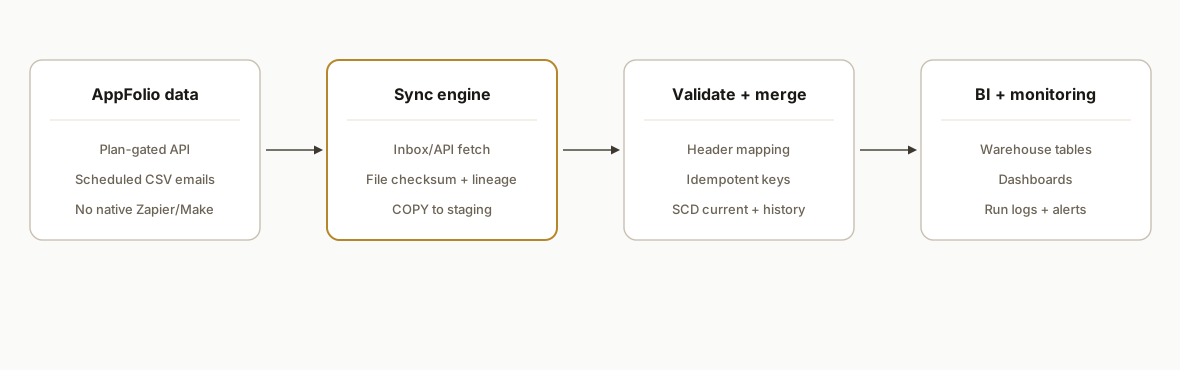
The pipeline runs as a scheduled job. It supports two extraction modes: plan-gated AppFolio API when available, or scheduled CSV report emails from AppFolio's reporting UI. Both paths land into a staging schema in Postgres with file-level lineage and per-row checksums. A merge step de-duplicates and performs SCD updates so your BI tools see clean, current, and historical views.
- Extraction: AppFolio API or Scheduled CSV: When API access is provisioned by plan, we call the tenant's API as documented in their Stack program. When it is not, we capture scheduled report CSVs from a dedicated inbox. Public developer details like base URLs and rate limits are not broadly published, so we designed a mode switch that keeps the storage and merge layers identical either way.
- Landing to staging: We write raw rows into staging tables partitioned by load batch, storing the message-ID or API batch ID and a file checksum. No transforms occur here except safe type coercions.
- Validation and mapping: We apply header mapping to tolerate renamed columns, cast types, and enforce required fields. Validation failures get quarantined with the offending row and reason.
- SCD merge to warehouse: We upsert current facts, track changes as SCD Type 2 where needed, and maintain a unique business key to prevent duplicates when a report is re-sent.
- Monitoring and replay: Each run records counts and checksums. Any batch can be replayed idempotently because merges are keyed and staging is immutable.
Step-by-step: how to build it
1) Set up the Postgres schemas and keys
Create three schemas: raw for untouched CSV loads, stg for typed staging, and dw for analytics tables. Store file lineage and a stable row key you can reproduce on re-runs.
-- raw: immutable landing per file
create schema if not exists raw;
create table if not exists raw.appfolio_report (
  id bigserial primary key,
  load_id uuid not null,
  source_filename text not null,
  message_id text,
  file_sha256 text not null,
  received_at timestamptz not null default now(),
  row_number int not null,
  row_csv text not null
);

-- stg: typed rows with a reproducible natural key
create schema if not exists stg;
create table if not exists stg.appfolio_report_typed (
  load_id uuid not null,
  natural_key text not null,
  payload jsonb not null,
  valid boolean not null default true,
  error text,
  primary key (load_id, natural_key)
);

-- dw: current snapshot plus history
create schema if not exists dw;
create table if not exists dw.appfolio_report_current (
  natural_key text primary key,
  payload jsonb not null,
  last_changed_at timestamptz not null
);

create table if not exists dw.appfolio_report_history (
  natural_key text not null,
  payload jsonb not null,
  valid_from timestamptz not null,
  valid_to timestamptz,
  is_current boolean not null default true
);
Key gotcha: pick a natural_key you can derive from each row consistently. If a perfect key is not present in a CSV, fall back to a hash of the canonicalized row.
2) Capture scheduled report emails and save CSVs
When API details are not provisioned, we rely on Scheduled Reports that email CSV attachments. A small IMAP worker saves attachments with deterministic names and records message-IDs for idempotency.
# imap_capture.py
import email, hashlib, imaplib, os, uuid
from email.policy import default

IMAP_HOST = os.environ["IMAP_HOST"]
IMAP_USER = os.environ["IMAP_USER"]
IMAP_PASS = os.environ["IMAP_PASS"]
SAVE_DIR  = os.environ.get("SAVE_DIR", "./inbox")

os.makedirs(SAVE_DIR, exist_ok=True)

with imaplib.IMAP4_SSL(IMAP_HOST) as M:
    M.login(IMAP_USER, IMAP_PASS)
    M.select("INBOX")
    typ, data = M.search(None, '(UNSEEN SUBJECT "AppFolio Report")')
    for num in data[0].split():
        typ, msg_data = M.fetch(num, '(RFC822)')
        msg = email.message_from_bytes(msg_data[0][1], policy=default)
        mid = msg.get('Message-Id', str(uuid.uuid4()))
        for part in msg.iter_attachments():
            if part.get_content_type() == 'text/csv':
                content = part.get_content()
                sha = hashlib.sha256(content.encode('utf-8')).hexdigest()
                fname = f"{sha}.csv"
                path = os.path.join(SAVE_DIR, fname)
                if not os.path.exists(path):
                    with open(path, 'w', encoding='utf-8', newline='') as f:
                        f.write(content)
                # persist mid->sha in your run log to prevent double loads
Gotcha: AppFolio partners document Scheduled Exports producing CSV attachments. Subject filters vary by tenant, so make the matcher configurable.
3) Load raw CSVs into Postgres quickly
Use COPY for speed. Record a load_id and keep row CSV intact for reproducibility.
# load_raw.py
import csv, hashlib, os, uuid, psycopg2
from datetime import datetime, timezone

DSN = os.environ["PG_DSN"]
INBOX = os.environ.get("SAVE_DIR", "./inbox")

def load_file(conn, path):
    load_id = uuid.uuid4()
    sha = hashlib.sha256(open(path, 'rb').read()).hexdigest()
    with conn, conn.cursor() as cur, open(path, newline='', encoding='utf-8') as f:
        reader = csv.reader(f)
        next(reader, None)  # skip header, store data rows verbatim
        rows = [(load_id, os.path.basename(path), None, sha, datetime.now(timezone.utc), i, ','.join(r))
                for i, r in enumerate(reader, start=1)]
        args_str = ','.join(cur.mogrify("(%s,%s,%s,%s,%s,%s,%s)", r).decode('utf-8') for r in rows)
        cur.execute(f"""
          insert into raw.appfolio_report
          (load_id, source_filename, message_id, file_sha256, received_at, row_number, row_csv)
          values {args_str}
        """)

conn = psycopg2.connect(DSN)
for fname in os.listdir(INBOX):
    if fname.endswith('.csv'):
        load_file(conn, os.path.join(INBOX, fname))
Gotcha: store file_sha256 and check raw for that hash to avoid double-loading the same attachment.
4) Parse headers safely and create a stable natural key
Header names change. Create a simple mapping table and generate a deterministic key from the fields that define a unique row in your reports.
-- registry for tolerant header mapping
create table if not exists stg.header_map (
  canonical text primary key,
  candidates text[] not null
);

insert into stg.header_map (canonical, candidates) values
  ('property',    array['Property', 'Property Name']),
  ('unit',        array['Unit', 'Unit Number']),
  ('lease_start', array['Lease Start', 'Lease Start Date'])
on conflict do nothing;
# to_staging.py
import csv, io, json, os, psycopg2, re, uuid, hashlib
DSN = os.environ["PG_DSN"]
def canonicalize(header_row, cur):
cur.execute("select canonical, candidates from stg.header_map")
mapping = {c: set(cands) for c, cands in cur.fetchall()}
idx = {}
for i, h in enumerate(header_row):
for canon, cands in mapping.items():
if h in cands:
idx[canon] = i
return idx
def natural_key(row, idx):
base = f"{row[idx.get('property','')]}|{row[idx.get('unit','')]}|{row[idx.get('lease_start','')]}"
return hashlib.sha256(base.encode('utf-8')).hexdigest()Gotcha: Do not hard-wire AppFolio field names. Keep a small registry you can update in one place when headers change.
5) Merge into current and history with idempotency
Upsert current, then open or close history windows only when payloads actually change.
-- example merge for one report family
with incoming as (
  select natural_key, payload::jsonb as payload, now() as ts
  from stg.appfolio_report_typed
  where load_id = $1
)
-- upsert current
insert into dw.appfolio_report_current as c (natural_key, payload, last_changed_at)
select i.natural_key, i.payload, i.ts from incoming i
on conflict (natural_key) do update
set payload = excluded.payload,
    last_changed_at = case when c.payload is distinct from excluded.payload then excluded.last_changed_at else c.last_changed_at end;

-- history SCD2
-- close existing window if changed
update dw.appfolio_report_history h
set valid_to = i.ts, is_current = false
from incoming i
where h.natural_key = i.natural_key
  and h.is_current = true
  and h.payload is distinct from i.payload;

-- open new window when changed or new
insert into dw.appfolio_report_history (natural_key, payload, valid_from, valid_to, is_current)
select i.natural_key, i.payload, i.ts, null, true
from incoming i
left join dw.appfolio_report_history h on h.natural_key = i.natural_key and h.is_current = true
where h.natural_key is null or h.payload is distinct from i.payload;
Gotcha: JSON comparisons must use is distinct from to catch semantically different payloads without tripping on null semantics.
6) Add run logging and alerts
Record per-batch counts and basic assertions, and alert on anomalies.
create table if not exists dw.load_audit (
  load_id uuid primary key,
  source text not null,
  received_files int not null,
  raw_rows int not null,
  staged_rows int not null,
  valid_rows int not null,
  errors int not null,
  started_at timestamptz not null,
  finished_at timestamptz not null
);
# minimal cron (Linux) to run every 2 hours
0 */2 * * * /usr/bin/python3 /opt/app/imap_capture.py && /usr/bin/python3 /opt/app/etl_runner.py >> /var/log/appfolio_etl.log 2>&1Gotcha: CSV schedules can arrive off-hour. A 2, 4 hour cadence balances freshness and operational noise when no webhooks are available publicly.
Where it gets complicated
- Plan-gated API: AppFolio's materials say API access depends on plan: Plus read-only, Max read and write. Public details like base URLs, auth, scopes, and limits are not broadly published. We designed our sync to run on scheduled CSV and switch to API when the client's tenant enables it.
- No native Zapier or Make app: AppFolio is not listed in Zapier or Make catalogs. Workflows that depend on those tools require Webhooks or CSV handling, which adds parsing and idempotency you must own.
- Header drift in scheduled reports: We saw benign header renames break naive loaders. A small header_map table and tolerant parser removed the fragility.
- Re-sent attachments: Finance teams forward the same report for audits. Without a file checksum and a per-row natural key, duplicates sneak into facts.
- Monthly vs daily cadence: Financial reports change monthly. Operational reports change daily. A single schedule creates either staleness or noise. Split by report family.
- Multi-entity portfolios: If you segment by owner or property group in BI, do that in dw at merge time so a single raw extract can feed multiple downstream slices.
Frequently asked questions
Does AppFolio have an official API for this?
AppFolio offers API access by plan: Plus includes read-only API access and Max adds full database access through a read and write API. Public technical specifics like base URLs and rate limits are not broadly documented. Our pipeline supports API when provisioned and uses scheduled CSV exports when it is not.
Can this run without the API?
Yes. AppFolio's reporting UI supports scheduled CSV report emails. We capture those attachments, store them immutably, and load them into Postgres with idempotency and validation. The merge and BI layers are identical across both modes.
How do you prevent duplicate rows when a report is re-sent?
Two layers: a file checksum to ignore already-processed attachments, and a per-row natural key to prevent duplicates if the same rows appear in a different file. History tables only open a new version when the actual payload changes.
Can it handle column header changes?
Yes. We maintain a header map that tolerates benign renames and we coerce types in staging before merge. This isolates BI models from upstream drift.
What does this cost to run monthly?
The runtime is light. Postgres hosts the data. A small worker pulls email attachments or makes API calls on a schedule. There are no Zapier or Make fees here because AppFolio is not listed in their catalogs. The primary cost is the initial build and ongoing minor maintenance when new reports are added.
How fast is the sync?
Cadence is configurable. Many teams use 2, 4 hour intervals for operational freshness and a nightly run for financial reports. Without publicly documented webhooks, scheduled pulls are the reliable default.
If you are bumping into the limits of CSV downloads and need a trustworthy AppFolio to Postgres backbone, we have this running in production. See our related breakdown on AppFolio to Power BI integration, explore how we approach custom integrations, and if you want the same system for your portfolio, book a 20-minute call.
Want us to build this for you?
Nine questions, about 90 seconds. You see the revenue it is costing you, then pick a time. No pitch.
See your options