
We automated AVImark reminders and data export by leaning on what the desktop system reliably provides: scheduled CSV and IIF files on a Windows machine, a small local agent that watches for new files, and a cloud endpoint that dedupes, sends SMS and email reminders, and mirrors clean data to reporting sinks. In production it runs nightly without touching any partner-gated API.
AVImark integration automation is: a file-based bridge that turns on-prem CSV and IIF exports into live reminders and usable data downstream when no public API or Zapier app exists.
The problem it solves
Most clinics on AVImark had no way to trigger automated recalls or pipe data into a CRM because AVImark is a closed, on-prem system. Staff exported CSVs manually, copied them to shared drives, and typed reminders in a separate messaging tool. When someone forgot, the day's callbacks were missed and reports drifted out of date.
| Manual process | Automated with our build |
|---|---|
| Staff runs exports and emails files to themselves | Windows Task Scheduler drops fresh CSVs in a known folder every night |
| Someone uploads data to a CRM or texting app | A local agent posts CSVs to a secure webhook automatically |
| Reminders typed by hand | Cloud job templates SMS and email recalls by due date and species/risk rules |
| Finance hand-keys into QuickBooks | IIF files land in an import folder queued for morning review |
| Reports stitched in Excel | Cleaned data mirrored to Sheets or S3 for BI |
How the automation works
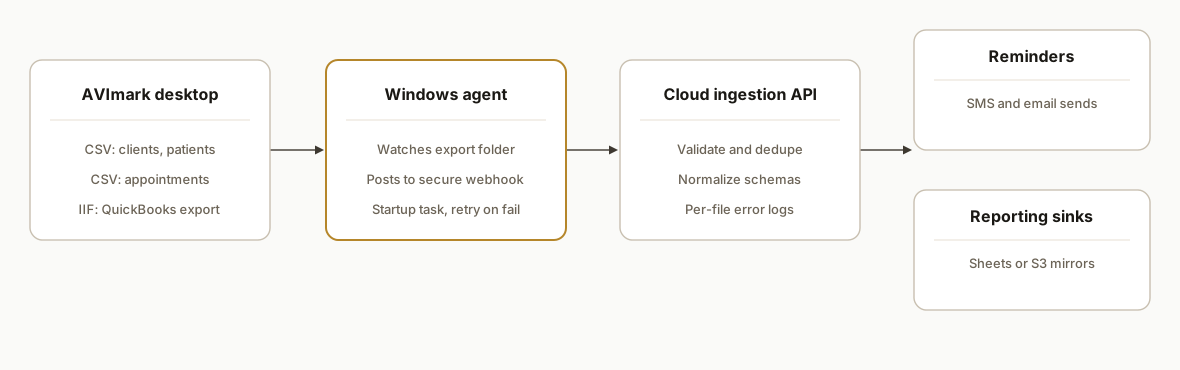
We keep AVImark as the source of truth and add a thin bridge: scheduled CSV and IIF exports on the clinic PC. A lightweight Windows agent detects new files and uploads them to a secure endpoint. The cloud process validates, dedupes, and routes: reminders out via SMS and email, and normalized datasets to Sheets or S3 for reporting. QuickBooks IIF stays file-based and imports on the accounting workstation.
- AVImark desktop exports: AVImark supports CSV exports for client and patient workflows. Clinics also export .IIF for QuickBooks Desktop. We standardized filenames and a nightly cadence.
- Local Windows agent: A PowerShell watcher or scheduled task posts new CSVs to a signed webhook. No polling in the cloud is required and no desktop UI automation is needed.
- Cloud ingestion API: Receives CSV, parses rows, enforces schemas, and dedupes patients and appointments. Failures are logged per file, not per batch, so one bad row never drops a night.
- Reminders engine: Templates SMS and email by rule: recall due dates, vaccines, post-op follow-ups. Sends through your messaging provider.
- Reporting mirrors: Pushes cleaned tables to Google Sheets or S3 for dashboards and ad-hoc analysis. IIF files are mirrored to an import folder for the accounting machine.
Step-by-step: how to build it
1) Standardize AVImark CSV exports and paths
Define consistent nightly exports for Clients, Patients, and Appointments to a single folder like C:\AVImark\Exports. Use stable filenames with a date stamp so the agent can pick them up predictably.
:: C:\Scripts\avimark-export-post.bat
:: 1) Ensure export folder exists
if not exist "C:\AVImark\Exports" mkdir "C:\AVImark\Exports"
:: 2) Copy last-run CSVs to date-stamped filenames (example clinic flow)
copy /Y "C:\AVImark\Exports\Clients.csv" "C:\AVImark\Exports\Clients_%DATE:/=-%.csv"
copy /Y "C:\AVImark\Exports\Patients.csv" "C:\AVImark\Exports\Patients_%DATE:/=-%.csv"
copy /Y "C:\AVImark\Exports\Appointments.csv" "C:\AVImark\Exports\Appointments_%DATE:/=-%.csv"
Key gotcha: keep headers and column order stable. Downstream parsers should not depend on visible names alone. Use position and a schema map.
2) Schedule the nightly job with Windows Task Scheduler
Create a daily trigger after close of business. We used schtasks so the clinic IT can re-create it quickly after a machine swap.
schtasks /Create /TN "AVImark Nightly Export" /TR "C:\Scripts\avimark-export-post.bat" ^
  /SC DAILY /ST 21:30 /F /RL HIGHEST /RU "SYSTEM"
Run under a user with read access to the export folder. Set Start when available so missed runs catch up after sleep.
3) Post new CSVs from Windows to a secure webhook
A tiny PowerShell watcher posts each new CSV to your ingestion API with a token. This avoids polling and minimizes state on the PC.
# C:\Scripts\watch-and-post.ps1
param(
  [string]$Path = 'C:\AVImark\Exports',
  [string]$Filter = '*.csv',
  [string]$Webhook = 'https://api.example.com/ingest/avimark',
  [string]$Token = 'Bearer YOUR-SIGNED-TOKEN'
)
$fsw = New-Object IO.FileSystemWatcher -Property @{ Path=$Path; Filter=$Filter; EnableRaisingEvents=$true }
Register-ObjectEvent $fsw Created -Action {
  Start-Sleep -Milliseconds 600  # allow file to finish writing
  $file = $Event.SourceEventArgs.FullPath
  try {
    Invoke-RestMethod -Uri $Webhook -Method Post -InFile $file -ContentType 'text/csv' -Headers @{ Authorization=$Token }
    Write-Host "Posted: $file"
  } catch {
    Write-Warning "Post failed: $file $_"
  }
} | Out-Null
Write-Host "Watching $Path for $Filter. Ctrl+C to exit."
while ($true) { Start-Sleep -Seconds 2 }
Wrap this in a Scheduled Task at system startup so it survives reboots.
4) Build the ingestion API and schema validation
We run a simple Express endpoint that parses CSV and validates required columns before routing to reminders and reporting sinks.
// server/ingest.js
import express from 'express';
import { parse } from 'csv-parse/sync';
const app = express();
app.use(express.text({ type: 'text/csv', limit: '20mb' }));

const REQ = { Clients: ['ClientID','FirstName','LastName','Phone','Email'],
              Patients: ['PatientID','ClientID','Species','Name','DOB'],
              Appointments: ['ApptID','PatientID','Date','Time','Reason'] };

app.post('/ingest/avimark', (req, res) => {
  const token = req.headers.authorization || '';
  if (!token.startsWith('Bearer ')) return res.status(401).send('bad token');
  const text = req.body || '';
  const rows = parse(text, { columns: true, skip_empty_lines: true });
  // naive file-type inference by header intersection
  const headers = Object.keys(rows[0] || {});
  const kind = Object.entries(REQ).find(([_, reqCols]) => reqCols.every(c => headers.includes(c)) )?.[0];
  if (!kind) return res.status(400).send('unknown schema');
  // TODO: upsert to your DB, dedupe by natural keys
  res.json({ ok: true, kind, rows: rows.length });
});

app.listen(8080, () => console.log('listening on 8080'));
Guardrails: accept only text/csv, enforce auth, and log per-row validation errors without dropping the file.
5) Generate and send SMS and email reminders
We template messages by recall rules and send via your provider. Here is a Twilio example.
// server/reminders.js
import twilio from 'twilio';
const client = twilio(process.env.TW_SID, process.env.TW_TOKEN);

export async function sendRecall({ phone, patient, due, clinic }) {
  if (!/^\+?\d{10,15}$/.test(phone)) return { skipped: true };
  const body = `Reminder: ${patient} is due on ${due}. Reply C to confirm or R to reschedule. ${clinic}`;
  return client.messages.create({ to: phone, from: process.env.TW_FROM, body });
}
Start with SMS for speed, pair with email for longer notices, and gate same-day reminders to business hours.
6) Mirror cleaned data to reporting sinks
Many clinics want a fresh sheet for morning huddles. Others prefer S3 for BI. Here is a minimal S3 write.
// server/reporting.js
import { S3Client, PutObjectCommand } from '@aws-sdk/client-s3';
const s3 = new S3Client({ region: 'us-east-1' });

export async function putCsv(key, csvBuffer) {
  await s3.send(new PutObjectCommand({ Bucket: process.env.BUCKET, Key: key, Body: csvBuffer, ContentType: 'text/csv' }));
}
Name keys by date so downstream tools can partition by day.
7) Stage QuickBooks Desktop imports from IIF
AVImark exports IIF files for QuickBooks Desktop. Keep this file-based. Mirror IIFs to an import queue on the accounting PC.
# C:\Scripts\mirror-iif.ps1
$src = 'C:\AVImark\Exports\*.iif'
$dst = '\\ACCOUNTING-PC\QB_Import_Queue'
Get-ChildItem $src | ForEach-Object { Copy-Item $_.FullName -Destination $dst -Force }
IIF is not real time. Train accounting to import once per day after a quick spot check.
Where it gets complicated
- Closed, on-prem system: AVImark's supported path to API access runs through the Covetrus Connect partner program. Public developer docs, endpoints, and auth details are not published. Our bridge avoids unsupported ad-hoc API calls.
- No native Zapier or Make app: There is no official Zapier or Make app for AVImark. We use generic webhooks for downstream steps and keep the AVImark side file-based.
- Windows automation realities: File exports often rely on Windows Task Scheduler. Missed triggers after sleep require Start when available and battery start flags so jobs catch up cleanly.
- QuickBooks Desktop is batch by design: IIF imports are not a sync. Keep a human approval gate and a dated archive for rollbacks.
- Appointment deletes affect partner syncs: As other partner docs note, deleting reservations in AVImark can break appointment syncs. We treat deletes as tombstones in our reporting rather than hard deletes.
What this actually changes
For a small animal clinic, this removed nightly manual work: no more exporting and emailing files, no more hand-typing reminders, and no more brittle spreadsheets. Reminders go out on time, and operations gets one clean data drop each morning.
One external anchor for scale: an estimated 66 percent of U.S. households own a pet, which is why reliable recall reminders compound value across a clinic's base. Source: American Pet Products Association, Pet Industry Market Size and Ownership Statistics.
Frequently asked questions
Does AVImark have an official API?
AVImark integrations are brokered through the Covetrus Connect ecosystem. Public developer documentation, base URLs, and auth details for AVImark are not published. Our production approach uses supported file exports on the clinic PC and a secure webhook to bridge the gap.
How do you automate reminders if there is no Zapier or Make app?
We keep the AVImark side simple: CSV exports written by AVImark. A tiny Windows agent posts those files to a cloud endpoint where we parse, dedupe, and trigger SMS and email through standard providers. The downstream automations can use Make or similar. AVImark itself stays file-based.
Can this run in real time?
AVImark is a desktop system. The reliable pattern is scheduled or watched file drops, not streaming webhooks. You can run exports multiple times a day for near-real-time recall lists, but we recommend nightly to reduce load and noise.
What about QuickBooks integration?
AVImark exports .IIF files that QuickBooks Desktop can import. It is not a live sync. We mirror IIFs to an import queue and keep a human approval step. For cloud accounting, we still land on a file-based handoff because AVImark does not expose public API sync for finances.
What does this cost to operate monthly?
The Windows agent and file handling have negligible cost. You pay messaging costs to your SMS and email providers, and hosting for the small API and reporting sink. Most clinics see low monthly infrastructure spend because the heavy lifting happens on the clinic PC.
Do staff need to change their workflow?
Not much. We standardize where AVImark saves CSV and IIF files and ensure the clinic PC stays on for scheduled jobs. Reminders and reports arrive automatically. If staff previously ran exports by hand, that step goes away.
If you run AVImark and want recalls and clean data without switching systems, we have shipped this exact bridge. See our related piece on ezyVet API automation for contrast, then map the right path for your clinic. We build and maintain the bridge end-to-end. Read more about our CRM automation services at /services#crm-automation, see a related veterinary post at /blog/ezyvet-api-integration-crm-recall, and book a quick scoping call at /book.
Want us to build this for you?
Nine questions, about 90 seconds. You see the hours it is costing you, then pick a time. No pitch.
Get your free assessment