
We built a proof-of-concept demo for Better Benefits USA (Wellness for the Workforce) that turns unbelievable six-figure savings into credible math: a percent-first ROI one-pager that itemizes savings across three levers, computes results with deterministic JavaScript, and uses a small AI narrative that never exposes raw digits. This page helped frame conversations and convert referral traffic into meetings. In this post we show exactly what shipped and how to productionize it.
Definition: an ROI one-pager generator is a self-serve page that takes a few inputs, computes savings with deterministic formulas, and outputs a branded, single-screen summary with a meeting CTA.
Gartner reports B2B buyers spend only about 17 percent of their time meeting with suppliers, which raises the bar for clear, self-serve evaluation content: a simple ROI one-pager pulls its weight before a rep joins. Source: https://www.gartner.com/en/insights/sales/insight/b2b-buying-journey
The problem it solves
A benefits seller who leads with a giant dollar claim often triggers disbelief. The early conversation stalls because the number feels like marketing instead of math. The Better Benefits USA team shared that switching to percentage savings in their framing improved pickup qualitatively. Our demo made that insight concrete: show percent first, then show how the dollars derive from three specific levers.
| Manual first conversation | Automated one-pager demo |
|---|---|
| Lead with a big dollar headline that sounds too good to be true. | Lead with a percent-of-current-spend anchor. Dollars are derived and visible. |
| Hand-wavy breakdowns of where savings come from. | Itemized levers: payroll tax, claims, plan restructuring. |
| Unclear assumptions and inconsistent napkin math. | Deterministic formulas in code with labeled inputs and intermediate outputs. |
| Long slide decks and multi-thread emails before a meeting. | One page with a clear Calendly button. |
How the automation works
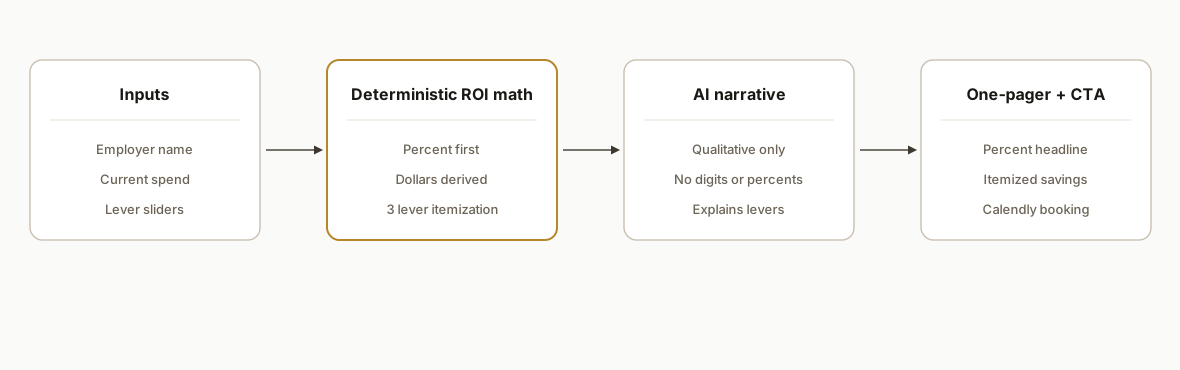
The demo is a single Next.js page on Vercel with a small math library and a narrative generator. Inputs are employer name and current benefits spend. Outputs are a percent-savings headline, derived dollar savings, and an itemized breakdown across three levers. We use a compact AI step only for narrative copy, and we keep digits out of that narrative so the model cannot drift from the math.
- Deterministic ROI engine: a tiny TypeScript module computes percent-first results and the three lever contributions. No randomness, no model in the loop.
- AI narrative helper: a gpt-5-mini call produces a short, qualitative paragraph. It references levers and impact but never repeats numbers.
- Single-page Next.js app: inputs on the left, results on the right, and a Calendly link for immediate scheduling.
- Safety and scope: demo authentication is off by design for easy review; the OpenAI key is set in the Vercel project environment. The production step would put this behind the client's referral link flow and a payment gate before connecting to live data.
Step-by-step: how to build it
1) Model the percent-first math in a dedicated module
Keep the math in one file and make it deterministic. Accept a currentSpend number and a few lever ratios. Return a percent-first headline and itemized dollars derived from that percent.
// lib/roi.ts
export type RoiInputs = {
  currentSpend: number;         // annual benefits spend
  payrollTaxRate: number;       // fraction of eligible payroll improvement
  claimsReductionRate: number;  // expected claims reduction fraction
  restructuringRate: number;    // plan design efficiency fraction
};

export type RoiResult = {
  percentSavings: number;   // e.g., 0.11 for 11%
  totalDollars: number;     // derived: currentSpend * percentSavings
  levers: {
    payrollTax: number;
    claims: number;
    restructuring: number;
  };
};

export function computeROI(i: RoiInputs): RoiResult {
  const clamp = (v: number) => Math.max(0, Math.min(1, v));
  const payroll = i.currentSpend * clamp(i.payrollTaxRate);
  const claims = i.currentSpend * clamp(i.claimsReductionRate);
  const restructuring = i.currentSpend * clamp(i.restructuringRate);
  const total = payroll + claims + restructuring;
  const percent = i.currentSpend > 0 ? total / i.currentSpend : 0;
  return {
    percentSavings: Number(percent.toFixed(4)),
    totalDollars: Math.round(total),
    levers: {
      payrollTax: Math.round(payroll),
      claims: Math.round(claims),
      restructuring: Math.round(restructuring)
    }
  };
}
Key gotcha: always clamp lever inputs between 0 and 1 to avoid accidental negative or 100 percent-plus results.
2) Render percent-first, then derive dollars
Order matters. Lead the UI with the percent headline. Then show the derived dollar savings and the three levers beneath it.
// components/Headline.tsx
import { computeROI } from "../lib/roi";

export function Headline({ currentSpend, rates }) {
  const r = computeROI({ currentSpend, ...rates });
  const pct = (r.percentSavings * 100).toFixed(1) + "%";
  return (
    <div>
      <h2>Savings estimate: {pct}</h2>
      <p>Equivalent dollars: ${r.totalDollars.toLocaleString()}</p>
    </div>
  );
}
Key gotcha: do not read raw digits from any AI output. The UI must only display numbers produced by the deterministic math.
3) Generate a safe AI narrative without digits
Use the model only to explain the levers and context. Never let the model restate the numeric outputs.
// pages/api/narrative.ts
import type { NextApiRequest, NextApiResponse } from "next";

export default async function handler(req: NextApiRequest, res: NextApiResponse) {
  const { employer, levers } = req.body; // pass qualitative lever names only
  const prompt = [
    {
      role: "system",
      content: "Write a concise, professional paragraph for a benefits ROI one-pager. Do not include any numbers or percentages. Mention the levers qualitatively and why they matter."
    },
    {
      role: "user",
      content: `Employer: ${employer}. Levers: ${levers.join(", ")}.`
    }
  ];

  // Pseudocode: call your LLM provider with the prompt
  const text = await runModel({ model: "gpt-5-mini", messages: prompt });
  res.status(200).json({ narrative: text });
}
Key gotcha: add a unit test that fails if the narrative contains digits, commas in a currency shape, or percent signs.
4) Compose a single-page layout with a Calendly CTA
Do not bury the CTA. The whole point of the page is to make it easy to book a conversation once the math feels credible.
// app/page.tsx
export default function Page() {
  // left: inputs; right: results + narrative; bottom: Calendly CTA
  return (
    <main className="grid grid-cols-1 md:grid-cols-2 gap-8">
      <section>{/* employer + spend + lever sliders */}</section>
      <section>{/* Headline + lever breakdown + Narrative */}</section>
      <div className="col-span-full text-center pt-6">
        <a className="btn btn-primary" href="https://calendly.com/yourlink">Book a 20 minute walkthrough</a>
      </div>
    </main>
  );
}
Key gotcha: keep the inputs small. Employer name, current spend, and a few clearly labeled lever sliders are enough.
5) Deploy as a demo on Vercel, then plan the production gates
For Better Benefits USA, the demo ran public on Vercel for easy review. The OpenAI key lived in Vercel environment settings. Moving to production requires two additions: integrate the generator into the real referral list flow and add a payment gate before any connection to live data.
# basic deploy flow
vercel env pull .env.local
vercel --prod
Key gotcha: do not send the demo link to prospects without confirming you are comfortable with public access. Authentication was intentionally off for frictionless internal review.
6) Write guardrails and tests
- A unit test for the math library to confirm clamped inputs and correct percent math.
- A narrative test that fails on digits and percent signs.
- A simple snapshot of the UI to protect the percent-first layout.
// tests/narrative.spec.ts
it("blocks digits and percent signs", () => {
  const bad = "We saved 12% or $120,000 by...";
  expect(/\d/.test(bad)).toBe(true);
});
Key gotcha: if you ever expand levers or change their definitions, update the explanatory copy and slider labels together to avoid mixed messages.
Where it gets complicated
- Open demo keys: the demo used a project-level OpenAI key. Before production, rotate keys and move to client-owned credentials.
- Public-by-design demo: authentication was intentionally off to reduce review friction. Add auth or referral gating before exposing it widely.
- Narrative containment: never allow the model to inject numbers. Keep digits out of the prompt and add output checks.
- Lever alignment: confirm definitions with the benefits team so the math and narrative describe exactly the same levers.
- Payment and referral wiring: in production, wire the page to the real referral list and a payment step to qualify traffic before showing estimates based on client data.
What this actually changes
For a benefits-focused nonprofit, a percent-first ROI page reframes savings as arithmetic instead of hype. The client reported that moving from a fixed-dollar savings anchor to a percentage framing improved pickup, and our demo makes that move concrete by leading with a percent, then deriving dollars and itemizing levers. Structurally, this reduces early-call friction and channels interested prospects straight to a Calendly link, which matters when buyers have little time for supplier meetings. Source: Gartner's 17 percent supplier-time statistic above.
Frequently asked questions
Was this a live deployment or a demo?
A proof-of-concept demo. I deploy the demo on Vercel with authentication off for easy review. The production path is straightforward: wire to the real referral list, add a payment gate, then connect to production data with client-owned credentials.
How do you keep the math trustworthy?
All numbers come from a deterministic math module. The AI assists only with qualitative narrative and is blocked from emitting digits or percents. We add tests to enforce that separation so the copy cannot drift from the math.
What are the three levers in the itemization?
Payroll tax, claims, and plan restructuring. The exact definitions are agreed with the benefits team, then encoded as clamped rates in the math module so the page reflects the same story every time.
What does it cost to build something similar?
A single-page calculator like this is a compact engagement. Cost depends on branding, lever modeling, and whether we add referral gating and payment. The demo footprint was small: one page, one math module, and a short narrative endpoint.
Can a non-technical team run it?
Yes. Inputs are simple and the page is self-serve. Engineering is needed for the initial build, branding, and deployment, plus the production wiring to referrals and payments. Day-to-day use is point-and-click.
How do you prevent abuse of a public demo?
We keep demos intentionally scope-limited, rotate keys, and avoid any connection to live data. Production adds auth or a referral gate, client-owned keys, and basic rate limits.
If you want a percent-first ROI one-pager to convert more of your inbound or referral traffic, we can build and brand it for your offer. See how we structured a two-tab ROI and onboarding engine in our related post on a partner ROI dashboard, then book a 20 minute call. Links: our custom AI integration services at /services#custom-ai-integration, the partner ROI + onboarding write-up at /blog/partner-roi-onboarding-dashboard-nextjs, and /book.
Want us to build this for you?
Nine questions, about 90 seconds. You see the hours it is costing you, then pick a time. No pitch.
Get your free assessment