
Business automation is worth it for a small business when a single workflow pays back the build within one quarter and then continues to return time or cash every month. The practical test: a 90-day payback target, clear hourly savings tied to a priced role, and a shadow-mode trial that proves accuracy before go-live.
Business automation: software and AI that take over repeatable work you would otherwise pay a person to do, with guardrails so the results are reliable.
We built and shipped automations across HVAC, real estate, e-commerce, nonprofit, and financial services. What decided whether it was worth it was not the model or the tool. It was the math and the way we proved it before turning it on. This guide answers the buyer query directly: is automation worth the cost for a small business, how to set ROI thresholds, and when an AI automation agency for small business makes sense.
Stat to frame the ceiling: McKinsey estimates about 60 percent of occupations have at least 30 percent of activities that could be automated (source: https://www.mckinsey.com/featured-insights/mckinsey-global-institute/a-future-that-works-automation-employment-and-productivity). That is your opportunity space, not your to-do list.
The problem it solves
Small teams spend real hours every week on repeatables: exporting CSVs, retyping into the CRM, chasing invoices, drafting routine emails, and checking five tabs to answer the same questions. In one SCORE study, small business owners reported spending up to 16 hours per week on administrative tasks, cutting into time for sales and delivery (source: https://www.score.org/resource/infographic-small-business-owners-time-managing-business).
When those tasks are not automated, a few things happen: speed-to-lead slips, reporting lags, and customer follow-up quality depends on who had time that day. The work is not hard. It is relentless and error-prone.
| Manual process | Automated process |
|---|---|
| Export a report weekly. Filter, copy into Sheets. Email a summary. | Scheduled job pulls data, summarizes, and emails to the right list every Monday. |
| Copy new web form leads into CRM. Send a first-reply template. | Webhook adds lead to CRM in seconds. On-brand first reply sends in under 2 minutes. |
| Check overdue invoices. Paste balances into Gmail drafts. | Nightly job builds a dunning queue. Sequenced reminders send with correct amounts. |
| Read meeting transcripts. Draft follow-ups. | Transcript arrives. Draft follow-up and SOW doc are ready in your Docs folder. |
Lead speed matters: companies that attempted contact within an hour of receiving an inquiry were nearly seven times as likely to qualify the lead as those that tried an hour later or more (source: Harvard Business Review, https://hbr.org/2011/03/the-short-life-of-online-sales-leads). Automation keeps you inside that window without adding headcount.
What automating one manual process is worth
Move the sliders to your own numbers. The defaults are only an example business, not client data.
Revenue the freed hours could earn each year
$41,600
8 hrs a week × 52 × $100
- Cost of errors and rework each year
- $6,000
- $500 a month × 12
- Staff cost of doing it by hand each year
- $14,560
- 8 hrs a week × $35/hr × 52 weeks
- Hours handed to the system each month
- 35 hrs
- 8 hrs a week × 52 ÷ 12
How the automation works
We scope one workflow, connect it to the systems you already use, run it in shadow mode for 2 to 4 weeks, then go live with guardrails and a swappable AI layer. The plumbing is boring by design: webhooks, scheduled jobs, a state ledger to prevent duplicates, and a comparison log so we can prove value before it sends anything live.
- Trigger or schedule: Events from your tools or a time-based trigger start the run. We prefer native webhooks where available. When a platform has no API, we schedule a safe export or a browser session.
- Fetch and normalize: We read from the source system and normalize fields. If a vendor blocks filters, we adapt with fan-out logic or a different report path.
- Decision and draft: A deterministic engine handles totals and dates. An AI step writes human-facing text only where it adds value.
- Guardrails: Unique keys prevent duplicates. Caps limit daily sends. Error handling logs partial success instead of failing the whole run.
- Delivery and writeback: We send the email, update the CRM, or file the document. A ledger records what happened for audits and reruns.
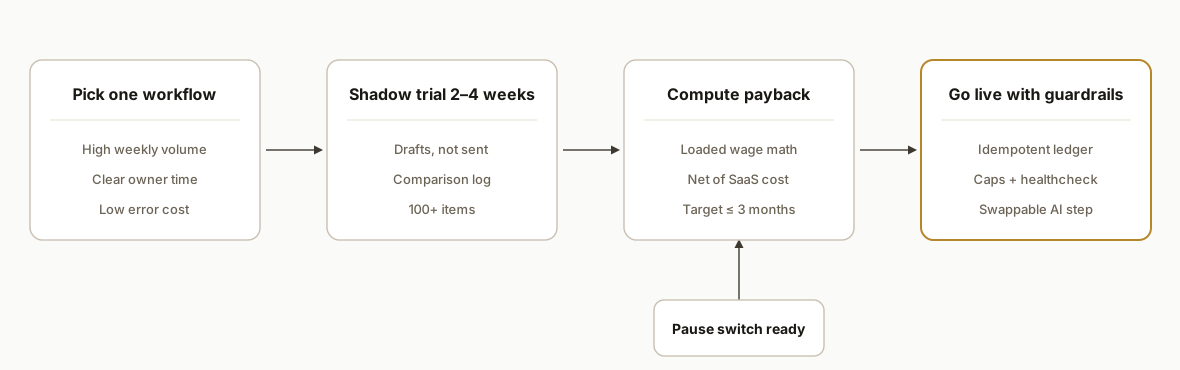
Step-by-step: how to build it
1) Set a 90-day payback target and write the math down
Pick one workflow and insist on a quarter-or-faster payback. Write the math in code so there is no ambiguity.
// Simple payback model
function paybackMonths({ buildCost, monthlyMinutesSaved, wagePerHour, burdenRate = 0.3, SaaS = 0 }) {
  const hourlyLoaded = wagePerHour * (1 + burdenRate); // BLS shows benefits are roughly 30% of wages
  const monthlySavings = (monthlyMinutesSaved / 60) * hourlyLoaded;
  const monthlyNet = monthlySavings - SaaS;
  return monthlyNet > 0 ? +(buildCost / monthlyNet).toFixed(2) : Infinity;
}

// Example: $4,000 build, 600 min/mo saved, $28/hr wage, 30% burden, $60 SaaS
console.log(paybackMonths({ buildCost: 4000, monthlyMinutesSaved: 600, wagePerHour: 28, burdenRate: 0.3, SaaS: 60 }));
Employer costs for employee compensation in the US show benefits add roughly 30 percent to wages on average, so use a loaded rate, not just base pay (source: US Bureau of Labor Statistics, https://www.bls.gov/news.release/ecec.nr0.htm).
2) Baseline today's manual time with a tiny, boring logger
Do not guess minutes. Log them for two weeks.
/** Google Apps Script: log how long a task takes */
function logTask(task, minutes) {
  const sh = SpreadsheetApp.getActive().getSheetByName('TimeLog');
  sh.appendRow([new Date(), Session.getActiveUser().getEmail(), task, minutes]);
}

// Example usage in a menu-driven helper
function onOpen() {
  SpreadsheetApp.getUi().createMenu('Time Logger')
    .addItem('Log 15m: Dunning', 'log15Dunning')
    .addToUi();
}
function log15Dunning(){ logTask('Dunning Email Prep', 15); }
Two weeks of real logs beat any estimate. We have caught 2x gaps between perceived time and measured time more than once.
3) Run a shadow-mode trial with a comparison log
Shadow mode is where we prove accuracy. The system runs, drafts outputs, and logs what it would have done. You review before anything is sent.
{
  "id": "run_2026_09_07T09_00",
  "workflow": "lead_response",
  "input": {"lead_id": 12345, "source": "website"},
  "draft": {"subject": "Welcome to ACME", "body": "Hi Sarah..."},
  "human_decision": "approved|edited|rejected",
  "reason": "approved as-is",
  "latency_ms": 8421
}
Keep the trial long enough to catch edge cases. We target 2 to 4 weeks or at least 100 items.
4) Compare automation to hiring with loaded costs and cadence
Put the choice on one line: add a part-time coordinator or automate. Compute loaded cost clearly.
# Loaded cost comparison
from math import inf

def monthly_loaded_cost(hours_per_week, wage, burden=0.30):
    return hours_per_week * 4.33 * wage * (1 + burden)

def compare(build_cost, saas, hours_per_week_saved, wage):
    loaded = monthly_loaded_cost(hours_per_week_saved, wage)
    net = loaded - saas
    months = (build_cost / net) if net > 0 else inf
    return {"monthly_loaded": round(loaded,2), "monthly_net": round(net,2), "payback_months": round(months,2)}

print(compare(4000, 60, 2.5, 28))  # 2.5 hours/week recovered
When hours are lumpy, look for triggers with revenue impact. Speed-to-lead pays back beyond labor savings because it lifts qualification odds within the first hour window (HBR: https://hbr.org/2011/03/the-short-life-of-online-sales-leads).
5) Lock requirements and pick build vs buy vs agency
Write a one-page spec and decide who builds it. If you shortlist an AI automation agency for small business, ask for a shadow-mode plan, duplicate prevention, and a written rollback.
requirements:
  workflow: "Dunning emails from accounting exports"
  sources: ["Stripe", "QuickBooks CSV"]
  outputs: ["Gmail send", "CRM note"]
  guardrails:
    - "Unique key: customer_id+invoice_id"
    - "Daily send cap: 50"
    - "Shadow mode: 14 days"
  rollbacks:
    - "Pause switch in dashboard"
    - "Revert tag in CRM"
vendor_selection:
  must_have:
    - "Shadow-mode trial"
    - "State ledger for idempotency"
    - "On-call window for first 2 weeks"
We have taken over mid-build projects that lacked a ledger or rollback. Those are what trip owners up, not the model.
6) Add duplicate checks, caps, and alerts before go-live
Treat idempotency as a feature, not an afterthought.
-- Prevent duplicates
CREATE UNIQUE INDEX IF NOT EXISTS ux_dunning ON sent_events(customer_id, invoice_id);

-- Daily cap view
CREATE VIEW v_daily_caps AS
SELECT current_date AS run_date, COUNT(*) AS to_send
FROM dunning_queue WHERE status = 'READY';
On our own LinkedIn drip automation, we learned that scheduler quirks can silently skip runs. We fixed Windows Task Scheduler silent-skip by enabling StartWhenAvailable so missed triggers catch up on wake. Treat posting and sending automations the same way: schedule resiliency matters.
7) Turn it on with a healthcheck and a pause switch
Give yourself a single place to see green or red.
# Healthcheck example
curl -s https://your-app.vercel.app/api/health | jq
# { "ok": true, "db": "ok", "queue": 12, "last_run": "2026-09-07T09:00:00Z" }
A visible healthcheck and a pause button are what let owners sleep the first week live. We ship both by default.
Where it gets complicated
Vendor gaps and blind spots. Some platforms expose no API or ignore filters on key reports. We have shipped around this with scheduled exports, browser sessions, or switching to a filterable report when the ideal one is UI-only.
Shadow-mode sample size. Two days is not enough. Edge cases appear in week two. We aim for 2 to 4 weeks or a 100-item minimum so accuracy is proven, not assumed.
Per-seat creep. A cheap run cost can be drowned by per-seat SaaS fees if each teammate needs a license. Centralize runs through a service account when the vendor allows it.
Speed vs correctness trade. Anything that touches money must keep the deterministic math off the AI. We keep totals, dates, and keys in code and let AI write human-readable text only.
Data access and consent. In regulated domains we keep PII server-side and encrypt at rest. For healthcare and finance we have shipped redaction and hashed identifiers in logs from day one.
What this actually changes
In production we saw the same pattern across industries. After we shipped an HVAC dashboard cutover, the team stopped babysitting a Sheet and focused on service quality. In a gym pilot, a no-API booking system feeding the CRM clocked zero error runs during launch hours once the state ledger was in place. On a real estate dialer, false bookings vanished after we added a server-side guard and tightened the classifier prompt.
The structural change is not just cost. It is speed, consistency, and fewer dropped balls. Owners get time back to sell and operate. Staff stop copying between tabs. Customers hear from you faster. On lead response, being inside the first hour makes you nearly seven times more likely to qualify a lead compared to waiting longer (HBR study: https://hbr.org/2011/03/the-short-life-of-online-sales-leads). On labor math, using a loaded wage rate that includes roughly 30 percent benefits keeps decisions honest (BLS: https://www.bls.gov/news.release/ecec.nr0.htm).
When to hire an automation agency for small business: if you want shadow-mode proof, guardrails, and a go-live you can pause. We have been hired after DIY attempts to fix duplicate sends, missing rollbacks, and quiet scheduler failures. If you are comparing the best AI automation agencies for small business, ask them to show you a state ledger, a healthcheck, and a rollback plan on a past build. Those three artifacts separate durable builds from demos.
Frequently asked questions
Is business automation worth it for a small business?
Yes when a single workflow pays back in 90 days or less and the run cost stays below the loaded labor it replaces. Prove it with a 2 to 4 week shadow-mode trial. Use a loaded wage rate that includes roughly 30 percent benefits to keep the math honest (BLS).
How do I choose an AI automation agency for small business?
Ask for a shadow-mode plan, a state ledger for idempotency, duplicate and cap guardrails, and a rollback switch. Request one past build where they solved a no-API or filter-blind platform gap. Agencies that lead with proof and guardrails save you from noisy launches.
What payback target should I use?
A quarter. We set 90-day payback as the default. Shorter is better. If a workflow cannot clear that bar, pilot a smaller slice or pick a different target. Use a simple model: monthly minutes saved at a loaded wage minus SaaS cost, and divide the build cost by the net.
What does it cost monthly to run?
Most SMB automations cost less than a part-time coordinator. Platform run costs are often small compared to labor, but per-seat SaaS can creep. Centralize runs under a service account and track run counts in a ledger so you can forecast.
Can a non-technical owner run this after go-live?
Yes if the build includes a visible healthcheck, a pause switch, caps, and a comparison log. The setup work is real engineering. Day to day should be turning a toggle, reading a green check, and approving drafts when a gate is in place.
What is automation ROI beyond cost savings?
Speed, consistency, and conversion lift. Lead response inside the first hour correlates with much higher qualification odds (HBR). Consistent billing and follow-up reduce aging. Staff morale improves when copy-paste work disappears, which stabilizes delivery quality.
Which AI automation agency for small business is best?
There is no universal best. Fit is about proof, guardrails, and whether they have built around your tools. Use a short paid pilot with a shadow-mode success criterion and a rollback plan. That turns a vendor list into a working relationship.
We publish an automation small series on ROI and selection to keep these decisions grounded.
If you want a builder to run this playbook with you: see our workflow patterns under Workflow Automation, read our deeper take in Automation ROI Explained, and when you are ready to quantify your first workflow, book a 20-minute call.
Sources
Curious what this would actually save you?
Put real numbers to it. The ROI calculator estimates the hours and dollars an automation like this returns, in about a minute.
See your options