
We shipped a Jackrabbit Class to HubSpot integration that syncs families and students into the CRM, keeps waitlists visible, and runs re-enrollment follow-up automatically. It is built for kids activity studios that run on Jackrabbit but want HubSpot to drive segmented email and task workflows. This guide shows how it works and how we bridged the gaps.
Definition: a Jackrabbit Class to HubSpot integration is an automation that captures family and student records from Jackrabbit, normalizes them, and upserts them into a CRM for targeted sequences like waitlist alerts and re-enrollment reminders.
The problem it solves
Studios on Jackrabbit Class manage enrollments well, but CRM follow-up lives elsewhere. Without a bridge, staff export CSVs, import into HubSpot, chase duplicates, and manually email when a seat opens or a session ends.
Answer first: we used Jackrabbit's Zapier triggers and report exports as sources, a small relay service to normalize data, and CRM automations to handle waitlist and re-enrollment sequences reliably.
| Process | Manual in Jackrabbit + HubSpot | Automated with our integration |
|---|---|---|
| New family or student | Export CSV. Import to HubSpot. Fix duplicates. | Zapier trigger posts to relay. Relay upserts family, parents, and students to CRM. |
| Waitlist monitoring | Run Waitlist report, scan for openings, email by hand. | Scheduled export processed by script. CRM alerts parents and creates a task. |
| Re-enrollment | Calendar reminders, ad-hoc emails, easy to forget. | Date rules programmatically create CRM deals/tasks and trigger sequences. |
| Segmentation | Build lists by hand off reports. | Lists build themselves from synced properties and tags. |
| Error handling | Silent failures when imports go wrong. | Ledgered idempotency, retries, and a health check panel. |
How the automation works
We designed around what Jackrabbit exposes publicly today. There is an official Zapier app with triggers for students, families, classes, and enrollments. CSV and Excel exports exist for key reports like Waitlists. Native outbound webhooks and a general developer API are not confirmed, so the architecture treats Zapier and exports as first-class sources.
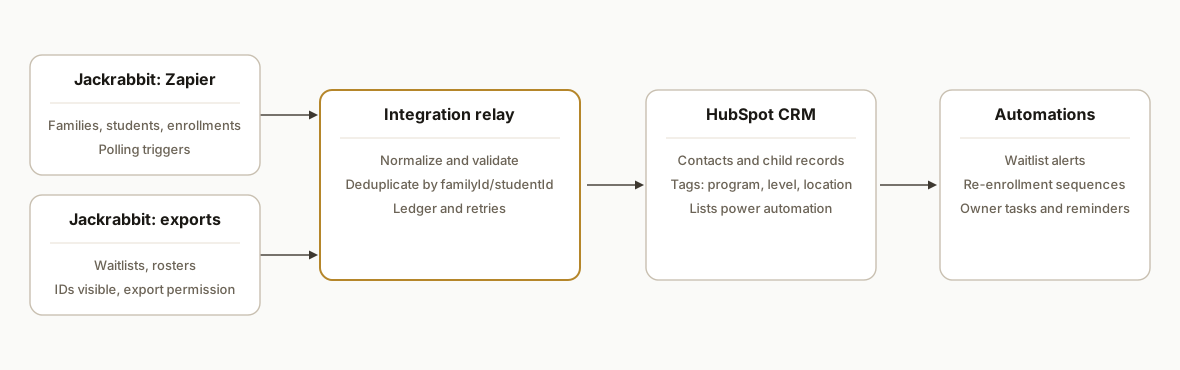
- Jackrabbit Class sources: Zapier triggers for new or updated families, students, and enrollments feed a webhook. Waitlist and seasonal rosters come from scheduled CSV exports.
- Integration relay: a lightweight service receives events, validates payloads, maps fields, dedupes by stable keys, and writes to the CRM. It also keeps a state ledger to prevent duplicates on retries.
- Staging store: a sheet or database holds raw rows and mappings so we can reprocess safely and audit changes.
- CRM automations: contacts and associated child records land in HubSpot-style objects with tags for program, level, location, waitlist status, and season. From there, lists drive re-enrollment and waitlist sequences.
Step-by-step: how to build it
1) Capture live changes from Jackrabbit via Zapier
Answer first: use Jackrabbit's Zapier triggers to catch new or updated families, students, and enrollments, then forward the payload to your relay.
{
  "zap": "jackrabbit.class.student.created",
  "student": {
    "studentId": "12345",
    "firstName": "Ava",
    "lastName": "Nguyen",
    "birthDate": "2017-09-21",
    "gender": "F",
    "status": "Active",
    "familyId": "9876",
    "level": "Gymnastics L2",
    "location": "Main Studio"
  },
  "family": {
    "familyId": "9876",
    "primaryEmail": "parent@example.com",
    "primaryPhone": "+1 555 0100",
    "address": "123 Spring St, City, ST"
  },
  "meta": { "firedAt": "2026-07-09T14:03:11Z" }
}
Key gotcha: Zapier triggers poll. Expect a delay on time-sensitive items like seat openings.
2) Build a relay endpoint to normalize and validate
Answer first: accept the event, validate required IDs, normalize fields, and stage raw payloads for audit before mapping to CRM fields.
// server/index.js
import express from "express";
import crypto from "crypto";
const app = express();
app.use(express.json());

app.post("/webhooks/jackrabbit", async (req, res) => {
  const evt = req.body;
  if (!evt?.student?.studentId || !evt?.family?.familyId) {
    return res.status(400).json({ ok: false, error: "missing ids" });
  }

  const record = {
    studentId: String(evt.student.studentId),
    familyId: String(evt.family.familyId),
    studentName: `${evt.student.firstName} ${evt.student.lastName}`.trim(),
    level: evt.student.level || null,
    location: evt.student.location || null,
    birthDate: evt.student.birthDate || null,
    parentEmail: evt.family.primaryEmail?.toLowerCase() || null,
    parentPhone: evt.family.primaryPhone || null,
    address: evt.family.address || null,
    ts: new Date(evt.meta?.firedAt || Date.now()).toISOString()
  };

  // write to staging for audit (pseudo function)
  await staging.insert("jackrabbit_events", record);
  res.json({ ok: true });
});

app.listen(3000);
Key gotcha: do not assume optional fields exist. Normalize emails and phone numbers consistently.
3) Upsert to the CRM with idempotency
Answer first: derive a stable dedupe key and upsert the parent contact first, then attach children and tags for segmentation. Keep a ledger so retries do not create duplicates.
// upsert.js
export async function syncToCrm(evt) {
  const familyKey = `jr_family:${evt.familyId}`;
  const studentKey = `jr_student:${evt.studentId}`;

  if (await ledger.seen(studentKey, evt.ts)) return; // idempotent

  const parent = {
    dedupeKey: familyKey,
    email: evt.parentEmail,
    phone: evt.parentPhone,
    properties: {
      address: evt.address,
      jackrabbit_family_id: evt.familyId,
      location: evt.location
    }
  };

  const child = {
    dedupeKey: studentKey,
    properties: {
      name: evt.studentName,
      jackrabbit_student_id: evt.studentId,
      level: evt.level,
      birth_date: evt.birthDate,
      family_ref: familyKey
    },
    labels: ["Student"],
    tags: [evt.level, evt.location].filter(Boolean)
  };

  await crm.upsertContact(parent); // CRM client encapsulates auth and routes
  await crm.upsertRelated(child);  // associate child to parent by family_ref
  await ledger.mark(studentKey, evt.ts);
}
Key gotcha: families can share emails across siblings. Do not dedupe on email alone. Use Jackrabbit IDs as the primary keys.
4) Pull and process waitlists from exports
Answer first: use the Waitlists report export to reconcile who is still waiting and who just moved. A simple script can read a CSV and post changes to the relay.
// scripts/process-waitlist.js
import fs from "fs";
import { parse } from "csv-parse/sync";
import fetch from "node-fetch";

const csv = fs.readFileSync(process.argv[2], "utf8");
const rows = parse(csv, { columns: true, skip_empty_lines: true });

for (const r of rows) {
  const payload = {
    type: "waitlist_row",
    className: r["Class"],
    level: r["Level"],
    location: r["Location"],
    studentName: r["Student"],
    studentId: r["Student ID"],
    familyId: r["Family ID"],
    parentEmail: r["Email"],
    status: "Waiting"
  };
  await fetch(process.env.RELAY_URL + "/ingest/waitlist", {
    method: "POST",
    headers: { "Content-Type": "application/json" },
    body: JSON.stringify(payload)
  });
}
Key gotcha: enable the Export Grid Information permission and show ID columns in the report before exporting, otherwise IDs will be missing.
5) Drive re-enrollment from dates and tags
Answer first: compute re-enrollment dates based on class end dates or terms, set CRM properties and tags, and let CRM workflows handle the touch pattern beyond 90 days.
// reenroll.js
export function computeReenrollAt(classEndIso, bufferDays = 21) {
  const end = new Date(classEndIso);
  end.setDate(end.getDate() - bufferDays);
  return end.toISOString();
}

export async function tagForReenroll(student) {
  const reenrollAt = computeReenrollAt(student.classEnd);
  await crm.setProperties(student.dedupeKey, {
    reenroll_at: reenrollAt,
    reenroll_season: student.season,
    program_level: student.level
  });
}
Key gotcha: Jackrabbit scheduled emails cap at 90 days. Longer sequences belong in the CRM with date rules and lists, not in Jackrabbit scheduling.
6) Add a ledger and a health check
Answer first: store processed keys and timestamps, and expose a status endpoint that shows last event time and queue depth.
-- migrations/001_ledger.sql
create table if not exists dedupe_ledger (
  key text primary key,
  last_seen_at timestamp not null
);

create table if not exists staging_events (
  id serial primary key,
  source text not null,
  payload jsonb not null,
  received_at timestamp default now()
);
// status.js
app.get("/status", async (_req, res) => {
const last = await db.oneOrNone(
"select max(received_at) as ts from staging_events"
);
const pending = await queues.count("crm_upserts");
res.json({ ok: true, lastEventAt: last?.ts, pending });
});Key gotcha: plan for retries. CRM writes and email sends occasionally fail. A visible queue prevents silent data loss.
Where it gets complicated
- No public developer API confirmed. We did not depend on undocumented endpoints. We used the official Zapier app and exports as our supported sources and treated them as the contract.
- Polling triggers introduce delay. A seat opening on a popular class can go fast. We mitigated by checking the Waitlists export on a schedule and tagging high demand programs for faster review.
- Export permissions and hidden columns. The Export Grid Information permission and visible ID columns are required. Without IDs, you cannot dedupe reliably in the CRM.
- Parent email reuse. Families often use one inbox for multiple children. We keyed records on Jackrabbit family and student IDs, not just email, and we associated siblings under the same family reference.
- Make.com connector gap. There is no native Jackrabbit app in Make at the time of writing. When we needed Make, we used its HTTP module to hit our relay rather than hoping for a direct connector.
What this actually changes
For a multi-location studio, this removed weekly CSV import chores and made re-enrollment a background job. New families and students showed up in the CRM the same day with correct tags for program, level, and location. Waitlist changes generated tasks and segmented emails without someone camping on the report. The structural win: date and tag logic lives in one place and sequences run beyond Jackrabbit's native 90-day email scheduling limit.
One external benchmark underscores why the speed matters: companies that attempted contact within an hour of receiving a query were nearly seven times as likely to qualify the lead compared with those who waited longer (Harvard Business Review, The Short Life of Online Sales Leads: https://hbr.org/2011/03/the-short-life-of-online-sales-leads). When a seat opens or a new trial inquires, faster automated touches convert more families without more staff hours.
Frequently asked questions
Does Jackrabbit Class have an official public API?
Jackrabbit promotes an official Zapier app with triggers for families, students, classes, and enrollments. A general developer REST API with public docs is not confirmed. We designed around supported surfaces: Zapier triggers and report exports.
Can this sync in real time?
Zapier triggers poll, so there is inherent delay. For seat openings and waitlists, we combined Zapier with scheduled processing of the Waitlists export to tighten the loop. Critical alerts can still be surfaced quickly in the CRM once the event reaches the relay.
What permissions do we need in Jackrabbit to export?
You need the Export Grid Information permission enabled and the relevant ID columns visible in the report before exporting. Without those IDs, downstream deduplication and association in the CRM will not be reliable.
Will this work with Make.com instead of Zapier?
There is no native Jackrabbit app in Make at the time of writing. You can still use Make's HTTP module to call your relay endpoints. In our builds, Zapier handled Jackrabbit triggers and our relay provided a consistent interface for any orchestration tool.
How do you prevent duplicates in the CRM?
We use Jackrabbit family and student IDs as primary keys, maintain a dedupe ledger, and associate siblings under a family reference. Email alone is not sufficient because multiple children often share one parent address.
What does this cost to run monthly?
Ongoing cost depends on your Zap volume, storage, and CRM plan. The relay is lightweight and inexpensive to host. The primary investment is the one-time build so data is mapped correctly and sequences are configured once.
If you run Jackrabbit Class and want HubSpot-grade follow-up without weekly CSVs, we can stand this up and tailor the mapping to your programs and seasons. See our CRM automation services at /services#crm-automation, read how we handle Jackrabbit data in our related post on syncing to Google Sheets at /blog/jackrabbit-class-to-google-sheets-automation, and book a working session at /book.
Want us to build this for you?
Nine questions, about 90 seconds. You see the hours it is costing you, then pick a time. No pitch.
Get your free assessment