
We bridge Jackrabbit Class families, students, enrollments, and waitlists into GoHighLevel using Jackrabbit's Zapier triggers and periodic CSV exports where needed. In production it keeps re-enrollment and waitlist follow-up pipelines current so campaigns fire automatically.
Definition: a Jackrabbit Class to GoHighLevel integration is an automation that listens for Jackrabbit changes and syncs normalized contacts, tags, and pipeline moves into GoHighLevel for instant sequences and tasks.
The problem it solves
A front-desk team was manually exporting waitlists and enrollments from Jackrabbit, then retyping parents into GoHighLevel, tagging classes, and starting re-enrollment or nurture sequences. Edits and drops were missed. Waitlist movement took days. Campaigns routinely targeted stale families.
| Workflow | Manual approach | Automated approach |
|---|---|---|
| New enrollment | Staff exports report, copy-pastes into CRM weekly | Zapier Student Enrolled trigger posts into GoHighLevel instantly |
| Waitlist add/drop | Staff checks Wait Lists report and updates tags | Zapier waitlist triggers update tags, sequences adjust automatically |
| Family updates | Inconsistent edits, frequent duplicates | Deterministic dedupe key, idempotent upserts |
| Backfill/history | Multi-hour CSV merges and cleanup | Scripted CSV importer with a replay-safe ledger |
Note: Zapier's Jackrabbit triggers are polled, so near real-time depends on your Zapier plan. Zapier documents that Free plans poll every 15 minutes. Source: https://zapier.com/apps/jackrabbit-class/integrations
How the automation works
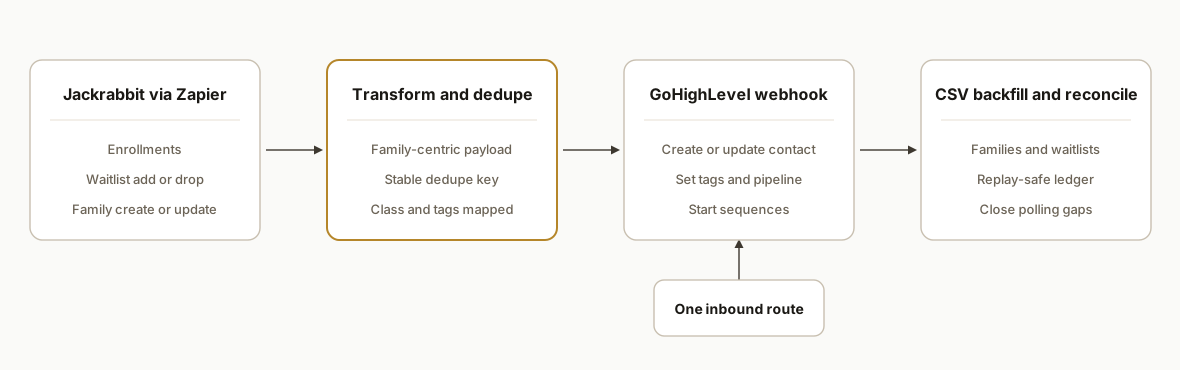
We run two paths in parallel: event-driven sync on new activity and a scheduled CSV backfill that reconciles anything a trigger missed. GoHighLevel receives one normalized contact per family plus per-student tags and pipeline updates for re-enrollment and waitlists.
- Jackrabbit via Zapier: We authorize Zapier in Jackrabbit Settings, then subscribe to Family Created or Updated, Student Created or Updated, Student Enrolled or Dropped, and Student Added to or Dropped from Waitlist. Zapier polling turns changes into events.
- Transform and dedupe: A small transform step builds a family-centric payload, computes a stable dedupe key, and maps students and classes into tags and custom fields.
- GoHighLevel inbound webhook: We trigger a GoHighLevel workflow by posting the normalized contact, tags, and class context to a single inbound webhook. The workflow handles tagging, pipeline stage, and sequences.
- CSV backfill and reconciliation: When historical windows or report limits matter, we export Families and Wait Lists as CSV and run a replay-safe importer that upserts into GoHighLevel and closes gaps.
Step-by-step: how to build it
1) Connect Jackrabbit to Zapier and pick the right triggers
Create a Zapier connection from Jackrabbit Settings: Zapier. Use these triggers: Family Created or Updated, Student Created or Updated, Student Enrolled or Dropped, Student Added to Waitlist or Dropped from Waitlist. Prefer targeted enrollment and waitlist triggers over broad updates so you do not miss edge fields Zapier does not watch.
Zap 1: Student Enrolled -> Transform -> GoHighLevel Webhook
Zap 2: Student Added to Waitlist -> Transform -> GoHighLevel Webhook
Zap 3: Student Dropped from Waitlist -> Transform -> GoHighLevel Webhook (remove tag)
Zap 4: Family Created/Updated -> Transform -> GoHighLevel Webhook
Key gotcha: Zapier polling is not instant. Plan for a short delay before GoHighLevel sequences start.
2) Normalize payloads and compute an idempotent dedupe key
We treat Family as the CRM contact and attach students and classes as tags and fields. The dedupe key ties the same family across multiple events so replays do not create duplicates.
// Zapier Code step (JavaScript)
const family = inputData.family;  // parent names, emails, phones
const student = inputData.student; // firstName, lastName, birthDate
const klass = inputData.class;     // name, id, season

function slug(s){ return String(s||"").trim().toLowerCase().replace(/\s+/g,'-'); }
const dedupeKey = [slug(family.primaryEmail||family.altEmail), student.id, klass?.id].filter(Boolean).join('|');

const tags = [];
if (klass?.name) tags.push(`class:${klass.name}`);
if (inputData.eventType === 'waitlist_add') tags.push('waitlist');
if (inputData.eventType === 'enrolled') tags.push('enrolled');

const payload = {
  dedupeKey,
  familyName: `${family.parent1First} ${family.parent1Last}`.trim(),
  email: family.primaryEmail || family.altEmail,
  phone: family.primaryPhone || family.altPhone,
  studentName: `${student.firstName} ${student.lastName}`.trim(),
  studentDob: student.birthDate,
  className: klass?.name,
  classId: klass?.id,
  season: klass?.season,
  tags
};
return payload;
Guardrail: empty emails are common. Route phone-only families into a separate path in GoHighLevel.
3) Post to a single GoHighLevel inbound webhook and let workflows route
We use one inbound webhook trigger in GoHighLevel and branch by tags inside the workflow. That keeps webhooks simple and routing flexible.
// Zapier Webhooks by Zapier step (POST JSON)
const url = process.env.GHL_WEBHOOK_URL; // Inbound webhook URL from GoHighLevel
const body = {
  contact: {
    email: bundle.cleanedRequest.email,
    name: bundle.cleanedRequest.familyName,
    phone: bundle.cleanedRequest.phone,
    customField_student_name: bundle.cleanedRequest.studentName,
    customField_student_dob: bundle.cleanedRequest.studentDob,
    customField_class_name: bundle.cleanedRequest.className,
    customField_class_id: bundle.cleanedRequest.classId,
    customField_season: bundle.cleanedRequest.season
  },
  tags: bundle.cleanedRequest.tags,
  dedupeKey: bundle.cleanedRequest.dedupeKey,
  eventType: inputData.eventType
};
fetch(url, { method: 'POST', headers: { 'Content-Type': 'application/json' }, body: JSON.stringify(body) });
Tip: store the dedupeKey in a custom field so later events can update the same record safely.
4) Build a replay-safe backfill from Jackrabbit CSV exports
For historical enrollments and long-running waitlists, export Families and Wait Lists to CSV from Jackrabbit and load through a script that respects the same dedupe key. This reconciles anything polling missed.
# backfill.py
import csv, hashlib, requests, os

GHL_URL = os.environ['GHL_WEBHOOK_URL']

def key(email, student_id, class_id):
    basis = '|'.join([ (email or '').strip().lower(), str(student_id or ''), str(class_id or '') ])
    return hashlib.sha1(basis.encode()).hexdigest()

with open('waitlists.csv') as f:
    for r in csv.DictReader(f):
        dedupe = key(r.get('Family Email'), r.get('Student ID'), r.get('Class ID'))
        payload = {
            'contact': {
                'email': r.get('Family Email'),
                'name': f"{r.get('Parent First')} {r.get('Parent Last')}",
                'phone': r.get('Phone')
            },
            'tags': ['waitlist', f"class:{r.get('Class Name')}"] ,
            'dedupeKey': dedupe,
            'eventType': 'waitlist_add'
        }
        requests.post(GHL_URL, json=payload, timeout=10)
Reminder: the Process Class Registrations report in Jackrabbit has a 60-day range limit, so plan multiple exports if you need deeper history.
5) Handle drops and edits cleanly without duplicates
When a student is dropped from a class or a waitlist, post an event that removes the tag and moves the pipeline back to nurture.
// Inside your GoHighLevel workflow
// If eventType == 'waitlist_drop': remove tag 'waitlist' and stop that sequence
// If eventType == 'dropped': remove 'enrolled' tag and route to win-back
We keep a lightweight ledger in a sheet or database keyed by dedupeKey and last event so replays are no-ops.
6) Protect speed-to-sequence against polling gaps
Because triggers are polled, we combine event zaps with a daily CSV reconciliation run. The zap carries parents into GoHighLevel within minutes, and the backfill ensures alignment by next morning. This pattern kept pipelines correct through busy registration spikes.
# Windows Task Scheduler or cron
0 2 * * * python backfill.py  # nightly reconciliation
7) Wire GoHighLevel for re-enrollment and waitlist moves
Create two core workflows: Re-enrollment and Waitlist. Trigger on inbound webhook or the presence of tags. Each sets the pipeline stage, assigns an owner, and starts SMS and email. Keep per-class messaging by keying templates on class tags.
Workflow: Re-enrollment
- Trigger: tag contains "enrolled" OR eventType == enrolled
- Actions: set Stage = Re-enrollment, add class tag, send SMS + email, create task if no reply

Workflow: Waitlist
- Trigger: tag contains "waitlist"
- Actions: set Stage = Waitlist, notify staff when a spot opens, remove tag on waitlist_drop
Where it gets complicated
- Polling, not instant: Zapier's Jackrabbit triggers are polled. Zapier documents that Free plans poll every 15 minutes, so plan for minutes of latency between Jackrabbit and GoHighLevel. Source: https://zapier.com/apps/jackrabbit-class/integrations
- Partial updated triggers: Jackrabbit's Updated triggers only fire on specific fields. We rely on enrollment and waitlist add or drop triggers for critical moves and use a nightly CSV reconciliation for safety.
- Report windowing: The Process Class Registrations report has a 60-day limit. For deeper history you must export in slices and replay through the importer.
- No native webhooks documented: We did not rely on native Jackrabbit webhooks. We used Zapier to observe changes and CSV exports for reconciliation. If a direct developer API exists, Jackrabbit does not publicly document it in the sources we reviewed.
- Make.com expectations: There is no native Jackrabbit app in Make that we could verify. You could use generic HTTP only if a direct API were available. We chose Zapier plus CSV because it is supported and predictable.
What this actually changes
For a kids activity studio, the live bridge removed manual exports and stopped sequences from running on stale families. Re-enrollment messages now start soon after an enrollment event, and waitlist updates flow into one CRM record without duplicates. The only timing constraint is Zapier polling, documented by Zapier as every 15 minutes on Free plans. Source: https://zapier.com/apps/jackrabbit-class/integrations
Frequently asked questions
Does Jackrabbit Class have an official API I can code against?
Public developer REST API docs were not available in the sources we reviewed. Jackrabbit does provide a Zapier integration that uses an API key created in Jackrabbit Settings to authorize Zapier. We integrated using Zapier triggers and CSV exports rather than a direct REST client.
Can I connect Jackrabbit to GoHighLevel without writing a custom app?
Yes. Jackrabbit offers a Zapier integration with triggers for families, students, enrollments, and waitlists, and Jackrabbit notes availability in the GoHighLevel marketplace. We post normalized events from Zapier into a GoHighLevel inbound webhook and let workflows route them.
How real-time is the sync?
Zapier's triggers are polled. Zapier documents that Free plans poll every 15 minutes, with faster polling on paid plans. We combine event zaps with a nightly CSV reconciliation to catch anything that polling timing might miss.
Can I use Make.com instead of Zapier?
We did not find a native Jackrabbit app in Make. You could theoretically use HTTP modules if a direct API existed, but we did not rely on that because public API details were not available in the sources we reviewed. Zapier plus CSV exports is the supported path we used.
How do you prevent duplicates in GoHighLevel?
We compute a stable dedupe key from family email plus student and class identifiers, store it in a custom field, and use a replay-safe ledger. Later events upsert the same contact and adjust tags and pipeline stages instead of creating new records.
What happens when a student drops from a class or waitlist?
Drop triggers in Zapier post an event that removes the corresponding tag in GoHighLevel and moves the contact to a nurture or win-back stage. Sequences stop cleanly and staff tasks are created when needed.
If you want this running without retyping data between systems, we have shipped this exact pattern: Zapier triggers from Jackrabbit, a resilient transform and dedupe layer, a GoHighLevel webhook, plus a nightly CSV reconciliation. See our broader CRM work under services, and for a related build see Jackrabbit Class to Google Sheets Automation. When you are ready to map your studio, book a 20-minute call.
Want us to build this for you?
Nine questions, about 90 seconds. You see the hours it is costing you, then pick a time. No pitch.
Get your free assessment