
We built a Jackrabbit Class integration that pushes live enrollment and waitlist events into the CRM, including Jackrabbit to Salesforce, keeps class data in sync via a JSON feed or scheduled CSV exports with support for Power BI reporting, and runs automated waitlist and re-enrollment sequences, including Klaviyo re-enrollment sync and Mailchimp family sync. It suits multi-location studios that need speed to lead, fewer manual moves, and consistent fills.
Definition: Jackrabbit Class automation is the set of integrations that capture class and student changes from Jackrabbit and trigger CRM actions: routing, follow-ups such as how to automate Jackrabbit no-show follow-up (SMS and email) and sync to your CRM and automating trial-class follow-ups, waitlist promotions, and re-enrollment sequences.
The problem it solves
Studios told us the same story: new inquiries lingered in inboxes, classes hit capacity but did not backfill when a seat opened, and re-enrollment reminders depended on staff memory. Jackrabbit lists classes well, but operators still re-keyed data into CRMs and emailed manually.
| Manual workflow | Automated workflow |
|---|---|
| Export waitlist and student CSVs weekly. Copy into the CRM. | Zapier triggers for Student Enrolled, Added to Waitlist, Class Updated post to a webhook that upserts the CRM in near real time. |
| Watch class openings and call parents. | When capacity crosses a threshold, the next waitlisted family is messaged and reserved with a hold timer. |
| Build re-enrollment emails each term. | Session-end dates drive a templated sequence with reminders and a last-chance nudge. |
| Fix duplicates across branches by hand. | Idempotent keys per student and class prevent duplicates across tenants. |
| Rebuild website class lists by copy paste. | Website embeds continue for display. A JSON feed or CSV jobs normalize class metadata for downstream automations. |
Answer first: if you run Jackrabbit Class today, you can use its Zapier app for event capture and either the requested JSON class feed or scheduled CSV exports for class metadata. That covers CRM sync, waitlist moves, re-enrollment, tuition and payment sync to QuickBooks Online, and automate Jackrabbit no-show follow-up (SMS and email) and sync to your CRM, plus trial-class follow-up automation without a fragile, unsupported scrape. For a deeper walkthrough of the triggers, see our Jackrabbit Zapier setup notes in /blog/jackrabbit-class-zapier-integration.
How does the Jackrabbit Class integration work?
We use three data paths: Zapier event triggers out of Jackrabbit for real-time moments, a JSON class feed by request where available or CSV exports otherwise for class metadata, and a small worker that normalizes and upserts to your CRM while driving automations.
- Zapier triggers from Jackrabbit: Jackrabbit's official Zapier app exposes events such as Student Enrolled, Student Added to Waitlist, and Class Updated. We subscribe those to a webhook the worker owns. Source: Zapier app listing. We also document trigger field mapping patterns here: /blog/jackrabbit-class-zapier-integration.
- Class metadata feed: Jackrabbit documents public class listing embeds for websites via OpeningsJS and OpeningsDirect URLs. These are for display, not full CRUD, and column order cannot be changed. A live JSON class feed can be requested, but Jackrabbit notes JSON support is not developer supported. We use the JSON feed when granted. Otherwise we schedule CSV exports of the relevant reports. If you prefer a staging layer or need Power BI dashboards, we have a simple approach in /blog/jackrabbit-class-to-google-sheets-automation.
- CRM upsert and automations: the worker dedupes on student email and phone, maps class identifiers, and tags the right pipeline or list, with optional revenue sync with QuickBooks. Waitlist logic promotes the next family when capacity opens. Re-enrollment sequences are scheduled off session-end dates. For a HubSpot example, see /blog/jackrabbit-class-to-hubspot-integration and for GoHighLevel see /blog/jackrabbit-class-to-gohighlevel-integration.
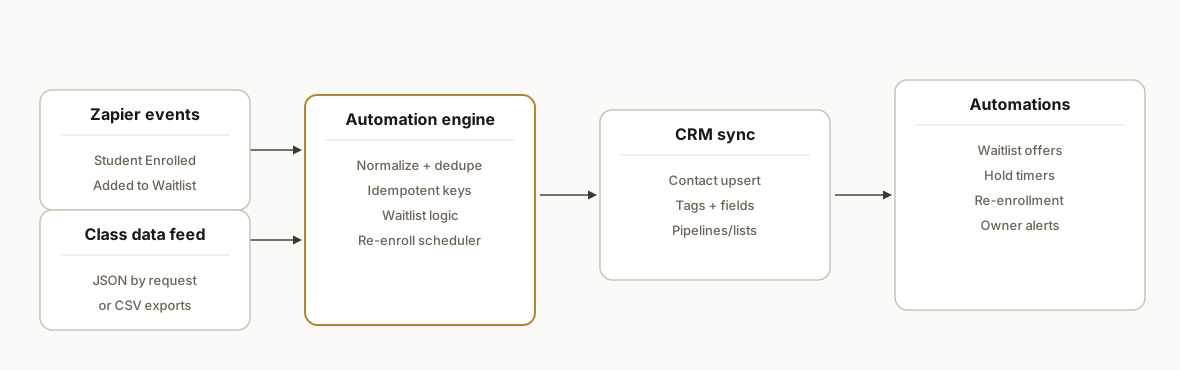
Jackrabbit Class API: what is actually supported
Short answer: Jackrabbit does not publish a general Events API. For real-time events we use the official Zapier app. For class metadata we use public website embeds for display only, a JSON feed by request when available, or scheduled CSV report exports otherwise. That is the supported path.
What we run in production:
- Events: Jackrabbit Zapier triggers for Student Enrolled, Student Added to Waitlist, Class Updated. These drive CRM upserts and waitlist moves.
- Class data: JSON class feed when your account is enabled. If not, scheduled CSV exports of class and waitlist reports into the worker.
- Display versus data: OpeningsJS and OpeningsDirect are great for website listings. We do not treat them as data sources for automation.
If you compare platforms across the space, our approach mirrors what we outlined in the broader /blog/gym-booking-software-api-integration-guide: lean on supported exports and event apps, then normalize before the CRM.
New: which CRMs work best for Jackrabbit CRM sync?
Short answer: the ones that can upsert a contact by email or external ID and attach tags or custom fields.
- HubSpot: works well when you standardize on external_id plus email for dedupe and use custom properties for class metadata. We detail the pattern in /blog/jackrabbit-class-to-hubspot-integration.
- GoHighLevel: straightforward when you tag contacts with jr_class and jr_location and drive campaigns off those tags. Our approach is outlined in /blog/jackrabbit-class-to-gohighlevel-integration.
- Sheets as a staging layer: for teams that want visibility first, push normalized classes and enrollments to Google Sheets, then into your CRM. See /blog/jackrabbit-class-to-google-sheets-automation.
Pick the CRM you already live in; if you use Salesforce, see Salesforce integration walkthrough, and if you use Mailchimp, see syncing families to Mailchimp. The worker layer keeps vendor specifics isolated so switching later is a config change, not a rebuild.
Field mapping: Jackrabbit to CRM properties
Answer first: map the minimum set that powers routing and follow-ups, then add class metadata as custom fields for segmentation and reporting.
// worker/mapping/jackrabbit-to-crm.js
export function mapToCrm(student, klass) {
  return {
    external_id: String(student.id),
    email: student.email || null,
    first_name: student.first || null,
    last_name: student.last || null,
    phone: student.phone || null,
    tags: [
      `jr_class:${klass.id}`,
      `jr_location:${klass.location}`,
      klass.session ? `jr_session:${klass.session}` : null,
      klass.waitlisted > 0 ? "jr_waitlisted" : null,
    ].filter(Boolean),
    custom_fields: {
      jr_class_name: klass.name,
      jr_capacity: klass.capacity,
      jr_enrolled: klass.enrolled,
      jr_waitlisted: klass.waitlisted,
      jr_start_date: klass.startDate || null,
      jr_end_date: klass.endDate || null,
    },
  };
}
Why this mapping works: tags drive campaigns and pipelines. Custom fields drive targeted follow-ups and dashboards. Pair this with your sales motion, for example automated CRM lead follow-up or AI customer response automation for the first reply.
Jackrabbit CRM go-live checklist
Use this to move from prototype to production without surprises.
- Enable Zapier triggers for enrollment, waitlist, and class updates. Point them to your webhook.
- Decide dedupe keys: student external ID plus email. Enforce idempotency in the worker.
- Confirm field mapping in your CRM: tags for jr_class and jr_location. Add custom fields for capacity and session dates.
- Define waitlist offer rules: hold time, reminder cadence, and when to expire.
- Set the class feed source: JSON by request or scheduled CSV exports. Keep CSV headers pinned in tests.
- Backfill: load historical enrollments and waitlists once, then cut over to events.
If you have a complex stack, this checklist pairs well with our overview of connection patterns in /blog/tools-to-connect-your-apps.
iClassPro API: what if I need CRM sync but cannot get API access?
Many teams search for iclasspro api and hit a wall when they cannot find developer-documented endpoints. Our path is gap and bridge: use supported exports and CRM intake rather than rely on private or changing endpoints.
Practical path we shipped:
- Capture enrollments and roster changes through supported exports or scheduled reports.
- Normalize to a stable schema in a worker or a Google Sheet staging tab.
- Upsert to the CRM on a schedule, keyed by email and an external student ID to stay idempotent.
We applied that approach in our iClassPro to GoHighLevel build here: /blog/automate-iclasspro-to-gohighlevel. The same worker and upsert patterns from this Jackrabbit integration carry over cleanly.
Step-by-step: how to build it
1) Capture Jackrabbit events via Zapier webhooks
Answer first: use the Jackrabbit Class Zapier app and send each trigger to your webhook for normalization.
// server/webhooks/jackrabbit.js
import express from "express";
import crypto from "crypto";

const app = express();
app.use(express.json());

// Simple idempotency store (swap for Postgres in prod)
const seen = new Set();

app.post("/webhooks/jackrabbit", async (req, res) => {
  const event = req.body; // from Zapier: Student Enrolled, Added to Waitlist, Class Updated
  const key = crypto
    .createHash("sha256")
    .update(`${event.type}:${event.student?.id}:${event.class?.id}:${event.timestamp}`)
    .digest("hex");
  if (seen.has(key)) return res.status(200).json({ ok: true, deduped: true });
  seen.add(key);

  // Normalize
  const payload = {
    type: event.type,
    student: {
      id: event.student?.id,
      first: event.student?.firstName,
      last: event.student?.lastName,
      email: event.student?.email,
      phone: event.student?.phone,
    },
    klass: {
      id: event.class?.id,
      name: event.class?.name,
      location: event.class?.location,
      capacity: event.class?.capacity,
      enrolled: event.class?.enrolled,
    },
    occurredAt: event.timestamp,
  };

  // Fan out to worker queue
  await fetch(process.env.WORKER_URL + "//ingest", {
    method: "POST",
    headers: { "Content-Type": "application/json" },
    body: JSON.stringify(payload),
  });

  return res.json({ ok: true });
});

export default app;
Gotcha: treat Zapier as your events spine. Jackrabbit does not document an events API. The Zapier app is the supported way to react to enrollments and waitlists.
2) Ingest class data: JSON feed when available, otherwise CSV
Answer first: request the live JSON feed if your account is enabled. If not, schedule CSV exports of the class and waitlist reports.
// worker/sources/classFeed.js
import Papa from "papaparse";

export async function fromJsonFeed(url, token) {
  const r = await fetch(url, { headers: token ? { Authorization: `Bearer ${token}` } : {} });
  const data = await r.json(); // feed format varies by account; no field assumptions here
  return data.classes.map(normalizeClass);
}

export async function fromCsv(csvText) {
  const { data } = Papa.parse(csvText, { header: true, skipEmptyLines: true });
  return data.map(normalizeClass);
}

function normalizeClass(row) {
  return {
    id: String(row.id || row.ClassID || row["Class Id"]).trim(),
    name: row.name || row["Class Name"],
    location: row.location || row["Location"],
    startDate: row.startDate || row["Start Date"],
    endDate: row.endDate || row["End Date"],
    capacity: toInt(row.capacity || row["Capacity"]),
    enrolled: toInt(row.enrolled || row["Enrolled"]),
    waitlisted: toInt(row.waitlisted || row["Waitlisted"]),
    session: row.session || row["Session"] || null,
  };
}

function toInt(v) { const n = parseInt(String(v || "").replace(/[^0-9]/g, ""), 10); return isNaN(n) ? 0 : n; }
Gotcha: Jackrabbit's public website embeds are for display. A JSON feed can be requested, but Jackrabbit notes JSON support is not developer supported. If you rely on CSV, pin the exported column headers and keep a normalization map.
3) Upsert into your CRM with idempotent keys
Answer first: use email plus a stable student ID to dedupe, and tag records with class and location for routing.
// worker/sinks/crm.js
export async function upsertContact(crmUrl, apiKey, student, klass) {
  const contact = {
    external_id: student.id, // Jackrabbit student id
    email: student.email,
    first_name: student.first,
    last_name: student.last,
    phone: student.phone,
    tags: [
      `jr_class:${klass.id}`,
      `jr_location:${klass.location}`,
      klass.session ? `jr_session:${klass.session}` : null,
    ].filter(Boolean),
    custom_fields: {
      jr_class_name: klass.name,
      jr_capacity: klass.capacity,
      jr_enrolled: klass.enrolled,
    },
  };

  const r = await fetch(crmUrl + "/contacts:upsert", {
    method: "POST",
    headers: {
      "Content-Type": "application/json",
      Authorization: `Bearer ${apiKey}`,
    },
    body: JSON.stringify({ key: ["email", "external_id"], contact }),
  });
  if (!r.ok) throw new Error(`CRM upsert failed: ${r.status}`);
  return r.json();
}
Gotcha: do not assume a CRM specific API. Wrap your CRM calls behind a single upsert function so you can swap vendors or tenants without touching business logic.
4) Automate waitlist promotion when a seat opens
Answer first: when capacity minus enrolled is greater than zero, promote the next waitlisted student and start a timed hold.
-- schema.sql (Postgres)
create table waitlist (
  id bigserial primary key,
  student_external_id text not null,
  class_id text not null,
  added_at timestamptz not null default now(),
  status text not null default 'waiting', -- waiting, offered, enrolled, expired
  unique(student_external_id, class_id)
);
// worker/logic/waitlist.js
export async function onClassCapacityChange(db, notifier, klass) {
const open = Math.max(0, klass.capacity - klass.enrolled);
if (open <= 0) return;
const next = await db.oneOrNone(
`select * from waitlist where class_id = $1 and status = 'waiting' order by added_at asc limit 1`,
[klass.id]
);
if (!next) return;
await db.none(`update waitlist set status = 'offered' where id = $1`, [next.id]);
await notifier.offerSeat({ studentId: next.student_external_id, classId: klass.id, holdMins: 120 });
}Gotcha: the waitlist report exports to CSV in Jackrabbit. Keep your waitlist state in your own datastore for automation timing, and reconcile nightly with Jackrabbit CSV to avoid drift.
5) Drive re-enrollment sequences from session end dates
Answer first: session metadata feeds the CRM to start a multi-step email or SMS sequence, or triggers Klaviyo re-enrollment flows.
// worker/logic/reenroll.js
export async function scheduleReenroll(crm, klass, now = new Date()) {
  if (!klass.endDate) return;
  const tMinus14 = new Date(new Date(klass.endDate).getTime() - 14 * 86400000);
  if (tMinus14 < now) return; // already within window, schedule immediately instead

  await crm.createCampaignEvent({
    campaign_key: "jr_reenroll",
    run_at: tMinus14.toISOString(),
    params: { class_id: klass.id, class_name: klass.name, session: klass.session },
  });
}
Gotcha: some website builders do not allow custom JavaScript embeds. If your public site is on such a platform, use Jackrabbit's direct link or an iframe for listings and keep CRM sequencing server side.
6) Add monitoring, retries, and a safe backfill path
Answer first: store a copy of incoming events, add retries with exponential backoff, and ship a backfill CLI that reads a CSV and replays safely.
# Backfill a historical waitlist CSV safely
node scripts/backfill-waitlist.js --csv ./waitlist-2026-06.csv --dry-run
Gotcha: if you request the live JSON feed, expect no developer support per Jackrabbit's note. Your normalization layer should survive schema changes and fall back to CSV if the feed is unavailable.
Where it gets complicated
- No events API: Jackrabbit notes there is no Events API. The supported spine for near real time is Zapier. We leaned on Zapier triggers to avoid polling.
- Website embeds are not data APIs: the OpeningsJS and OpeningsDirect URLs power display, not CRUD. Column order cannot be changed. We kept embeds for public sites and used JSON or CSV for automation.
- JSON feed is by request and unsupported: Jackrabbit documents a live class feed in JSON is available by request and that JSON support is not available through Jackrabbit. We built with that reality. If granted, we treat it as best effort, and we always keep a CSV fallback.
- CSV headers drift: staff can rename columns in some report exports. Our normalization map handles multiple header variants and we pin a regression test to catch surprises.
- Builder constraints: platforms that block JavaScript require a link or iframe for listings. We decouple public listing UX from back-office automation so one does not block the other.
What this actually changes
We shipped this for a multi-location kids activity studio. After go live, enrollment events hit the CRM in near real time, waitlist moves happened without phone tag, and re-enrollment nudges went out on a predictable schedule. The value is structural: fewer manual touches, faster response, better capacity utilization. For the first reply and routing, pair this with automated CRM lead follow-up or AI customer response automation.
One benchmark worth anchoring: responding to a new lead within five minutes is associated with a dramatically higher connect rate. Harvard Business Review reported companies responding within five minutes were 21 times more likely to qualify a lead than those taking 30 minutes or longer. Source: https://hbr.org/2011/03/the-short-life-of-online-sales-leads
Frequently asked questions
Does Jackrabbit Class have an official API I can use?
Jackrabbit states there is no Events API. Jackrabbit does reference a JSON API for classes and supports public class listing embeds. A live class feed in JSON can be requested, but Jackrabbit notes JSON support is not available through Jackrabbit. For events, we rely on the official Zapier app.
Can this run in real time, or only on a schedule?
Enrollment and waitlist events can flow in near real time through the Zapier app. Class metadata can be synced from a requested JSON feed when available. If you are on CSV exports, run the worker hourly or nightly depending on your needs.
What CRM does this support?
We keep the CRM layer abstract. If a CRM can upsert a contact by email or external ID and accept tags or custom fields, it plugs in. We have shipped this pattern into common CRMs without vendor-specific code in the business logic.
How do you prevent duplicates across locations?
We use idempotent keys: student external ID plus email and a class-scoped tag. The worker ignores repeats and updates in place. This prevents cross-tenant duplicates and lets you re-run backfills safely.
Will this work with my website builder?
Public class listings work with Jackrabbit's provided embed or direct link. If your builder blocks custom JavaScript, use the iframe or link approach and keep the automation server side so listings and automations remain independent.
Is there an iClassPro API for this, or do I need a workaround?
Public API access for iClassPro is not consistently advertised. We deliver CRM sync using supported exports and a normalization worker, then upsert to your CRM on a schedule. The same patterns here apply. See the approach in /blog/automate-iclasspro-to-gohighlevel.
What does it cost to operate monthly?
Infrastructure is light. Zapier carries most of the event plumbing. The worker runs as a small serverless service. Real cost depends on volume and CRM pricing. We design it so you can scale up events without re-architecting later.
If you want this running against your Jackrabbit account with CRM sync, waitlist moves, and re-enrollment sequences, we have shipped it already and can scope yours quickly. See our CRM automation services at /services#crm-automation, read how we bridged a similar platform in /blog/automate-iclasspro-to-gohighlevel, and book time at /book.
Want us to build this for you?
Nine questions, about 90 seconds. You see the hours it is costing you, then pick a time. No pitch.
Get your free assessment