
We built a production cold email pipeline on Instantly that takes scraped vertical lists, enriches and verifies addresses, sequences multi-sender campaigns, and hands real replies to a human with CRM context. This is for operators who inherit messy CSVs and still need clean sending, low bounces, and visible handoff to sales. We cover the exact build, the gotchas, and what changed once it ran.
Cold email automation on Instantly is: a verified, enriched contact flow that loads cleaned leads into throttled campaigns, paces sends from warmed inboxes, and routes replies to the right salesperson with CRM notes.
The problem it solves
Scraped lists look big on paper and then crater deliverability: unknown or catch-all domains, role emails, peers and mismatches, and no systematic way to clean or verify before someone flips a campaign live. When bounces surge, shared senders get punished and a whole domain can lose inbox placement. Manual spot checks and one-off verifiers are not enough at scale.
| Manual process | Automated with Instantly + verification |
|---|---|
| Hand-triage spreadsheets by gut feel | Deterministic keep or drop per lead with enrichment + verifier signals |
| Upload to a campaign, hope for the best | Verify first, only then activate, with atomic clean-and-activate flow |
| One sender gets hammered | Multi-sender routing and daily caps per list source |
| No reply visibility | Lightweight reply monitor with CRM handoff |
How the automation works
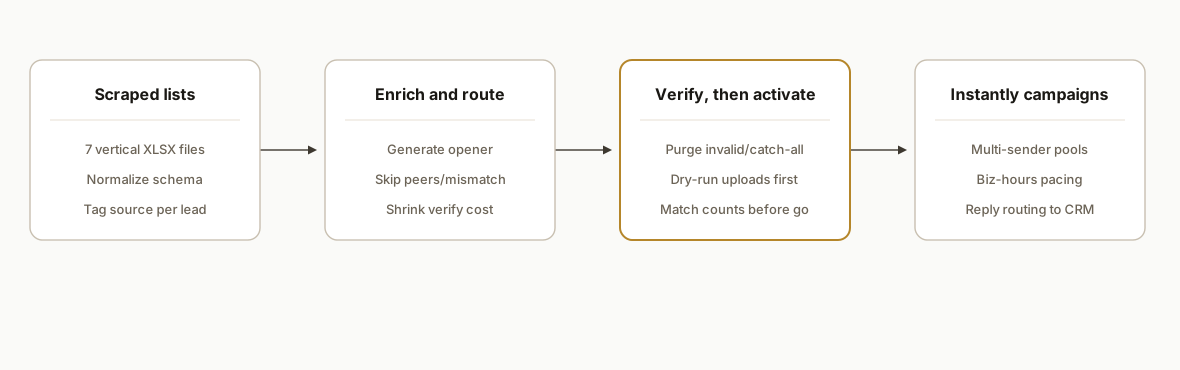
We run a three-stage flow: list prep and enrichment, verification and atomic activation, then sequencing and reply routing. The key is that campaigns never go live on unverified emails, and we treat Instantly as the send engine while the guardrails live in our prep scripts and monitors.
- List prep and enrichment: We ingest seven vertical XLSX lists, standardize fields, enrich company context, and generate per-lead openers so we can drop peers and mismatches early. That shrinks cost before verification.
- Verification and cleaning: We submit all candidate addresses to a verifier, poll until a decision, and purge invalids and catch-alls. Only then do we touch campaign status. This is where deliverability is protected.
- Sequencing and pacing in Instantly: We pre-build campaigns with verticalized copy and multi-sender pools. Daily caps and business-hour schedules keep cadence human.
- Reply routing and CRM handoff: A small dashboard shows new replies, which inbox to answer from, and includes a click-through to the CRM or Gmail view so a salesperson can respond in context.
Step-by-step: how to build it
1) Normalize the scraped lists
Create a single schema across all vertical files so enrichment and verification run once. We standardize company, website, contact name, title, and email, plus a source tag for routing and reporting.
# normalize.py
import csv, pathlib

FIELDS = ["source","company","website","first_name","last_name","title","email"]

def normalize(input_path: pathlib.Path, source: str):
    out = []
    with input_path.open(encoding="utf-8-sig", newline="") as f:
        rdr = csv.DictReader(f)
        for r in rdr:
            email = (r.get("Email") or r.get("email") or "").strip()
            if not email:
                continue
            row = {
                "source": source,
                "company": (r.get("Company") or r.get("company") or "").strip(),
                "website": (r.get("Website") or r.get("domain") or "").strip(),
                "first_name": (r.get("First Name") or r.get("first") or "").strip(),
                "last_name": (r.get("Last Name") or r.get("last") or "").strip(),
                "title": (r.get("Title") or r.get("Role") or "").strip(),
                "email": email.lower(),
            }
            out.append(row)
    return out
Key point: drop rows without an email now. Do not pay to enrich or verify blanks.
2) Enrich and route keep or skip
For scraped lists, we cut waste by tagging peers and mismatches before verifier spend. We generate a lightweight opener and a routing decision per row.
# enrich_route.py
from typing import Dict

PEER_KEYWORDS = {"recruiting","agency","consultant","freelance"}

def route_decision(row: Dict) -> str:
    title = (row.get("title") or "").lower()
    if any(k in title for k in PEER_KEYWORDS):
        return "skip_peer"
    if not row.get("company"):
        return "skip_mismatch"  # domain or company missing
    return "keep"

for row in rows:
    row["route"] = route_decision(row)
Anything not marked keep never reaches verification. This saves verifier credits and reduces NDR risk later.
3) Verify emails and wait for a decision
Verification must finish before activation. We submit the batch, poll for results, and only write keepers to the outbound list when their status is safe.
# verify_then_write.py
import time

SAFE_STATUSES = {"valid"}
DROP_STATUSES = {"invalid","disposable","role","catch_all"}

submitted = submit_for_verification([r["email"] for r in rows if r["route"]=="keep"])  # returns job id(s)

def poll_until_ready(job_id: str, timeout_s=900, interval_s=8):
    start = time.time()
    while time.time()-start < timeout_s:
        status = get_verification_status(job_id)  # "pending" or dict of results
        if isinstance(status, dict):
            return status
        time.sleep(interval_s)
    raise TimeoutError("verification polling timed out")

results = poll_until_ready(submitted)
clean = []
for row in rows:
    if row["route"] != "keep":
        continue
    v = results.get(row["email"], {"status":"unknown"})
    if v["status"] in SAFE_STATUSES:
        clean.append(row)
    elif v["status"] in DROP_STATUSES:
        pass  # purge
The trap we avoided: activating a campaign while verification is still pending. That is how bounce spikes happen.
4) Load cleaned leads and configure sending safely
We create or update campaigns with the cleaned leads, set business-hour schedules, daily caps, and assign warmed inboxes. We keep a dry-run flag so uploads can be audited without changing send state.
# load_campaigns.py
DRY_RUN = False

def upsert_campaign(name: str, copy_template: str, senders: list, schedule: dict, daily_cap: int):
    # create or update a campaign by name, returns internal id
    ...

def add_leads(campaign_id: str, leads: list[dict]):
    if DRY_RUN:
        return {"added": 0}
    # bulk or iterative add, depending on provider behavior
    ...

cid = upsert_campaign(
    name="Consultants Outreach",
    copy_template="consulting_v1",
    senders=["inbox1@yourdomain.com","inbox2@yourdomain.com"],
    schedule={"days":["Mon","Tue","Wed","Thu","Fri"],"tz":"America/Detroit","start":"08:30","end":"18:00"},
    daily_cap=50,
)
add_leads(cid, clean)
Set DRY_RUN true by default. Flip it false only after a spot check confirms lead counts and fields look correct.
5) Atomically clean, then activate
Activation happens in one pass: pause if needed, ensure only verified leads remain, then go active. We do not expose intermediate states that could send to unverified rows.
# activate_safely.py

def activate_if_clean(campaign_id: str, verified_count: int, uploaded_count: int):
    if verified_count != uploaded_count:
        raise RuntimeError("mismatch: not all uploaded leads are verified")
    set_campaign_status(campaign_id, "active")  # provider-agnostic status change

verified_count = len(clean)
uploaded_count = count_uploaded_leads(cid)
activate_if_clean(cid, verified_count, uploaded_count)
The precondition matters: if uploaded_count exceeds verified_count, something bypassed the gate. Stop and fix it.
6) Monitor replies and route to the CRM
We poll for new replies, display which inbox to reply from, and push contact plus thread metadata into the CRM so sales can respond in context.
# replies.py
from datetime import datetime, timezone

LAST_SEEN = load_cursor()
replies = list_new_replies(since=LAST_SEEN)
for r in replies:
    upsert_crm_contact(email=r["from"], company=r.get("company"), source=r.get("campaign_name"))
    create_crm_activity(subject="Cold reply", body=r.get("snippet"), link=r.get("message_url"))
    print(f"Reply via: {r['inbox']}  |  {r['from']}  |  {r['subject']}")

save_cursor(datetime.now(timezone.utc).isoformat())
The light-touch UI avoids a whole new inbox. Sales gets a list of who replied, which inbox to use, and a one-click path into the native mail view.
Where it gets complicated
Never activate before verifying. In the first pass, three campaigns were flipped active too early and produced non-delivery reports. The fix was simple: enforce verify first, then activate in one atomic step.
Asynchronous verification burns credits and time if you are sloppy. We tracked verifier balances, polled with backoff, and purged pending leads rather than guessing. Treat caught-up verification as a prerequisite, not a background activity.
Provider HTTP quirks exist. Some list routes reject requests that do not send a browser-like User-Agent. Some delete routes reject an empty JSON body. These are not bugs in your code. They are behaviors to adapt to in your HTTP client.
Share senders across campaigns carefully. Stagger activations and watch daily caps. Warm inboxes can be blacklisted if two campaigns hit the same pool at once with unclean lists.
Pacing and hours matter. We scheduled sends Monday to Friday during local business hours with a conservative per-day cap to keep cadence human. This protects reputation while you learn the market's tolerance.
What this actually changes
We cleaned seven scraped vertical lists into campaigns that a team could trust. Real figures from production:
- Raw inputs: 660 scraped leads across seven lists.
- Post-clean: 465 kept leads. Peers, mismatches, and no-email rows were dropped up front.
- Before cleanup bounce snapshot: 18.8 percent on one small list, 6.2 percent on another, 3.1 percent on a third. Those were the warning lights that triggered this work.
- Automated cleanup: 47 invalid or catch-all addresses were purged. Verifier credits used: about 45 net on the pass we logged. Balances were tracked to avoid surprises.
After we re-activated only the verified lists, bounce risk dropped and shared sender reputation was protected. Sequences went live with verticalized copy, and replies started showing in the monitor with the correct inbox to answer from. The qualitative change: outreach moved from risky to safe and visible.
Frequently asked questions
Can Instantly handle scraped leads safely?
Yes, if you clean them first. The safe pattern is enrich and route obvious peers or mismatches to skip, submit the rest to a verifier, wait for decisions, purge invalids and catch-alls, then upload. Only activate after verified counts match uploaded counts.
How do you prevent high bounce rates on cold email?
Verify every address before activation, drop catch-alls and disposables, stagger activations, and cap daily sends per warmed inbox. Schedule during business hours and keep copy human. The biggest lever is simple: never send to unverified rows.
Do I need multiple inboxes to run this?
It helps. Multi-sender pools spread risk and keep daily volumes per inbox low. Warm each inbox first, then assign senders per campaign based on list size and expected pacing. We also recommend reply routing so a salesperson answers from the right inbox.
Can this route replies into my CRM?
Yes. We push contact and thread metadata into the CRM and surface a one-click link to the native email view. Sales stays in their lane, and you still have campaign-level visibility in the monitor.
How long does setup take?
A cleaned first pass usually ships in a few days: schema normalization and enrichment on day one, verification pipeline and dry-run uploads on day two, then sequencing, pacing, and reply routing by day three. Timelines depend on list quality and approvals.
What does this cost monthly?
Your recurring costs are verifier credits, Instantly seats, and warmed inboxes. We keep verification usage down by dropping peers and mismatches before submission, and by only activating once. Build cost is one-time; ongoing spend scales with volume.
If you are sitting on scraped lists and worried about damaging deliverability, we already built and shipped this flow. See how we run AI sales outreach, read our take on why most cold outreach fails, and if you want this cleaned up for your stack, book a 20 minute call.
Want us to build this for you?
Nine questions, about 90 seconds. You see the hours it is costing you, then pick a time. No pitch.
Get your free assessment