
A lead scraping and enrichment pipeline connects web and file sources to a normalization and dedup layer, verifies and enriches contacts, then auto-builds a call queue for an AI voice dialer to qualify a large backlog. We built and shipped this for high-volume backlogs where reps could not keep up. This post breaks down the architecture, the build steps, and the real pitfalls we hit in production.
Definition: lead scraping and enrichment automation is the process of programmatically collecting prospects from trusted sources, cleaning and verifying them, enriching with missing fields, and routing them into downstream dialing and outreach systems without manual copy and paste.
The problem it solves
A manual backlog workflow looks like this: export CSVs from a few directories, paste columns into a sheet, try to remove duplicates by eye, guess missing emails, push a rough list to reps, then dial from the top until the day ends. It burns hours, repeats work after every new export, and produces duplicate and stale calls.
The automated version ingests sources on a schedule, de-duplicates against a state ledger, verifies and enriches only the records worth pursuing, and builds a prioritized call queue for an AI dialer that runs at a safe cadence. A human sees one panel: what got called, what qualified, what to review.
| Step | Manual process | Automated process |
|---|---|---|
| Ingest | Download CSVs. Copy and paste into a master sheet | Scheduled scrapes and file watches write to an ingest table |
| Normalize | Hand-fix column names and formats | Canonical schema with mappers per source |
| De-dup | VLOOKUP and eyeballing | Fingerprints and a write-once state ledger |
| Verify | Trial and error calls and emails | Early email and phone verification gates cost |
| Enrich | Manual LinkedIn or Google | API enrichment only for verified records |
| Handoff | Email a list to reps | Build a call_queue and hand off to the AI dialer |
According to Harvard Business Review, companies that responded to leads within an hour were seven times more likely to qualify the lead than those who waited an hour or more, and 60 times more likely than companies that waited 24 hours (source: hbr.org, The Short Life of Online Sales Leads).
What calling your old leads is worth
Move the sliders to your own numbers. The defaults are only an example business, not client data.
Revenue from one pass through the list
$75,000
3000 leads × 25% reached × 8% booked × 25% closed × $5000
- Closed deals from one pass
- 15
- 3000 × 25% × 8% × 25%
- Staff cost of dialing the same list by hand
- $5,250
- 3000 leads × 3 min × $35/hr
- Hours of dialing handed to the system
- 150 hrs
- 3000 × 3 min ÷ 60
How the automation works
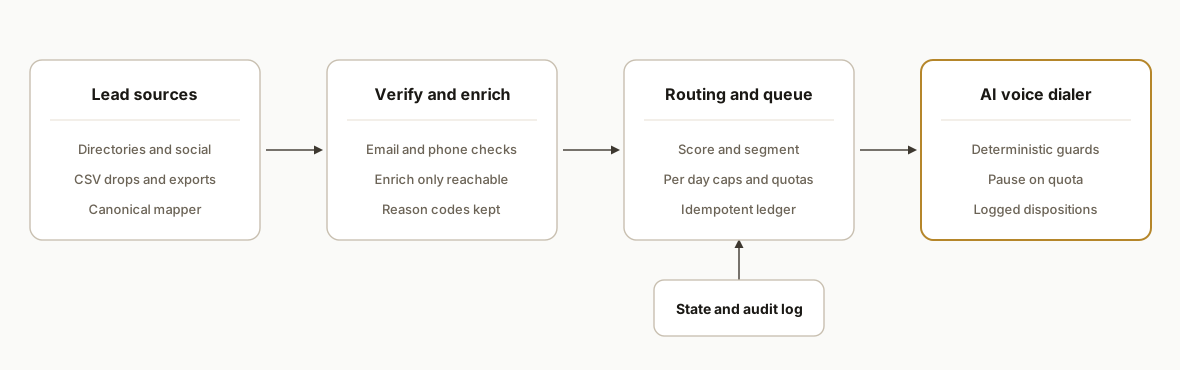
The working architecture has four parts: sources, hygiene and enrichment, routing, and the AI dialer. Each part is simple on its own. The glue and the safety rails are where we spent most of the engineering time.
- Lead sources: scrapes of target directories and social profiles, CSV drops from partners, and CRM exports land in an ingest table. Each source maps to a canonical schema so later steps do not care which source produced a record.
- Normalization and dedup ledger: we compute a fingerprint per record from stable fields and write a ledger row the first time we see it. Re-runs become idempotent. A one-row ledger makes it safe to reprocess sources daily.
- Verification and enrichment: we verify contactability early, then enrich only reachable records to avoid wasting credits. Email verification runs before enrichment. Social-only records can be de-prioritized or routed to a different channel.
- Segmentation and routing: we score and bucket into call-first and email-first. The pipeline builds a call_queue table with per-day caps and per-sender quotas so the dialer never overruns vendor limits or brand guidelines.
- AI voice dialer: the engine calls, classifies dispositions, and routes qualified outcomes. We added deterministic booking guards and quota checks so a misclassification or a TTS overage cannot create false bookings or silent overruns.
Step-by-step: how to build it
1) Ingest and normalize all sources
Start with a single entrypoint that accepts scrapes and CSVs, maps each source to a canonical schema, and writes to an ingest table. Keep the mapper per source in code so schema drift is handled in one place.
# ingest.py
from datetime import datetime
import csv
from pathlib import Path

CANON_COLS = [
    "source", "company", "full_name", "email", "phone",
    "title", "city", "state", "url", "raw"
]

def map_row(src_name, row):
    # Example: turn various CSV headers into our canon schema
    return {
        "source": src_name,
        "company": row.get("Company") or row.get("company_name"),
        "full_name": row.get("Name") or f"{row.get('first')} {row.get('last')}",
        "email": (row.get("Email") or row.get("email") or "").strip().lower(),
        "phone": (row.get("Phone") or row.get("phone") or "").strip(),
        "title": row.get("Title") or row.get("role"),
        "city": row.get("City"),
        "state": row.get("State"),
        "url": row.get("ProfileUrl") or row.get("url"),
        "raw": row,
    }

def load_csv(path, src_name, db):
    with open(path, newline="", encoding="utf-8") as f:
        for row in csv.DictReader(f):
            db.insert("ingest", map_row(src_name, row) | {"ingested_at": datetime.utcnow()})

# db is your wrapper around Postgres or SQLite
Key gotcha: treat the raw row as a first-class field so you can recover when a mapper missed a column after a partner changes their CSV.
2) Fingerprint and de-duplicate into a write-once ledger
A stable fingerprint prevents duplicates across sources and across time. We compute one from email when present, else from phone and company, else from a name plus company hash.
// ledger.js
import crypto from "node:crypto";

function fingerprint(rec) {
  const email = (rec.email || "").trim().toLowerCase();
  if (email) return `em:${email}`;
  const phone = (rec.phone || "").replace(/\D/g, "");
  if (phone && rec.company) return hash(`ph:${phone}|co:${rec.company}`);
  return hash(`nm:${rec.full_name}|co:${rec.company}`);
}

function hash(s) { return crypto.createHash("sha1").update(s).digest("hex"); }

export function upsertLedger(db, rec) {
  const fp = fingerprint(rec);
  const exists = db.selectOne("select 1 from ledger where fp = ?", [fp]);
  if (exists) return { status: "skip", fp };
  db.exec("insert into ledger(fp, first_seen_source, first_seen_at) values(?,?,datetime('now'))", [fp, rec.source]);
  db.exec("insert into prospects(fp, company, full_name, email, phone, title, city, state, url) values(?,?,?,?,?,?,?,?,?)",
    [fp, rec.company, rec.full_name, rec.email, rec.phone, rec.title, rec.city, rec.state, rec.url]);
  return { status: "new", fp };
}
Key gotcha: never rewrite ledger rows. Make new information an upsert into a separate prospects table keyed by fp.
3) Verify early, enrich only the reachable
Email verification and phone sanity checks should run before enrichment to avoid burning credits on dead records. Gate enrichment on verification results.
// hygiene.ts
export async function verifyAndEnrich(p, vendors) {
  const okPhone = p.phone && p.phone.replace(/\D/g, "").length >= 10;
  let emailStatus: "valid"|"risky"|"invalid"|"unknown" = "unknown";
  if (p.email) emailStatus = await vendors.emailVerifier.check(p.email);
  if (emailStatus === "invalid" && !okPhone) return { ...p, status: "drop" };

  const shouldEnrich = okPhone || emailStatus === "valid" || emailStatus === "risky";
  const enriched = shouldEnrich ? await vendors.enrichment.lookup(p) : p;
  return { ...enriched, status: shouldEnrich ? "ready" : "hold" };
}
Key gotcha: keep a reasons column for drops and holds so you can audit why a record did not progress.
4) Segment and build the call queue
Turn verified and enriched prospects into a prioritized call_queue with per-day caps. Score by source, recency, ICP fit, and available phone quality.
-- schema.sql
create table call_queue (
  id integer primary key,
  fp text not null,
  phone text not null,
  priority integer not null,
  status text not null default 'queued',
  scheduled_for datetime,
  last_error text
);
# queue.py
from datetime import datetime, timedelta
def score(p):
s = 0
if p["source"] in {"consented", "engaged"}: s += 50
if p.get("industry") in {"target1", "target2"}: s += 20
if p.get("phone_quality") == "mobile": s += 10
return s
def build_queue(db, daily_cap=500):
ready = db.select("select * from prospects where status = 'ready' and phone is not null")
ranked = sorted(ready, key=score, reverse=True)[:daily_cap]
for p in ranked:
db.exec("insert into call_queue(fp, phone, priority, scheduled_for) values(?,?,?,?)",
[p["fp"], p["phone"], score(p), datetime.utcnow() + timedelta(minutes=5)])Key gotcha: add a unique index on call_queue.fp where status in queued or in_progress to prevent duplicates on re-runs.
5) Handoff to the AI dialer with deterministic guards
Push batched call jobs to your dialer and guard bookings with deterministic checks in addition to any model classification. We learned this the hard way.
// dialer.js
async function classifyBooking(transcript) {
  // Model classification result from your provider
  const ai = await dialer.modelClassify(transcript);
  const hasHardSignals = /calendar|sent you a link|booked|confirm(ed)?/.test(transcript.toLowerCase());
  return ai.isBooking && hasHardSignals;
}

export async function runCalls(db, dialer) {
  const jobs = db.select("select * from call_queue where status = 'queued' order by priority desc limit 50");
  for (const j of jobs) {
    db.exec("update call_queue set status='in_progress' where id=?", [j.id]);
    const res = await dialer.call(j.phone, { fp: j.fp });
    const booking = await classifyBooking(res.transcript || "");
    const disposition = booking ? "qualified_booking" : res.disposition || "no_answer";
    db.exec("update call_queue set status='done', last_error=null where id=?", [j.id]);
    db.exec("insert into dispositions(fp, disposition, raw) values(?,?,?)", [j.fp, disposition, JSON.stringify(res)]);
  }
}
Key gotcha: keep the booking guard on the server, not in the client. In production we eliminated new false bookings after we shipped the guard and prompt tighten.
6) Quota checks and pause or resume safety
Vendors often allow overage billing. Add an automated quota check that can pause the dialer until limits reset.
// quota.ts
let cache: { until: number, ok: boolean } = { until: 0, ok: true };

export async function canRun(vendors) {
  const now = Date.now();
  if (now < cache.until) return cache.ok;
  const q = await vendors.tts.getSubscription();
  const ok = q.used_chars < q.limit_chars * 0.95; // pause near 95 percent
  cache = { until: now + 10 * 60 * 1000, ok };
  return ok;
}

export async function guardedRun(runFn, vendors) {
  if (!(await canRun(vendors))) return { status: "paused_on_quota" };
  return runFn();
}
Key gotcha: expose POST pause and POST resume endpoints and log every transition with the reason so ops can explain a quiet dialer day later.
Where it gets complicated
- Bulk adds that are not. Some outreach APIs claim bulk endpoints, then return 400 in production. We fell back to one-by-one adds with idempotent keys and a retry loop.
- Vendor HTML sanitizers. If you run an email side channel, a bare line break can drop lines. Wrap each line in a safe block element and re-fetch the stored body after a patch to verify.
- Overage billing is real. Our TTS vendor continued to speak while racking up overage spend until we added a quota check and automated pause. Add this before your first big day, not after.
- Stale records cause bad dials. Our first dialer pass called a stakeholder due to stale CRM state. We replaced upsert-only with an evict-on-sync strategy that deactivates rows missing from a complete import.
- Model misclassifications. We saw false bookings until we layered a deterministic guard alongside the model. Always gate important transitions with both pattern checks and a model decision.
- Scrape costs rise with volume. Social and directory scraping can jump from tens to hundreds per month as polling windows grow. Budget and poll less often on low-yield sources.
What this actually changes
For a real estate brokerage, our production dialer processed 3,130 callable leads and recorded 5,573 total calls. After we shipped the deterministic booking guard and prompt fixes, we observed zero new false bookings. An early verification gate reduced downstream enrichment spend by avoiding contacts that could not be reached by any channel.
Two data points frame why this matters. Harvard Business Review found that responding within one hour makes you seven times more likely to qualify a lead than waiting longer (source: hbr.org). Separately, B2B contact data decays quickly. ZoomInfo estimates roughly 30 percent data decay per year, which means a backlog goes stale faster than teams expect (source: zoominfo.com blog on data decay).
The combination of instant routing and a safeguarded dialer is what shifts outcomes: less time wasted on duplicates and dead numbers, and more qualified conversations from the same list.
Frequently asked questions
Can I set this up without a developer?
Not end to end. You can run a scrape or buy a list, but building the ledger, verification gates, enrichment routing, and a safe dialer handoff is real engineering. We ship the system, then give you a simple panel to run it.
Where do the leads come from in this setup?
Scrapes of niche directories, CSV drops from partners, and CRM exports. In production we also pulled social profiles for some clients. Every source maps into a canonical schema so the later steps do not need to know the origin.
How do you prevent duplicates across sources and runs?
A write-once ledger keyed by a fingerprint based on stable fields like email or phone plus company. The pipeline upserts prospect details separately. Re-ingesting the same record later becomes a safe no-op.
Can the dialer run in real time?
Yes, but most teams start with a scheduled call queue to control cadence and quotas. We typically poll sources hourly, update the queue daily, and allow the dialer to run in windows with per-day caps.
What does this cost monthly?
Variable and usage-based. You are paying for scraping, verification, enrichment, and TTS minutes on the dialer. Early verification gates and idempotent routing limit spend to only reachable, on-ICP records.
Will this connect to my CRM?
Yes. We either write directly if the CRM supports it or bridge via exports and webhooks when it does not. The dialer dispositions can update stages or tasks so your team sees the right next action.
If you are sitting on a growing backlog and want the calls made safely and consistently, we have this running in production. See our related post on migrating dialers at scale: Migrate to an AI Dialer at Scale. If you want to discuss your list and targets, review our AI voice agents service and book a 20 minute call.
Want us to build this for you?
Nine questions, about 90 seconds. You see the revenue it is costing you, then pick a time. No pitch.
See your options