
A partner ROI dashboard with a live onboarding tracker works by packaging your economic model and post-signing checklist into a shareable web app: a Next.js frontend for sliders and charts, plus a lightweight Neon Postgres notes API for collaboration. In production it aligned KGI's stakeholders faster, kept build tasks in one place, and turned a messy target list into a reachable segment without spreadsheets.
Definition: a partnership ROI dashboard is a two-tab web app that quantifies outcomes before the deal closes and operationalizes onboarding after signatures.
The problem it solves
A buyer asks for numbers. You open a spreadsheet, tweak hidden cells, export a PDF, and hope the stakeholder shares it accurately. After the close, onboarding lives in emails and scattered docs. Decisions drift, tasks stall, and the seller spends hours chasing status updates.
We saw the same pattern at Kingdom Growth Initiatives: parallel email threads for numbers and tasks, unclear next steps, and no single source of truth once enrichment kicked off. McKinsey estimated knowledge workers spend up to 19 percent of time searching for information, which mirrors what we observed in scattered onboarding threads (source: McKinsey Global Institute, The social economy, 2012). A single app that pairs a model with an action-first tracker replaces ad hoc files and back-and-forth email.
| Manual workflow | Automated workflow |
|---|---|
| Spreadsheets emailed back and forth | Shareable URL with sliders and presets |
| ROI screenshots lose context | Live charts with inputs in the open |
| Onboarding steps in emails | Tracker tab with milestones and progress |
| Notes trapped in inboxes | Shared notes API visible to both teams |
| Version drift | One deployed source of truth |
How does the automation work?
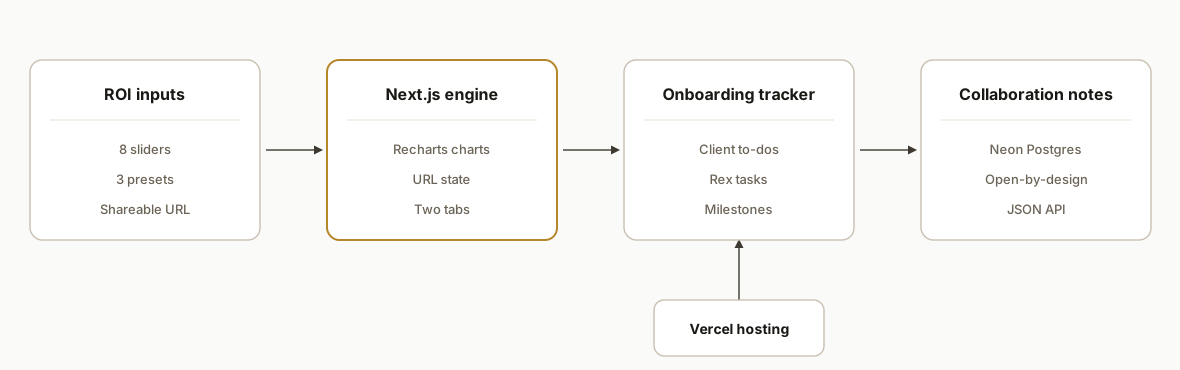
At KGI we shipped a compact two-tab architecture: ROI model and Onboarding. The app runs on Vercel with a Neon Postgres-backed notes endpoint and a single TypeScript module that stores the onboarding plan.
- Next.js ROI model page: the Growth Model tab renders sliders and presets, writes state to the URL, and draws ramp charts. It keeps scenarios shareable without user accounts.
- Onboarding tracker page: the Onboarding tab shows waiting-on banners, client to-dos, our tasks, milestones, and a progress bar. All content reads from a typed data module we update as the project moves.
- Neon Postgres notes API: a minimal GET, POST, DELETE JSON API powers shared notes. It is intentionally open-by-design behind an unguessable URL so both teams can collaborate instantly.
- Data-enrichment pipeline support: we staged and analyzed enrichment results, then surfaced guidance and counts in the tracker to keep outreach grounded in data hygiene.
- Vercel hosting: two projects existed during iteration. We consolidated on the canonical deployment with stable environment configuration.
Step-by-step: how to build it
Step 1: How do you scaffold the two-tab Next.js app?
Start with a Next.js App Router project. Add two routes: the ROI model at / and the onboarding tracker at /onboarding. Keep state in URL params on the ROI page so stakeholders can share exact scenarios without accounts.
npx create-next-app@latest kgi-roi --ts --eslint
cd kgi-roi
npm i recharts zod
// app/layout.tsx
export default function RootLayout({ children }: { children: React.ReactNode }) {
return (
<html lang="en">
<body>
<nav className="topnav">Growth Model | <a href="/onboarding">Onboarding</a></nav>
{children}
</body>
</html>
);
}Gotcha: keep React and Next pinned to known-good versions during iteration. We locked the canonical build to Next 15.5 and React 18.3 for consistent serverless behavior and library compatibility.
Step 2: How do you implement sliders, presets, and shareable URLs?
Use a Zod schema for model inputs, read query params on load, and write them back with shallow routing. Presets are just named param sets. This keeps scenarios reproducible in links.
// app/page.tsx (ROI model)
import { useRouter, useSearchParams } from "next/navigation";
import { z } from "zod";

const Model = z.object({ mrr: z.number().min(0), ramp: z.number().min(1).max(24) });

export default function GrowthModel() {
  const router = useRouter();
  const q = useSearchParams();
  const base = Number(q.get("mrr") ?? 33750); // gross MRR preset
  const ramp = Number(q.get("ramp") ?? 12);

  function update(key: string, val: number) {
    const u = new URLSearchParams(q.toString());
    u.set(key, String(val));
    router.replace("/?" + u.toString(), { scroll: false });
  }

  return (
    <section>
      <h1>Growth Model</h1>
      <label>Gross MRR: {base.toLocaleString()}</label>
      <input type="range" min={0} max={100000} step={250} value={base}
             onChange={e => update("mrr", Number(e.target.value))} />
      <label>Ramp months: {ramp}</label>
      <input type="range" min={1} max={24} value={ramp}
             onChange={e => update("ramp", Number(e.target.value))} />
    </section>
  );
}
Gotcha: encode numbers only. Passing objects or arrays in URL params complicates sharing and breaks on copy. Keep presets as flat scalars.
Step 3: How do you render charts reliably?
We used Recharts for ramp and allocation visuals. Keep charts pure-client and derived from query params so sharing a link reproduces the exact view.
// app/_components/RampChart.tsx
"use client";
import { LineChart, Line, XAxis, YAxis, Tooltip, ResponsiveContainer } from "recharts";

export function RampChart({ mrr, months }: { mrr: number; months: number }) {
  const data = Array.from({ length: months }, (_, i) => ({
    m: i + 1,
    net: Math.round((mrr * 0.98) * ((i + 1) / months)) // example ramp
  }));
  return (
    <ResponsiveContainer width="100%" height={220}>
      <LineChart data={data} margin={{ top: 8, right: 12, left: 0, bottom: 0 }}>
        <XAxis dataKey="m" tickLine={false} />
        <YAxis tickFormatter={(v) => "$" + v.toLocaleString()} tickLine={false} />
        <Tooltip formatter={(v: number) => "$" + v.toLocaleString()} />
        <Line type="monotone" dataKey="net" stroke="#B5862A" strokeWidth={2} dot={false} />
      </LineChart>
    </ResponsiveContainer>
  );
}
Gotcha: server-rendered chart libraries can mismatch hydration. Keep Recharts in client components and derive data from URL state.
Step 4: How do you add a Neon Postgres-backed shared notes API?
We created a tiny Notes table and exposed GET, POST, DELETE under /api/notes. The endpoint is intentionally open-by-design with a secret token header in the admin panel proxy for write actions.
-- schema.sql
create table if not exists notes (
  id uuid primary key default gen_random_uuid(),
  created_at timestamptz not null default now(),
  author text not null,
  body text not null
);
// app/api/notes/route.ts
import { NextResponse } from "next/server";
import { neon } from "@neondatabase/serverless";
const sql = neon(process.env.DATABASE_URL!);
export async function GET() {
const rows = await sql`select id, author, body, created_at from notes order by created_at desc limit 200`;
return NextResponse.json(rows);
}
export async function POST(req: Request) {
const token = req.headers.get("x-notes-token");
if (token !== process.env.NOTES_TOKEN) return NextResponse.json({ ok: false }, { status: 401 });
const { author, body } = await req.json();
await sql`insert into notes (author, body) values (${author}, ${body})`;
return NextResponse.json({ ok: true });
}
export async function DELETE(req: Request) {
const token = req.headers.get("x-notes-token");
if (token !== process.env.NOTES_TOKEN) return NextResponse.json({ ok: false }, { status: 401 });
const { id } = await req.json();
await sql`delete from notes where id = ${id}`;
return NextResponse.json({ ok: true });
}Gotcha: open-by-design works when the URL is unguessable and notes are non-sensitive. If that assumption changes, add auth and ACL before inviting more seats.
Step 5: How do you make onboarding data a single source of truth?
We store the tracker in a typed module and render it directly. There is no separate CMS to drift. Updating the plan is a one-line code change and redeploy.
// lib/onboarding.ts
export type Step = { title: string; tips?: string[]; done?: boolean };
export const CLIENT_TODOS: Step[] = [
  { title: "Buy sending domain", tips: ["Cloudflare account", "Use subdomain like send.example.com"] },
  { title: "Create Gmail seats", tips: ["2, 3 inboxes", "Name-wide alias off"] },
  { title: "Upload ICP list", tips: ["50, 500 employees first", "Exclude partners"] }
];
export const REX_HANDLING: Step[] = [
  { title: "Warm inboxes" },
  { title: "Enrichment chunk 1", tips: ["200, 300 rows per run"] },
  { title: "Sequence QA & dry run" }
];
export const MILESTONES = [
  "SOW signed", "Domains live", "Enrichment ready", "Sequences approved", "First sends"
];
Gotcha: put live commercial variables in code so UI cards reflect amendments. We surfaced the revenue-share change inside the app to keep finance and delivery in sync.
Step 6: How do you deploy cleanly on Vercel and avoid environment drift?
Create one canonical project and set environment variables. If you had a legacy deploy, retire it to avoid confusion.
# .env
DATABASE_URL=postgres://...  # Neon connection
NOTES_TOKEN=long-random-string
NEXT_PUBLIC_APP_NAME=KGI ROI + Onboarding
// vercel.json
{ "functions": { "api/**/*": { "maxDuration": 10 } }, "routes": [ { "src": "/api/.*", "dest": "/api" } ] }Gotcha: when pasting env vars via shell, avoid a trailing newline. We use printf over echo to prevent hidden characters that break auth tokens in production.
Where it gets complicated
Open-by-design notes. We shipped shared notes intentionally unauthenticated with a token at the proxy for write actions. That made collaboration instant, but it demands discipline about what goes in a note. If confidentiality tightens, add auth and role gates before scaling seats.
Duplicate deployments. Two Vercel projects existed during iteration. We consolidated on the canonical URL and documented which one to retire. Keep a single production project to prevent team members from sharing the wrong link.
Contract amendments in-product. The revenue-share moved mid-build. We exposed the variables in code and the UI so finance could see terms reflected live. The app warns to revert if paperwork differs later.
ICP re-segmentation before enrichment. KGI's current list was 2,304 records with only about 27 percent tier-aligned. After enrichment we saw 1,234 reachable contacts and 1,142 unique emails, plus 211 accurate additions. Re-segmenting from a 178k raw file first would have improved match rates and saved credits.
Chunk enrichment to protect credits. We run enrichment in 200 to 300 record chunks. Large batches spike costs and hide data quality issues until late. Chunking keeps outcomes measurable and rollbacks cheap.
Sending domains before sequences. No KGI website or sending domains existed at kickoff. The tracker explicitly asks for domain purchase and DNS to be set up before any sends. Skipping this step risks deliverability and delays.
Real-world results
We deployed the KGI app at a canonical public URL: https://kgi-rex-roi-dashboard.vercel.app. The Growth Model reproduces the preset baseline we agreed with the client: gross MRR of $33,750 with a net of $33,075 and scenarios annualizing near $198k per offer when toggled in the model.
On the data side, enrichment started from a 2,304-record list and yielded 1,234 reachable contacts after cleaning, with 1,142 unique emails and 211 accurate additions. That output is now visible on the onboarding tab so the sales plan stays grounded in reality instead of a CSV guess.
The structural win was alignment. A single link combined ROI math, onboarding checklists, progress, and shared notes. That replaced parallel email threads and reduced time spent finding the latest file. McKinsey reports knowledge workers spend roughly 19 percent of time searching for information; consolidating into one app directly attacks that drag (source: McKinsey Global Institute, The social economy, 2012).
Frequently asked questions
How long does a two-tab ROI + onboarding app take to build?
A focused version ships in days, not weeks. KGI's first deployment covered the ROI model, tracker, and shared notes with Vercel hosting in a short sprint. Additional integrations, auth, or CRM sync add time. The pattern stays the same: model first, tracker second, optional integrations last.
Do I need a backend for this, or can it be static?
The ROI model can be entirely static with URL params. We add a minimal serverless backend for shared notes and any enrichment log endpoints. If you later need auth or per-account data, Neon Postgres is already in place.
What does it cost to run monthly?
Vercel serverless and Neon Postgres are low-cost at this scale. Most of the expense is initial build time. Ongoing API usage shows up only if you add enrichment or mailing integrations. For KGI's current footprint, infrastructure costs were negligible compared to the sales outcome.
Can non-technical team members update onboarding steps?
Yes, through a small ops ritual. We keep the onboarding plan in a typed module so it never drifts. Updating it is a one-line edit and redeploy. If you need self-serve editing, we can move the plan into Postgres with a simple admin panel.
How do you prevent sensitive data from leaking in shared notes?
We kept notes open-by-design for speed and asked teams to avoid sensitive content. If confidentiality needs change, we can add auth, encrypt at rest, and enforce role-based access in front of the same Neon table without changing the UI much.
Can this connect to a CRM or outreach tool later?
Yes. The tracker is the control plane. We can add buttons to push audiences into Instantly, Apollo, or your CRM, then mirror reply counts back in the app. The same Neon database can hold campaign state and suppression lists.
If you want this pattern for your team, we have built and shipped it in production. See our broader capabilities on the workflow-automation section of our services, read how we think about the math in Automation ROI Explained, and book a short call. We will tell you in the first five minutes whether your setup maps to this pattern.
- Services: /services#workflow-automation
- Related post: /blog/automation-roi-explained
- Book a call: /book
Want us to build this for you?
Nine questions, about 90 seconds. You see the hours it is costing you, then pick a time. No pitch.
Get your free assessment