
A reliable Drip to Google Sheets sync uses two paths: real time events from Drip webhooks or HTTP Post actions into a Sheets-backed endpoint, and a scheduled backfill via the Drip API or CSV exports with pagination, idempotency, and 429-aware retries. We shipped this for ecommerce teams who want subscriber, event, and campaign metrics in one spreadsheet they control.
If you run Drip for email and want clean numbers without logging into yet another dashboard, this walks through the working architecture, exact steps, and the gotchas that matter.
Definition: Drip to Google Sheets automation is a one-way export where Drip events and records land in Sheets in near real time while a scheduled job backfills history and heals gaps.
The problem it solves
A marketing ops lead usually exports CSVs from Drip, pastes them into a workbook, and prays columns have not shifted. Realtime events get lost if a Zap is turned off. Backfills break when exports switch from direct download to emailed links. The result: missing rows, duplicates, and no single source of truth for subscriber status or campaign performance.
| Manual process | Automated sync |
|---|---|
| Click to export CSVs for people and email metrics weekly | Time-based job pulls via API or receives emailed CSVs. Writes to Sheets on a schedule |
| Ad hoc Zaps for form submits only | Webhook or HTTP Post captures all configured events into a ledger |
| Duplicates from repeated pastes | Idempotent keys per event or subscriber prevent repeat writes |
| No retry on rate limits | Backoff on 429 and job resume logic |
| Metric pages drift and exports change format | Schema guard and mapping layer per tab |
Answer first: the fix is a two-path design: webhooks for immediacy and a scheduled API or CSV pull for completeness.
What keeping your systems in sync is worth
Move the sliders to your own numbers. The defaults are only an example business, not client data.
Revenue from deals that stop slipping each year
$100,800
80 a month × 12 × 5% × 70% × $3000
- Deals kept a year
- 34
- 80 × 12 × 5% × 70%
- Staff cost of doing it by hand each year
- $9,100
- 5 hrs a week × $35/hr × 52 weeks
- Hours handed to the system each month
- 22 hrs
- 5 hrs a week × 52 ÷ 12
How the automation works
The system has four parts that keep Sheets fresh even when parts of Drip lag or rate limit.
- Drip event feed: We create webhooks in Drip or use Drip's HTTP Post action inside workflows to POST JSON to our endpoint. This gives us near real time event capture without polling. Zapier-created webhooks are managed in Zapier and do not appear in Drip's webhook list, so we register our own when we need system-level visibility.
- Backfill and metrics job: We run a scheduled job against the Drip API or CSV exports to fetch subscribers and campaign metrics in batches. Drip's public API uses Basic auth with an API Token or OAuth 2.0 for public apps. Rate limits are 3,600 requests per hour for standard endpoints and 50 batch requests per hour, with batch processing asynchronous. We page, back off on 429, and resume.
- Sheets ledger: A Google Sheet holds three tabs: subscribers, events, metrics. Each tab enforces a unique key so replays or backfills do not duplicate rows.
- Retry and idempotency: We hash event payloads or use Drip object IDs as dedupe keys. Retries on 429 and transient 5xx ensure eventual consistency.
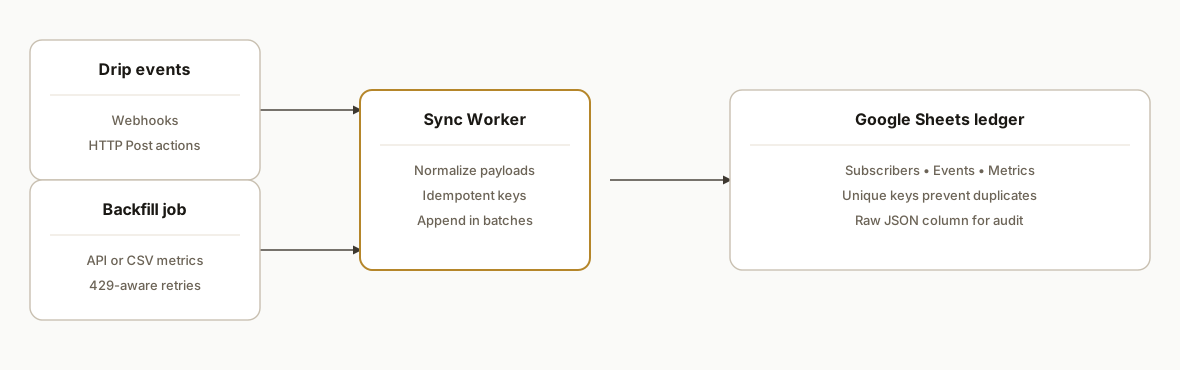
Answer first: events flow in real time, metrics arrive on a schedule, and idempotent writes keep Sheets clean.
Step-by-step: how to build it
1) Create a Sheets project and tabs
Start with a Google Sheet that has three tabs: Subscribers, Events, Metrics. Add a Logs tab for failures.
- Subscribers: key, email, status, created_at, updated_at, raw
- Events: key, type, email, occurred_at, campaign_id, raw
- Metrics: key, campaign_id, date, sent, opens, clicks, revenue, raw
Answer first: decide your unique key per tab up front and never let writes bypass it.
// sheets/schema.ts (local note for your team)
export const TABS = {
  subscribers: {
    name: 'Subscribers',
    key: ['email'],
  },
  events: {
    name: 'Events',
    key: ['type', 'email', 'occurred_at'],
  },
  metrics: {
    name: 'Metrics',
    key: ['campaign_id', 'date'],
  },
};
Gotcha: keep a raw JSON column. When Drip adds fields, you still have the source payload. For a deeper dedupe walkthrough in Sheets, see our pattern in avoid duplicates when writing to Google Sheets.
2) Build a webhook endpoint bound to the Sheet
Use Google Apps Script as a minimal receiver. Drip can send webhooks you create, or you can add an HTTP Post action in automations to POST event JSON.
Answer first: accept arbitrary JSON and write to the Events tab with a deterministic key.
// Code.gs (Apps Script)
function doPost(e) {
  try {
    const body = JSON.parse(e.postData.contents || '{}');
    const sheet = SpreadsheetApp.getActive().getSheetByName('Events');
    const type = body.type || body.event || 'unknown';
    const email = (body.email || (body.person && body.person.email) || '').toLowerCase();
    const occurredAt = body.occurred_at || new Date().toISOString();
    const key = `${type}|${email}|${occurredAt}`;
    // Idempotency check: simple key scan in first column
    const keys = sheet.getRange(2, 1, sheet.getLastRow() - 1, 1).getValues().flat();
    if (keys.indexOf(key) !== -1) return ContentService.createTextOutput('dup');
    sheet.appendRow([
      key,
      type,
      email,
      occurredAt,
      body.campaign_id || '',
      JSON.stringify(body),
    ]);
    return ContentService.createTextOutput('ok');
  } catch (err) {
    const log = SpreadsheetApp.getActive().getSheetByName('Logs');
    log.appendRow([new Date().toISOString(), 'doPost', String(err)]);
    return ContentService.createTextOutput('error').setResponseCode(500);
  }
}
Gotcha: Drip's Help Center does not document a webhook retry policy. Treat delivery as at least once and build idempotency. Source: Create a Webhook and HTTP Post docs in Drip Help Center.
3) Authenticate to the Drip API for backfills
When pulling history, use Drip's public API. Private integrations use HTTP Basic with your API Token as the username and an empty password. OAuth 2.0 Bearer tokens are used for public apps.
Answer first: set the Authorization header correctly and be ready for 429 backoff.
// backfill/auth.js (Node.js)
import fetch from 'node-fetch';

const DRIP_BASE = 'https://api.getdrip.com';
const DRIP_TOKEN = process.env.DRIP_API_TOKEN; // username in Basic auth, password is empty

export function basicAuthHeader() {
  const encoded = Buffer.from(`${DRIP_TOKEN}:`).toString('base64');
  return { Authorization: `Basic ${encoded}` };
}

export async function dripGet(path, qs = '') {
  const url = `${DRIP_BASE}${path}${qs ? `?${qs}` : ''}`;
  let attempt = 0;
  for (;;) {
    const res = await fetch(url, { headers: { ...basicAuthHeader() } });
    if (res.status === 429) {
      const retryAfter = Number(res.headers.get('retry-after')) || Math.min(60, 2 ** attempt);
      await new Promise(r => setTimeout(r, retryAfter * 1000));
      attempt++;
      continue;
    }
    if (!res.ok) throw new Error(`${res.status} ${await res.text()}`);
    return res.json();
  }
}
Gotcha: Drip lists 3,600 requests per hour for standard endpoints and 50 batch requests per hour. Respect both ceilings and design pagination. Source: developer.drip.com.
4) Page through subscribers safely
Drip's API organizes resources under /v2. We do not assume a specific endpoint path here. The pattern is: request a page, write rows with a stable key, and continue while a next cursor exists.
Answer first: write per page with dedupe by key so reruns are safe.
// backfill/subscribers.js
import { dripGet } from './auth.js';
import { appendSubscribers } from './sheets.js';

export async function backfillSubscribers() {
  let cursor = '';
  for (;;) {
    const qs = new URLSearchParams();
    if (cursor) qs.set('page', cursor);
    // Replace `PATH` with the appropriate Drip subscribers collection path in your account
    const data = await dripGet('/v2/PATH', String(qs));
    const rows = (data.items || data.subscribers || []).map(s => ({
      key: (s.email || '').toLowerCase(),
      email: (s.email || '').toLowerCase(),
      status: s.status || '',
      created_at: s.created_at || '',
      updated_at: s.updated_at || '',
      raw: JSON.stringify(s),
    }));
    await appendSubscribers(rows);
    cursor = data.next_page || data.meta?.next || '';
    if (!cursor) break;
  }
}
Gotcha: do not hardcode field names in your core logic. Map defensively and always stash raw for audit and schema drift. For a reusable continuous backfill loop, see our pattern in Typeform to Sheets continuous backfill.
5) Append rows to Google Sheets with idempotency
Use the Sheets API or Apps Script to check keys and append only new rows.
Answer first: maintain a set of existing keys in memory and batch appends.
// backfill/sheets.js (Apps Script variant is also fine)
import { google } from 'googleapis';

export async function appendSubscribers(rows) {
  const sheets = google.sheets('v4');
  const auth = await getAuth();
  const spreadsheetId = process.env.SHEET_ID;
  // Read existing keys from column A
  const existing = await sheets.spreadsheets.values.get({ auth, spreadsheetId, range: 'Subscribers!A2:A' });
  const have = new Set((existing.data.values || []).flat());
  const toWrite = rows.filter(r => !have.has(r.key)).map(r => [r.key, r.email, r.status, r.created_at, r.updated_at, r.raw]);
  if (!toWrite.length) return;
  await sheets.spreadsheets.values.append({
    auth,
    spreadsheetId,
    range: 'Subscribers!A:F',
    valueInputOption: 'RAW',
    requestBody: { values: toWrite },
  });
}
Gotcha: pull keys once per job where possible, not per page. If the job is long-running, refresh keys between major phases.
6) Pull campaign metrics on a schedule
Drip email metrics pages support CSV export. Support may switch exports from direct download to email delivery. We schedule a job that either calls the API for metrics or parses the arriving CSV when it lands in an ops inbox.
Answer first: treat CSVs as an alternative source and normalize into the Metrics tab.
// metrics/csv.js (Node.js sketch; inbox processing depends on your mail provider)
import { parse } from 'csv-parse/sync';
import fs from 'fs';
import { appendMetrics } from './sheets.js';

export async function importMetricsCsv(filePath) {
  const csv = fs.readFileSync(filePath, 'utf8');
  const recs = parse(csv, { columns: true, skip_empty_lines: true });
  const rows = recs.map(r => ({
    key: `${r.campaign_id}|${r.date}`,
    campaign_id: r.campaign_id,
    date: r.date,
    sent: Number(r.sent || 0),
    opens: Number(r.opens || 0),
    clicks: Number(r.clicks || 0),
    revenue: Number(r.revenue || 0),
    raw: JSON.stringify(r),
  }));
  await appendMetrics(rows);
}
Gotcha: emailed CSVs are not guaranteed to arrive in a tight window. Keep the job idempotent and re-runnable.
7) Optional: use Zapier or Make when you need velocity
Drip has official apps on Zapier and Make. We use them when a team needs quick wiring to Sheets and later replace with a native endpoint. In Make, connect Drip with OAuth or API key and use a Google Sheets Add a Row step. In Zapier, pick Drip triggers and Google Sheets actions.
Answer first: start fast with Zapier or Make, then migrate to your endpoint when volumes or control demand it.
Zapier: Drip trigger -> Google Sheets: Create Spreadsheet Row
Make: Drip: Watch Events -> Google Sheets: Add a Row
Gotcha: Zapier-managed webhooks do not show in Drip's webhook list. Document ownership and triggers so nothing is silently turned off.
Configure Drip webhooks and HTTP Post for Google Sheets
You can wire events two ways: native webhooks or HTTP Post actions inside Drip automations. We ship both, then converge on one.
- Create a receiving URL. Host an Apps Script web app or a lightweight HTTPS endpoint. Append a static token parameter for simple verification.
- In Drip, add a webhook or an HTTP Post action to send JSON to that URL. Include key fields you care about if you are using HTTP Post.
- Log every request. Store raw for audit and replays.
Answer first: verify the request before writing any row.
// Code.gs: add a shared token check
function doPost(e) {
  const token = (e.parameter && e.parameter.token) || '';
  const expected = PropertiesService.getScriptProperties().getProperty('WEBHOOK_TOKEN');
  if (!expected || token !== expected) {
    return ContentService.createTextOutput('forbidden').setResponseCode(403);
  }
  // ... proceed with parse, key, and append as shown earlier
}
Practical notes: keep per-environment tokens. If you must rotate a token, accept both old and new for a short window to avoid drops during rollout.
Drip Google Sheets via Zapier or Make: pitfalls and fixes
We used Zapier and Make to get teams live in hours, then swapped to a direct endpoint for scale. These are the sharp edges that matter in production.
- Ownership: document who owns the Drip and Google connections. If a teammate leaves, Zaps and scenarios can stall silently.
- Make specifics: HTTP module method must be lowercase put in certain actions. Google Sheets addRow often expects spreadsheetId with a leading slash. Variables set with util:SetVariable2 are not accessible via double curly references in API-authored blueprints. If datastore:AddRecord loses fields, prefer a raw HTTP PUT to a Data Store endpoint for reliability. See our Make.com reliability checklist.
- Dedupe: always key rows in Sheets. If you start on Zapier or Make, still compute and store a deterministic key to enable a clean migration later.
Answer first: use Zapier or Make to de-risk day one, but build your long-term key and ledger from the start.
What to know about getdrip.com API limits
GetDrip hosts the API at api.getdrip.com. Plan for these constraints:
- Standard endpoints: 3,600 requests per hour.
- Batch requests: 50 per hour, batch processing is asynchronous.
- 429 handling: honor Retry-After when present and resume from your last cursor.
These are why our design uses webhooks for immediacy and scheduled pulls for completeness. Source: developer.drip.com.
Where it gets complicated
- Rate limits and backoff: Drip lists 3,600 requests per hour for standard endpoints and 50 batch requests per hour. Build client-wide throttling and an exponential backoff on 429 with respect for Retry-After. Source: developer.drip.com.
- Batch endpoints are asynchronous: Drip's batch processing is async and UI updates may lag. Treat responses as accepted, poll for completion if applicable, and design idempotent replays.
- Webhook retries are not documented: The Help Center does not state delivery retry behavior. Assume at least once delivery and build idempotency on your side. Keep a dead-letter log for malformed payloads.
- CSV exports can change delivery mode: Email metrics and people exports can switch between direct download and email delivery. Your job should accept either without operator changes.
- Event shapes vary by workflow: HTTP Post actions you configure in automations can differ from native webhooks. Normalize into a common event envelope before writing to Sheets.
- Schema drift is inevitable: New custom fields appear. Keep a raw JSON column, and run a lightweight mapper that tolerates missing fields.
What this actually changes
For ecommerce teams we shipped this to, the biggest change was structural: Sheets became the source of truth for marketing analysis across brands and seasons. Events landed within seconds via webhooks. Metrics backfilled daily. Duplicates stopped because writes were idempotent. Marketing could pivot tables without waiting on another dashboard.
A practical reason this design matters: Drip enforces 3,600 requests per hour for standard endpoints and 50 batch requests per hour, so a naive pull script will stall without backoff and pagination. Building for those limits is what makes the export reliable. Source: Drip Developer Docs at developer.drip.com.
Frequently asked questions
Does Drip have an API for this?
Yes. Drip exposes a public developer API at https://api.getdrip.com with endpoints commonly under /v2. Private integrations authenticate with HTTP Basic using your API Token as the username and an empty password. Public apps use OAuth 2.0 Bearer tokens. Source: developer.drip.com.
Can this sync in real time, or is it only scheduled?
Both. We capture near real time events via Drip webhooks or HTTP Post actions configured in automations. We also run a scheduled job for subscriber lists and campaign metrics to ensure completeness and to heal any missed events.
How do you prevent duplicates in Google Sheets?
We write with a deterministic key per tab: for example email for subscribers, campaign_id plus date for metrics, and type plus email plus occurred_at for events. We check existing keys before append and store the raw JSON for audit.
What happens when Drip rate limits the API?
We back off on HTTP 429 responses, honoring Retry-After when present, and cap requests to stay under 3,600 per hour on standard endpoints and 50 batch requests per hour. Jobs resume from the last successful cursor so partial runs are safe.
Do we need Zapier or Make, or can we go direct?
You can do either. Drip has official Zapier and Make apps that connect to Google Sheets. We often start fast with those, then switch to a direct webhook plus API backfill for tighter control, better logging, and lower long-term cost.
Where do I configure Drip webhooks in getdrip.com?
You can either register native webhooks in Drip or add HTTP Post actions inside your automations. Both send JSON to your endpoint. We typically add a shared token to the URL and verify it server side before appending to Sheets.
Will CSV exports keep working the same way?
Drip's Help Center notes that email metrics pages and people lists support CSV export and that delivery can switch from direct download to emailed CSV. We account for both modes and normalize the data before writing.
If you want this running without babysitting, we already built and shipped this pattern: webhooks for immediacy, scheduled API or CSV pulls for completeness, and a deduped Sheets ledger your team can analyze. See how we wire similar stacks in our Shopify to Google Sheets post: Automate Shopify Local Orders to Google Sheets. For Make-heavy environments, read our Make.com reliability checklist for production scenarios. If you prefer a bespoke build rather than a Zap, read our custom AI integration page, then book a 20-minute call.
Want us to build this for you?
Nine questions, about 90 seconds. You see the revenue it is costing you, then pick a time. No pitch.
See your options