
Jackrabbit Class to Power BI automation is a two-part bridge: real-time enrollment events via Jackrabbit's Zapier app feed an operational table, and a nightly export of Revenue and Waitlist reports lands CSVs in storage for Power BI to refresh on schedule. We built this for a multi-location kids activity studio so owners see enrollments today and financial and waitlist rollups every morning.
If you run Jackrabbit Class and want automated enrollment, revenue, and waitlist reporting in Power BI, this guide shows the production pattern we shipped: what we connected, how refresh works, and where it gets tricky without a general Jackrabbit API.
The problem it solves
Most Jackrabbit Class operators pull reports by hand, paste into spreadsheets, and reformat the same columns every week. Revenue and Waitlist views export to CSV or Excel, but there is no native scheduled CSV delivery and no general BI API. Zapier can capture enrollments but it is a polling trigger and returns line items for multiple contacts that need flattening.
| Task | Manual workflow | Automated workflow |
|---|---|---|
| Enrollment tracking | Export a list, clean columns, copy into a tracker | Zapier trigger posts new or changed enrollments to a database, Power BI refreshes every hour |
| Revenue rollup | Run Revenue report, export CSV, paste into workbook | Nightly headless export drops CSVs into storage, Power BI ingests on schedule |
| Waitlist monitoring | Open Waitlist report, filter by program, export | Nightly export per location into a standardized folder, PBI updates the queue chart |
| Multi-location view | Merge sheets from each site | Power Query combines by filename pattern and tags location automatically |
| Deduping and joins | VLOOKUPs and ad-hoc keys | Deterministic keys and idempotent inserts in the landing tables |
According to a Forrester Total Economic Impact study commissioned by Microsoft, organizations realized an estimated 366 percent ROI over three years with Power BI and a payback under six months (source: https://info.microsoft.com/ww-landing-Forrester-Total-Economic-Impact-of-Power-BI.html). When the data flows automatically, that ROI is easier to capture.
What live reporting is worth
Move the sliders to your own numbers. The defaults are only an example business, not client data.
A client about to churn, a margin slipping, a backlog growing. Put in what you have actually seen.
Cost avoided each year by seeing problems sooner
$6,000
6 problems × $2000 × 50% caught in time
- Staff cost of doing it by hand each year
- $7,280
- 4 hrs a week × $35/hr × 52 weeks
- Hours handed to the system each month
- 17 hrs
- 4 hrs a week × 52 ÷ 12
How the automation works
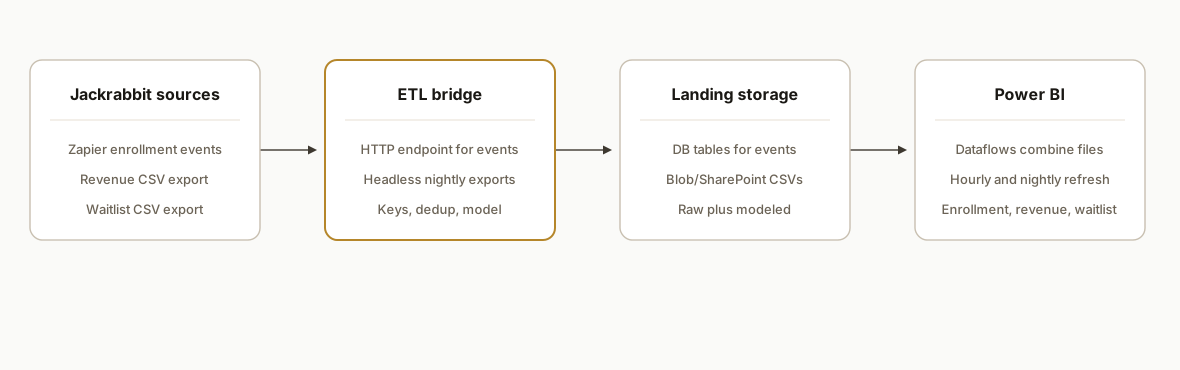
We run two ingestion lanes into a Power BI dataset: an event lane for enrollments using the official Zapier app, and a batch lane for nightly CSV exports of Revenue and Waitlists. A small service normalizes payloads and stores both raw and modeled tables. Power BI refreshes the event lane hourly and the batch lane nightly.
-
Event lane: Zapier to endpoint: Jackrabbit Class in Zapier authorizes with a Jackrabbit-generated Zapier API key. A Zap sends new or updated enrollment details to our HTTPS endpoint, which upserts rows into an enrollments table with a deterministic dedup key. Zapier is polling-based, so near real time means minutes, not instant. If you want Zap configuration details end to end, we documented them in our guide on Jackrabbit Class Zapier integration.
-
Batch lane: nightly CSV exports: Revenue and Waitlist reports support Export to CSV. A scheduled headless browser session logs in, applies saved filters per location, downloads CSVs, and drops them into Azure Blob or SharePoint with a dated path. For teams that reconcile revenue to accounting, see how we handle classification in Jackrabbit to QuickBooks revenue sync.
-
Storage and model: We keep a raw layer for compliance and a modeled layer for Power BI. Keys are consistent across lanes so enrollments can join to revenue at class or program grain.
-
Power BI refresh: Dataflows or the dataset pull the event table hourly and the CSV lake nightly. Incremental refresh keeps the footprint small and speeds up the schedule.
Can you connect Jackrabbit Class to Power BI without an API?
Yes. The working pattern in production combines Zapier events for operational freshness and nightly CSV exports for finance and waitlists.
- Use the Jackrabbit Class Zapier app to capture new or updated enrollments. Post to your endpoint, upsert to a typed table, and refresh Power BI hourly.
- Automate headless CSV exports for Revenue and Waitlists per location. Land files in Azure Blob or SharePoint and refresh nightly.
- Keep a raw layer for reprocessing if a report format changes, and enforce idempotency on both lanes.
If you prefer a lighter landing zone before Power BI, our Jackrabbit Class to Google Sheets automation covers a sheets-first variant that uses the same sources.
Which Jackrabbit Class reports export to CSV reliably?
Revenue and Waitlist reports export to CSV and have been stable across client accounts we worked with. Other reports may differ by account configuration. Validate in your tenant.
Quick test procedure:
- Open the target report and apply the filters you plan to reuse.
- Confirm there is an Export to CSV action and download a sample.
- Check that column headers are consistent across locations and days.
- Save the filter set per location so the export job can select it deterministically.
If a report does not expose Export, keep it out of the nightly batch and source that metric from enrollments or a different exportable view.
Do you need a Power BI gateway for this setup?
- Azure Blob or SharePoint Online as your CSV destination: no on-premises gateway required. Use the native connectors in Dataflows or Desktop.
- Azure SQL Database as your landing database: no gateway if it is accessible over the public endpoint with Azure Active Directory or SQL auth.
- Self-hosted Postgres or SQL Server: you will need a Power BI gateway to refresh from that private network resource.
We typically place CSVs in Azure Blob for gatewayless refresh and keep the database optional for teams that want SQL access.
Step-by-step: how to build it
1) Stand up a landing database and buckets
Create a Postgres or SQL Server table set for raw and modeled data, plus a storage bucket for nightly CSVs. We prefer Azure for Power BI proximity, but S3 or SharePoint also work.
-- enrollments_raw: stores exact JSON payloads for audit
create table if not exists enrollments_raw (
  id serial primary key,
  received_at timestamptz default now(),
  source text not null,
  dedup_key text unique not null,
  payload jsonb not null
);

-- enrollments: flattened, typed model
create table if not exists enrollments (
  enrollment_key text primary key, -- deterministic hash of stable fields
  student_key text not null,
  class_key text not null,
  location text,
  enrolled_at timestamptz,
  status text,
  updated_at timestamptz default now()
);
Key detail: the raw table is your safety net. If a report or trigger changes shape, you still have the original JSON or CSV to reprocess.
2) Capture enrollments with Zapier and post to your endpoint
Use the official Jackrabbit Class app in Zapier. Authorize with the in-app Zapier API key Jackrabbit provides. Add a Webhooks by Zapier action to POST the trigger payload to your endpoint over HTTPS. We normalize payloads and compute a dedup key server side.
// server/index.js
import express from "express";
import crypto from "crypto";
import bodyParser from "body-parser";
import pg from "pg";

const app = express();
app.use(bodyParser.json({ limit: "1mb" }));
const db = new pg.Pool({ connectionString: process.env.DATABASE_URL });

function hash(obj) {
  return crypto.createHash("sha256").update(JSON.stringify(obj)).digest("hex");
}

app.post("/webhooks/jackrabbit/enrollment", async (req, res) => {
  const payload = req.body; // structure varies by Zap trigger
  const dedupKey = hash(payload);
  await db.query(
    "insert into enrollments_raw (source, dedup_key, payload) values ($1,$2,$3) on conflict (dedup_key) do nothing",
    ["zapier:enrollment", dedupKey, payload]
  );
  // Flatten cautiously: handle possible line items from Zapier
  // Example approach: if you detect arrays for contacts, upsert one row per contact
  await db.query(
    `insert into enrollments (enrollment_key, student_key, class_key, location, enrolled_at, status)
     values ($1,$2,$3,$4,$5,$6)
     on conflict (enrollment_key) do update set status = excluded.status, updated_at = now()`,
    [dedupKey, /* map fields defensively in your code */ null, null, null, null, "Active"]
  );
  res.sendStatus(204);
});

app.listen(3000, () => console.log("ok"));
Gotcha: Zapier triggers can include multiple contacts as line items. Detect arrays in the incoming body and fan out to multiple enrollment rows. Do not assume fixed field names from Jackrabbit in your code without inspecting real Zap samples.
3) Automate nightly CSV exports for Revenue and Waitlists
Jackrabbit documents CSV exports for many reports, including Revenue and Waitlists. There is no native scheduled CSV, so we run a headless browser session nightly to export each location's report to storage.
// scripts/export-reports.js
import { chromium } from "playwright";
import fs from "fs/promises";

const { JR_USER, JR_PASS, OUT_DIR } = process.env;

async function exportReport(page, menuText, filename) {
  const [download] = await Promise.all([
    page.waitForEvent("download"),
    page.click(`text=${menuText}`),
  ]);
  const path = `${OUT_DIR}/${new Date().toISOString().slice(0,10)}-${filename}.csv`;
  await download.saveAs(path);
}

(async () => {
  const browser = await chromium.launch({ headless: true });
  const context = await browser.newContext({ acceptDownloads: true });
  const page = await context.newPage();

  await page.goto("https://app.jackrabbitclass.com/");
  await page.fill("input[name=username]", JR_USER);
  await page.fill("input[name=password]", JR_PASS);
  await page.click("text=Log In");

  // Apply saved filters per location before export if available
  await exportReport(page, "Export Revenue CSV", "revenue");
  await exportReport(page, "Export Waitlist CSV", "waitlist");

  await browser.close();
})();
Note: selectors differ by account configuration. We keep selectors and flows in a config file per tenant and include alerts if the UI changes.
4) Land CSVs in Azure Blob and build a Power BI Dataflow
Have your export job write to Azure Blob storage with a container per dataset. In Power BI, create a Dataflow and use Power Query to combine new files by prefix.
let
  Source = AzureStorage.Blobs("https://youraccount.blob.core.windows.net"),
  Container = Source{[Name="jackrabbit-csv"]}[Data],
  RevenueFiles = Table.SelectRows(Container, each Text.StartsWith([Name], "revenue/")),
  AddCsv = Table.AddColumn(RevenueFiles, "Csv", each Csv.Document(Web.Contents([Content.Link]),[Delimiter=",", Encoding=65001, QuoteStyle=QuoteStyle.Csv])),
  Promote = Table.TransformColumns(AddCsv, {{"Csv", each Table.PromoteHeaders(_), type table}}),
  Expanded = Table.ExpandTableColumn(Promote, "Csv", Table.ColumnNames(Promote{0}[Csv]))
in
  Expanded
Use a similar query for Waitlists. Add a Location column from the file path. Set incremental refresh by date column if present.
5) Build the model and joins in Power BI Desktop
Create relationships between Enrollment, Revenue, Waitlist, Class, and Date tables. Define DAX measures for enrollment counts, MTD revenue, and waitlist length. Use row-level security if managers should only see their locations.
Enrollments MTD =
CALCULATE(
  DISTINCTCOUNT(Enrollments[enrollment_key]),
  DATESMTD('Date'[Date])
)

Revenue MTD =
CALCULATE(
  SUM(Revenue[amount]),
  DATESMTD('Date'[Date])
)
Publish to a workspace with scheduled refresh: hourly for enrollments, daily pre-open for revenue and waitlists.
6) Add idempotency and monitoring
Protect against duplicates by hashing each incoming event into a dedup key and defining a unique index on that key. For CSVs, use a load log table keyed by file name and byte size to prevent double-loads. Add an alert if a nightly file is missing or has zero rows.
create table if not exists load_log (
  id serial primary key,
  dataset text not null,
  file_name text not null,
  bytes int not null,
  loaded_at timestamptz default now(),
  unique(dataset, file_name, bytes)
);
Where it gets complicated
-
No general BI API: Jackrabbit's help docs note no JSON support in Online Class Listing Tables and call out no API for Events. Plan for Zapier polling for operational changes and headless exports for reports rather than expecting a REST surface.
-
Zapier line items: Zapier triggers can include multiple contacts as line items. Flatten arrays into one row per student and keep the raw payload for reconciliation.
-
Export variability by report: Not every report exposes Export. Revenue and Waitlists do, but others may not. Build per-report flows and fail safe when a selector is missing.
-
Scheduled email is not a scheduled CSV: Jackrabbit can email from a report and Send Later, but that is messaging. It does not produce a scheduled data file. The export job still needs to run nightly.
-
Refresh quotas and timing: Power BI Pro refresh limits and gateway timing might cap how often you can poll. Set hourly for events and one or two timed windows for nightly fact loads.
-
UI changes and MFA: A headless export relies on stable navigation. Record smoke tests that assert key selectors, and include a manual fallback if MFA appears.
What this actually changes
For the kids activity studio we built this for, enrollment counts, MTD revenue, and waitlist by class were available without anyone logging in to run a report. Managers opened Power BI each morning to the same metrics. New enrollments appeared within minutes, while revenue and waitlists updated before the first class of the day. A Forrester Total Economic Impact study estimates 366 percent ROI over three years for Power BI when organizations centralize reporting and reduce manual effort, which matches what we saw once the nightly exports and event stream stabilized (source: https://info.microsoft.com/ww-landing-Forrester-Total-Economic-Impact-of-Power-BI.html).
Frequently asked questions
Does Jackrabbit Class have an official API for Power BI?
Jackrabbit does not publish a general REST API for BI pulls. Their help docs note no JSON support for Online Class Listing Tables and state no API for Events. We bridge with the official Zapier app for enrollment events and automate CSV exports for Revenue and Waitlists.
How real-time is the enrollment feed?
Zapier for Jackrabbit uses polling triggers, so new or changed enrollments arrive in minutes, not instantly. We schedule an hourly Power BI refresh for the event lane. Revenue and Waitlists update on a nightly window after the export job drops CSVs.
How do you prevent duplicates in Power BI?
We compute a deterministic dedup key per event and enforce a unique index in the landing table. For CSV loads, we log file name and byte size in a load_log table and skip a file if it already landed. Power Query also de-duplicates on known keys before publish.
Can I do this without code using only Zapier?
Zapier is useful for enrollment events, but it does not schedule CSV exports and is polling-based. To automate Revenue and Waitlists you need a small service or headless export job to place files in storage for Power BI. Most teams need light engineering here.
What does this cost monthly?
Power BI licensing, a Zapier plan sized to your volume, and light cloud hosting for the endpoint and export job. Storage costs are negligible for CSV. The primary investment is the initial build and a bit of ongoing monitoring.
Will this keep working if Jackrabbit changes the UI?
We ship smoke tests and selectors in config per tenant. If the export button or path changes, the job alerts and stops rather than saving empty files. You still have the Zapier enrollment feed while we adjust the export flow.
If you want Jackrabbit Class data flowing into Power BI without weekly exports and spreadsheets, we have shipped this exact bridge. See our related post on Jackrabbit Class to Google Sheets automation, read how we configure Zaps in our Jackrabbit Class Zapier integration guide, learn how we reconcile revenue in Jackrabbit to QuickBooks revenue sync, read more about our custom AI integration services, or book a 20-minute call and we will map your setup in one conversation.
Sources
- 1.The Total Economic Impact of Power BI (Forrester, for Microsoft)info.microsoft.com
Want us to build this for you?
Nine questions, about 90 seconds. You see the revenue it is costing you, then pick a time. No pitch.
See your options