
We rebuilt PruneAI's onboarding so creators connected their sources and channels without creating new vendor accounts or sharing passwords. The new grant-access flow used native role delegation for YouTube, Meta, and a partner OAuth for TikTok, then fed those connections into the existing video-to-shorts pipeline. If you run a shorts service, this is the pattern that keeps conversion high and risk low.
Grant-access onboarding is a connection model where clients delegate access with first-party roles or OAuth instead of handing over credentials or creating net-new tool accounts.
The problem it solves
Most done-for-you shorts offers collapse at onboarding: asking clients to create multiple third-party accounts, share passwords, and configure webhooks. That friction kills conversion and creates security risk. We saw both in PruneAI v1: two prospects approved clip quality then quietly dropped at setup.
| Workflow | Manual sign-ups and passwords | Grant-access onboarding |
|---|---|---|
| Account setup | Client creates 3 vendor accounts, shares creds | Client sends channel invites or clicks OAuth |
| Security posture | Shared passwords and stored creds | No passwords shared, roles revocable by client |
| Time to connect | 45, 90 minutes and back-and-forth | 5, 15 minutes with clear, single-page flow |
| Support load | High: resets, unknown UIs, rate limits | Low: native invites, revocation handled by platform |
| Vendor secrecy | Stack exposed in emails/docs | Stack abstracted behind one branded page |
Two external anchors shaped this redesign:
- Baymard reports average cart abandonment around 70 percent for frictiony checkouts, a reminder that extra steps are conversion poison even outside ecommerce. Source: https://baymard.com/lists/cart-abandonment-rate
- Verizon's 2024 DBIR notes the human element is involved in most breaches, so removing password sharing is not just convenience. Source: https://www.verizon.com/business/resources/reports/dbir/
How the automation works
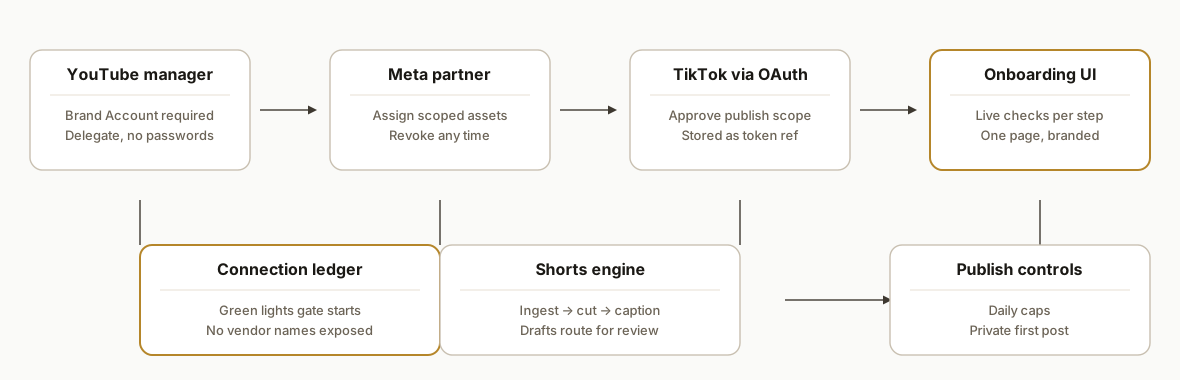
We replaced create-accounts and share-passwords with three native connections and a single onboarding page that validates each step in real time. The pipeline behind it did not change much, but the risk and friction dropped dramatically.
- YouTube channel manager invites: Creators add PruneAI as a manager on a Brand Account, which is revocable at any time. No password sharing. This unlocks upload and library read as needed by the service.
- Meta Business partner access: Creators add the service as a partner with scoped assets. Roles limit posting and insights to what is required.
- TikTok via an approved partner OAuth: We route TikTok through a publishing partner the client already trusts. One click to approve posting on their behalf.
- Onboarding UI and config: A branded page captures only what delegation cannot. It verifies invites landed, stores minimal IDs, and keeps vendor names out of client-facing copy.
- Shorts pipeline: Once a platform lights green, our prebuilt blueprints begin ingesting long-form, generating cuts, and routing drafts for review. The pipeline was already tuned; onboarding was the blocker.
Step-by-step: how to build it
1) Prepare platform identities and roles
Create or confirm the service identities you will be delegated to. Document the minimum roles needed per platform and test them on internal sandboxes before you ever ask a client.
YouTube: Request Channel Manager on a Brand Account.
Meta: Request Partner access with scoped assets and roles.
TikTok: Use an approved partner that exposes OAuth on the client side.
Key gotcha: YouTube channel manager invites require a Brand Account. Personal channels behave differently and block expected roles.
2) Ship a single onboarding page with live checks
We built a small static app that renders per-platform sections with status checks and clear instructions. A single config object controls the copy, IDs, and partner links.
// /lib/prune.config.js
export const PRUNE = {
  brand: { name: "PruneAI", supportEmail: "support@prune.ai" },
  youtube: { needs: ["Brand Account", "Manager invite"], help: "Add our email as channel manager." },
  meta: { needs: ["Business ID", "Partner add"], help: "Add our Business ID as a partner and assign assets." },
  tiktok: { needs: ["OAuth connect"], help: "Click Connect TikTok and approve publishing." },
  legal: { scope: "post + insights only", revoke: "You can revoke any time in platform settings." }
};
Key gotcha: Mark fields optional unless delegation truly requires them. Over-collecting info tanks completion.
3) YouTube manager invite flow and verification
Give creators an exact invite target and a short template to confirm it landed. Our page watches for a verification click rather than polling APIs.
Subject: YouTube access for shorts automation

Please add this email as Channel Manager on your Brand Account. Then click "I sent the invite" on the onboarding page.
Key gotcha: Verify receipt, not just the client's claim. Many platforms silently fail invites when the target is not a Brand Account.
4) Meta Business partner access with scoped assets
Provide your Business ID and a one-screen checklist of which assets to assign. Keep the copy inside your brand so you do not leak your vendor tree.
Assign these assets to the partner:
- Facebook Page: Content publishing
- Instagram Account: Content publishing and insights
Key gotcha: Asset scopes drift. If reels fail to publish, check whether Instagram permissions were assigned to the partner at the account level, not just the Page.
5) TikTok via partner OAuth
Creators click Connect TikTok, authenticate with the partner, and accept the requested scope. We store only the partner's token reference, not raw credentials.
Connect TikTok
- Click the button on the onboarding page
- Approve the publish scope
- Return to see the green Connected state
Key gotcha: If the partner account is not provisioned, the button should degrade to a friendly error and a support contact, not a blank screen.
6) Wire the shorts pipeline behind the switches
We reused our existing blueprints for ingesting long-form, creating vertical cuts, and routing drafts to review, then gated start conditions on the green lights from onboarding.
# pipeline.yml
sources:
  youtube: enabled_if: youtube.connected
  drive: enabled_if: true
steps:
  - detect_scenes
  - generate_captions
  - render_vertical
  - route_for_review
sinks:
  - youtube_shorts: enabled_if: youtube.connected
  - instagram_reels: enabled_if: meta.connected
  - tiktok: enabled_if: tiktok.connected
Key gotcha: Keep dry-run default on until at least one platform is fully green. First publish should be a single private test per destination.
7) Add human review and guardrails
Publishing is never fully automated. We add two gates: a brand-voice approval step and a daily cap per channel.
function canPublishToday(channel, limit = 5) {
  const sent = getSentCount(channel, new Date());
  return sent < limit;
}
Key gotcha: Some sanitizers drop bare line breaks or unsupported characters. Wrap lines in simple divs and keep captions ASCII-safe unless you have tested the destination renderer.
Where it gets complicated
YouTube requires a Brand Account. Manager invites to personal channels look like they worked but do not grant the rights your pipeline needs. Bake this check into onboarding copy.
Meta asset scoping is easy to misassign. Partners can be added without the correct Instagram asset permissions. If reels fail to post, the partner probably lacks the correct role on the IG account.
TikTok access is partner gated. If you rely on a third-party publisher, your OAuth surface is only as good as their provisioning. Degrade gracefully and give creators a quick support path.
Verify invites landed, not just marked done. Creators often click Next before the platform sends the invite. Use an explicit Received button and do not flip green until a human confirms.
Keep the vendor stack abstracted. Your client needs one page and a few invites, not a diagram of your toolchain. We kept vendor names out of client copy and stored only what delegation made necessary.
Staging is not optional. Run all first posts as private with a per-destination dry run until every role and scope is verified. One public misfire costs more than a week of caution.
What this actually changes
For PruneAI, the onboarding bottleneck disappeared. Prospects who already liked the clips no longer faced a wall of account creation and password sharing. The new flow asked them to do what they already know how to do: send a channel invite or click Connect.
Qualitatively, we saw three behaviors shift after shipping v3:
- Creators finished onboarding in one sitting because every step was native to the platform they use daily.
- Support time moved from new-account setup to a few targeted scope fixes, which are faster to resolve.
- Security posture improved because no passwords were exchanged and all access was revocable by the client in their own consoles.
The conversion lesson generalizes beyond creators. Frictiony flows drive drop-off, as the Baymard figure reminds us. Removing password sharing also hardens risk at the same time that it improves completion, aligning with DBIR's warning about human-element breaches.
Frequently asked questions
Do creators need to share passwords for this to work?
No. The entire redesign removed password sharing. Creators delegate access with first-party roles on YouTube and Meta, and approve TikTok posting through a trusted partner. All access is revocable at any time in their own platform consoles.
What if a creator does not have a YouTube Brand Account?
Manager invites require a Brand Account. If a channel is still personal, onboarding pauses with clear instructions to migrate to a Brand Account. This is a one-time change and it unlocks proper role delegation.
How long does onboarding take now?
Typical completion is a single session of about 5, 15 minutes because steps are native to each platform. The only longer case is converting a personal YouTube channel to a Brand Account, which is a platform task and outside the automation.
Does this expose the vendor stack we use behind the scenes?
No. The onboarding page is branded to the service and asks only for native invites or a single Connect click. We keep vendors and intermediate tools out of client copy and store only minimal identifiers for routing.
What happens if a client revokes access?
Publishing pauses automatically. The onboarding page flips to a Reconnect state and the internal pipeline gates turn red for that destination until access is restored.
Can a non-technical creator do this without help?
Yes. That is the point of grant-access onboarding. Steps are the same actions creators already use to add a manager or connect a publishing app. We kept jargon and extra fields out of the UI to reduce decision load.
If you run a shorts service or creator pipeline and your setup flow is costing you clients, we can rebuild it around native delegation and a single onboarding page. See our broader work in custom AI integration, and read how we handle publishing at scale in Automate Short-Form Video. Ready to map your flow and ship it in a week: book a call.
Want us to build this for you?
Nine questions, about 90 seconds. You see the hours it is costing you, then pick a time. No pitch.
Get your free assessment