
You can automate iClassPro booking emails and follow-ups by chaining three things you already have: iClassPro's automated emails, its Mailchimp contact sync, and CSV exports of enrollment data that a small script turns into tags for Mailchimp Journeys. This suits gyms, swim and gymnastics schools that need reminders, no-show recovery, and post-class review asks without re-keying.
iClassPro booking follow-up automation is: using iClassPro's native emails plus a CSV-driven tag pipeline to trigger external journeys in your email platform when new enrollments or trials appear.
The problem it solves
Most studios want a predictable flow after someone books: instant confirmation, pre-class prep, a day-of reminder, and a post-class nudge to rebook or review. iClassPro has automated emails and Email Blasts, but there is no public API and no native Zapier/Make app to push booking events into your CRM. Mailchimp sync covers basic contacts, not booking context, and scheduled Blasts snapshot recipients at schedule time, not send time, so late signups miss messages.
| Task | Manual workflow | Automated workflow |
|---|---|---|
| Confirmation + prep | Staff writes ad-hoc emails per booking | iClassPro automated emails send templated confirmations and policies |
| Day-before reminder | Someone filters a report, copies addresses | CSV export feeds a Sheet, tags in Mailchimp trigger a Reminder Journey |
| No-show recovery | Staff hunts attendance, sends 1:1 notes | Script marks likely no-shows by date, Journey sends rebook offer |
| Post-class review ask | Batches an Email Blast weekly | Tag-based Journey schedules 24, 48h after class without batching gaps |
| CRM visibility | Manually adds contacts | Sheet or CRM import consumes the same CSV on a schedule |
How the automation works
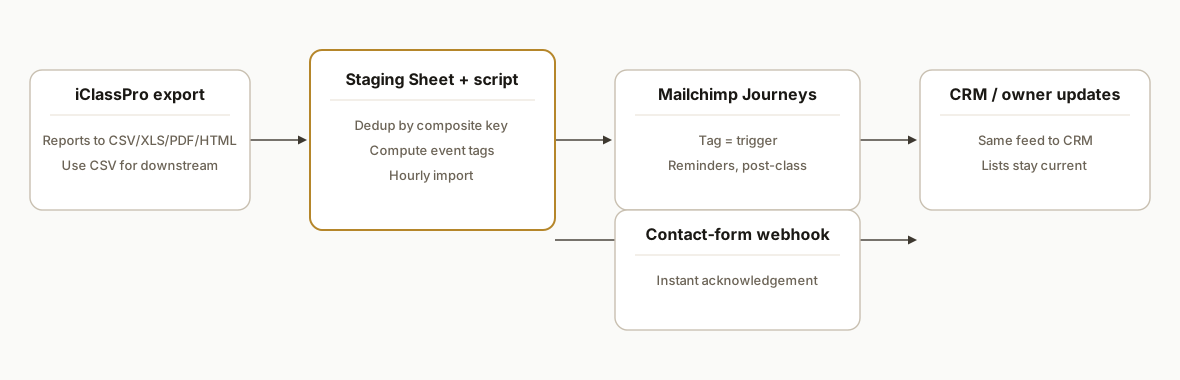
The backbone is simple: export relevant iClassPro reports to CSV, drop them in a watched folder, then have a small script dedupe and compute event tags like New Enrollment, Trial Booked, or Post-Class. Those tags update contacts in Mailchimp, where Journeys send the right message at the right time. iClassPro's own automated emails still cover confirmations; your external Journeys handle the multi-step nurture.
- iClassPro built-ins: Automated emails fire on enrollments and other events, and Email Blasts can be scheduled. Use these for confirmations and policy delivery.
- CSV export surface: iClassPro reports export to CSV, XLS, PDF, or HTML. CSV is the easiest feed into a Sheet or CRM.
- Mailchimp sync: iClassPro syncs basic family contact fields to Mailchimp, which you extend with tags for Journeys. The native sync does not carry booking details, so tags bridge that gap.
- Form webhooks: If you use iClassPro's Integrated Website contact form, it can send webhooks to a third-party endpoint. That is useful for instant replies on enquiries, but it does not fire on core booking events.
Step-by-step: how to build it
1) Map your follow-up journey
Decide what runs natively vs externally. A common split: confirmations in iClassPro automated emails, and these tags for external Journeys: New Enrollment, Trial Booked, Class Tomorrow, Post-Class, No-Show Candidate, Dropped or Cancelled. Write the content once and keep timing in your email platform.
Journey map
- iClassPro automated: Enrollment confirmation, policy/what-to-bring
- Mailchimp Journeys (tag-triggered):
  - New Enrollment: welcome + orientation video
  - Class Tomorrow: day-before reminder at 10:00 local
  - Post-Class: 24, 48h after, review ask or rebook link
  - No-Show Candidate: 36h after scheduled start if no attendance seen
  - Dropped/Cancelled: win-back offer in 7, 10 days
Key gotcha: scheduled Email Blasts in iClassPro snapshot the recipient list at schedule time, not at send time. Use tag-triggered Journeys in Mailchimp to avoid late signups falling through.
2) Export the right iClassPro report to CSV
From iClassPro, export the enrollment or class roster style report that includes at least: student name, family email, class name, start date and time, and status. Save as CSV. If you produce this daily, you get near-real-time follow-ups without needing an API.
Required CSV columns (example)
student_first,student_last,family_email,class_name,start_date,start_time,status
Jane,Doe,jane@example.com,Mini Gym Mon 4pm,2026-10-07,16:00,ENROLLED
3) Land the CSV in a staging Sheet with dedupe keys
Put exported CSVs in a single Drive folder. A small Google Apps Script can watch that folder, parse new CSVs into a Sheet, and skip duplicates by a composite key. This keeps your downstream tags idempotent.
// Apps Script: parse new CSVs from a Drive folder into a Sheet and dedupe by a composite key
const FOLDER_ID = 'YOUR_DRIVE_FOLDER_ID';
const SHEET_NAME = 'staging_enrollments';

function importNewCSVs() {
  const sh = getOrCreateSheet_(SHEET_NAME);
  const files = DriveApp.getFolderById(FOLDER_ID).getFilesByType('text/csv');
  const seen = new Set(readExistingKeys_(sh));

  while (files.hasNext()) {
    const f = files.next();
    const rows = Utilities.parseCsv(f.getBlob().getDataAsString());
    const header = rows.shift();
    const cols = indexCols_(header, ['student_first','student_last','family_email','class_name','start_date','start_time','status']);

    rows.forEach(r => {
      const email = r[cols.family_email]?.toLowerCase().trim();
      if (!email) return;
      const key = [r[cols.student_first], r[cols.student_last], email, r[cols.class_name], r[cols.start_date]].join('|').toLowerCase();
      if (seen.has(key)) return;
      seen.add(key);
      const tag = deriveTag_(r[cols.status], r[cols.start_date], r[cols.start_time]);
      sh.appendRow([r[cols.student_first], r[cols.student_last], email, r[cols.class_name], r[cols.start_date], r[cols.start_time], r[cols.status], tag, new Date()]);
    });
  }
}

function deriveTag_(status, date, time) {
  const now = new Date();
  const start = new Date(`${date}T${(time||'00:00')}:00`);
  if (status === 'ENROLLED' && start > now) return 'New Enrollment';
  if (status === 'TRIAL' && start > now) return 'Trial Booked';
  const hoursToStart = (start - now) / 36e5;
  if (hoursToStart <= 24 && hoursToStart > 0) return 'Class Tomorrow';
  if (now - start > 48*36e5 && status === 'ENROLLED') return 'No-Show Candidate';
  if (status === 'DROPPED' || status === 'CANCELLED') return 'Dropped or Cancelled';
  return '';
}

function getOrCreateSheet_(name){
  const ss = SpreadsheetApp.getActive();
  return ss.getSheetByName(name) || ss.insertSheet(name).setFrozenRows(1)
    .appendRow(['student_first','student_last','family_email','class_name','start_date','start_time','status','tag','ingested_at']);
}

function indexCols_(header, fields){
  const idx = {}; fields.forEach(f => idx[f] = header.indexOf(f)); return idx;
}

function readExistingKeys_(sh){
  const vals = sh.getDataRange().getValues();
  const keys = [];
  for (let i=1;i<vals.length;i++) {
    const [sf,sl,email,cn,sd] = [vals[i][0],vals[i][1],vals[i][2],vals[i][3],vals[i][4]];
    if (!email) continue;
    keys.push([sf,sl,String(email).toLowerCase().trim(),cn,sd].join('|').toLowerCase());
  }
  return keys;
}
Run this on a time-based trigger every hour. It keeps a tidy staging table and assigns a single tag per row.
4) Upsert contacts and apply tags in Mailchimp
Use the staging Sheet as the source of truth. A lightweight Node script can upsert each email into your Mailchimp Audience and apply the tag from the Sheet. Mailchimp tags drive Journeys reliably without relying on scheduled Blasts.
// Node 18+ example: upsert a member and add a tag in Mailchimp v3.0
import crypto from 'node:crypto';
import fetch from 'node-fetch';

const API_KEY = process.env.MAILCHIMP_API_KEY; // format: key-usX
const DC = API_KEY.split('-')[1];
const LIST_ID = process.env.MAILCHIMP_LIST_ID;

async function upsertAndTag(email, mergeFields, tag) {
  const hash = crypto.createHash('md5').update(email.toLowerCase()).digest('hex');
  const base = `https://${DC}.api.mailchimp.com/3.0/lists/${LIST_ID}/members/${hash}`;
  const auth = 'Basic ' + Buffer.from(`any:${API_KEY}`).toString('base64');

  // Upsert member
  await fetch(base, {
    method: 'PUT',
    headers: { 'Authorization': auth, 'Content-Type': 'application/json' },
    body: JSON.stringify({ email_address: email, status_if_new: 'subscribed', merge_fields: mergeFields })
  }).then(r => r.ok ? r : r.text().then(t => Promise.reject(new Error(t))));

  // Apply tag if present
  if (tag) {
    await fetch(`${base}/tags`, {
      method: 'POST',
      headers: { 'Authorization': auth, 'Content-Type': 'application/json' },
      body: JSON.stringify({ tags: [{ name: tag, status: 'active' }] })
    }).then(r => r.ok ? r : r.text().then(t => Promise.reject(new Error(t))));
  }
}
Pull rows from the Sheet with a small Apps Script web app or export as CSV and let the Node job read it. Keep tag names identical to your Journey triggers.
5) Build tag-triggered Journeys in Mailchimp
In Mailchimp, create a Customer Journey per tag. Example: When tag equals Class Tomorrow, send Reminder Email A at 10:00 local. For Post-Class, delay 24, 48 hours, then send a review ask. For Dropped or Cancelled, delay 7, 10 days, then send a win-back offer. This avoids the scheduled-Blast snapshot limitation and stays aligned even when new bookings arrive late.
Journey triggers
- Tag: New Enrollment -> send welcome now, delay 3d -> send FAQ
- Tag: Class Tomorrow -> send 10:00 local pre-class reminder
- Tag: Post-Class -> delay 36h -> send review ask + rebook link
- Tag: No-Show Candidate -> send rebook with alternate slots
- Tag: Dropped or Cancelled -> delay 10d -> send win-back offer
6) Use the iClassPro contact-form webhook for instant enquiry replies
iClassPro's Integrated Website contact forms can send webhooks to your endpoint. Use that for speed-to-lead on enquiries since there is no official booking webhook. Accept JSON, store the lead, and send an acknowledgement immediately from your email platform or CRM.
// Next.js API route example: accept iClassPro Integrated Website contact-form webhook
export default async function handler(req, res) {
  if (req.method !== 'POST') return res.status(405).end();
  const { name, email, phone, message } = req.body || {};
  if (!email) return res.status(400).json({ ok: false, error: 'missing email' });

  // 1) Persist to your CRM or Sheet
  // 2) Trigger an immediate acknowledgement email via your ESP

  return res.status(200).json({ ok: true });
}
Where it gets complicated
- No public booking API or webhooks: There are no official developer docs for core booking events. Plan on exports plus a light script rather than polling undocumented endpoints.
- Email Blast snapshots: Scheduled Blasts snapshot recipients at schedule time, not send time. Use tag-triggered Journeys in your ESP for dynamic lists.
- Mailchimp sync scope: The native iClassPro sync only sends basic family contact fields. You will not get booking context without your own tags.
- Deduping without a booking ID: Build a composite key from student, class, email, and date. That keeps your pipeline idempotent if a row appears in multiple exports.
- Time zones and windows: Compute Class Tomorrow and Post-Class with local time and guardrails, so holidays and late exports do not misfire.
- Consent and list hygiene: Respect unsubscribes and consent. Your script should never re-subscribe a contact automatically if they have opted out.
What this actually changes
Studios get consistent reminder and nurture flows even without a public API: confirmations stay in iClassPro, and everything time-sensitive rides on tag-triggered Journeys fed by CSV. That closes the gap for late signups and no-shows while keeping admin off your front desk. One adjacent data point: Harvard Business Review reported companies that attempted to contact potential customers within an hour of receiving a query were nearly seven times as likely to qualify the lead as those that waited longer (The Short Life of Online Sales Leads, hbr.org/2011/03/the-short-life-of-online-sales-leads).
Frequently asked questions
Does iClassPro have an official API for bookings?
We found no public iClassPro developer documentation for booking events. Some third parties mention undocumented endpoints, but those are not official and we do not rely on them for production work. The safe path is exports plus a light script that tags contacts in your email platform.
Can I automate this with Zapier or Make?
There is no official iClassPro app in Zapier or Make. You can still automate: use iClassPro's CSV exports to feed a Google Sheet and call your email platform's API for tags and Journeys. If you use Mailchimp already, its native contact sync covers basic fields that you extend with tags.
How close to real time can this get?
For enquiries, the Integrated Website contact form can send a webhook to your endpoint for instant acknowledgements. For bookings, schedule frequent CSV exports and a 15, 60 minute import run. That is enough to catch day-before reminders and next-day post-class messages reliably.
What does this cost monthly?
Most cost sits in your email platform subscription. The CSV watcher and tagger can run on zero-infrastructure components like Google Apps Script or a small job on your host, so ongoing infra cost is minimal. The primary investment is the initial setup time.
Who should I hire to set this up?
Hire a marketer or automator comfortable with Mailchimp Journeys and CSV-to-Sheet workflows. Bring in a developer only if you plan to pursue undocumented endpoints or need a custom CRM adapter. The common stack here is Mailchimp plus Google Sheets and a small script.
Can I add SMS?
Yes. The same CSV-to-Sheet feed can power an SMS step from your CRM or messaging provider. Keep consent and quiet hours enforced at the CRM layer and do not rely on undocumented booking hooks.
If you want a second set of eyes on your journey map or the CSV-to-tag plumbing, we scope and build these pipelines regularly. See our related guide on the iClassPro to GoHighLevel bridge for CRM handoffs: How to Automate iClassPro to GoHighLevel. Or browse our CRM automation services and book a call.
Want us to build this for you?
Nine questions, about 90 seconds. You see the hours it is costing you, then pick a time. No pitch.
Get your free assessment