
We wired WellSky Personal Care Subscriptions to a small orchestration service that turns every clock in or clock out into a clean billing row and triggers caregiver SMS when a shift changes or a clock event is missed. It is built for home care agencies that need scheduling-to-billing accuracy and faster caregiver communications. This guide shows exactly how we implemented it: OAuth2, Subscriptions, event handlers, phone validation, and the real integration gotchas.
Definition: WellSky ClearCare integration automation is a webhook-driven bridge that listens to scheduling and encounter events in WellSky Personal Care and converts them into billing entries and caregiver communications in near real time.
The problem it solves
Operators were reconciling visits to payroll by hand and chasing caregivers by text when schedules changed. That created late payroll fixes, inconsistent phone formats that broke imports, and no audit trail tying encounters to final pay. We replaced spreadsheets and ad hoc texting with a real-time pipeline.
| Task | Manual workflow | Automated with WellSky Subscriptions |
|---|---|---|
| Capture completed visits | Export, filter, and hand-key hours into payroll weekly | Webhook receives encounter change. One row upserted instantly |
| Handle schedule changes | Coordinators call or text caregivers one by one | Event routes to SMS template per caregiver instantly |
| Phone number hygiene | Free-form entry breaks downstream sends | Normalized to 10 digits, validated before any send/write |
| Backfills and audits | Find and fix gaps after the fact | Daily reconciliation job flags mismatches and repairs |
How the automation works
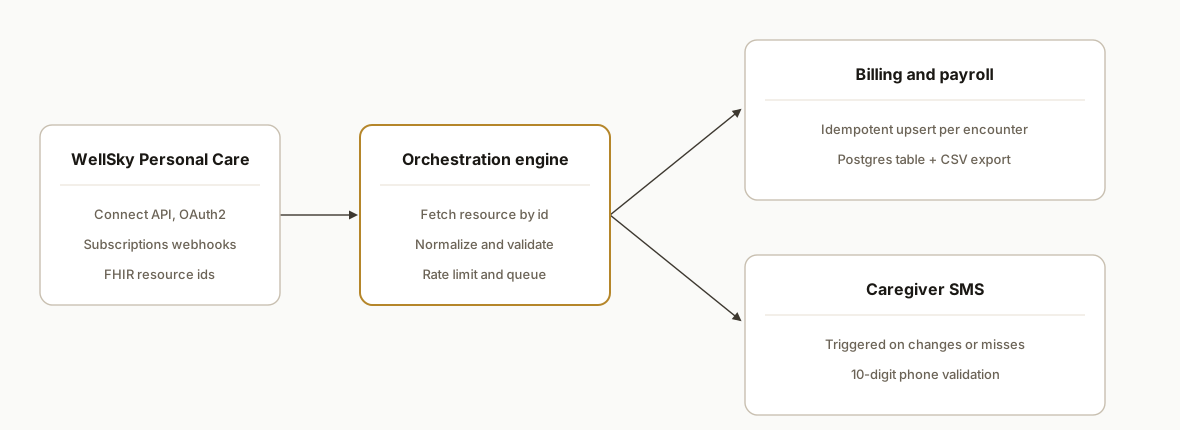
A subscription in WellSky Personal Care posts event notifications to our webhook with a resourceType and id. The service exchanges OAuth2 client credentials for a short-lived bearer token, fetches the changed resource, normalizes it, then either upserts a billing record or triggers a caregiver SMS depending on event type. A daily reconciliation job consumes the WellSky Data Access feed to catch stragglers and keep payroll in lockstep.
- WellSky Personal Care Connect API: FHIR-based REST at https://connect.clearcareonline.com/v1/. OAuth 2.0 client credentials to /oauth/accesstoken. We fetch detail for each event by resourceType and id.
- Subscriptions webhooks: WellSky posts to our HTTPS endpoint on key lifecycle changes. Example in docs: encounter.clockout.changed and admintask.created. We treat the notification as a pointer and re-fetch the resource.
- Orchestration service: Node worker with a small job queue. It rate-limits requests and enforces the required trailing slash on resource GETs.
- Billing sink: A Postgres table plus a CSV export the payroll system already accepts. We upsert by a deterministic key so replays do not double pay.
- Caregiver SMS: External SMS provider triggered by events. Messaging endpoints in WellSky public docs are not confirmed, so we bridge outbound communications outside the EMR and store only minimal metadata.
Step-by-step: how to build it
How do you authenticate to WellSky Personal Care Connect API?
Request a short-lived bearer token with OAuth 2.0 client credentials against /oauth/accesstoken. Store only the client_id and client_secret and refresh the token on expiry.
// auth.ts
import fetch from "node-fetch";

const BASE = "https://connect.clearcareonline.com/v1";

export async function getToken(clientId: string, clientSecret: string) {
  const resp = await fetch(`${BASE}/oauth/accesstoken`, {
    method: "POST",
    headers: { "Content-Type": "application/x-www-form-urlencoded" },
    body: new URLSearchParams({
      grant_type: "client_credentials",
      client_id: clientId,
      client_secret: clientSecret,
    }).toString(),
  });
  if (!resp.ok) throw new Error(`OAuth failure: ${resp.status}`);
  const json = await resp.json();
  return json.access_token as string; // short-lived bearer
}
Gotcha: plan for short lifetimes. Cache the token in memory with a conservative TTL and rotate on 401.
How do you subscribe to visit and task changes?
Create Subscriptions so WellSky POSTs events to your webhook. The docs show many topics. We used encounter change events for scheduling-to-billing and a general task-created subscription for coordination flows.
// subscribe.ts
import fetch from "node-fetch";

async function createSubscription(token: string, topic: string, callbackUrl: string) {
  const resp = await fetch(`${BASE}/subscriptions/`, {
    method: "POST",
    headers: {
      Authorization: `Bearer ${token}`,
      "Content-Type": "application/json",
    },
    body: JSON.stringify({ topic, endpoint: callbackUrl }),
  });
  if (!resp.ok) throw new Error(`Subscribe failed ${resp.status}`);
  return resp.json();
}

// examples consistent with docs
await createSubscription(token, "encounter.clockout.changed", process.env.WEBHOOK_URL!);
await createSubscription(token, "admintask.created", process.env.WEBHOOK_URL!);
Gotcha: endpoints in this API require a trailing slash. Keep the slash on collections like /subscriptions/ or writes will fail in subtle ways.
How do you handle webhooks and fetch the changed resource?
Treat the webhook as a pointer. It contains a resourceType and id. Immediately re-fetch that resource with your bearer token and a trailing slash.
// webhook.ts
import type { Request, Response } from "express";
import fetch from "node-fetch";

export async function handleWellSky(req: Request, res: Response) {
  const { resourceType, id } = req.body || {};
  if (!resourceType || !id) return res.status(400).send("bad payload");

  const token = await getToken(process.env.WK_ID!, process.env.WK_SECRET!);
  const url = `${BASE}/${encodeURIComponent(resourceType)}/${encodeURIComponent(id)}/`; // trailing slash
  const r = await fetch(url, { headers: { Authorization: `Bearer ${token}` } });
  if (!r.ok) return res.status(502).send("fetch failed");
  const resource = await r.json();

  await enqueue(resource); // hand to your job queue
  res.status(202).send("ok");
}
Gotcha: do not process heavy logic in the webhook request. A queue keeps the webhook fast and resilient under bursts.
How do you normalize data and enforce phone rules?
Normalize caregiver phones to exactly 10 digits before any downstream use. The docs call out 10 digits without a leading 0 or 1. Reject or correct anything else.
// normalize.ts
export function normalizeUSPhone(input: string): string | null {
  const digits = (input || "").replace(/\D/g, "");
  const cleaned = digits.startsWith("1") ? digits.slice(1) : digits;
  return cleaned.length === 10 ? cleaned : null;
}

export function mapEncounterToBilling(e: any) {
  return {
    encounterId: e.id,
    caregiverId: e.participant?.id,
    clientId: e.subject?.id,
    start: e.period?.start,
    end: e.period?.end,
    minutes: Math.max(0, (new Date(e.period?.end).getTime() - new Date(e.period?.start).getTime()) / 60000),
  };
}
Gotcha: treat any non-10-digit result as invalid. Surface it to an exceptions queue instead of silently skipping.
How do you upsert billing rows safely?
Use a deterministic key so replays or duplicate events never double-pay. We use encounterId plus the encounter's lastUpdated timestamp when present.
-- billing.sql
create table if not exists billing_rows (
  key text primary key,
  encounter_id text not null,
  caregiver_id text not null,
  client_id text not null,
  start_at timestamptz not null,
  end_at timestamptz not null,
  minutes integer not null,
  source jsonb not null,
  created_at timestamptz default now(),
  updated_at timestamptz default now()
);
// upsert.ts
export async function upsertBillingRow(db, r: any) {
const key = `${r.encounterId}:${r.meta?.lastUpdated || r.period?.end}`;
await db.query(
`insert into billing_rows(key, encounter_id, caregiver_id, client_id, start_at, end_at, minutes, source)
values ($1,$2,$3,$4,$5,$6,$7,$8)
on conflict(key) do update set end_at=excluded.end_at, minutes=excluded.minutes, source=excluded.source, updated_at=now()`,
[key, r.id, r.participant?.id, r.subject?.id, r.period?.start, r.period?.end, r.minutes, r]
);
}Gotcha: the API is not for batch jobs. Process one resource at a time and keep steady backoff if you approach 100 requests per second.
How do you trigger caregiver SMS on changes or misses?
Because public docs do not confirm in-platform messaging endpoints, we bridged to an external SMS provider. We trigger an SMS when an encounter state implies an actionable change or a missed clock event.
// sms.ts
import twilio from "twilio";
const client = twilio(process.env.TWILIO_SID!, process.env.TWILIO_TOKEN!);

export async function notifyCaregiver(phone10: string, msg: string) {
  const to = `+1${phone10}`;
  await client.messages.create({ to, from: process.env.SMS_FROM!, body: msg });
}
Gotcha: keep PHI out of messages. Use minimal phrasing and rely on the caregiver portal for details.
How do you reconcile and backfill daily?
WellSky's Data Access provides daily data access to agency data. We run a daily compare job that loads the feed and flags any encounters not seen via webhook so payroll does not miss anything.
// reconcile.ts (shape illustrative)
import fs from "fs";
import csv from "csv-parse/sync";

export function reconcileDaily(csvPath: string, seenKeys: Set<string>) {
  const raw = fs.readFileSync(csvPath, "utf8");
  const rows = csv.parse(raw, { columns: true });
  const gaps = rows.filter(r => !seenKeys.has(`${r.encounter_id}:${r.last_updated}`));
  return gaps; // enqueue fetches for each gap
}
Gotcha: the Data Access implementation details are vendor-managed and update daily. Treat it as a repair lane rather than a primary pipeline.
WellSky SMS caregivers not receiving: step-by-step fix
If caregivers report not receiving texts, run this sequence. These are the exact checks we implemented to stabilize delivery:
- Validate phone format: store as 10 digits, send as +1 plus those digits. Reject anything else into an exceptions queue and route by call for urgent items.
- Confirm opt-in status: if a caregiver replied STOP to your number, carriers block future messages. Record provider status and honor opt-out. Use portal or voice for urgent changes.
- Register A2P 10DLC: use a registered brand and campaign for operational alerts. Unregistered long codes are filtered more often, especially with templated text or links.
- Add delivery logging: persist a correlation id that ties the WellSky event id to the provider message id and final status so you can prove delivery or act on failures.
- Quiet hours and retries: avoid sending during late hours, then retry with randomized spacing. Do not spam. Escalate to a call after a small, finite number of failures.
- Seed test numbers: keep at least one test handset per major carrier to verify changes before broad sends and to detect carrier-side filtering early.
Caregiver does not receive messages: a 60 second triage
- Text START from the caregiver handset to your sending number to clear a prior STOP if appropriate for your policy.
- Send a one-off plain text without links to that handset. If it delivers, tighten content hygiene and register A2P if not already.
- Check the provider message id status for that send. If it is Undelivered with a carrier code, fix phone format or opt-in. If it is Sent with no delivery receipt, try a voice fallback for urgent schedule changes.
ClearCare scheduling software: what we automate
ClearCare is the scheduling layer inside WellSky Personal Care. We subscribe to encounter events that represent visit starts, clock-ins, clock-outs, and edits. The service maps those events to payroll-ready billing rows and triggers caregiver notifications when a visit time changes or a clock action is missed. If your current process exports schedules and re-keys hours, this replaces that with a real-time, source-of-truth stream.
- Visit edits in ClearCare turn into an upsert on the matching billing row.
- Newly created or reassigned shifts generate a templated caregiver SMS with the updated time window.
- Missed clock-in at a threshold (for example 10 minutes past start) triggers a nudge to the caregiver plus a coordinator task.
If you are evaluating broader customer messaging patterns beyond scheduling, see our playbook on automated replies in AI-driven channels: automating customer response workflows.
ClearCare scheduling software: setup checklist in WellSky
Use this checklist to make scheduling-to-billing clean from day one:
- Topics: subscribe to encounter create, edit, clock-in, and clock-out topics that match your payroll logic. Keep a list of active subscription ids and renew them on schedule.
- Idempotency: key by encounter id plus lastUpdated when present so replays never double-pay.
- Time policy: encode rounding or grace rules in one place. For example, define when a missed clock-in becomes an exception rather than zero minutes.
- Exception queue: route invalid phones and conflicting edits to a coordinator review list with links back to the original encounter.
- Reconciliation: run a daily compare against the Data Access feed to backfill any missed encounters before payroll.
WellSky CRM integration: patterns that work
When buyers ask for WellSky CRM integration, they want caregiver and client context available in their CRM and timely activities created when schedules move. Here is the pattern we implement without guessing at undocumented endpoints:
- Trigger: rely on Subscriptions. Treat each webhook as a pointer, then refetch the changed resource with the Connect API as shown earlier.
- Mapping: represent caregivers and clients as CRM contacts. Represent visits, missed clocks, and schedule changes as CRM activities or tasks. Keep PHI out of CRM. Store only what is operationally necessary and link back to the WellSky record.
- Upserts: use a stable external id format such as wellsky::. Upsert in the CRM by that external id so retries never create duplicates.
- Phones and consent: normalize to 10 digits and unify opt-out status between CRM and your SMS provider. If STOP is present, do not trigger CRM sequences that send texts.
- Audit trail: log the WellSky resource id, the webhook delivery id, and the CRM record id on every write so coordinators can trace who got created or updated and why.
Implementation sketch:
// crm-bridge.ts (shape illustrative)
export type CrmContact = {
  externalId: string; // wellsky:{type}:{id}
  name?: string;
  phone10?: string | null;
  email?: string | null;
};

export async function upsertCrmContact(c: CrmContact) {
  // Call your CRM's contact upsert with externalId for idempotency
}

export async function handlePointer(resourceType: string, id: string) {
  const token = await getToken(process.env.WK_ID!, process.env.WK_SECRET!);
  const resource = await fetchByPointer(resourceType, id, token); // as in webhook handler

  // Map only the fields your CRM needs and that policy allows
  const contact: CrmContact = {
    externalId: `wellsky:${resourceType}:${id}`,
    // derive name, phone, email from resource per your model
  };
  await upsertCrmContact(contact);
}
If you want a concrete CRM upsert pattern, we document it in two adjacent builds: our HubSpot-style external id approach in Towbook to HubSpot CRM integration and our AMS360 to HubSpot contact sync where idempotency and field ownership are strict: AMS360 to HubSpot integration. For follow-up sequences after contacts land in CRM, see automated CRM lead follow-up.
Troubleshoot: caregivers do not receive SMS in WellSky
If caregivers do not receive messages in WellSky or you see intermittent SMS delivery, work through this checklist. Here is how we implement each item to stabilize deliverability:
- Phone normalization: store phones as exactly 10 digits. Send as +1 followed by those 10 digits. Reject anything else into an exceptions queue.
- Opt-out status: a prior STOP to your sending number blocks future messages. We record provider delivery status and opt-out flags, then route urgent changes by call when opt-out is present.
- Registered sender: use a compliant A2P channel for the country you send in. Unregistered long codes are filtered more often, especially for links or repeated templates.
- Content hygiene: keep messages short and factual. No PHI. Avoid shortened links and avoid words that look like marketing offers to reduce carrier filtering.
- Observability: log a per-message correlation id that ties the WellSky event id to the SMS provider message id and final delivery status. That gives you a clean audit trail during disputes.
If you want a concrete pattern for compliant SMS, review how we handle opt-outs, quiet hours, and retries in our mortgage SMS follow-up automation and a scheduling-first SMS case: service scheduling SMS workflow.
WellSky Personal Care vs ClearCare: terms and scope
ClearCare is the legacy product name. WellSky Personal Care is the platform name in current docs and the API branding. The Connect API and Subscriptions cover Personal Care resources such as encounters, tasks, and related administrative items. When you see ClearCare scheduling in operations meetings, it maps to Personal Care encounter events that our pipeline consumes.
Where it gets complicated
Trailing slashes break anything that auto-trims. We saw client SDKs and even IDE snippets drop the trailing slash on collection endpoints. The API expects it. Bake a test that fails without it.
Not a batch ETL. The API guidance is real-time, object by object with sensible limits. Keep your pipeline streaming. Use backoff and a queue rather than fan-out batches.
Phone numbers must be exactly 10 digits. Anything else fails validation downstream. Normalize and reject early. Do not auto-correct ambiguous inputs.
No official Zapier or Make app visible. We did not find an official WellSky Personal Care app in those directories at the time. Use their HTTP or Webhooks modules to call the API directly.
Messaging is a bridge, not in-platform. Public docs do not confirm caregiver messaging endpoints. We trigger external SMS on events and keep copies free of PHI to stay clean.
What this actually changes
For a regional home care agency, this ran in production and reduced the weekly reconciliation grind into a background job while caregivers received timely SMS when shifts moved or a clock-in was missed. The value is structural: encounter events become billing and communications within minutes, and a daily audit keeps payroll accurate.
One external anchor: The U.S. ONC's Cures Act Final Rule requires FHIR-based APIs for certified EHRs, which is why a FHIR-shaped API like WellSky Personal Care Connect plays nicely with downstream systems you control. Source: https://www.healthit.gov/curesrule/
Frequently asked questions
Does WellSky ClearCare have an official API?
Yes. WellSky Personal Care Connect is a FHIR-based REST API at https://connect.clearcareonline.com/v1/. Auth uses OAuth 2.0 client credentials obtained from /oauth/accesstoken to produce a short-lived bearer token.
Can WellSky push events to my system in real time?
Yes. Subscriptions post to your webhook on many events. The docs show topics like encounter.clockout.changed and admintask.created. You receive resourceType and id, then fetch the resource to act on it.
Is there a Zapier or Make app for WellSky Personal Care?
We did not find an official app in those directories at the time we built this. You can still integrate by using generic HTTP or Webhooks modules to call the Connect API directly with OAuth tokens.
Can I send SMS to caregivers directly from the API?
Public docs do not confirm messaging endpoints. We route caregiver notifications through an external SMS provider triggered by Subscriptions events and keep messages minimal to avoid PHI exposure.
How do you prevent duplicate payroll rows?
Use a deterministic idempotency key such as encounterId plus lastUpdated. Store a ledger of processed keys and upsert on conflict so retried webhooks and replays never double-pay.
Can it run in near real time?
Yes. Subscriptions deliver near real time. Your actual speed depends on webhook latency and your queue. We keep webhook handlers thin and push work to a job runner to stay responsive under bursts.
How do I integrate WellSky with my CRM?
Use Subscriptions to detect changes, re-fetch the resource with the Connect API, map allowed fields to your CRM contact or activity model, and upsert by a stable external id like wellsky::. Keep PHI out of CRM and log cross-ids for traceability. For working patterns, see Towbook to HubSpot CRM integration and automated CRM lead follow-up.
Why do SMS show as sent but caregivers do not receive them?
Two common causes: a prior STOP opt-out at the carrier and carrier filtering of unregistered long codes. Confirm A2P registration, check delivery status per message id, and verify the handset is reachable. Use voice fallback for urgent schedule changes and fix phone formatting at the source contact record.
If you run WellSky Personal Care and want scheduling-to-billing sync and caregiver communications without spreadsheets, here is the pattern we build. See our adjacent build on AlayaCare referrals to CRM, review our workflow automation services, and book a 20 minute call.
Sources
- 1.ONC's Cures Act Final Rulehealthit.gov
Want us to build this for you?
Nine questions, about 90 seconds. You see the revenue it is costing you, then pick a time. No pitch.
See your options