
We built and shipped a production integration that connects Shop-Ware to a CRM and kicks off automated customer follow-up: appointment confirmations, post-service review requests, declined-service win-backs, and reactivation. This is for independent and multi-location repair shops that want CRM-grade messaging while staying inside Shop-Ware for operations. The guide shows the working architecture, build steps, and where shops usually get tripped up.
Shop-Ware CRM integration automation is: a pipeline that listens for customer or appointment changes from Shop-Ware, normalizes them, and pushes structured events into your CRM to trigger compliant email or SMS sequences.
The problem it solves
Shops that live in Shop-Ware often bolt on basic reminders but still miss structured follow-up. Without a bridge to a CRM, teams copy contact info manually, send ad hoc emails, and guess on timing. Updates in Shop-Ware do not propagate, customers get duplicate messages, and declined services rarely receive a second look.
| Workflow | Manual process | Automated with a Shop-Ware bridge |
|---|---|---|
| New customer welcome | Export or copy into a mailing tool weekly | Instant CRM upsert and welcome sequence on creation |
| Appointment confirmation | Front-desk calls or texts one by one | CRM fires email or SMS on appointment create/update |
| Post-service review ask | Staff sends a few when time permits | Timed review request with fallback and suppress-on-reply |
| Declined services | Sticky notes and memory | Tagged in CRM and sequenced with parts-ready follow-ups |
| Reactivation | Occasional batch email | Rolling inactivity-based nudges with exclusions |
How the automation works
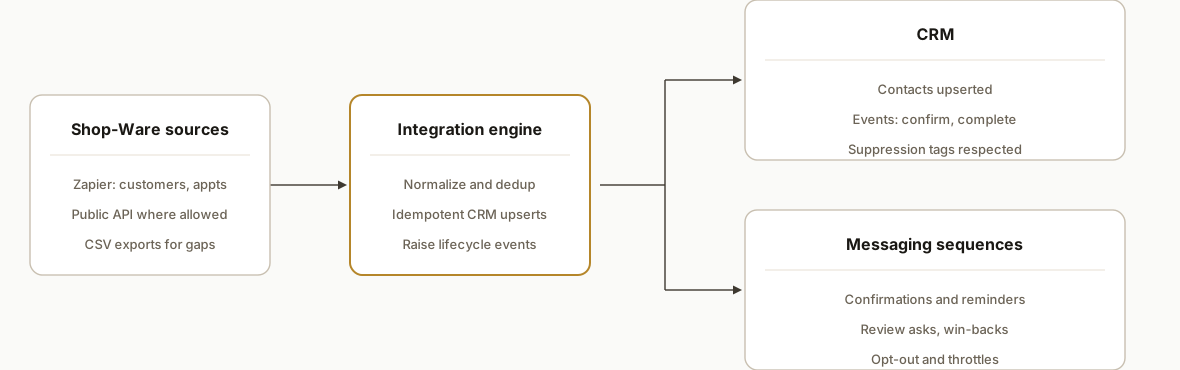
We run three reliable paths into the same engine so you are not blocked by one connector: the official Shop-Ware Zapier app for customers and appointments, the public API when partner access allows, and CSV exports for anything Zapier does not cover. The engine deduplicates, maps Shop-Ware fields to your CRM, and raises specific events that trigger sequences.
- Shop-Ware data intake: Zapier triggers for Customer Created and Appointment Created or Updated feed webhooks. For fields Zapier does not expose, we supplement with the public API or scheduled CSV exports where allowed.
- Normalization and dedup: We compute a stable dedup key per person and per appointment so updates do not create duplicates. We tag declined services and RO context without scraping.
- CRM upsert and event fan-out: The engine upserts contacts and pushes lifecycle events like appointment_confirm, service_completed, and declined_line_items.
- Messaging automation: The CRM runs compliant email or SMS sequences with throttle and opt-out handling, including review requests and win-backs.
- Observability: A dashboard shows received events, upsert outcomes, and sequence starts so operations can trust what is firing.
Step-by-step: how to build it
1) Stand up a webhook endpoint for Zapier triggers
Use the official Shop-Ware Zapier app for Customer Created and Appointment Created or Updated. Point both to a secure endpoint that validates basic shape, normalizes fields, and writes to a queue.
// server/webhooks.js
import express from "express";
import crypto from "crypto";
import { createClient } from "@supabase/supabase-js";

const app = express();
app.use(express.json());
const supabase = createClient(process.env.SUPABASE_URL, process.env.SUPABASE_SERVICE_ROLE);

function dedupKeyCustomer(p) {
  const basis = `${p.email || ""}|${p.phone || ""}|${p.first_name || ""}|${p.last_name || ""}`.toLowerCase();
  return crypto.createHash("sha1").update(basis).digest("hex");
}

app.post("/webhooks/shop-ware", async (req, res) => {
  const { type, data } = req.body || {};
  if (!type || !data) return res.status(400).json({ ok: false, error: "invalid_payload" });

  const payload = { type, received_at: new Date().toISOString(), data };

  // Compute idempotency key for customers and appointments
  if (type.startsWith("customer")) payload.idempotency_key = dedupKeyCustomer(data);
  if (type.startsWith("appointment") && data.id) payload.idempotency_key = `appt:${data.id}`;

  const { error } = await supabase.from("inbox_events").insert(payload);
  if (error) return res.status(500).json({ ok: false, error: error.message });
  res.json({ ok: true });
});

export default app;
Gotcha: Zapier's Shop-Ware app fields are narrow, so do not assume RO or line-item details will arrive here. Handle only what the trigger provides.
2) Add a CSV ingestion path for gaps
For data not covered by Zapier, configure a CSV export in Shop-Ware where available and drop files into a watched bucket. Parse and enqueue as events with a distinct source label.
// workers/csv-ingest.js
import fs from "fs";
import csv from "csv-parse";
import { createClient } from "@supabase/supabase-js";
const supabase = createClient(process.env.SUPABASE_URL, process.env.SUPABASE_SERVICE_ROLE);

export async function ingestCsv(filePath) {
  const parser = fs.createReadStream(filePath).pipe(csv({ columns: true, trim: true }));
  for await (const row of parser) {
    const evt = { type: "csv.customer_or_appt", received_at: new Date().toISOString(), data: row, source: "csv" };
    await supabase.from("inbox_events").insert(evt);
  }
}
Gotcha: Scheduled email exports are unconfirmed. Treat CSV as a manual or admin-triggered path unless Shop-Ware confirms automation options.
3) Map to a canonical contact and appointment model
Normalize names, phones, and times, and compute marketing-consent flags. Keep the mapping table in code or a config store.
// lib/normalize.js
export function normalizePerson(src) {
  return {
    firstName: src.first_name || src.first || "",
    lastName: src.last_name || src.last || "",
    email: (src.email || "").toLowerCase(),
    phone: (src.phone || src.mobile || "").replace(/[^\d]/g, ""),
    shopwareId: src.id || src.customer_id || null,
    marketingOk: ["yes", "true", "1"].includes(String(src.marketing_opt_in || src.opt_in || "").toLowerCase())
  };
}

export function normalizeAppointment(src) {
  return {
    appointmentId: src.id || src.appointment_id,
    startsAt: src.starts_at || src.start || src.appointment_time,
    vehicle: src.vehicle || null,
    location: src.location || src.shop || null
  };
}
Gotcha: Time zones. Normalize all timestamps to ISO UTC in the store and convert at send time.
4) Upsert into the CRM and raise lifecycle events
Push a batched worker that drains the queue, upserts contacts in your CRM, and posts event markers that sequences listen to. Use a generic webhook to keep the CRM swappable.
// workers/crm-fanout.js
import fetch from "node-fetch";
import { createClient } from "@supabase/supabase-js";
import { normalizePerson, normalizeAppointment } from "../lib/normalize.js";

const supabase = createClient(process.env.SUPABASE_URL, process.env.SUPABASE_SERVICE_ROLE);
const CRM_WEBHOOK_URL = process.env.CRM_WEBHOOK_URL; // e.g., CRM inbound hook or middleware

export async function runOnce() {
  const { data: rows } = await supabase
    .from("inbox_events")
    .select("*")
    .order("received_at", { ascending: true })
    .limit(200);

  for (const row of rows || []) {
    try {
      if (row.type.startsWith("customer")) {
        const person = normalizePerson(row.data);
        await fetch(CRM_WEBHOOK_URL + "/contacts/upsert", { method: "POST", headers: { "Content-Type": "application/json" }, body: JSON.stringify(person) });
        await fetch(CRM_WEBHOOK_URL + "/events", { method: "POST", headers: { "Content-Type": "application/json" }, body: JSON.stringify({ email: person.email, event: "customer_created" }) });
      }
      if (row.type.startsWith("appointment")) {
        const appt = normalizeAppointment(row.data);
        await fetch(CRM_WEBHOOK_URL + "/events", { method: "POST", headers: { "Content-Type": "application/json" }, body: JSON.stringify({ contactRef: row.data.customer_id, event: "appointment_created", meta: appt }) });
      }
      await supbaseMarkProcessed(row.id);
    } catch (e) {
      await supbaseMarkError(row.id, e.message);
    }
  }
}

async function supbaseMarkProcessed(id) {
  await supabase.from("inbox_events").update({ status: "done" }).eq("id", id);
}
async function supbaseMarkError(id, msg) {
  await supabase.from("inbox_events").update({ status: "error", error: msg }).eq("id", id);
}
Gotcha: Use idempotency keys when your CRM supports them, or store last-seen hashes to avoid duplicate sequences on updates.
5) Configure sequences for review and win-back
Create two core automations in the CRM: a review request sequence that fires on service_completed and a declined-service win-back that stages educational content and a parts-available notice.
# crm/sequences.yml
sequences:
  review_request:
    trigger: event == "service_completed"
    steps:
      - t:+24h email: review-ask-1
      - t:+72h sms: review-ask-2 if: no_response
  win_back_declined:
    trigger: event == "declined_line_items"
    steps:
      - t:+3d email: safety-education
      - t:+10d email: promo-offer if: no_booking
      - t:+21d sms: check-in
Gotcha: Respect opt-outs. Marketing consent must be honored for email and SMS. Keep transactional appointment confirmations separate from marketing lists.
6) Add observability and suppression rules
Expose a simple dashboard that shows last 24 hours of Shop-Ware events, contact upserts, and sequence starts. Add suppression by tag: warranty, fleet, or VIP so they do not enter generic win-backs.
-- supabase/schema.sql
create table if not exists inbox_events (
  id bigserial primary key,
  type text not null,
  idempotency_key text,
  received_at timestamptz not null,
  data jsonb not null,
  source text default 'zapier',
  status text default 'queued',
  error text
);
create index on inbox_events (idempotency_key);
create index on inbox_events (received_at);
Gotcha: Build a quarantine queue for events that fail schema checks rather than dropping them. Investigate and replay.
Where it gets complicated
- API specifics are gated: Shop-Ware hosts an API gateway and docs, but public details on authentication, scopes, and rate limits are not published. Plan a discovery phase or partner access rather than hard-coding assumptions.
- Zapier coverage is narrow: The official Zapier app focuses on customers and appointments. If you need repair-order lifecycle, payments, or line-item events, expect to supplement with the API or CSV. Do not assume Zapier will include those fields.
- No Make.com native app: There is no first-party Shop-Ware app in Make. You can still integrate with HTTP and Webhooks modules, but treat it as custom work, not click-to-connect.
- Terms and compliance: Shop-Ware terms prohibit scraping and unapproved automated access. Use the official API and Zapier, and obtain written authorization where required. Keep SMS opt-in and opt-out handling compliant.
- Idempotency and updates: Customer Updated and Appointment Updated can retrigger. Use idempotency keys and last-modified checks to avoid duplicate sequence starts.
What this actually changes
In production this handled new customer welcomes, appointment confirmations, next-day review requests, and structured win-backs on declined services for a multi-location repair group. The value is structural: every customer and appointment in Shop-Ware becomes a CRM-traceable lifecycle without manual copy-paste. One hard external fact to anchor the review flow: 76 percent of consumers read online reviews for local businesses regularly, so consistent post-service asks matter for shops that win on reputation. Source: https://www.brightlocal.com/research/local-consumer-review-survey/
Frequently asked questions
Does Shop-Ware have an API?
Yes. Shop-Ware hosts an API gateway at api.shop-ware.com and references current docs at /api/v1/docs. Public details about authentication, scopes, and rate limits are not published, so plan a short discovery or partner access before you rely on specific endpoints.
Is there a native Zapier integration for Shop-Ware?
Yes. The official Zapier app exposes triggers such as Appointment Created, Customer Created, and Customer Updated, plus actions. Field coverage is narrow, so for RO lifecycle or payments you will typically supplement with the API or CSV exports.
Can I use Make.com to connect Shop-Ware to my CRM?
There is no first-party Shop-Ware app in Make. You can still build with generic HTTP and Webhooks modules. Treat it as a custom integration and lean on Shop-Ware's API or CSV exports alongside Make for orchestration.
Can this run in real time?
Yes for what Zapier triggers expose. Customer and appointment events can flow to your CRM within seconds. Deeper events that require API or CSV will be near real time or scheduled depending on what Shop-Ware authorizes and what the CSV path supports.
What does an implementation typically cost?
It is usually a fixed build that wires Zapier, a small persistence layer, and your CRM, plus modest platform fees for Zapier and hosting. The main variable is whether you need API-backed RO or payment events, which adds discovery and testing time.
Will this spam customers?
No if you implement suppression and consent rules. We tag warranty, fleet, and VIP segments to exclude them from generic sequences and separate transactional confirmations from marketing messages with clear opt-out handling.
If you want the same result for your shop, we have already built and shipped this pattern. See our CRM automation services at /services#crm-automation, read how we approached a similar problem in our Mitchell1 integration post at /blog/mitchell1-api-integration-review-follow-up, and book a working session at /book.
Want us to build this for you?
Nine questions, about 90 seconds. You see the revenue it is costing you, then pick a time. No pitch.
Get your free assessment