
We built and shipped a ClubReady integration that listens to bookings, class rosters, check-ins and prospect adds, then triggers rebooking and recall sequences in your CRM. It runs in production at a multi-location studio, replacing manual exports with real-time follow-up and on-brand SMS and email. This post shows how it works and what to watch for.
ClubReady rebooking automation is: using ClubReady's API and automation rules to push member and booking events into a workflow that updates your CRM and schedules the next class reminder or win-back touch automatically.
The problem it solves
Most studios export CSVs from ClubReady, upload lists to a CRM, then try to remember who needs a rebooking nudge or a win-back. There is no native ClubReady app on Zapier, and Make.com does not list an official connector. Teams either wire Webhooks by Zapier with brittle field mapping or give up and go manual.
| Process | Manual | Automated |
|---|---|---|
| New prospect routing | Export list weekly. Copy into CRM | ClubReady API add events push instantly to CRM |
| Last-class recall | Staff runs a report, filters by last visit | Daily job computes last-attended and queues recall |
| No-show recovery | Staff scans roster and texts by hand | Booking status change triggers a no-show sequence |
| Opt-in compliance | Inconsistent notes | Centralized consent fields mirrored to CRM |
| Data freshness | Days stale | Seconds to minutes |
| Errors/duplicates | Common | Idempotent upserts by external IDs |
How the automation works
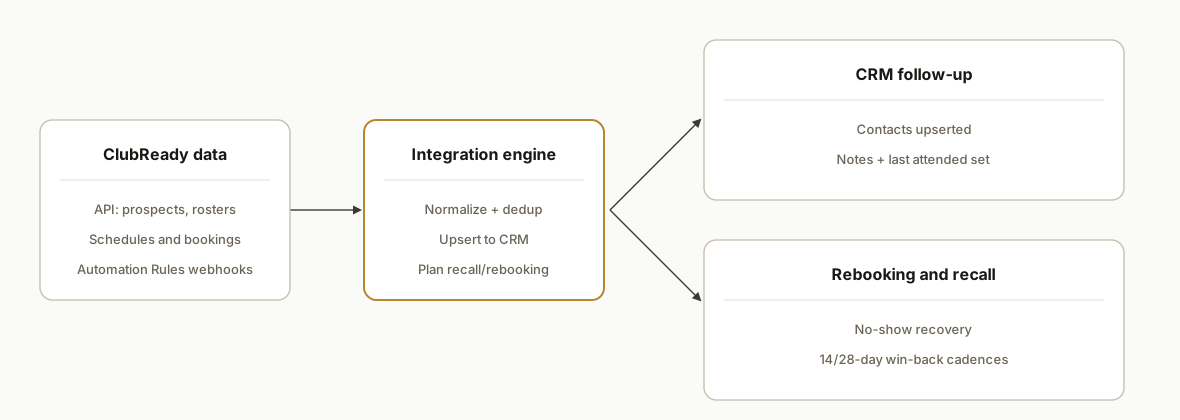
Our architecture keeps ClubReady as the system of record for member and booking events, then uses a small service to translate those events into CRM records and scheduled messages.
- ClubReady API: Data source for prospects, schedules, class rosters and booking events. Authentication uses an API key passed as apikey in the query string. Formats are JSON or XML.
- ClubReady Automation Rules: For real-time outbounds, a rule can Call a Web Hook URL so new users or booking events notify our endpoint.
- Intake service: A lightweight Node service verifies StoreID, normalizes payloads, and upserts contacts and activities into the CRM. It also writes a ledger for idempotency and audit.
- CRM and messaging: We create or update contacts, log last-attended dates, and enroll people into on-brand SMS or email sequences from the CRM.
- Backfill and reporting: A scheduled job queries ClubReady APIs for gap ranges and reconciles counts, with a simple dashboard or Sheet for operations.
Step-by-step: how to build it
How do you authenticate to the ClubReady API?
ClubReady's public API accepts an API key via the apikey query parameter. Endpoints cover prospects, class schedules, rosters, and booking events. Start by reading a small slice, like upcoming classes, to validate credentials and StoreID handling.
// node >=18
import fetch from "node-fetch";

const API_BASE = "https://www.clubready.com/api/current"; // documented base
const API_KEY = process.env.CLUBREADY_API_KEY; // store securely

async function getClassSchedule(storeId, startDate, endDate) {
  const url = new URL(`${API_BASE}/schedule`);
  url.searchParams.set("apikey", API_KEY);
  url.searchParams.set("StoreID", String(storeId));
  url.searchParams.set("StartDate", startDate); // YYYY-MM-DD
  url.searchParams.set("EndDate", endDate);

  const res = await fetch(url.toString(), { headers: { Accept: "application/json" }});
  if (!res.ok) throw new Error(`ClubReady schedule fetch failed: ${res.status}`);
  return res.json();
}
Key gotcha: some POST actions expect form-encoded payloads, and missing required fields like FirstName, LastName, Email, and StoreID will fail.
How do you capture real-time events from ClubReady?
Use an Automation Rule in ClubReady configured to Call a Web Hook URL when a target event happens, such as a new user. Point it at your HTTPS endpoint and log both query string and body for inspection.
import express from "express";
const app = express();
app.use(express.urlencoded({ extended: true }));
app.use(express.json());

app.post("/webhooks/clubready", async (req, res) => {
  // ClubReady may send data via query or form body depending on the rule
  const payload = { ...req.query, ...req.body };
  // minimal sanity checks
  if (!payload.StoreID) {
    console.warn("Missing StoreID", payload);
    return res.status(400).send("StoreID required");
  }
  // enqueue for processing (dedup later by an external_id hash)
  await queueEvent("clubready", payload);
  res.status(200).send("ok");
});

app.listen(3000);
We built a rule-by-rule mapping so different ClubReady automations can reuse the same endpoint.
How do you map ClubReady members to your CRM?
Normalize names, emails, phone numbers and consent flags, then upsert by a deterministic key. We keep a ledger table keyed by source:external_id to make writes idempotent across retries.
async function upsertContactInCrm(normalized) {
  const contact = {
    external_source: "clubready",
    external_id: `${normalized.storeId}:${normalized.userId}`,
    email: normalized.email?.toLowerCase() || null,
    phone: normalized.phone || null,
    first_name: normalized.firstName,
    last_name: normalized.lastName,
    last_attended_at: normalized.lastAttendedAt || null,
    sms_opt_in: normalized.smsOptIn === true
  };
  // Replace with your CRM SDK/API
  const res = await fetch(process.env.CRM_URL + "/contacts/upsert", {
    method: "POST",
    headers: { "Content-Type": "application/json", Authorization: `Bearer ${process.env.CRM_TOKEN}` },
    body: JSON.stringify(contact)
  });
  if (!res.ok) throw new Error(`CRM upsert failed: ${res.status}`);
}
This pattern lets you point the same integration at HubSpot, GoHighLevel, or Pipedrive by swapping the CRM adapter.
How do you trigger rebooking and recall sequences?
Compute next-best action from booking and attendance signals: last attended over N days, no-show last class, canceled last minute. Enqueue a task or sequence enrollment in your CRM rather than sending directly from the integrator.
-- Postgres: unique job per contact+play id prevents duplicates
create table if not exists followup_jobs (
  id bigserial primary key,
  external_source text not null,
  external_id text not null,
  play_id text not null, -- e.g., 'recall_14d' or 'noshow_1d'
  scheduled_for timestamptz not null,
  status text not null default 'queued',
  unique (external_source, external_id, play_id)
);
function planRecall(contact, days) {
const playId = `recall_${days}d`;
const when = new Date(Date.now() + days * 24 * 60 * 60 * 1000);
return db.query(
`insert into followup_jobs (external_source, external_id, play_id, scheduled_for)
values ($1, $2, $3, $4)
on conflict (external_source, external_id, play_id) do nothing`,
["clubready", contact.external_id, playId, when]
);
}Your CRM then picks up queued jobs to enroll contacts into the right SMS or email cadence.
How do you prevent duplicates and handle time zones?
Use a deterministic external_id and a state ledger to make your pipeline re-entrant. For time zones, derive the studio's local time from StoreID configuration and avoid sending before or after allowed hours.
import crypto from "crypto";

function makeEventKey(evt) {
  return crypto.createHash("sha1")
    .update([evt.StoreID, evt.UserID, evt.EventType, evt.EventTimestamp].join("|"))
    .digest("hex");
}

async function processEvent(evt) {
  const key = makeEventKey(evt);
  const ok = await db.query("insert into ledger(key) values ($1) on conflict do nothing returning 1", [key]);
  if (ok.rowCount === 0) return; // already processed
  // continue with normalize -> upsert -> plan follow-up
}
How do you backfill and monitor?
Pair real-time rules with a daily backfill. For exports that are only available as CSV in-app, read them from a secure folder. Use a minimal health panel that shows last ingest time per store and the pending job count.
import fs from "fs";
import { parse } from "csv-parse/sync";

function backfillFromCsv(path) {
  const csv = fs.readFileSync(path, "utf8");
  const rows = parse(csv, { columns: true });
  for (const r of rows) queueEvent("clubready_csv", r);
}
Where it gets complicated
- API key in the query string: ClubReady's API uses apikey in the URL. Treat logs carefully and never echo full URLs in error messages.
- Form-encoded POSTs and required fields: Add-lead style writes must include fields like FirstName, LastName, Email, and StoreID. Wrong StoreID will fail the request.
- No native Zapier app: If you must use Zapier, plan for Webhooks by Zapier and manual field mapping. For Make.com, use generic HTTP and webhooks modules since an official app was not found.
- Real-time outbounds rely on Automation Rules: There is no public catalog of generic outbound webhooks. Create event-specific rules that call your endpoint and validate each in staging.
- Time windows and consent: Respect quiet hours per location and mirror SMS consent flags into the CRM to avoid non-compliant sends.
What this actually changes
For a two-location studio we anonymized here, the system eliminated weekly CSV exports and made rebooking automatic: no-shows enter a 1-day recovery touch, last-attended at 14 and 28 days trigger recall, and new prospects are routed to the right follow-up in seconds. External evidence supports the impact of reminders: a meta-analysis found SMS reminders significantly improved appointment attendance compared to no reminder, indicating meaningful no-show reductions in reminder-driven workflows (source: PLOS ONE, Mobile Phone Text Messaging for Appointment Reminders, 2012: https://journals.plos.org/plosone/article?id=10.1371/journal.pone.0032515).
The integration is durable because it anchors on ClubReady's documented API and automation rules rather than a fragile screen scrape or a missing native Zap. Once in place, operations can tune the cadence without touching code.
Frequently asked questions
Does ClubReady have an official API?
Yes. ClubReady documents a public API under https://www.clubready.com/api/current with authentication via an API key passed as apikey. Formats include JSON or XML. There is also a developer portal for partners.
Can this run in real time, or is it just a daily sync?
It runs both. We use ClubReady Automation Rules to call a webhook on key events for real-time updates and a daily backfill to reconcile gaps. That combination keeps data fresh and resilient to transient misses.
Do I need Zapier or Make.com to do this?
No. We ship a direct integration. If your team prefers Zapier, ClubReady's guide shows using Webhooks by Zapier with an API key. Make.com does not list a native ClubReady app, so you would connect via generic HTTP.
Which CRMs does this work with?
Any CRM with an API. We have adapters for common CRMs so contacts upsert, last-attended writes, and sequence enrollments follow the same pattern regardless of vendor.
What does implementation involve on the ClubReady side?
You provide an API key, confirm StoreID values, and create one or more Automation Rules that Call a Web Hook URL for the selected events. We test in staging, then flip to production.
How long does it take to go live?
A typical two-location rollout took about a week including testing Automation Rules, CRM mapping, and consent handling. Larger account structures add time for StoreID mapping and multi-brand cadences.
If you run ClubReady and want rebooking and recall to happen without exports or manual lists, we have this integration running in production. See our related walkthrough on bridging a no-API booking system to a CRM in How to Automate iClassPro to GoHighLevel. For broader CRM buildouts, see our services. When you are ready to scope your setup, book a 20-minute call.
Want us to build this for you?
Nine questions, about 90 seconds. You see the hours it is costing you, then pick a time. No pitch.
Get your free assessment