
Jackrabbit Zapier integration works by connecting the official Jackrabbit Class Zapier app with the Jackrabbit-issued API key, then fanning events into Slack, your CRM, and SMS tooling. Where triggers are limited or too slow, we bridge with Zapier Webhooks, email parsing, and scheduled report exports.
Definition: Jackrabbit Zapier integration is the use of Zapier's official Jackrabbit Class app plus Webhooks-by-Zapier and email or CSV workarounds to sync studio data to Slack, CRMs, and SMS tools.
The problem it solves
Studios needed Slack alerts when enrollments changed, automatic CRM upserts, and two-way SMS visibility. Manually exporting reports, pasting into Slack, and re-typing families into the CRM created delays and errors. Zapier helps, but polling triggers can lag and SMS replies route back via email, which do not land in Slack or your CRM without extra handling.
| Workflow | Manual process | Automated with Zapier + bridges |
|---|---|---|
| Enrollment alerts | Check reports daily and paste to Slack | Triggered Slack message with class, student, and time |
| CRM updates | Export CSV and import to CRM weekly | Per-event upsert into CRM via Zapier action |
| SMS replies | Read provider emails and forward by hand | Gmail trigger parses SMS-reply email to Slack + CRM note |
| Exported metrics | Download CSV and share | Script parses emailed CSV and posts summaries to Slack |
How the automation works
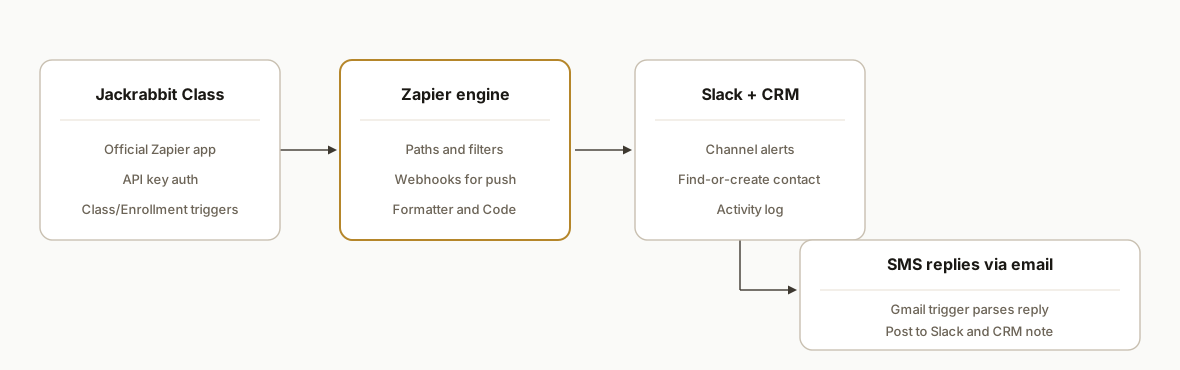
We connect Jackrabbit Class to Zapier using the Jackrabbit-issued API key, then compose Zaps for Slack notifications and CRM upserts. For near real time or unmodeled events, we use Webhooks by Zapier as a catch endpoint and feed it from email parses or a small script. SMS replies are routed through a Gmail trigger because Jackrabbit texting uses external providers and replies land as emails.
- Jackrabbit Class Zapier app: Official Zapier connector that authenticates with a Jackrabbit-provided API key. It exposes triggers such as Class Created or Enrollment Type Change for downstream actions.
- Zapier engine with Paths and Webhooks: Orchestrates Slack messages, CRM upserts, and branching. When triggers are polling-based, a Webhooks by Zapier Catch Hook provides a faster path.
- Slack notifications: Posts structured, on-brand alerts to relevant channels so front desk and coaches see enrollment or withdrawal changes immediately.
- CRM upsert: Maps student and family fields into your CRM's contact and activity records so follow-ups are consistent.
- SMS reply bridge: Since provider replies route as email, a Gmail-based Zap parses inbound messages and writes them into Slack and the CRM for a true two-way view.
Step-by-step: how to build it
1) Create and connect the Jackrabbit Zapier API key
Connect the Jackrabbit Class Zapier app using the API key generated in Jackrabbit. This key is specific to Zapier connections.
- In Jackrabbit: generate the Zapier API key (per Jackrabbit help article on automating workflows with Zapier). Store it securely.
- In Zapier: add a new Jackrabbit Class connection and paste the key.
Configuration reminder: deleting this key in Jackrabbit immediately breaks all Jackrabbit Zaps.
Zapier connection: Jackrabbit Class
Auth: API key (from Jackrabbit settings)
Security: restrict who can access the key; rotate only with a change window
2) Build a Slack enrollment alert Zap
Use a Jackrabbit trigger like Enrollment Type Change. Route to Slack with formatted context and a deep-link back to the record if you include an internal URL.
{
  "channel": "#enrollments",
  "text": "Enrollment updated: {{ClassName}}, {{StudentFirst}} {{StudentLast}}",
  "attachments": [
    {
      "color": "#B5862A",
      "fields": [
        { "title": "Change", "value": "{{ChangeType}}", "short": true },
        { "title": "When", "value": "{{EventTime}}", "short": true },
        { "title": "Family", "value": "{{FamilyName}}", "short": true }
      ]
    }
  ]
}
Gotcha: on some Zapier plans, polling triggers can fire as infrequently as every 15 minutes. If you need faster alerts, add a webhook or email-based bridge in Step 4.
3) Upsert families and students into your CRM
Add a CRM action step to find-or-create a contact on family email or phone, then log an activity with the class and enrollment status. Keep writes idempotent by searching first, then updating.
Zap step: CRM Find Contact by Email → if not found Create → Update fields
Key fields: Parent Email (primary), Student Name, Class, Change Type, Event Time
Activity: "Enrollment {{ChangeType}}: {{ClassName}} / {{StudentFirst}} {{StudentLast}}"
Tip: if your CRM supports external IDs, set a stable key like jackrabbit: to prevent duplicates across imports. For HubSpot-specific mapping and property choices, see our deep dive on Jackrabbit to HubSpot integration patterns.
4) Capture SMS replies that arrive via email and post to Slack + CRM
Jackrabbit texting uses external providers and replies route by email. Create a Gmail trigger in Zapier that watches the SMS-replies label, then parse the body and map it to Slack and your CRM.
// Code by Zapier: parse a typical SMS-reply email body into fields
const body = inputData.body || "";
const from = (body.match(/From:\s*(.*)/i) || [])[1] || "";
const phone = (body.match(/\+?\d[\d\-\s()]{7,}/) || [])[0] || "";
const msg = (body.match(/Message:\s*([\s\S]*)/i) || [])[1] || body;
return { from, phone, msg: msg.trim() };
Then send a Slack message and log a CRM note against the matched contact. Use your CRM's find-by-phone action before writing the note. For downstream follow-ups and nurture triggered from replies, we also used the same pattern in our trial class follow-up automation.
5) Add a near real-time path with Webhooks by Zapier
If a Jackrabbit event you care about is not available or polling is too slow, create a Zap with a Webhooks by Zapier Catch Hook and forward structured data to it from an allowed bridge like a small Apps Script that processes emailed reports.
# Example: post a parsed row to a Zapier Catch Hook
curl -X POST "https://hooks.zapier.com/hooks/catch/123456/abcde" \
  -H "Content-Type: application/json" \
  -d '{
    "event": "class_roster_row",
    "className": "Tue Beginner Ballet",
    "studentFirst": "Ava",
    "studentLast": "Nguyen",
    "parentEmail": "parent@example.com",
    "timestamp": "2026-07-10T16:20:00Z"
  }'
In Zapier, branch by event type and reuse the same Slack and CRM actions from Steps 2 and 3.
6) Parse emailed CSV exports when you need a data dump
Jackrabbit supports exporting table-style reports as CSV or Excel. If staff emails a CSV to an automation inbox, a simple Google Apps Script can parse attachments on arrival and forward rows to your Zapier webhook.
function onNewCsv() {
  const threads = GmailApp.search('to:automation@studio.com label:jr-csv newer_than:1d');
  threads.forEach(t => t.getMessages().forEach(m => {
    m.getAttachments({includeInlineImages: false, includeAttachments: true})
     .filter(a => /\.csv$/i.test(a.getName()))
     .forEach(a => {
       const rows = Utilities.parseCsv(a.getDataAsString());
       const [header, ...data] = rows;
       data.forEach(r => {
         const rec = Object.fromEntries(header.map((h,i) => [h, r[i]]));
         UrlFetchApp.fetch('https://hooks.zapier.com/hooks/catch/123456/abcde', {
           method: 'post',
           contentType: 'application/json',
           payload: JSON.stringify({ event: 'csv_row', ...rec })
         });
       });
     });
  }));
}
Note: report exports are permission-gated in Jackrabbit. Coordinate roles so staff who email CSVs have the correct access. If your goal is a live sheet for ops, see our guide on a direct Jackrabbit to Google Sheets automation.
New: can you send Jackrabbit to Google Sheets with Zapier?
Yes. When the Jackrabbit trigger you want exists in the Zapier app, use it to drive a Google Sheets Create Row action. If it does not, route through the CSV or webhook bridge above. Keep the sheet clean with a consistent header and a stable key.
Zap: Jackrabbit trigger → Code by Zapier (normalize fields) → Google Sheets: Create Row
Normalization examples: trim names, standardize phone to E.164, split Parent Name into First/Last
Key column: jackrabbit:{{FamilyId}} or a composed key like {{FamilyEmail}}|{{StudentFirst}}|{{ClassName}}
For teams that rely on Sheets dashboards, we often pair this with a scheduled backfill using emailed reports, then let Zapier append incremental changes. If you later outgrow Sheets, the same mapping flows into your CRM or BI with minimal change.
New: how we map Jackrabbit to HubSpot or Salesforce cleanly
Studios want parents visible as contacts and students traceable to classes. Our working pattern kept CRM data tidy and avoided duplicates:
- Contact identity: search by Parent Email and set an External ID like jackrabbit:.
- Household vs student: parent as the primary contact, student stored as a child record where supported or as a structured note if not.
- Activities: one activity per enrollment change with class, level, and timestamp.
{
  "contact": {
    "externalId": "jackrabbit:{{FamilyId}}",
    "email": "{{ParentEmail}}",
    "firstName": "{{ParentFirst}}",
    "lastName": "{{ParentLast}}",
    "phone": "{{ParentPhone}}"
  },
  "activity": {
    "type": "Enrollment",
    "summary": "{{ChangeType}}: {{ClassName}} / {{StudentFirst}} {{StudentLast}}",
    "occurredAt": "{{EventTime}}"
  }
}
This maps one-to-one into HubSpot or Salesforce actions in Zapier. If you want deeper property choices and enrollment lifecycle tracking, our dedicated write-up on Jackrabbit to HubSpot walks through the exact property set and dedup rules we used in production.
Where it gets complicated
- Key lifecycle: Deleting the Jackrabbit Zapier API key in Jackrabbit breaks all Zaps immediately. Plan rotations during maintenance windows and re-auth all affected Zaps first.
- Trigger latency: Some Zapier triggers are polling-based. On Free plans this can be every 15 minutes, which is too slow for front-desk alerts. Use a webhook or email-bridge for time-sensitive paths.
- No native webhooks documented: We could not find Jackrabbit-native webhook docs. When you need push behavior, rely on Webhooks by Zapier with a small bridge like an email or CSV parser.
- SMS is email-backed: Jackrabbit texting uses external providers and replies land by email. True two-way sync requires parsing inbound emails and mapping to contacts reliably.
- Make.com coverage: We did not find an official Jackrabbit connector on Make. Keep Zapier as your primary hub for Jackrabbit events and use Webhooks to interop where needed. For platform tradeoffs, see our comparison of Make vs n8n vs Apps Script.
- Exports are gated: CSV or Excel exports from reports are permission-based. Align roles so automation has lawful access and audit who can send scheduled emails.
What this actually changes
After we shipped this pattern, enrollment changes appeared in Slack without staff refreshing reports. CRM records stayed current because every event fanned into an upsert. SMS replies that used to be buried in inboxes showed up next to the family record and in a shared channel. For time-sensitive alerts, we avoided polling lag by adding a webhook or email bridge. Zapier notes that polling triggers on Free plans can run as infrequently as every 15 minutes, so using Webhooks where possible keeps alerts responsive (source: Zapier Webhooks docs).
Frequently asked questions
Does Jackrabbit have a Zapier integration?
Yes. There is an official Jackrabbit Class app on Zapier that connects using an API key generated in Jackrabbit. We use it for triggers like Class Created or Enrollment Type Change, then fan out to Slack and CRMs.
Does Jackrabbit have a public developer API I can call directly?
Jackrabbit documents an API key for Zapier. We did not find public developer API documentation or a base URL. When we need functionality beyond the Zapier app, we bridge with Webhooks by Zapier, email parsing, and CSV exports.
Can this run in real time?
Zapier polling triggers can be delayed, and on Free plans they may run every 15 minutes. For near real time we add a Webhooks by Zapier Catch Hook or a Gmail trigger so emails and CSVs push into Zapier immediately.
How do you handle SMS replies?
Jackrabbit texting uses external providers and replies arrive by email. We set a Gmail-based Zap to parse those emails, post to Slack, and log a CRM note against the matched contact, giving you a two-way view without switching tools.
Is there a Make.com connector for Jackrabbit?
We did not find an official Jackrabbit connector on Make. We keep Zapier as the primary hub and use Webhooks to interoperate with other systems when necessary.
How long does setup take?
Slack alerts and basic CRM upserts are typically configured in a day once access is in place. Adding email or CSV bridges, dedup logic, and testing usually takes a short follow-on sprint so staff can exercise each path before handoff.
Can I use Zapier Email Parser instead of Gmail?
Yes, if your SMS provider's emails are consistently formatted. We prefer Gmail triggers with labels because they are reliable, easy to scope to one mailbox, and simpler to maintain when providers tweak templates.
How do we keep Slack noise low?
Add a Filter step before Slack to only pass important changes, and format messages compactly. Example: ignore schedule-only updates or late-night events, and collapse repeated changes within a short window using a storage-based dedup key.
If you run Jackrabbit Class and want Slack alerts, a clean CRM sync, and visible SMS replies without adding a new tool, we have built and shipped this exact setup. See our related post on Jackrabbit Class API to CRM and waitlists. For spreadsheet workflows, review our Jackrabbit to Google Sheets automation. If you need help mapping your studio stack, explore our CRM automation services or book a 20-minute call.
Want us to build this for you?
Nine questions, about 90 seconds. You see the hours it is costing you, then pick a time. No pitch.
Get your free assessment