
Stripe failed payment automation works by subscribing to Stripe webhooks for the invoice.payment_failed webhook and payment_intent.payment_failed (and when to consider charge.failed, see invoice vs charge failures), verifying the signature against the raw request body, and queuing idempotent workflows that trigger alerts, coordinate automated dunning emails, run Smart Retries, and sync your CRM. We shipped this pattern for subscription products so finance sees issues in minutes and customers get a clean path to pay. If you prefer a human touch on first contact, the workflow can create a Gmail draft with a pay link instead of sending immediately.
Definition: Stripe failed payment automation is a webhook-driven workflow that recovers declined or expired card charges with retries, notifications, and CRM updates without manual intervention.
If you run subscriptions or recurring invoices, this guide shows how we built it, the exact Stripe events we watch, and the traps to avoid when you go live.
The problem it solves
Teams usually notice failed payments late, send manual emails from shared inboxes, and lose track of who retried and who updated their card. A proper dunning flow listens to Stripe in real time, retries intelligently, and coordinates clean customer outreach plus CRM tasks.
| Manual handling | Automated with Stripe webhooks |
|---|---|
| Someone checks the dashboard weekly for failed charges | Webhooks fire invoice.payment_failed within seconds of failure |
| A rep writes an email asking to update the card | Branded dunning email is sent automatically with a secure update link |
| Unclear who is following which account | CRM task and owner assignment created automatically |
| Finance exports CSVs for status | Status lives in the CRM and Slack, with scheduled Stripe reports for audit |
| Duplicate emails after each retry | One idempotent workflow with a suppression window guards duplicates |
How the automation works
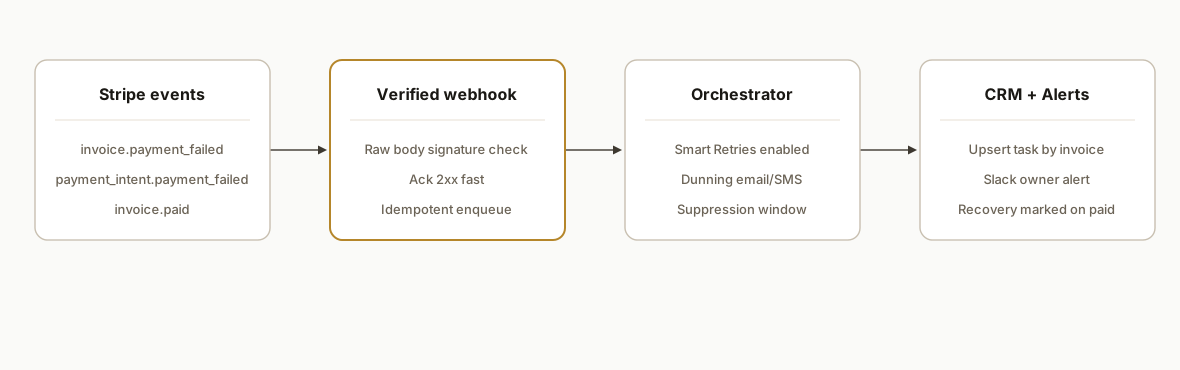
A secure webhook endpoint receives Stripe events, verifies the signature using the raw request body, and acknowledges quickly. Heavy work is queued. The job reads event context, fetches the latest invoice or payment intent via the Stripe API, decides the next action, and fans out: Smart Retries, dunning comms, CRM sync, and Slack alerts. We record a dedup key so re-deliveries do not create duplicates.
- Webhook ingestion: Stripe posts events like invoice.payment_failed. We verify signatures and respond 2xx quickly so Stripe does not retry.
- Orchestrator queue: A worker performs the heavy logic: fetch invoice, pick dunning step, and enqueue comms. If you are choosing tooling for this layer, see our comparison in /blog/make-vs-n8n-vs-gas.
- Smart Retries and schedule: Stripe Billing Smart Retries is enabled. We also keep a custom schedule for edge cases and track resend suppression; for when to layer custom retries, see our dedicated comparison.
- CRM and alerts: We upsert a contact or account, log an activity, and post a Slack alert so the owner sees context.
- Reporting: We schedule Stripe reports for audit and export recovery stats to a dashboard.
Which Stripe event fires on failed payments and what to read
Short answer: watch invoice.payment_failed for Billing invoices and payment_intent.payment_failed for one-off PaymentIntents. For when to use charge.failed instead, see choosing the right webhook. We always re-fetch the authoritative object before acting so we are never acting on stale payloads.
- invoice.payment_failed: best for subscriptions and automatic invoice charges. The event carries an invoice ID. We retrieve the invoice and expand customer to get email and metadata. If present, we then retrieve the linked payment_intent for processor details.
- payment_intent.payment_failed: best for direct charges without an invoice. We retrieve the PaymentIntent, then look up the associated invoice only if it exists.
Reference: Stripe event reference for these types is in the official docs. We keep the link in our runbook alongside sample payloads for test and live.
// Safe extraction pattern we use in production
const evt = await stripe.events.retrieve(eventId);
if (evt.type === 'invoice.payment_failed') {
  const invoice = await stripe.invoices.retrieve(evt.data.object.id, { expand: ['customer'] });
  const pi = invoice.payment_intent ? await stripe.paymentIntents.retrieve(invoice.payment_intent) : null;
  const email = invoice.customer_email || invoice.customer?.email || pi?.receipt_email;
  // decide next step
}
How Stripe webhook retries behave and how to design for them
Stripe retries webhook deliveries automatically when your endpoint does not return 2xx. The platform uses exponential backoff and will retry for multiple days. Design for at-least-once and out-of-order delivery.
- Verify signatures against the raw body and return 200 OK quickly. Do the heavy work in a queue.
- Store event.id in a log table to drop duplicate deliveries. Always re-fetch the invoice or PaymentIntent before side effects.
- Keep your dunning communication cadence separate from raw event volume. Background retries should not trigger duplicate emails or tasks.
// Fast-ack pattern
router.post('/stripe', bodyParser.raw({ type: 'application/json' }), (req, res) => {
  try {
    const event = stripe.webhooks.constructEvent(req.body, req.headers['stripe-signature'], process.env.STRIPE_WEBHOOK_SECRET);
    queue.enqueue('stripe-event', { id: event.id, type: event.type });
    res.status(200).send('ok');
  } catch (e) {
    return res.status(400).send('sig verify failed');
  }
});
If you are hardening no-code scenarios that call webhooks and can spike retries, our checklist in /blog/patching-200-make-com-scenarios-safely covers backoff, timeouts, and safe replays.
Are Stripe webhook events ordered? Official guidance
No. Stripe does not guarantee delivery order across webhooks. Deliveries are at-least-once and can arrive out of order or be retried for days after a temporary failure. The safe design:
- Treat every handler as idempotent. Key side effects by event.id and by business object ID.
- Always re-fetch the latest invoice or PaymentIntent before acting. Never trust embedded snapshots for final decisions.
- Acknowledge quickly and push heavy work to a queue so a slow downstream does not cause retries.
Reference: see Stripe Webhooks guide on acknowledgements, retries, and ordering. https://stripe.com/docs/webhooks
Stripe webhook signature verification and idempotency: official docs
Stripe requires verifying signatures using the exact raw request body and your webhook secret. Use the official helper to construct and verify the event, and return 2xx fast. For idempotency, combine two layers:
- Event-level idempotency: log event.id and drop duplicates before side effects.
- API write idempotency: when you create or update Stripe resources from a webhook, send an Idempotency-Key so a replay cannot double-write.
Docs:
- Signature verification and raw body requirements: https://stripe.com/docs/webhooks/signatures
- Idempotency keys for API writes: https://stripe.com/docs/idempotency
// Signature verification with the raw body
const event = stripe.webhooks.constructEvent(
  req.body, // raw Buffer from bodyParser.raw
  req.headers['stripe-signature'],
  process.env.STRIPE_WEBHOOK_SECRET
);

// Example: protect any subsequent Stripe write
const key = `failed-${event.id}`;
await stripe.customers.update(customerId, { metadata: { dunning: 'active' } }, { idempotencyKey: key });
Stripe failed payment retry options: Smart Retries vs custom
Two layers work well together. For a deeper comparison, see /blog/stripe-failed-payment-retry-strategy. We also cover choosing Smart Retries vs custom in a newer guide, and how to configure dunning emails and retries.
- Enable Stripe Billing Smart Retries: configured in Billing settings. Stripe will choose better retry times and attempt charges automatically.
- Add a thin custom layer: track a suppression window per invoice for outbound emails. Only re-email on material state changes like invoice.payment_failed after a long gap or invoice.paid recovery. For manual collection_method, pivot to a pay-by-link email instead of retries.
// Suppression by invoice to avoid spam during Smart Retries
await db.none(
  `insert into dunning_suppressions(invoice_id, until)
   values($1, now() + interval '24 hours')
   on conflict (invoice_id) do update set until = excluded.until`,
  [invoice.id]
);
If you need to wire this with a visual tool first then harden later, start with a connector from our roundup in /blog/tools-to-connect-your-apps and migrate the critical path to a signed webhook service once volume grows.
Step-by-step: how to build it
1) Create a verified Stripe webhook endpoint
Use the official API key authentication and verify event signatures with the raw body. If you need a refresher on configuring the invoice.payment_failed webhook, start there. Respond 2xx fast and offload heavy work to a queue.
// server/webhooks.js
const express = require('express');
const Stripe = require('stripe');
const bodyParser = require('body-parser');
const stripe = new Stripe(process.env.STRIPE_SECRET_KEY, { apiVersion: '2024-06-20' });

const router = express.Router();
// Use raw body for signature verification
router.post('/stripe', bodyParser.raw({ type: 'application/json' }), async (req, res) => {
  const sig = req.headers['stripe-signature'];
  let event;
  try {
    event = stripe.webhooks.constructEvent(
      req.body,
      sig,
      process.env.STRIPE_WEBHOOK_SECRET
    );
  } catch (err) {
    console.error('Webhook signature verification failed', err.message);
    return res.status(400).send(`Webhook Error: ${err.message}`);
  }

  // Ack first to avoid retries, then queue the job
  res.status(200).send('ok');

  try {
    if (event.type === 'invoice.payment_failed' || event.type === 'payment_intent.payment_failed') {
      await queueFailedPaymentJob({ id: event.id, type: event.type });
    }
  } catch (err) {
    console.error('Enqueue failed-payment job error', err);
  }
});

module.exports = router;
Key gotcha: signature verification requires the raw request body. Many frameworks parse JSON by default and break verification. Keep this route on a raw parser.
2) Make the workflow idempotent and out-of-order safe
Stripe webhooks are delivered at least once and not guaranteed in order. Store a processed-events table keyed by event.id and guard all side effects.
-- migrations/001_failed_events.sql
create table if not exists stripe_event_log (
  event_id text primary key,
  event_type text not null,
  received_at timestamptz not null default now()
);
// jobs/failed-payment.js
async function queueFailedPaymentJob(meta) {
const already = await db.oneOrNone('select event_id from stripe_event_log where event_id = $1', [meta.id]);
if (already) return; // drop duplicate delivery
await db.none('insert into stripe_event_log(event_id, event_type) values($1,$2)', [meta.id, meta.type]);
return worker.enqueue('failed-payment', meta);
}This pattern is what kept our production runs clean when Stripe retried deliveries for hours after a brief network blip.
3) Fetch fresh invoice context and choose the next action
Always re-fetch the relevant object to avoid acting on stale data.
// workers/failed-payment.js
const ACTION = { SMART_RETRY: 'smart_retry', EMAIL: 'email', TASK: 'task' };

worker.process('failed-payment', async (job) => {
  const evt = await stripe.events.retrieve(job.data.id); // authoritative snapshot
  let customerEmail, invoice, paymentIntent;

  if (evt.type === 'invoice.payment_failed') {
    invoice = await stripe.invoices.retrieve(evt.data.object.id, { expand: ['customer'] });
    customerEmail = invoice.customer_email || invoice.customer.email;
    paymentIntent = invoice.payment_intent ? await stripe.paymentIntents.retrieve(invoice.payment_intent) : null;
  } else {
    paymentIntent = await stripe.paymentIntents.retrieve(evt.data.object.id);
    const invId = paymentIntent.invoice;
    invoice = invId ? await stripe.invoices.retrieve(invId, { expand: ['customer'] }) : null;
    customerEmail = invoice?.customer_email || invoice?.customer?.email || paymentIntent.receipt_email;
  }

  const retryAllowed = Boolean(invoice?.collection_method === 'charge_automatically');
  const action = retryAllowed ? ACTION.SMART_RETRY : ACTION.EMAIL;

  await Promise.all([
    postSlackAlert({ invoice, paymentIntent }),
    upsertCrmTask({ invoice, paymentIntent })
  ]);

  if (action === ACTION.SMART_RETRY) await scheduleSmartRetry({ invoice });
  await sendDunningEmail({ to: customerEmail, invoice });
});
We preferred Slack alerts and CRM tasks to fire regardless of the chosen next action so an owner always had context.
4) Enable and lean on Stripe Billing Smart Retries
Stripe Billing includes Smart Retries that use machine learning to choose better retry times. We turn it on in Billing settings and still keep a thin custom safety net for edge cases. Listen to subsequent invoice.payment_failed and invoice.paid to update CRM status.
// retries/schedule.js
async function scheduleSmartRetry({ invoice }) {
  // Smart Retries is configured in Stripe Billing settings.
  // Here we record intent and suppress duplicate comms until the next terminal event.
  await db.none('insert into dunning_suppressions(invoice_id, until) values($1, now() + interval \'24 hours\') on conflict (invoice_id) do update set until = excluded.until', [invoice.id]);
}
Reference: Stripe Billing Smart Retries documentation describes AI-driven retry timing and custom schedules you can define in Billing settings. For a side-by-side of options, see /blog/stripe-smart-retries-vs-custom-retry-logic.
5) Sync your CRM and post alerts without duplicates
Use an upsert pattern keyed by customer or invoice. If you prefer no-code, Stripe has official Zapier and Make apps for visual workflows.
// crm/sync.js
async function upsertCrmTask({ invoice, paymentIntent }) {
  const key = `stripe:${invoice?.id || paymentIntent?.id}`;
  const payload = {
    external_key: key,
    title: `Failed payment: ${invoice?.number || paymentIntent?.id}`,
    status: 'open',
    amount: invoice?.amount_due,
    currency: invoice?.currency,
    customer_email: invoice?.customer_email
  };
  await http.post(process.env.CRM_TASK_UPSERT_URL, payload); // your CRM upsert endpoint
}

async function postSlackAlert({ invoice }) {
  await fetch(process.env.SLACK_WEBHOOK_URL, {
    method: 'POST',
    headers: { 'Content-Type': 'application/json' },
    body: JSON.stringify({ text: `Invoice ${invoice.number} failed for ${invoice.customer_email}. Owner: ${invoice.customer_name || 'Unassigned'}` })
  });
}
This mirrors what we run in production. Alerts are immediate, CRM stays the source of truth, and duplicates are suppressed by the external_key.
6) Schedule reports for audit and feed your dashboard
Stripe supports CSV exports and scheduled reports from the Dashboard. We schedule weekly invoice and payment reports and push a summary to a finance dashboard.
Dashboard: Reports -> Scheduled. Add Payments and Invoices weekly. Send to finance@ and archive to your reporting folder. Document the schedule in runbooks.We also listen to invoice.paid and customer.subscription.updated to mark recoveries in the CRM so owners see win rates without exporting CSVs daily.
How to create a Gmail draft invoice email when invoice.payment_failed fires
If you want a rep to review messaging before send, create a Gmail draft instead of auto-sending the first dunning email. We use the Gmail API with OAuth2 and the drafts.create method.
High level: when invoice.payment_failed arrives, generate a pay link, render a short email body, then call Gmail to create a draft on the owner mailbox. We keep the same idempotency key so re-deliveries do not create multiple drafts.
// gmail/draft.js
const { google } = require('googleapis');

async function gmailClientForUser() {
  const oAuth2Client = new google.auth.OAuth2(
    process.env.GOOGLE_CLIENT_ID,
    process.env.GOOGLE_CLIENT_SECRET,
    process.env.GOOGLE_REDIRECT_URI
  );
  // Token must include Gmail scopes like gmail.modify or gmail.compose
  oAuth2Client.setCredentials({
    refresh_token: process.env.GOOGLE_REFRESH_TOKEN
  });
  return google.gmail({ version: 'v1', auth: oAuth2Client });
}

function buildRawMessage({ from, to, subject, html }) {
  const boundary = 'mixedBoundary';
  const lines = [
    `From: ${from}`,
    `To: ${to}`,
    `Subject: ${subject}`,
    'MIME-Version: 1.0',
    `Content-Type: multipart/alternative; boundary=${boundary}`,
    '',
    `--${boundary}`,
    'Content-Type: text/plain; charset=UTF-8',
    '',
    // Plain text fallback
    html.replace(/<[^>]+>/g, ''),
    `--${boundary}`,
    'Content-Type: text/html; charset=UTF-8',
    '',
    html,
    `--${boundary}--`
  ].join('\r\n');
  return Buffer.from(lines)
    .toString('base64')
    .replace(/\+/g, '-')
    .replace(/\//g, '_')
    .replace(/=+$/, ''); // base64url
}

async function createGmailDraft({ to, subject, html, ownerEmail }) {
  const gmail = await gmailClientForUser();
  const raw = buildRawMessage({ from: ownerEmail, to, subject, html });
  const res = await gmail.users.drafts.create({
    userId: 'me',
    requestBody: { message: { raw } }
  });
  return res.data.id; // store draft id to avoid duplicates
}

// In your failed-payment worker
async function onFirstFailureCreateDraft({ invoice, ownerEmail }) {
  const payLink = invoice.hosted_invoice_url || invoice.invoice_pdf; // hosted link preferred
  const subject = `Action required: Invoice ${invoice.number} payment failed`;
  const html = `
    <p>Hi ${invoice.customer_name || ''},</p>
    <p>Your payment for invoice <strong>${invoice.number}</strong> could not be processed.</p>
    <p>Please update your card or pay securely here: <a href="${payLink}">View invoice</a>.</p>
    <p>Thank you.</p>
  `;
  const draftId = await createGmailDraft({ to: invoice.customer_email, subject, html, ownerEmail });
  await db.none('insert into comms_log(external_key, channel, ref) values($1,$2,$3) on conflict do nothing', [
    `stripe:${invoice.id}:first-draft`,
    'gmail_draft',
    draftId
  ]);
}
Notes:
- Use a user-authorized OAuth2 client. Service accounts do not access consumer Gmail. For Google Workspace, domain-wide delegation may be appropriate but still requires per-user impersonation.
- Keep scopes minimal. gmail.compose or gmail.modify is sufficient for drafts.
- Decide the owner mailbox: assign by account owner in your CRM or a shared billing inbox.
For a deeper pattern on wiring Gmail to downstream systems, see our guide on a Gmail API quickstart and CRM sync pattern.
Gmail Drafts.create: exact method and scopes
If you searched for draftCreated or Drafts.create, the Gmail API method you want is users.drafts.create. This is unrelated to Streak CRM and separate from Stripe webhooks. You need an OAuth2 user token with gmail.compose or gmail.modify.
POST https://gmail.googleapis.com/gmail/v1/users/me/drafts
Authorization: Bearer ya29.your-token
Content-Type: application/json

{
  "message": {
    "raw": "<base64url-encoded-MIME>"
  }
}- Encode the MIME message as base64url, not standard base64. Replace plus with hyphen and slash with underscore, and trim padding.
- Store the returned draft id so webhook retries do not create duplicate drafts.
Gmail draft on Stripe webhook failure vs payment failure
The search phrasing trips teams up. You should trigger the Gmail draft when the payment fails, not when your webhook handler fails. A webhook failure means your endpoint had a problem. Stripe will retry deliveries automatically and you should not email customers due to an internal outage. The safe pattern:
- Create the Gmail draft on invoice.payment_failed or payment_intent.payment_failed.
- If your webhook handler fails, alert ops and fix the endpoint. Let Stripe retries redeliver. Do not send customer emails tied to handler errors.
- As a safety net, run a dead-letter or lag monitor that pages an owner when events are undelivered for a threshold. We cover hardening patterns in /blog/patching-200-make-com-scenarios-safely.
Where are the official docs for invoice.payment_failed?
Here are the canonical entry points we keep in our runbook:
- Stripe Webhooks overview: acknowledgements, retries, and signature verification. https://stripe.com/docs/webhooks
- Events API reference: the Event object, retrieving events, and event types such as invoice.payment_failed and payment_intent.payment_failed. https://stripe.com/docs/api/events
- Billing emails and retries: configuration for Smart Retries and dunning email settings in Billing. https://stripe.com/docs/billing
Use the Event type names from this post in the Events reference to jump to the latest fields and sample payloads.
Why Stripe does not automatically email invoices by default
Stripe can send billing emails, but defaults may not match your model or may be disabled. Common reasons invoices are not emailed automatically:
- Email settings are off. Billing emails need to be enabled in Billing settings before Stripe sends dunning or invoice messages.
- Automatic charge vs manual collection. With collection_method charge_automatically you often rely on card retries and optional failed-payment emails. With manual collection you must send the hosted invoice link to collect.
- Missing customer email. If customer_email is not set on the invoice or customer, Stripe has no recipient.
- Brand or compliance rules. Many teams prefer customized messaging or review-first outreach. That is why we create a Gmail draft on first failure, then rely on Stripe dunning emails for subsequent touches.
If you want Stripe to handle emails, turn on the relevant Billing emails and Smart Retries. If you want controlled language and CRM ownership, keep emails in your system and mirror status changes back to the CRM. Our comparison of retry tactics is in /blog/stripe-failed-payment-retry-strategy.
How to test invoice.payment_failed locally
Use the Stripe CLI to forward events to your local endpoint and trigger specific event types on demand.
# 1) Forward live webhook traffic from Stripe to your local server
stripe listen --forward-to localhost:3000/stripe

# 2) Trigger a sample failed invoice event
stripe trigger invoice.payment_failed

# 3) Inspect logs and confirm: event logged, Slack alert posted, CRM upserted,
#    and either a dunning send or a Gmail draft created without duplicates
If your handler returns non-2xx the CLI shows retries. Fix raw-body verification issues before testing downstream effects.
Where it gets complicated
Raw body vs JSON body. Signature verification fails if JSON parsing runs before the webhook route. Keep a raw body parser scoped to this one route.
At-least-once and out-of-order. Stripe webhooks are not ordered and retry for days after delivery failures. Store event IDs and always re-fetch the invoice or payment intent before acting. For no-code stacks, we documented safe retry patterns in /blog/patching-200-make-com-scenarios-safely.
2xx quickly, do heavy work async. If you block on email or CRM calls before acknowledging, Stripe marks the attempt failed and keeps retrying. A fast 200 OK with a queued job prevents thundering herds.
Test and live key isolation. Keep environments fully separate. We saw teams accidentally fire live dunning emails from test events because a shared webhook URL was used.
Smart Retries vs your comms cadence. When Smart Retries triggers a background attempt, do not send a new email every time. We use a suppression window per invoice and only re-email on material state changes.
CRM idempotency. Without a true upsert keyed by invoice or payment intent, you create duplicate tasks. We key all side effects to a single external key.
What it actually changes
In production this system handled every failure event within minutes, posted owner-visible Slack alerts, queued clean dunning emails with secure update links, and marked recoveries automatically when invoice.paid landed. Finance stopped exporting CSVs to find declines and reps stopped stepping on each other with duplicate outreach.
One concrete delivery fact from Stripe docs: webhook deliveries are retried automatically for up to three days on failures, with exponential backoff, so your handlers must be idempotent and fast to acknowledge (Stripe Webhooks guide). That reliability is what makes a webhook-first dunning loop viable without polling.
Frequently asked questions
Which Stripe events should I subscribe to for failed payments?
Invoice and payment intent failures are the core: invoice.payment_failed and payment_intent.payment_failed. Also listen to invoice.paid to mark recoveries and customer.subscription.updated for status changes. These cover the dunning loop without polling.
Do I need Stripe Billing for Smart Retries?
If you use Stripe Billing, Smart Retries provides AI-driven retry timing you can configure in settings. Without Billing you can still run your own retry logic. We compare options in our /blog/stripe-failed-payment-retry-strategy, but we recommend enabling Billing when subscriptions are your core model so Stripe handles the heavy lift.
How do I prevent duplicate emails and CRM tasks?
Store and check event.id in a log table, key all side effects by invoice or payment intent ID, and set a suppression window per invoice so background retries do not trigger new emails. Always re-fetch the latest invoice before acting to avoid stale state.
Can I build this without writing code?
Yes at a basic level. Stripe has official Zapier and Make integrations for visual workflows. For production scale we still add a small webhook service to verify signatures, enforce idempotency, and coordinate CRM plus alerting with better control.
What does this cost to run monthly?
Stripe webhooks and API usage do not carry separate fees. Your costs are the small serverless or container runtime and your email or SMS provider. Most of the lift is the one-time engineering to wire verification, idempotency, CRM sync, and the comms cadence.
If you want this shipped as a turnkey workflow with proper verification and idempotency, we have built it and can adapt it to your stack. See our service overview at /services#workflow-automation, a deeper dive on /blog/stripe-invoice-payment-failed-webhook-guide, our orchestration comparison in /blog/make-vs-n8n-vs-gas, and the Gmail integration pattern in /blog/gmail-to-crm-auto-sync-leads-and-emails. Book a working session at /book.
Sources
- 1.Receive Stripe events in your webhook endpointstripe.com
- 2.Receive Stripe events in your webhook endpointstripe.com
- 3.Idempotent requestsstripe.com
- 4.Events | Stripe API Referencestripe.com
- 5.Billingstripe.com
Want us to build this for you?
Nine questions, about 90 seconds. You see the revenue it is costing you, then pick a time. No pitch.
See your options