
Towbook webhook integration works by capturing Towbook job notifications and updates at the edge, parsing them, then routing structured events into Slack, Google Sheets, and HubSpot. We design it so dispatch gets instant alerts, managers get a live log, and sales sees account activity without opening Towbook.
This is for towing and roadside teams that run Towbook day to day but want operational signals and CRM visibility elsewhere. We cover the gap, the architecture we use, and the exact steps to build it safely.
Definition: Towbook webhook automation is a bridge that turns Towbook job notifications into structured events for downstream tools when native webhooks are not documented: email routing, a partner connector, or light polling feed a router that posts to Slack, writes Sheets, and updates CRM.
The problem it solves
Towbook runs dispatch, but the rest of the business needs the signal. Without webhooks documented publicly, teams screenshot jobs to Slack, copy fields into Sheets, and retype customer details in HubSpot. Important updates get missed, and sales has no context on operator activity.
| Process | Manual reality | Automated flow |
|---|---|---|
| New job alert to dispatch | Someone posts a screenshot in Slack | Event parser posts a formatted Slack message with buttons |
| Management log | End of day CSV or manual tally | Append a structured row to Google Sheets instantly |
| CRM visibility | Re-enter customer, vehicle, and status | Upsert HubSpot contact and create or update a ticket |
| Duplicates | Same job shared 2, 3 times | Idempotent keys block repeats |
| After-hours | Alerts wait until morning | Router runs 24 by 7 with safe caps |
How the automation works
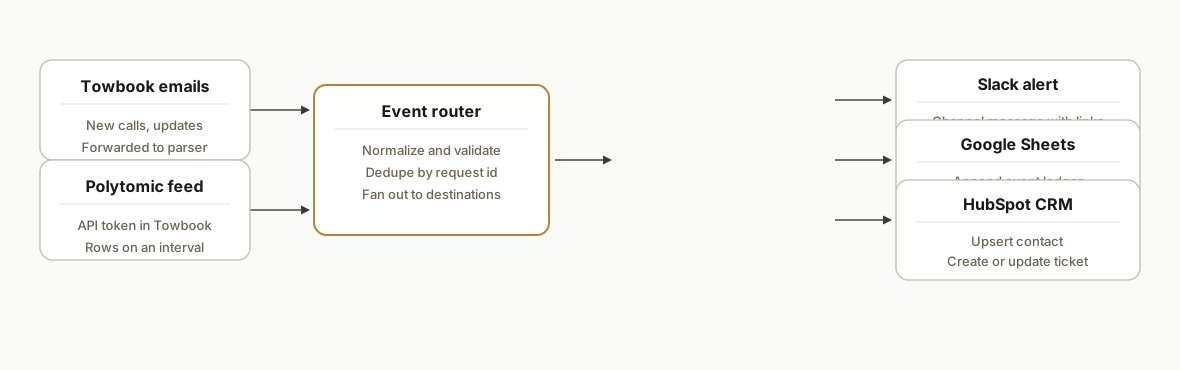
We bridge the webhook gap with two proven capture methods, then route to three destinations. No Towbook internals are assumed.
- Email capture: Towbook can email accident reports and operational notifications. We point those to an automation inbox, parse with Make.com, and emit a normalized event.
- Partner connector: Polytomic documents a Towbook connection using an API token. Where permitted, we pull new or changed records on an interval and emit the same normalized event.
- Router: A lightweight serverless endpoint validates and dedupes events with a composite key, then fans out to Slack, Google Sheets, and HubSpot.
- Slack destination: Dispatch gets a clear, actionable message in the right channel, with deep links back to Towbook if provided in the notification.
- Sheets destination: Every event appends a row for audit, exports, and ad hoc pivots.
- HubSpot destination: We upsert the contact, associate or update a ticket, and attach the latest status so sales has live context.
Important platform notes we design around:
- Towbook's public webhook documentation is not available. We rely on email routing or a partner sync to simulate webhooks. Polytomic confirms Towbook connects with an API token; base URLs and endpoints are not public.
- There is no Towbook app in Zapier or Make directories. We use Make's generic HTTP and Email modules for parsing and delivery.
- Accident Reports can be emailed or downloaded. Other exports and request logs exist in Towbook's help center, but export shapes are not publicly confirmed, so we avoid hard-coding them.
Step-by-step: how to build it
1) Capture Towbook notifications reliably
Point Towbook notifications to an automation inbox you control. Use a forwarding rule to post raw messages to a webhook for parsing.
# Gmail filter example: forward Towbook notices
from:(no-reply@towbook.example) OR subject:(New Call) OR subject:(Job Updated)
Forward to: inbound+tb@your-automation-mailbox.com
Gotcha: do not forward from a personal mailbox. Use a dedicated automation mailbox so SPF and DKIM are consistent and parsing is stable.
2) Normalize emails into a clean JSON event
Use Make.com to parse the forwarded email and emit a normalized body. Regex and line delimiters work well because Towbook emails are structured.
{
  "event_type": "job.created",
  "external_id": "{{match(1.regexp, "Request #(\\d+)")}}",
  "received_at": "{{now}}",
  "customer": {
    "name": "{{match(1.text, "Customer: (.*)")}}",
    "phone": "{{match(1.text, "Phone: (.*)")}}"
  },
  "vehicle": {
    "year_make_model": "{{match(1.text, "Vehicle: (.*)")}}",
    "vin": "{{match(1.text, "VIN: (.*)")}}"
  },
  "location_from": "{{match(1.text, "From: (.*)")}}",
  "location_to": "{{match(1.text, "To: (.*)")}}",
  "status": "New",
  "source": "email"
}
Gotcha: Make's IML lacks some helpers. If match is missing in your version, chain contains and slice, or push the raw email to your own parser endpoint where you can use full regex.
3) Optional: pull changes through Polytomic
When email coverage does not include edits or closures, add Polytomic as a supplemental feed. Configure the Towbook connection with the API token inside Polytomic, then sync the relevant objects into your warehouse or directly to Google Sheets. Emit normalized change events from there on a schedule.
Gotcha: scope, limits, and endpoint details are not public. Treat Polytomic as a black box that emits rows and handle downstream diffing and dedupe yourself.
4) Build a lightweight router with idempotency
Create a serverless endpoint to accept both sources, validate the payload, and prevent duplicates by keying on the Towbook request number plus a status stamp.
// api/route.js
import crypto from "node:crypto";
import fetch from "node-fetch";

export default async function handler(req, res) {
  const evt = req.body; // normalized event from Step 2 or Polytomic
  const key = `${evt.external_id}:${evt.status ?? evt.event_type}`;
  const hash = crypto.createHash("sha256").update(key).digest("hex");
  const seen = await cacheHas(hash);
  if (seen) return res.status(200).json({ ok: true, dedup: true });

  await Promise.all([
    postToSlack(evt),
    appendToSheet(evt),
    upsertHubSpot(evt)
  ]);

  await cacheSet(hash, Date.now());
  return res.status(200).json({ ok: true });
}
Gotcha: choose a cache that survives cold starts. Redis, DynamoDB, or Supabase work well. Avoid in-memory dedupe in serverless functions.
5) Send a clear, actionable Slack message
Use Slack Incoming Webhooks or chat.postMessage with a bot token. Keep the payload tight and link back to Towbook if your email includes a job URL.
curl -X POST "$SLACK_WEBHOOK_URL" \
  -H "Content-Type: application/json" \
  -d '{
    "text": "New Towbook call: #12345, 2018 F-150 from I-75 to Main Yard",
    "blocks": [
      {"type":"section","text":{"type":"mrkdwn","text":"*New call* #12345\nCustomer: Jane Smith 555-123-9876\nVehicle: 2018 Ford F-150"}},
      {"type":"context","elements":[{"type":"mrkdwn","text":"From: I-75 MP 247  To: Main Yard"}]}
    ]
  }'
Gotcha: wrap lines in sections or dividers. Bare line breaks can be collapsed by sanitizers in some tools.
6) Append a row to Google Sheets for audit
Expose a simple Apps Script web app that accepts JSON and writes to a sheet. Call it from the router.
// Code.gs
function doPost(e) {
  const body = JSON.parse(e.postData.contents);
  const ss = SpreadsheetApp.openById(PropertiesService.getScriptProperties().getProperty('SHEET_ID'));
  const sh = ss.getSheetByName('Events');
  sh.appendRow([
    new Date(), body.event_type, body.external_id,
    body.customer?.name, body.customer?.phone,
    body.vehicle?.year_make_model, body.status,
    body.location_from, body.location_to
  ]);
  return ContentService.createTextOutput(JSON.stringify({ ok: true })).setMimeType(ContentService.MimeType.JSON);
}
Gotcha: Apps Script web apps run as the deployer. Re-deploy after code changes or your endpoint will keep serving the old version.
7) Upsert HubSpot contact and ticket
Use a Private App token. First search or create the contact, then create or update a ticket and associate them.
# Create or update a contact by email
curl -s -X POST \
  https://api.hubapi.com/crm/v3/objects/contacts \
  -H "Authorization: Bearer $HUBSPOT_TOKEN" \
  -H "Content-Type: application/json" \
  -d '{
    "properties": {
      "email": "jane.smith@example.com",
      "firstname": "Jane",
      "phone": "555-123-9876"
    }
  }'

# Create a ticket
curl -s -X POST \
  https://api.hubapi.com/crm/v3/objects/tickets \
  -H "Authorization: Bearer $HUBSPOT_TOKEN" \
  -H "Content-Type: application/json" \
  -d '{
    "properties": {
      "hs_pipeline": "0",
      "hs_pipeline_stage": "1",
      "subject": "Towbook Call #12345, 2018 F-150",
      "content": "From I-75 MP 247 to Main Yard. Status: New"
    }
  }'
Gotcha: keep the router model agnostic. If you later move from HubSpot to another CRM, nothing changes upstream.
Where it gets complicated
- No public Towbook webhooks. You cannot rely on native event delivery. We solved this with email routing and, where allowed, a partner sync. Treat both as first-class inputs.
- Unknown Towbook API surface. Polytomic confirms API token auth exists, but base URLs, limits, and object shapes are not public. Abstract the source and handle diffs downstream.
- Duplicate suppression. Operators often forward the same job twice. We key on request number plus status to prevent repeat posts and noisy Slack alerts.
- Time zones and shifts. Dispatch needs local time. Normalize to the company time zone before writing to Sheets or CRM.
- Attachments. Accident Reports can be emailed as attachments. Store them in Drive and link in Slack and CRM rather than inlining base64 payloads.
What this actually changes
For towing operators, dispatch gets a reliable heads-up in Slack the moment Towbook emits a notice. Managers see a live operational ledger without CSV exports. Sales gets context in HubSpot when a customer has active jobs, which tightens follow-up and collections. The value is structural: fewer copy steps, fewer missed updates, and a consistent audit trail.
A speed-to-lead fact underscores why Slack delivery matters: Harvard Business Review found firms that responded within one hour were nearly 7 times more likely to qualify a lead than those that waited longer, and 60 times more likely than those that waited 24 hours or more. Source: https://hbr.org/2011/03/the-short-life-of-online-sales-leads
Frequently asked questions
Does Towbook have webhooks I can turn on?
Towbook does not publicly document webhooks. We bridge the gap by capturing Towbook emails and, where permitted, syncing via a partner connector that uses an API token. Both sources emit the same normalized event into Slack, Sheets, and HubSpot.
Do I need Polytomic to make this work?
No. Email routing covers new jobs well. We add Polytomic when you need edits or closures without relying on inbox coverage. It syncs Towbook data with an API token and you emit change events from those rows.
Can this run in real time?
Email notifications arrive quickly and post to Slack and Sheets within moments. Partner syncs run on an interval. For most operators, this is functionally real time for dispatch and more than sufficient for CRM.
How do you prevent duplicates?
We compute an idempotency key from the Towbook request number plus the status or event type. The router caches keys short term and drops repeats, so Slack and CRM do not get spammed when a message is forwarded twice.
What does this cost to operate monthly?
The router and Slack delivery are low cost. Make.com or a serverless host adds a modest fee. Polytomic is a separate subscription if you use it. The main expense is the initial build; run costs are minimal relative to the saved labor.
Can a non-developer set this up?
You can wire basic email parsing in Make.com, but idempotency, retries, and CRM association logic benefit from an engineer. We ship it as a managed integration so your team does not have to maintain parsers or fix edge cases.
If you want this wired into your stack, this is a pattern we scope and build for towing operators. See our related write-up on Towbook to HubSpot integration, our broader CRM automation services, and when you are ready to scope yours, book a 20 minute call.
Want us to build this for you?
Nine questions, about 90 seconds. You see the hours it is costing you, then pick a time. No pitch.
Get your free assessment