
Here is how we build a Tailwind TMS bridge that turns dispatch activity into clean accounting and customer updates. It reads Tailwind exports or uses an integration token when available, creates invoices or bills in QuickBooks, and emails or CRM-updates customers as statuses change. This post shows the exact pattern we design for trucking carriers when Tailwind lacks a native workflow, and for a broader view on TMS integration with QuickBooks see our dedicated guide.
Definition: Tailwind TMS automation is a bridge that turns Tailwind dispatch and billing data into downstream accounting entries and customer notifications without manual rekeying.
The problem it solves
Operators rekey Tailwind dispatches into accounting and then paste status updates into email or a CRM. Tailwind can export CSVs, but invoice and bill exports are totals only. QuickBooks sync requires posted documents and exact customer or vendor internal names. There is no public Zapier app. The manual path causes delays and duplicates.
| Step | Manual process | Automated with our bridge |
|---|---|---|
| Dispatch closed | Dispatcher emails accounting with lane and totals | Job ingested from Tailwind export or API token read, queued for accounting |
| Invoice creation | Bookkeeper rekeys totals into QuickBooks and hopes names match | QuickBooks draft created with mapped customer, GL and tax rules; posted per rule |
| Customer update | CSR sends a status email from a template | Status email generated from dispatch data, or CRM field updated |
| Exceptions | Discovered days later in reconciliation | Diff-ledger flags changes, retries failed posts, alerts on mismatches |
Source facts used here: Tailwind lets admins export core objects including Dispatches as CSV. Invoice and bill exports are totals only, no line items. Tailwind QuickBooks Online sync only moves posted invoices or bills and requires QBO Plus or higher. Internal Name matching is required to avoid duplicates. There is no public Zapier listing for Tailwind TMS. Tailwind exposes an integration token for partners, but public developer docs are not published.
How the automation works
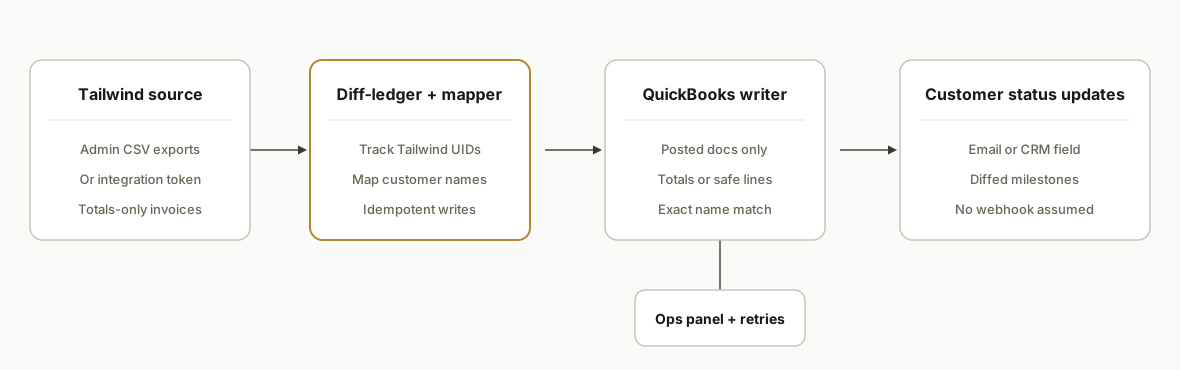
The architecture treats Tailwind as a source of truth and adds a diff-ledger to make downstream systems idempotent. When Tailwind lacks a native trigger, we poll exports on a schedule. Where an integration token is provisioned, we prefer API reads.
- Tailwind data source: We pull Dispatches, Customers, and Vendors via admin CSV exports. When the client issues an integration token, we add authenticated reads. Invoice or bill CSVs contain totals only, so we enrich from dispatch records for GL mapping.
- Diff-ledger and mapper: A Postgres table tracks every Tailwind UID we have pushed to accounting or the CRM. We map Tailwind customers or vendors to QuickBooks display names and enforce name matching to prevent duplicates.
- Accounting writer: We post QuickBooks invoices or bills only when Tailwind shows the document as posted. If line items are needed and Tailwind exports lack them, we synthesize safe item rows from dispatch components or write totals per the client's policy.
- Customer status updates: We update a CRM field or send an email when milestones change. No webhooks exist in Tailwind's public surface, so we compute changes by diffing current state vs the last run.
- Ops panel and retries: A small dashboard shows queued, sent, retried, and failed records. Mismatches like missing customers trigger alerts and a guided fix, not silent failures.
Step-by-step: how to build it
Step 1: Enable the safest Tailwind data path you have
Answer first: start with admin CSV exports. If you have an integration token, add authenticated reads later.
Tailwind supports admin CSV exports for core objects. We begin with Dispatches plus Customers and Vendors so name matching is deterministic. If your account can issue an integration token, store it as an environment secret and add a separate fetch adapter. Do not assume public API docs or a fixed base URL.
# Minimal extractor skeleton
cron: "0 * * * *"  # hourly
export TAILWIND_EXPORTS_DIR=/secure/tailwind/exports
export RUN_MODE=poll_csv
node dist/jobs/ingest-tailwind.js
Key gotcha: invoice and bill exports are totals only. Plan to enrich from dispatch rows.
Step 2: Normalize and stage Tailwind CSVs
Answer first: parse CSVs into a normalized staging table keyed by Tailwind UIDs.
// src/ingest/tailwindCsv.ts
import fs from "node:fs";
import { parse } from "csv-parse/sync";
import { sql } from "./db";

type DispatchRow = {
  dispatch_id: string;
  order_no: string;
  customer_internal_name: string;
  vendor_internal_name?: string;
  revenue_total: string;
  expense_total: string;
  status: string; // e.g., Completed, Posted
  last_modified: string;
};

export function ingestDispatchCsv(path: string) {
  const recs = parse(fs.readFileSync(path), { columns: true }) as DispatchRow[];
  for (const r of recs) {
    sql`
      insert into staging_tailwind_dispatches
        (dispatch_id, order_no, customer_internal_name, vendor_internal_name,
         revenue_total_cents, expense_total_cents, status, last_modified)
      values
        (${r.dispatch_id}, ${r.order_no}, ${r.customer_internal_name}, ${r.vendor_internal_name ?? null},
         ${Math.round(parseFloat(r.revenue_total) * 100)}, ${Math.round(parseFloat(r.expense_total) * 100)},
         ${r.status}, ${r.last_modified})
      on conflict (dispatch_id) do update set
        revenue_total_cents = excluded.revenue_total_cents,
        expense_total_cents = excluded.expense_total_cents,
        status = excluded.status,
        last_modified = excluded.last_modified;
    `;
  }
}
Key gotcha: treat money as integers. Store cents, not floats.
Step 3: Build the diff-ledger and name matching rules
Answer first: create a ledger that records every outbound write with Tailwind IDs and destination IDs.
-- migrations/001_tailwind_ledger.sql
create table if not exists tailwind_push_ledger (
  dispatch_id text primary key,
  qb_doc_type text not null, -- 'invoice' or 'bill'
  qb_doc_id text,            -- set after a successful post
  status text not null default 'queued',
  last_error text,
  updated_at timestamptz not null default now()
);

create table if not exists tailwind_name_map (
  kind text not null, -- 'customer' | 'vendor'
  tailwind_internal_name text not null,
  quickbooks_display_name text not null,
  primary key(kind, tailwind_internal_name)
);
Key gotcha: QuickBooks Online requires an eligible plan and only posted Tailwind documents should sync. Enforce name equality to avoid duplicates.
Step 4: Map dispatch totals to QuickBooks documents
Answer first: for invoices and bills, write totals-only or synthesized lines per policy.
// src/map/mapToQuickBooks.ts
import { getQBClient } from "./qbClient";
import { sql } from "./db";

export async function pushToQuickBooks(row: any) {
  const qb = await getQBClient();
  const customer = await sql`
    select quickbooks_display_name from tailwind_name_map
    where kind = 'customer' and tailwind_internal_name = ${row.customer_internal_name}`;
  if (!customer.count) throw new Error("Missing customer name map");

  const doc = {
    CustomerRef: { name: customer[0].quickbooks_display_name },
    Line: [{
      Amount: row.revenue_total_cents / 100,
      DetailType: "SalesItemLineDetail",
      SalesItemLineDetail: { ItemRef: { name: "Freight" } }
    }],
    PrivateNote: `Tailwind dispatch ${row.dispatch_id}`
  };

  const saved = await qb.invoices.create(doc); // adapter hides SDK specifics
  await sql`update tailwind_push_ledger set qb_doc_id = ${saved.Id}, status = 'sent' where dispatch_id = ${row.dispatch_id}`;
}
Key gotcha: if your finance team requires line items, generate them deterministically from dispatch fields. Do not guess values.
Step 5: Detect status changes and notify customers or update CRM
Answer first: compute deltas between the latest Tailwind state and the last pushed state.
// src/notify/statusDelta.ts
import { sql } from "./db";
import { sendEmail } from "./email";

export async function processStatusChanges() {
  const rows = await sql`
    select d.dispatch_id, d.order_no, d.status, l.status as pushed_status
    from staging_tailwind_dispatches d
    left join tailwind_status_shadow l on l.dispatch_id = d.dispatch_id`;

  for (const r of rows) {
    if (r.status !== r.pushed_status) {
      await sendEmail({
        to: pickCustomerEmail(r.order_no),
        subject: `Order ${r.order_no}: ${r.status}`,
        body: `Your load is now ${r.status}. Reference: ${r.dispatch_id}.`
      });
      await sql`insert into tailwind_status_shadow(dispatch_id, status)
                 values(${r.dispatch_id}, ${r.status})
                 on conflict(dispatch_id) do update set status = excluded.status`;
    }
  }
}
Key gotcha: Tailwind's public surface does not promise webhooks. Poll and diff reliably.
Step 6: Add retries, alerts, and an ops panel
Answer first: surface failures and allow safe replays.
// src/ops/retry.ts
import { sql } from "./db";
import { pushToQuickBooks } from "../map/mapToQuickBooks";

export async function retryFailed(limit = 20) {
  const failed = await sql`select * from tailwind_push_ledger where status = 'failed' limit ${limit}`;
  for (const f of failed) {
    try {
      const row = await loadDispatch(f.dispatch_id);
      await pushToQuickBooks(row);
    } catch (e: any) {
      await sql`update tailwind_push_ledger set last_error = ${e.message}, updated_at = now() where dispatch_id = ${f.dispatch_id}`;
    }
  }
}
Key gotcha: treat Samsara documents separately. Tailwind's Samsara integration does not sync documents back into Tailwind, so do not expect return document flows.
Where it gets complicated
Invoice and bill line items are not in CSV exports. Tailwind's exports include totals only, which limits a pure CSV accounting sync. We handle this with deterministic synthesized lines or totals-only documents per finance policy.
QuickBooks Online constraints apply. Tailwind's QBO sync expects QBO Plus or higher, posted documents only, and exact Internal Name matching for customers or vendors. We mirror those rules in our bridge to avoid duplicate records.
No public Zapier app means no point-and-click flows. There is no public Tailwind app in Zapier. We ship a polling bridge plus an optional token-backed reader instead of relying on an app that does not exist.
No public webhook guarantees. We compute deltas by diffing staged exports instead of expecting event pushes. This is how we make customer status updates reliable.
Enterprise features are gated. Tailwind's Samsara integration is available on Enterprise and does not sync documents back. EDI via Kleinschmidt requires Unlimited and an API token. We design around those gates rather than assuming them.
What it actually changes
For a carrier running Tailwind, the bridge is designed to remove manual rekeying from dispatch to accounting and make customer status updates automatic. Accounting receives draft or posted documents aligned with Tailwind's posting rules, and customers or CRMs reflect live status without a dispatcher sending emails. As a broader context, McKinsey estimated that about 60 percent of occupations have at least 30 percent of activities that could be automated, indicating room to remove repetitive entry and status updates across teams. Source: https://www.mckinsey.com/featured-insights/future-of-work/where-machines-could-replace-humans-and-where-they-cant-yet
Frequently asked questions
Does Tailwind TMS have an API?
Tailwind supports integration tokens for partners and third parties. Public developer docs and a public base URL are not published. We design for both modes: exports-first and token-backed reads when a client provisions a token.
Is there a native Tailwind app in Zapier or Make?
There is no public Tailwind listing in Zapier's App Directory at the time of writing. Private apps may exist. We ship a standalone bridge that polls exports and, when possible, reads via an integration token.
Can you sync detailed line items into QuickBooks?
Tailwind's invoice and bill exports are totals only. We either post totals-only documents or generate safe, deterministic lines from dispatch fields. We never invent amounts. If native line items are required, we design with that constraint up front.
What QuickBooks plan do we need?
QuickBooks Online Plus or higher is required for Tailwind's native sync. Our bridge follows the same expectation: post only when Tailwind shows a posted document and ensure customer or vendor names match to avoid duplicates.
Can this run in real time?
Tailwind's public surface does not guarantee webhooks, so we poll exports on a short cadence and compute deltas. Where a token-backed reader is enabled, we reduce latency further. We keep retries and alerts in place either way.
What does it cost to operate monthly?
The bridge is lightweight. Costs are driven by hosting the small service and any email or CRM API usage. There is no per-record vendor fee from us. The main investment is the initial build to match your GL, tax, and status policy.
If you run Tailwind and want dispatch to flow into QuickBooks with customer updates handled automatically, this is the bridge we scope. See our related post on McLeod for comparison: /blog/mcleod-software-api-integration. If you prefer a broader integration path, see our service overview at /services#workflow-automation. When you are ready, book a working session at /book.
Want us to build this for you?
Nine questions, about 90 seconds. You see the hours it is costing you, then pick a time. No pitch.
Get your free assessment