
We automated load entry and status-to-invoice flow for a small carrier on ITS Dispatch by combining three pieces: upstream load ingestion through Truckstop partner APIs where available, a dispatcher-safe status workflow on the main Dispatch board, and a downstream QuickBooks Desktop IIF export pipeline with validation before import. It is built for carriers that run ITS Dispatch but do not have a native sync to accounting.
ITS Dispatch automation is: a pragmatic bridge that turns booked loads into validated QuickBooks invoices using the tools ITS supports today. This guide explains the working design, how we built it, and where the limitations sit.
The problem it solves
Carriers lose hours every week re-keying loads, chasing status updates, and hand-building invoices. In ITS Dispatch, certain status changes have to happen from the main Dispatch board, and accounting exports are built around QuickBooks IIF. That makes a fully automatic API sync unrealistic, but the right guardrails still remove most of the manual work.
| Step | Manual workflow | Automated workflow |
|---|---|---|
| Load entry | Copy load details from a board or email into ITS | Ingest from Truckstop partner APIs or an intake sheet into a staging queue for one-click create |
| Status updates | Click through each load, risk wrong screen for Delivered | Guided update on the main Dispatch board with a browser helper and audit |
| Paperwork checks | Hunt for PODs and totals before invoicing | Pre-invoice checklist prompts and blocks on missing fields |
| Invoicing | Hand-build invoices, risk duplicate numbers | Validate exported IIF, dedupe, then hand-off for QuickBooks Desktop import |
How the automation works
We designed around what is confirmed about ITS Dispatch today: there is no publicly documented ITS Dispatch API, and QuickBooks exports are IIF-based and enabled by ITS support. The architecture keeps humans where the tool requires it and automates the rest.
- Load ingest adapter: Where partner access is granted, we pull loads from Truckstop-side APIs into a normalized staging table. If partner APIs are not available, we support a dispatcher intake sheet with the same schema.
- ITS Dispatch board helper: A small browser worker guides the dispatcher to update statuses from the main Dispatch board when a load is Delivered or Completed. This respects the operational quirk that some status changes must occur on the board, not inside the load.
- IIF export validator (accent): After Delivered, the dispatcher runs the built-in QuickBooks export. Our service watches a shared folder, validates each .iif for duplicates and amount mismatches, and routes clean files to a Ready-to-Import folder.
- QuickBooks Desktop import: Accounting imports validated IIF through QuickBooks Desktop. We log imported invoice numbers to prevent re-imports.
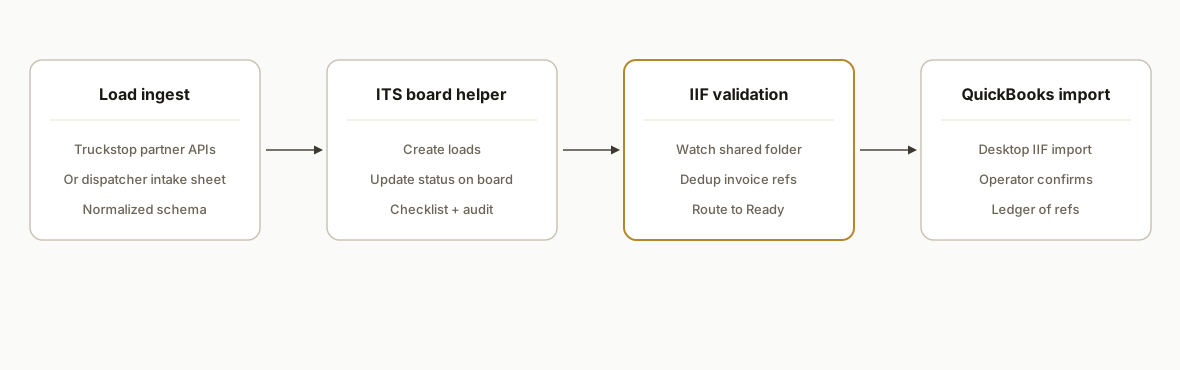
ITS Dispatch QuickBooks: what is supported today
If you searched for ITS Dispatch QuickBooks, here is the short answer based on what we run in production:
- QuickBooks Desktop IIF export: supported in ITS Dispatch with help from ITS support. We validate the .iif files before import.
- Public API: not available for ITS Dispatch. We do not rely on undocumented endpoints.
- Status workflow: some status changes must be done on the main Dispatch board. Our helper enforces this and adds a Delivered checklist.
- Zapier or Make app: not listed. We bridge with a staging UI, a browser helper, and an IIF validation and dedupe layer.
For a related dispatch-to-accounting pattern in another TMS, see our write up on a Tailwind TMS dispatch to accounting bridge.
QuickBooks Desktop vs Online with ITS Dispatch
- Desktop: ITS Dispatch exports IIF files that QuickBooks Desktop can import. We parse, dedupe, and route clean IIF files to Ready-to-Import, then accounting imports in Desktop.
- Online: IIF is not a native QuickBooks Online import. When clients run QuickBooks Online, we map the validated data into their accounting process separately. We keep the gap-and-bridge pattern and do not assume a hidden ITS API.
If you want to see another TMS that invoices into QuickBooks, our Towbook case explains item and reference hygiene at the edge: Towbook to QuickBooks invoicing sync.
Quick start checklist: enabling the QuickBooks handoff
Use this to go from Delivered to Desktop import without double entry:
- Ask ITS support to enable the QuickBooks IIF export in your environment. Confirm which fields populate the invoice reference you use for dedupe.
- Standardize your QuickBooks item and account mapping. Keep names stable so Desktop accepts the IIF without errors.
- Set up a shared IIF Inbox and Ready-to-Import folder. Point our watcher at the Inbox so clean files are moved and duplicates are held.
- Train dispatchers on the Delivered checklist on the main board. Require POD present and totals confirmed before export.
- Add a simple ledger report that lists Delivered without invoice and Imported invoice refs. Review daily.
Step-by-step: how to build it
1) Normalize upstream load data into a staging queue
We built a small adapter that accepts partner-authorized Truckstop payloads and maps them to a common Load schema. If partner APIs are not approved, dispatchers paste the same fields into a protected intake sheet.
// src/load-intake.ts
import fetch from "node-fetch";

type Load = {
  externalId: string;
  pickupDate: string;
  deliveryDate: string;
  origin: string;
  destination: string;
  rate: number;
  reference: string;
};

export async function fetchPartnerLoads(token: string): Promise<Load[]> {
  const url = process.env.TRUCKSTOP_PARTNER_API_BASE + "/loads"; // partner access required
  const r = await fetch(url, { headers: { Authorization: `Bearer ${token}` } });
  if (!r.ok) throw new Error(`Partner API error: ${r.status}`);
  const rows = await r.json();
  return rows.map((x: any) => ({
    externalId: String(x.id),
    pickupDate: x.pickup_date,
    deliveryDate: x.delivery_date,
    origin: `${x.pickup_city}, ${x.pickup_state}`,
    destination: `${x.drop_city}, ${x.drop_state}`,
    rate: Number(x.rate_total || 0),
    reference: x.po_number || x.ref || "",
  }));
}
Key gotcha: partner APIs are gated. When partner access is not granted, keep the same schema and allow a spreadsheet intake so the rest of the pipeline does not change.
2) Create loads safely in ITS with a dispatcher gate
With no public ITS Dispatch API, we push normalized rows to a staging UI. The dispatcher reviews and clicks Create, then the browser worker completes the entry steps.
// src/itd-board-worker.ts
import { chromium } from "playwright";

export async function createLoadInITS(creds: { user: string; pass: string }, load: any) {
  const browser = await chromium.launch({ headless: false });
  const ctx = await browser.newContext();
  const page = await ctx.newPage();
  await page.goto(process.env.ITS_LOGIN_URL as string);
  await page.fill("[name=email]", creds.user);
  await page.fill("[name=password]", creds.pass);
  await page.click("button:has-text('Sign In')");
  // Navigate to the create-load screen, then fill fields
  await page.click("text=Create Load");
  await page.fill("[name=origin]", load.origin);
  await page.fill("[name=destination]", load.destination);
  await page.fill("[name=pickupDate]", load.pickupDate);
  await page.fill("[name=deliveryDate]", load.deliveryDate);
  await page.fill("[name=rate]", String(load.rate));
  await page.fill("[name=reference]", load.reference);
  await page.click("text=Save");
  await browser.close();
}
Key gotcha: run headed and pinned to a dispatcher workstation. Respect ITS session rules and keep cadence human-like.
3) Update statuses from the main Dispatch board
We codified a Delivered checklist and a board-based status update because certain status changes must be done on the main board.
export async function markDeliveredOnBoard(page: any, loadNumber: string) {
  await page.goto(process.env.ITS_DISPATCH_BOARD_URL as string);
  await page.fill("input[placeholder='Search loads']", loadNumber);
  await page.press("input[placeholder='Search loads']", "Enter");
  await page.click(`text=${loadNumber}`);
  await page.click("text=Set Status");
  await page.click("text=Delivered");
  await page.click("text=Confirm");
}
Key gotcha: build an allow-list of which statuses your helper can touch and surface a checklist: POD received, totals confirmed, accessorials applied.
4) Validate QuickBooks IIF exports before import
ITS Dispatch supports QuickBooks exports to IIF with help from ITS support. We watch a shared folder where the dispatcher drops the .iif and run duplicate and sanity checks.
// src/iif-validate.ts
import fs from "fs";

export type IifFile = { path: string; invoices: { ref: string; amount: number }[] };

export function parseIIF(path: string): IifFile {
  const lines = fs.readFileSync(path, "utf8").split(/\r?\n/);
  const invoices: { ref: string; amount: number }[] = [];
  for (const line of lines) {
    if (line.startsWith("TRNS\tINVOICE")) {
      const cols = line.split("\t");
      const ref = cols[12] || cols[6] || ""; // refno or docnum depending on template
      const amt = Number(cols[7] || 0);
      invoices.push({ ref, amount: amt });
    }
  }
  return { path, invoices };
}

export function dedupeCheck(iif: IifFile, seen: Set<string>) {
  const dups = iif.invoices.filter(x => seen.has(x.ref));
  return { ok: dups.length === 0, duplicates: dups.map(d => d.ref) };
}
Key gotcha: IIF is strict. Keep item names and accounts aligned with your QuickBooks Desktop company file. Log processed invoice numbers to avoid re-imports.
5) Route clean IIF files to Ready-to-Import and alert accounting
We move validated files to a Ready-to-Import folder and post a notification with counts and any warnings.
// src/watcher.ts
import chokidar from "chokidar";
import path from "path";
import fs from "fs";
import { parseIIF, dedupeCheck } from "./iif-validate";

const seen = new Set<string>();

chokidar.watch(process.env.IIF_INBOX as string, { ignoreInitial: true })
  .on("add", p => {
    if (!p.endsWith(".iif")) return;
    const iif = parseIIF(p);
    const dup = dedupeCheck(iif, seen);
    if (!dup.ok) {
      console.warn(`Duplicate invoices: ${dup.duplicates.join(", ")}`);
      return; // hold for review
    }
    iif.invoices.forEach(inv => seen.add(inv.ref));
    const dest = path.join(process.env.IIF_READY as string, path.basename(p));
    fs.renameSync(p, dest);
    console.log(`Ready: ${dest} (${iif.invoices.length} invoices)`);
  });
Key gotcha: some teams prefer a second reviewer before import. Our alert includes invoice refs so accounting can spot anomalies quickly.
6) Maintain a simple reconciliation ledger
We keep a tiny ledger: load numbers we staged, loads marked Delivered, and invoice refs imported. The daily report flags orphaned Delivered loads or IIF files still waiting.
-- schema.sql
create table delivered_loads (
  load_no text primary key,
  delivered_at timestamp not null
);
create table imported_invoices (
  invoice_ref text primary key,
  imported_at timestamp not null
);
Key gotcha: without a public ITS API, reconciliation depends on your staging metadata and dispatcher checklists. Keep the ledger simple and operator-visible.
Where it gets complicated
- No public ITS Dispatch API: Truckstop operates partner APIs for load-board functions, but there is no published ITS Dispatch API. Our build avoids inventing endpoints and confines automation to safe browser assistance and staging queues.
- Status change location matters: Some statuses must be changed on the main Dispatch board. We codified this in the helper and blocked in-load status edits to avoid silent misses.
- IIF is the accounting bridge: ITS Dispatch exports invoices and carrier payables to QuickBooks IIF with support assistance. Driver or sales-rep payables are not exported to QuickBooks via IIF. Keep your QuickBooks item and account mapping stable or you will see import errors.
- No Zapier or Make connectors: There is no official ITS Dispatch app listed in Zapier or Make. We avoided brittle RPA that pretends an API exists and instead made the human gates explicit where the platform requires them.
- Environment and credentials: Run the board helper on a dispatcher workstation that already signs into ITS. Avoid headless cloud VMs that can trip login challenges.
What this actually changes
For a small carrier, the system removed copy-paste load entry, prevented out-of-order status changes, and stopped duplicate invoices before they touched QuickBooks. The value is structural: dispatch runs faster, accounting imports only clean IIF files, and rework drops because invoice refs are deduped at the edge.
One benchmark to anchor the ROI: APQC reports typical organizations spend on the order of five to eleven dollars to process a single invoice, while top performers spend less. Reducing manual touches before import directly lowers that cost envelope. Source: https://www.apqc.org/knowledge-base/documents/measure-cost-process-accounts-payable-invoice
Frequently asked questions
Does ITS Dispatch have an official API?
Truckstop provides partner APIs around load-board functions. There is no publicly documented ITS Dispatch API and partner details require approval. Our production builds do not assume an ITS API exists: we combine partner-side ingest where available with dispatcher-guided actions in ITS.
How do I connect ITS Dispatch to QuickBooks?
Enable the QuickBooks IIF export in ITS Dispatch with support, then run our IIF validation and dedupe step before importing into QuickBooks Desktop. This keeps dispatch in ITS, moves only clean invoices to accounting, and avoids relying on an undocumented API.
Can I connect ITS Dispatch to Zapier or Make?
There is no official ITS Dispatch app listed in Zapier or Make at the time of writing. We bridge with a small staging app, a browser helper for the Dispatch board, and an IIF validation pipeline for QuickBooks Desktop imports.
How do you prevent duplicate invoices?
We parse each .iif, extract the invoice reference, and check it against a processed ledger. Duplicates are held for review and never reach the Ready-to-Import folder. Accounting imports only from the Ready folder.
Can this be fully hands-off from status to invoice?
Not fully. Certain statuses must be changed from the main Dispatch board and ITS Dispatch exports to IIF require an operator step. The automation removes copy-paste and prevents errors, and the human gates happen where the platform expects them.
Does this work with QuickBooks Online?
ITS Dispatch exports to QuickBooks IIF, which is a QuickBooks Desktop import format. If you run QuickBooks Online, we map the validated data into your accounting process separately. We do not rely on an undocumented ITS API for that.
How long does it take to implement?
Typical timeline: two to four weeks. Week 1: staging app and load ingest. Week 2: board helper and IIF validator. Week 3: operator dry run and reconciliation tweaks. Partner API access, if used, can affect timing.
If you run ITS Dispatch and want this bridge in place, we have shipped it in production for carriers that needed accounting accuracy without changing TMS. See our related post on a cousin platform in Tailwind TMS: Integration and Automation Guide, a deeper pattern on dispatch to accounting for Tailwind, or how we handle invoicing sync on another TMS in Towbook to QuickBooks invoicing sync. Explore our workflow automation services, and when you are ready to scope your map, book a 15-minute call.
Want us to build this for you?
Nine questions, about 90 seconds. You see the hours it is costing you, then pick a time. No pitch.
Get your free assessment