
We automated Towbook to QuickBooks invoicing by using Towbook's native QuickBooks connector for the heavy lift (see QuickBooks invoice sync options), then adding a reconciliation layer that detects item and tax mismatches, missing invoices, and payment drift before they hit month end. This post is for towing operators who rely on Towbook for jobs and QuickBooks for accounting. It shows the working pattern we shipped in production.
Towbook to QuickBooks invoicing sync: the operational pattern that uses Towbook's built-in QuickBooks integration for invoice and payment creation, then verifies AR against a trusted ledger view and alerts on exceptions so humans only handle edge cases.
The problem it solves
Most tow companies end up reconciling Towbook and QuickBooks by hand. Discrepancies come from item and tax mapping drift, desktop connector issues, and inconsistent timing of invoice pushes. Staff export spreadsheets, spot check a few invoices, and hope nothing slipped. When it does, you find out at month end.
| Task | Manual process | Automated process |
|---|---|---|
| Map items and taxes | Remember to align items and tax rates in two places | Pre-flight checklist blocks push until mapping matches |
| Push invoices to QBO/QBD | Click through each day. Sometimes re-push when it fails | Native Towbook push configured. Monitor for exceptions only |
| Find missing invoices | Export both systems. VLOOKUPs. Hours of checks | Diff engine flags missing or mismatched totals in minutes |
| Track payments vs Towbook jobs | Read QBO aging. Skim Towbook job history | Daily AR digest shows status deltas and suspected drifts |
| Month-end cleanup | All-hands scramble | A few targeted fixes from the exception list |
How the automation works
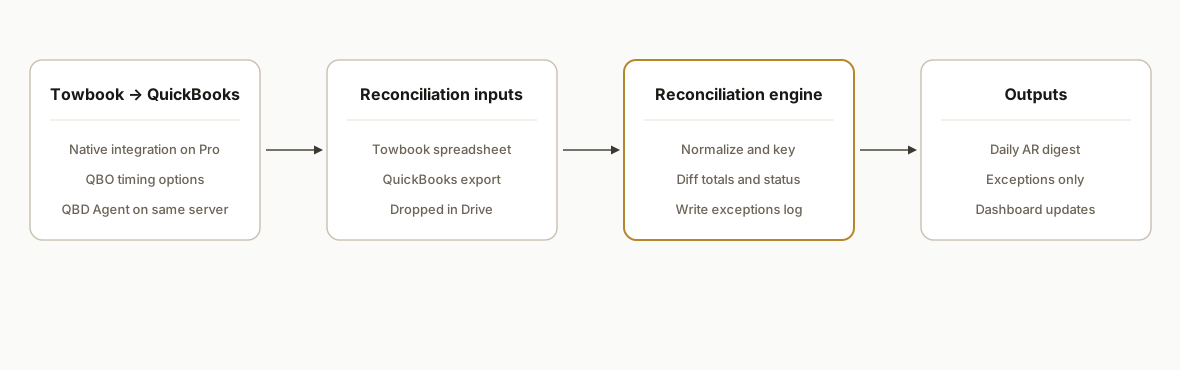
We did not try to replace Towbook's native accounting integration. We hardened it, then wrapped it with a light reconciliation and alerting layer. That solved the gaps without relying on an unconfirmed API surface.
- Towbook's native QuickBooks integration: Towbook supports QuickBooks Online and QuickBooks Desktop. The QuickBooks integration requires the Pro plan or above. For Desktop, Towbook requires installing the Towbook Agent and notes it often needs to run on the same server as the QuickBooks company file and that hosted third-party servers are not supported. For QuickBooks Online, you can choose when invoices and payments push: immediately, manually, or after 24 hours. Towbook support also calls out a Chrome and QBO session nuance during setup and troubleshooting: stay logged into QBO in the same Chrome window.
- Item and tax alignment: To avoid sync errors, items and tax rates must match between Towbook and QuickBooks. We enforce this with a pre-flight checklist and a small test batch.
- Reconciliation inputs: Because a public developer API or webhooks are not published by Towbook and no official Zapier or Make apps were found, we rely on Towbook's built-in sync plus operator exports. We accept Towbook spreadsheets that staff already know how to generate and QuickBooks invoice or aging exports as the authoritative ledger view.
- Diff and alert engine: A Google Apps Script routine normalizes the two inputs, keys records by invoice number and job reference, and flags missing invoices, mismatched totals, and payments that did not land. It emails a daily digest and updates a small AR dashboard.
- Human-in-the-loop fixes: Staff resolve only the exceptions. Everything else flows through Towbook's native connector.
Step-by-step: how to build it
1) Configure Towbook's QuickBooks integration correctly
Answer first: align items and taxes, pick a QBO timing mode, and validate with a tiny batch before turning on daily pushes.
- Confirm plan eligibility: QuickBooks integration requires the Towbook Pro plan or higher.
- Map items and taxes to matching QuickBooks items and tax rates. This avoids Towbook sync errors.
- If you use QBO: choose push timing: immediately, manually, or after 24 hours. These options are QBO-only per Towbook's notes.
- If you use QBD: install the Towbook Agent on the same server as the QuickBooks file per Towbook guidance. Hosted third-party servers are not supported.
2) Run a pre-flight mapping check
Answer first: create a one-time checklist so mis-mapped items never hit production.
function preflightMappingCheck() {
  const cfg = getConfig(); // your own sheet-backed config
  const towbookItems = cfg.towbookItems;   // e.g., ["Standard Tow","Mileage","Storage"]
  const qbItems = cfg.qbItems;             // map of Towbook->QuickBooks
  const missing = towbookItems.filter(it => !qbItems[it]);
  if (missing.length) throw new Error("Unmapped items: " + missing.join(", "));
}
Key gotcha: do not skip this. Towbook's own docs call out matching tax rates and items to avoid sync errors.
3) Set up a Drive intake for Towbook and QuickBooks exports
Answer first: staff drop two files into Drive: a Towbook export and a QuickBooks export. The script grabs the newest pair and runs.
function getLatestCsvFrom(folderName) {
  const folder = DriveApp.getFoldersByName(folderName).next();
  const files = folder.getFiles();
  let newest = null, latest = 0;
  while (files.hasNext()) {
    const f = files.next();
    if (f.getMimeType() !== MimeType.CSV) continue;
    const t = f.getLastUpdated().getTime();
    if (t > latest) { latest = t; newest = f; }
  }
  if (!newest) throw new Error("No CSV in " + folderName);
  return Utilities.parseCsv(newest.getBlob().getDataAsString());
}
Note: we kept inputs as CSV to avoid parsing Excel in code. If your team prefers Excel, export as CSV before upload.
4) Normalize and key the records
Answer first: build comparable shapes from both files and key on invoice number.
function indexByInvoice(rows, headerMap) {
  const [header, ...data] = rows;
  const idx = Object.fromEntries(header.map((h,i) => [h.trim().toLowerCase(), i]));
  const out = new Map();
  data.forEach(r => {
    if (!r.length) return;
    const inv = r[idx[headerMap.invoice]];
    const amt = parseFloat((r[idx[headerMap.amount]]||"0").replace(/[^0-9.\-]/g, ""));
    const status = (r[idx[headerMap.status]]||"").toLowerCase();
    if (inv) out.set(inv.trim(), { amount: amt, status });
  });
  return out;
}
Key gotcha: Towbook and QuickBooks column headers differ. Use a headerMap per source to avoid brittle column positions.
5) Diff Towbook vs QuickBooks and flag exceptions
Answer first: compare presence, totals, and settled status. Output a compact exceptions list.
function diffAr(towRows, qbRows) {
  const towIdx = indexByInvoice(towRows, { invoice: "invoice #", amount: "total", status: "status" });
  const qbIdx  = indexByInvoice(qbRows,  { invoice: "doc number", amount: "amount", status: "status" });
  const out = { missingInQB: [], missingInTow: [], amountMismatch: [], statusDrift: [] };
  // Towbook present but not in QB
  towIdx.forEach((v,k) => { if (!qbIdx.has(k)) out.missingInQB.push(k); });
  // QB present but not in Towbook
  qbIdx.forEach((v,k) => { if (!towIdx.has(k)) out.missingInTow.push(k); });
  // Compare amounts and status
  towIdx.forEach((tv,k) => {
    const qv = qbIdx.get(k);
    if (!qv) return;
    if (Math.abs(tv.amount - qv.amount) > 0.01) out.amountMismatch.push({ invoice: k, tow: tv.amount, qb: qv.amount });
    const paidLike = s => /paid|closed/i.test(s);
    if (paidLike(tv.status) !== paidLike(qv.status)) out.statusDrift.push({ invoice: k, tow: tv.status, qb: qv.status });
  });
  return out;
}
Key gotcha: treat status semantically. Systems use different labels. We normalize to paid-like vs open-like.
6) Email a daily AR digest and store the log
Answer first: one email with exceptions and links back to the two canonical files.
function sendDigest(ex) {
  const fmt = arr => arr.length ? arr.join(", ") : "none";
  const body = [
    "Missing in QuickBooks: " + fmt(ex.missingInQB),
    "Missing in Towbook: " + fmt(ex.missingInTow),
    "Amount mismatches: " + ex.amountMismatch.length,
    "Status drift: " + ex.statusDrift.length
  ].join("\n");
  GmailApp.sendEmail("ar@yourcompany.com", "Towbook  QuickBooks AR exceptions", body);
}

function runArCheck() {
  preflightMappingCheck();
  const tow = getLatestCsvFrom("Towbook Exports");
  const qb  = getLatestCsvFrom("QuickBooks Exports");
  const ex = diffAr(tow, qb);
  sendDigest(ex);
  // Optionally append to a Log sheet for history
}
Key gotcha: schedule the run after your Towbook push timing. If QBO is set to push after 24 hours, run this the following morning.
Where it gets complicated
- No public developer API for Towbook (see Towbook API and invoice sync): we did not find public API docs or an official Zapier or Make app. That means the safe, supportable path is to let Towbook's built-in QuickBooks connector own creates and updates, then reconcile with exports.
- Desktop connector realities: QuickBooks Desktop requires installing and maintaining the Towbook Agent. Towbook notes it often needs to live on the same server as the QB file and that hosted third-party servers are not supported. Plan that into IT operations.
- Mapping drift creates invisible failures: Towbook's own guidance calls out matching items and tax rates. We treat mapping as a gate. No gating, no push.
- Timing differs by edition: QuickBooks Online exposes push timing options. Desktop does not list those options the same way. Your reconciliation job should follow the actual push window you configured.
- Setup quirks: Towbook's support notes call out being logged into QBO in the same Chrome window during setup and troubleshooting. It sounds small. It prevents an afternoon of head-scratching when OAuth or session checks fail.
What this actually changes
For a regional towing company, this removed the end-of-month scramble. In production it pushed invoices and payments through Towbook's native connector and reduced the back-and-forth to a short, daily exceptions list that the office manager cleared in minutes. The structural value is fewer surprises in AR and faster cash application without switching systems or taking on brittle, undocumented integrations.
Cash flow is the reason to care. Intuit's Small Business Cash Flow report found that 61 percent of small businesses have struggled with cash flow at least once, and late payments are a primary driver. Source: https://quickbooks.intuit.com/r/reports/small-business-cash-flow
Frequently asked questions
Does Towbook have an official API my team can use?
We could not find public developer documentation, a base URL, or an auth scheme from Towbook. We also did not find Towbook in Zapier or Make catalogs. That is why we lean on Towbook's built-in QuickBooks integration and use exports for reconciliation rather than attempting an unsupported direct integration.
What Towbook plan do I need for QuickBooks syncing?
Towbook's QuickBooks integration requires the Pro plan or higher. If you are on a lower plan, upgrade first. We verify item and tax mapping before turning on pushes so the first live batch does not error out.
Does this work with QuickBooks Desktop as well as Online?
Yes via Towbook's native paths. Desktop requires the Towbook Agent and Towbook notes it often needs to run on the same server as the QuickBooks file and that hosted third-party servers are not supported. QuickBooks Online offers timing options for pushing invoices and payments that we respect when scheduling reconciliation.
Can it sync in real time?
For QuickBooks Online, Towbook exposes timing options: immediately, manually, or after 24 hours. We schedule reconciliation after that window. For Desktop, we follow the cadence your team runs the Towbook Agent and your accounting close process.
How do you prevent duplicates or double-pushes?
We let Towbook own creates and updates. The reconciliation job is read-only against exports and flags exceptions. We key by invoice number and treat QuickBooks as the ledger of record for AR status. No automation writes back into Towbook.
What does this cost to run monthly?
Infrastructure is light. A Google Apps Script job and a small dashboard are effectively free at the volumes most tow operators run. The real cost is the initial build and a small allowance for adjustments when items or tax rules change.
If you want this set up without trial-and-error, we already built and shipped it. See our related post on Towbook integration options when Zapier or Make are not available: /blog/towbook-api-integration-zapier-alternatives. Or review our broader workflow work at /services#workflow-automation and book a short scoping call at /book.
Want us to build this for you?
Nine questions, about 90 seconds. You see the hours it is costing you, then pick a time. No pitch.
Get your free assessment