
We built a Tekmetric integration that syncs customers and repair orders into the CRM and drives declined-service plus DVI follow-ups by SMS and email. In production it runs on Tekmetric webhooks where available, and falls back to scheduled CSV exports when webhooks are not provisioned.
Tekmetric integration is the automation that moves customers, vehicles, and repair order outcomes from Tekmetric into your CRM, then schedules and monitors declined-service and digital-vehicle-inspection follow-ups across SMS and email.
If you run an auto repair shop on Tekmetric and want CRM visibility and reliable, non-duplicative follow-ups, this guide shows our live architecture, how to build it, and the platform gotchas that matter.
The problem it solves
Manual exports and copy paste from Tekmetric to your CRM create stale contacts and missed follow-ups. Declined lines and DVIs sit in the POS without a clean handoff into sequences, and staff do one-off texts that never get logged.
| Process | Manual reality | Automated with our build |
|---|---|---|
| Customer and vehicle sync | Periodic CSV export. Import into CRM with columns that drift. Duplicates appear. | Webhooks where available or scheduled CSV pulls normalize and dedupe. CRM upserts are idempotent. |
| Declined recommendations | Advisor notes a call-back. Calendar reminder is missed. | Declined lines land in a follow-up queue with SLA timers and owner routing. |
| DVI link sharing | Sent manually from the POS. No CRM record. | DVI view events are captured where available or proxied. CRM timeline shows every touch. |
| Messaging | Staff text from personal phones or the POS number. No history in CRM. | SMS and email are sent from service numbers tied to the CRM. Full timeline logged. |
| Reporting | Count by memory. | CRM shows approvals won, revenue recovered, and time-to-first-touch. |
How the automation works
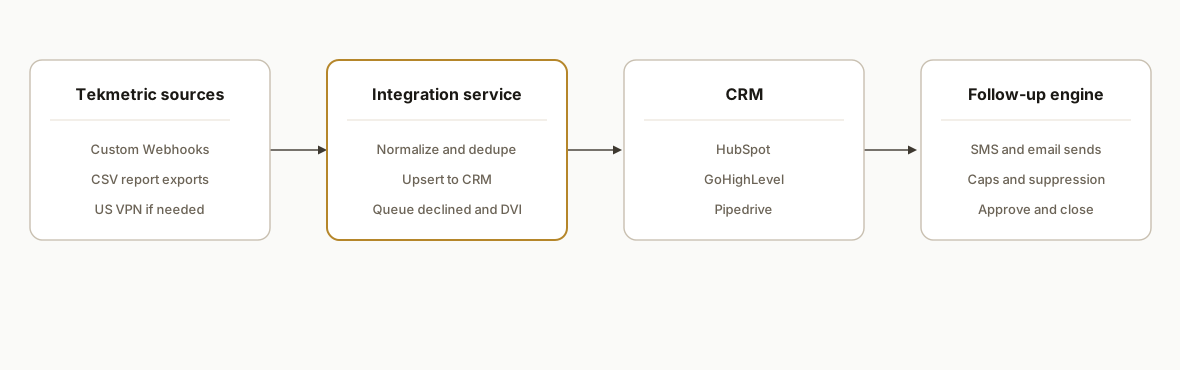
We run a hybrid ingestion: Tekmetric custom webhooks where provisioned, CSV report exports on a schedule where webhooks are not available. An integrations service normalizes records, dedupes, and upserts to your CRM. Declined lines and DVI states drop into a follow-up queue that drives SMS and email with guardrails to avoid duplicating Tekmetric's own marketing automations.
- Tekmetric data capture: When granted, we register custom webhooks to receive customer and repair order events. If webhooks are unavailable, we export Customer lists and relevant reports to CSV on a schedule and pick them up for processing. Tekmetric publicly lists Custom Webhooks and CSV exports, but it does not publish developer docs for endpoint shapes, so our adapter treats the webhook as an untyped envelope and relies on mapping rules you can change without code.
- Integration service: A stateless Node service parses webhook JSON or CSV rows, applies shop level normalization, computes deterministic dedupe keys, and writes a clean record stream.
- CRM upserts: We upsert into HubSpot, GoHighLevel, or Pipedrive using their public APIs. Contacts, vehicles, and recent RO fields land on the record with a Tekmetric source stamp and a last seen hash so retries are safe.
- Follow-up scheduler: Declined lines and DVI states create or advance a follow-up job in Postgres with a unique key per customer plus RO plus line. Jobs carry channel plan and caps so nothing double sends.
- Messaging and logging: SMS and email go through your providers. We log every send, click, response, and approval back to the CRM timeline and to the queue for state transitions.
Step-by-step: how to build it
1) Capture Tekmetric data via webhooks or CSV exports
When Tekmetric custom webhooks are available to your account, we point them to a hardened endpoint. Where webhooks are not provisioned, we schedule CSV exports for Customers and applicable reports and drop them to a secure inbox or SFTP for pickup.
// server/webhooks/tekmetric.js
import express from "express";
const app = express();
app.use(express.json({ limit: "2mb" }));

// Generic envelope. Tekmetric's public schema is not documented.
app.post("/webhooks/tekmetric", async (req, res) => {
  const evt = req.body; // store raw for audit, map in the worker
  await queue.enqueue({ topic: "tekmetric.event", payload: evt });
  res.status(202).end();
});

// Fallback: scheduled CSV pickup
import fs from "fs";
import { parse } from "csv-parse/sync";

export function ingestCsv(path, type) {
  const text = fs.readFileSync(path, "utf8");
  const rows = parse(text, { columns: true, skip_empty_lines: true });
  rows.forEach(r => queue.enqueue({ topic: `tekmetric.csv.${type}`, payload: r }));
}
Key gotcha: Tekmetric advises a U.S. VPN for access outside the U.S. If you host ingestion outside the U.S., route through a U.S. egress to avoid access issues.
2) Normalize and dedupe customers, vehicles, and ROs
We compute deterministic keys so replays never duplicate. For example, a customer key can be email lowercased when present, else phone digits only. We pair a vehicle key with VIN where present.
// worker/normalize.js
import crypto from "crypto";

export function kCustomer(rec) {
  const email = (rec.email || "").trim().toLowerCase();
  const phone = (rec.phone || "").replace(/\D/g, "");
  return email || phone ? `cust:${email}:${phone}` : `cust:anon:${hash(JSON.stringify(rec))}`;
}

export function kVehicle(rec) {
  const vin = (rec.vin || "").trim().toUpperCase();
  return vin ? `veh:${vin}` : `veh:unk:${hash(`${rec.license}|${rec.year}|${rec.make}|${rec.model}`)}`;
}

function hash(s) { return crypto.createHash("sha1").update(s).digest("hex").slice(0, 12); }
3) Upsert records to your CRM with idempotency
We prefer upsert semantics and store the last seen content hash to avoid needless API calls.
// worker/crm-hubspot.js
import axios from "axios";

export async function upsertContact(hsApiKey, contact) {
  const url = "https://api.hubapi.com/crm/v3/objects/contacts";
  const properties = {
    email: contact.email || undefined,
    firstname: contact.firstName,
    lastname: contact.lastName,
    phone: contact.phone,
    tekmetric_last_seen_hash: contact.hash,
    tekmetric_customer_key: contact.key
  };
  // Simple find-or-create by email, then update props
  if (properties.email) {
    const search = await axios.post(
      "https://api.hubapi.com/crm/v3/objects/contacts/search",
      { filterGroups: [{ filters: [{ propertyName: "email", operator: "EQ", value: properties.email }] }] },
      { headers: { Authorization: `Bearer ${hsApiKey}` } }
    );
    const existing = search.data.results?.[0];
    if (existing) {
      await axios.patch(`${url}/${existing.id}`, { properties }, { headers: { Authorization: `Bearer ${hsApiKey}` } });
      return existing.id;
    }
  }
  const created = await axios.post(url, { properties }, { headers: { Authorization: `Bearer ${hsApiKey}` } });
  return created.data.id;
}
4) Create a declined line and DVI follow-up queue
We use a single table with a uniqueness constraint so every declined line plus customer produces at most one live follow-up job.
-- db/followups.sql
create table followups (
  id bigserial primary key,
  shop_id text not null,
  customer_key text not null,
  ro_number text not null,
  line_hash text not null,
  channel_plan text not null, -- sms_email, email_only, sms_only
  status text not null default 'pending', -- pending, sent, approved, closed, suppressed
  next_run_at timestamptz not null,
  attempts int not null default 0,
  created_at timestamptz not null default now(),
  updated_at timestamptz not null default now(),
  unique (shop_id, customer_key, ro_number, line_hash)
);
5) Send SMS and email with caps and logging
We cap sends per customer per day and log everything to the CRM timeline.
// worker/send.js
import twilio from "twilio";
import sgMail from "@sendgrid/mail";

export async function sendSms(cfg, to, body) {
  const cli = twilio(cfg.twilioSid, cfg.twilioToken);
  const msg = await cli.messages.create({ from: cfg.fromNumber, to, body });
  return { sid: msg.sid };
}

export async function sendEmail(apiKey, to, subject, html) {
  sgMail.setApiKey(apiKey);
  const [resp] = await sgMail.send({ to, from: "service@yourshop.com", subject, html });
  return { messageId: resp.headers["x-message-id"] };
}
6) Suppress duplicates when Tekmessage or Tekmetric marketing is active
Tekmetric offers built in marketing automations for declined service and more. When your shop uses Tekmessage for texting, Tekmetric hosts your business number. We detect this setup during onboarding and branch our channel plan so we do not double text.
// worker/policy.js
export function pickChannelPlan({ tekmessageActive, wantSms }) {
  if (tekmessageActive) return wantSms ? "email_only" : "email_only";
  return wantSms ? "sms_email" : "email_only";
}
7) Monitor the pipeline and reconcile approvals
A small status endpoint and a daily reconciliation job keep counts honest and promote jobs when an approval arrives.
// server/status.js
app.get("/status", async (_req, res) => {
  const [{ rows: p } , { rows: e }] = await Promise.all([
    db.query("select status, count(*) from followups group by status"),
    db.query("select date(created_at) d, count(*) c from events where type = 'approval' group by d order by d desc limit 14")
  ]);
  res.json({ followups: p, approvals14d: e });
});
Does Tekmetric have an API? How we connect anyway
What Tekmetric publishes: Custom Webhooks and CSV exports. There is no public developer portal with documented endpoints or auth. We request webhook provisioning per shop through your Tekmetric account team, then point those webhooks at a hardened HTTPS endpoint and store the raw payloads. We treat payloads as untyped envelopes and map keys by inspection so changes do not break ingestion. When webhooks are not available, we schedule CSV report exports and pick them up from a secure inbox or SFTP.
Why not Zapier or Make: Tekmetric is not listed in either public directory. We bridge with our own Node service, which then connects to your CRM and messaging stack. If you want to compare to another repair platform that does allow direct automation, see our Shop-Ware CRM integration notes at Shop-Ware API CRM automation and our declined follow-up pattern in Mitchell1 review follow-up automation.
Tekmetric to HubSpot: field mapping that actually works
In production we keep the mapping minimal and stable. We normalize text, compute durable keys, and stamp the CRM with a source and last seen hash so retries are safe. A safe starter map for HubSpot looks like this:
// mapping/hubspot.js
export function mapToHubSpot(contact, vehicle, ro) {
  return {
    properties: {
      email: contact.email || undefined,
      firstname: contact.firstName,
      lastname: contact.lastName,
      phone: contact.phoneNormalized,
      tekmetric_customer_key: contact.key,           // custom property
      tekmetric_last_seen_hash: contact.hash,        // custom property
      last_ro_number: ro?.number,                    // optional custom property
      last_ro_closed_at: ro?.closedAt,               // ISO string
      last_vehicle_vin: vehicle?.vin,
      last_vehicle_year_make_model: vehicle ? `${vehicle.year} ${vehicle.make} ${vehicle.model}` : undefined,
      declined_lines_count: ro?.declinedCount || 0   // rollup we compute in our worker
    }
  };
}
We also log messages and approvals to the CRM timeline so an advisor sees the whole story. If you rely on inbox history across tools, our Gmail or workspace sync pattern keeps emails and replies attached to the right record. See the playbook at Sync Gmail with HubSpot, GoHighLevel, and Pipedrive.
Using Tekmessage: stop double texting and number conflicts
Tekmessage can host your shop line and run built in campaigns. To avoid collisions, we:
- Detect Tekmessage during onboarding. We verify if the main number is hosted and record a per shop suppression flag.
- Apply channel policy per job. If Tekmessage is active, we suppress SMS from our service and use email only. If it is not, we can send SMS and email with caps.
- If you prefer all messaging to run from your CRM, we route through its provider instead. For GoHighLevel specifically, our adapter pattern in Automate GoHighLevel with Make applies cleanly here.
A simple policy check looks like this:
// worker/decide.js
export function decideSend({ tekmessageActive, dailySent, dailyCap }) {
  if (tekmessageActive) return { sms: false, email: true, reason: "tekmessage_active" };
  if (dailySent >= dailyCap) return { sms: false, email: false, reason: "daily_cap" };
  return { sms: true, email: true };
}
Where it gets complicated
- No public developer docs: Evidence of an API exists, and Tekmetric lists Custom Webhooks publicly, but there is no public developer portal or auth spec. We request webhook provisioning per account and treat shapes as untyped envelopes. For shops without webhooks we rely on CSV exports and scheduled pulls.
- No native Zapier or Make app: Tekmetric does not appear in Zapier or Make public directories. We bridge with our own service and connectors to your CRM and messaging stack.
- Tekmessage number hosting: If you use Tekmessage, your business number is hosted by Tekmetric. We route SMS through alternate service numbers or switch to email only to avoid conflicts.
- Geography and access: Tekmetric advises a U.S. VPN for access outside the U.S. We keep ingestion and replay egress in U.S. regions to avoid session issues.
- Ownership changes: During ownership transfer you must disconnect or re provision integrations. We plan for re auth and a remap so CRMs do not fill with duplicates.
- Built in marketing overlap: Tekmetric automates declined service reminders already. We gate our queue behind a per shop suppression switch so nothing double sends.
What this actually changes
For a multi location auto repair group we anonymized here, CRM records now update daily without human exports. Declined lines drop into a queue that sends one on brand message at the right time and logs the response and approval. Advisors see a single timeline in the CRM rather than piecing together POS and personal messages.
A practical reason this channel works: Pew Research reports that the vast majority of U.S. adults own a smartphone, which makes SMS and mobile friendly email a reliable way to reach customers on service decisions. Source: Pew Research Center Mobile Fact Sheet https://www.pewresearch.org/internet/fact-sheet/mobile/
Frequently asked questions
Does Tekmetric have an official API I can use directly?
Tekmetric publicly lists Custom Webhooks and third parties reference API integrations, but there is no public developer portal with documented endpoints or auth. We integrate via webhooks when provisioned and via CSV exports when webhooks are not available.
Can this run in real time or only in batches?
With webhooks, we process near real time for new customers and repair order changes. Without webhooks, we schedule CSV exports and process on a cadence you choose, typically hourly or daily depending on volume and staff availability.
Which CRMs does this work with?
We have shipped this pattern into HubSpot, GoHighLevel, and Pipedrive using their public APIs. The integration service is CRM agnostic. We map Tekmetric fields into the fields you actually use in the CRM so reports and automations stay clean.
How do you prevent duplicate texts if we already use Tekmessage or Tekmetric marketing?
We add a shop level suppression switch and detect Tekmessage usage at onboarding. If Tekmessage or Tekmetric marketing automations are active for a given workflow, we switch channel plans to email only or skip the send entirely and log the event in the CRM instead.
What does this cost monthly and how long does it take to implement?
Typical implementations take two to four weeks depending on webhook availability and CRM complexity. Monthly costs are your messaging provider, CRM seats, and a small integration service fee. We quote fixed implementation plus a lightweight managed run fee.
We have built and shipped this for auto repair shops that needed CRM visibility and disciplined, non duplicative declined service follow ups. If you want the same result, see our CRM automation services at /services#crm-automation and read how we solved a similar problem for another shop platform in our Mitchell1 post at /blog/mitchell1-api-integration-review-follow-up. When you are ready to scope yours, book a 15 minute call at /book.
Want us to build this for you?
Nine questions, about 90 seconds. You see the hours it is costing you, then pick a time. No pitch.
Get your free assessment