
We connected Open Dental's API to a lightweight service that keeps your CRM in sync with due and overdue recall patients, reactivation candidates, and recently completed visits for automated review requests. It runs continuously with API Events for near-real-time updates and writes clean, deduped records and tasks into your CRM.
Open Dental recall automation is the process of using the official Open Dental API and API Events to keep patient recall status updated in your CRM so that reminders, win-back sequences, and review requests send without manual exports.
The problem it solves
Most practices export lists from Open Dental and paste them into a CRM every few weeks. Recalls go out late, inactive patients are missed, and review requests only send when someone remembers. The on-again, off-again process breaks as volume grows.
| Manual process | Automated with Open Dental API |
|---|---|
| Export CSV of due recalls monthly, clean in Excel, import to CRM, send a one-off | Continuous sync: due and overdue recalls flow into CRM with tags and due dates |
| Staff builds a reactivation list by hand from old charts | Inactive window logic flags lapsed patients and enrolls them in a reactivation sequence |
| Review requests only send when front desk remembers | Post-appointment events trigger templated review asks automatically |
| Duplicates and stale contact data in CRM | Deterministic dedupe by Open Dental IDs keeps one contact per patient |
| Hours per week maintaining lists | Minutes per week verifying a dashboard |
How the automation works
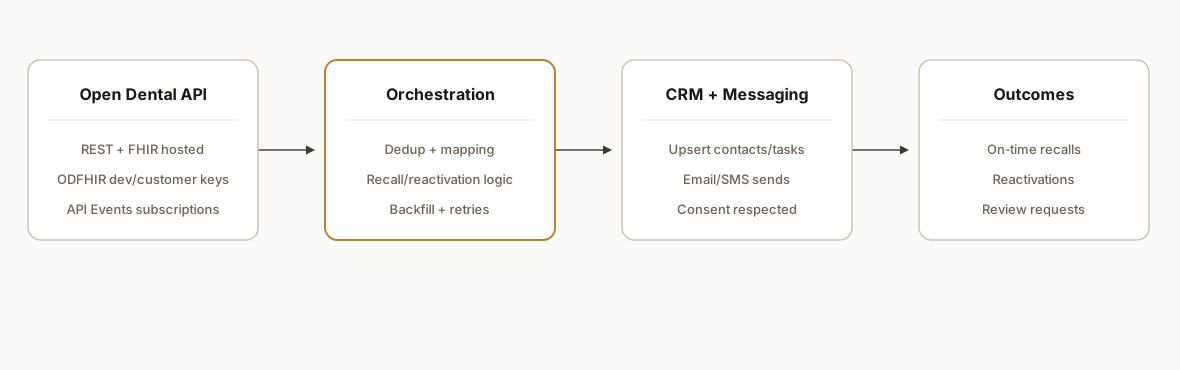
We use Open Dental's hosted REST and FHIR endpoints plus API Events. The service authenticates with the ODFHIR header, fetches recall and appointment data on a schedule, listens for event pushes, and mirrors changes into your CRM and messaging tools.
- Open Dental REST/FHIR API: Base REST URL: https://api.opendental.com/api/v1. Base FHIR URL: https://api.opendental.com/fhir/v2. Auth header format: Authorization: ODFHIR /. Keys are issued per office through the Developer Portal and require the eConnector to be running.
- API Events subscriptions: Webhook-style events that Open Dental delivers using API Subscriptions. They are polling-based under the hood, can batch up to 1,000 items, and only replay about three days of missed events if your endpoint is down.
- Orchestration service: A small Node service receives events, schedules backfills, and applies idempotent upserts to your CRM. It also computes inactivity windows for reactivation.
- CRM and messaging connectors: The service writes contacts and tasks into your CRM and calls your email or SMS gateway to send recall reminders and review requests with the correct templates.
Step-by-step: how to build it
1) Authenticate to Open Dental's REST API
Set up environment variables for your DeveloperKey and CustomerKey, then call the REST base with the required ODFHIR header. Keep keys scoped per office.
// env: OD_DEV_KEY, OD_CUST_KEY
const BASE = "https://api.opendental.com/api/v1";
const headers = {
  Authorization: `ODFHIR ${process.env.OD_DEV_KEY}/${process.env.OD_CUST_KEY}`,
  "Content-Type": "application/json"
};

async function odGet(resourcePath, qs = "") {
  const url = qs ? `${BASE}${resourcePath}?${qs}` : `${BASE}${resourcePath}`;
  const res = await fetch(url, { headers });
  if (!res.ok) throw new Error(`OD ${res.status}: ${await res.text()}`);
  return res.json();
}
Answer first: use the ODFHIR header with your developer and customer keys against the hosted Open Dental API. Do not hardcode keys in code. Use secret storage.
Key gotcha: eConnector must be running and your office version must match what the API expects.
2) Optionally read via FHIR for portability
If you prefer FHIR resources, hit the FHIR base and map Patient and related resources to your CRM fields.
const FHIR_BASE = "https://api.opendental.com/fhir/v2";
const fhirHeaders = { Authorization: headers.Authorization, Accept: "application/fhir+json" };

async function fhirSearch(resource, query) {
  const url = `${FHIR_BASE}/${resource}?${query}`;
  const res = await fetch(url, { headers: fhirHeaders });
  if (!res.ok) throw new Error(`FHIR ${res.status}`);
  return res.json();
}
Answer first: FHIR keeps your mapping future-proof but requires a translation layer to your CRM's schema.
Key gotcha: resource shapes differ from REST. Normalize early and keep one internal model.
3) Subscribe to API Events and expose a webhook
Create an API Subscription in Open Dental, then stand up a public HTTPS endpoint to receive batched events. Store last processed IDs and acknowledge quickly.
// Express-style handler
app.post("/api/od/events", express.json(), async (req, res) => {
  const events = Array.isArray(req.body) ? req.body : [req.body];
  queueBatch(events); // enqueue for async processing
  res.status(202).json({ accepted: events.length });
});
Answer first: accept and enqueue events, then process asynchronously. Do not perform long work in the request thread.
Key gotcha: events are replayable for only about three days and may arrive in batches up to 1,000. Persist checkpoints.
4) Build the recall, reactivation, and review mappers
Transform Open Dental records into CRM contacts, tasks, and enrollment triggers. Use deterministic keys to avoid duplicates.
function toCrmContact(odPatient) {
  return {
    external_id: `od:${odPatient.PatientNum}`,
    first_name: odPatient.FName,
    last_name: odPatient.LName,
    email: odPatient.Email || null,
    phone: odPatient.HmPhone || odPatient.WkPhone || null
  };
}

function recallTask(odRecall) {
  return {
    external_id: `odrecall:${odRecall.RecallNum}`,
    title: "Dental recall due",
    due_date: odRecall.DateDue,
    contact_external_id: `od:${odRecall.PatientNum}`
  };
}
Answer first: use Open Dental's stable identifiers as your CRM external keys for idempotent upserts.
Key gotcha: do not hard-delete tasks on date changes. Update in place by external_id.
5) Upsert into your CRM and trigger messaging
Write contacts and tasks first, then invoke your SMS or email gateway for recall and review sequences.
async function upsertCrm(entity, payload) {
  const res = await fetch(`${process.env.CRM_URL}/${entity}`, {
    method: "PUT",
    headers: { "Authorization": `Bearer ${process.env.CRM_TOKEN}`, "Content-Type": "application/json" },
    body: JSON.stringify(payload)
  });
  if (!res.ok) throw new Error(`CRM ${res.status}`);
  return res.json();
}

async function sendReviewAsk(contact, link) {
  // call your messaging provider
  return fetch(process.env.MSG_URL, {
    method: "POST",
    headers: { "Content-Type": "application/json", Authorization: `Bearer ${process.env.MSG_TOKEN}` },
    body: JSON.stringify({ to: contact.phone || contact.email, template: "review_request", data: { link } })
  });
}
Answer first: upsert by external keys, then trigger outbound messages through your approved channels.
Key gotcha: honor consent flags and avoid PHI in templates.
6) Add a scheduled backfill and a dead-letter queue
Poll on a safe cadence to catch any missed updates and handle batched or failed events.
async function reconcileSince(isoTimestamp) {
  // Fetch changed resources since timestamp, then upsert
}

setInterval(() => reconcileSince(loadCheckpoint()), 15 * 60 * 1000);
Answer first: combine events with periodic reconciliations to stay within the three-day replay window.
Key gotcha: store per-office checkpoints and rotate keys per location.
Which CRMs does this support and how do we map them?
We built this to be CRM agnostic. The pattern is the same: upsert contacts by od:PatientNum, attach recall tasks by odrecall:RecallNum, and set minimal flags to enroll workflows.
- HubSpot: contact external id maps to a stable custom property, recall dates create Tasks with owners and due dates. Enrollment uses a boolean or date property. See our HubSpot upsert pattern in Towbook to HubSpot for a close analogue: HubSpot external id and task upserts.
- GoHighLevel: contacts are upserted, custom values hold recall due, and tags control campaign enrollment. We use Make.com or a lightweight service as the bridge. This mirrors our approach in automating GoHighLevel with Make.
- Pipedrive or Salesforce: contacts upsert by external key, Activities represent recalls with due dates. The enrichment and stage update pattern matches our write-up on Pipedrive enrichment and stage automation.
For post-visit review asks, we reuse the same messaging layer we documented in automated Google review replies. That post covers template and tone controls that keep outreach on-brand.
Multi-location rollout: keys, routing, and reporting
In production we segmented by office from day one.
- Credentials: keys are issued per office. We store one credential set per location and route events and reconciliations accordingly.
- Isolation: the service namespaces every record with both office and Open Dental identifiers to prevent cross-posting between locations.
- Reporting: CRM properties and tags carry the office code so dashboards and sequences filter cleanly. Owner assignment rules respect local schedules.
- Operations: each office maintains its own checkpoint and dead-letter queue. A failure in one location does not block others.
Where it gets complicated
- eConnector and version alignment: The hosted API requires the office eConnector and a compatible office version. Mismatches and eConnector failures are the most common root cause of broken calls.
- API Events replay window: Missed endpoints only replay for about three days and batches can include up to 1,000 items. Run a periodic backfill and keep durable checkpoints.
- Per-office key management: Keys are issued per office. Multi-location practices need per-office credentials, routing, and isolation to avoid cross-posting records.
- REST vs FHIR mapping: Resource shapes differ. Pick one internal canonical model, then write two adapters. Do not mix fields from both surfaces downstream.
- CRM dedupe and idempotency: Use Open Dental stable IDs as external keys everywhere. Never rely on name or email matching in healthcare contexts.
- HIPAA-safe messaging: Keep outreach content generic and non-diagnostic. Use stored consent flags before any SMS or email is sent.
What this actually changes
For a multi-location practice we implemented this for, front-desk exports stopped entirely. Recalls and reactivations enrolled themselves, and review requests went out within minutes of a completed visit. The value is structural: clean, ongoing sync replaces intermittent manual lists.
One external data point: BrightLocal's 2024 survey found 98 percent of consumers read online reviews for local businesses and 87 percent used Google to evaluate local providers (source: https://www.brightlocal.com/research/local-consumer-review-survey/). Another: a Cochrane review concluded SMS reminders increase attendance versus no reminder in healthcare settings (source: https://www.cochranelibrary.com/cdsr/doi/10.1002/14651858.CD007458.pub3/full).
Frequently asked questions
Does Open Dental have an official API?
Yes. The hosted REST API lives at https://api.opendental.com/api/v1 and the FHIR API at https://api.opendental.com/fhir/v2. Both use the Authorization: ODFHIR / header and require the office eConnector.
Is there a native Zapier or Make.com app for Open Dental?
Open Dental's official pages do not list Zapier or Make among native integrations. When teams need recall, reactivation, or review workflows, we bridge directly to the REST or FHIR API and use API Events for updates.
Can this run in real time?
API Events provide near-real-time change notifications with batched delivery. We pair events with a 15, 30 minute reconciliation to catch anything missed within the approximate three-day replay window.
How do you prevent duplicate contacts in the CRM?
We upsert by deterministic external keys built from Open Dental stable identifiers, for example od:PatientNum for contacts and odrecall:RecallNum for tasks. That keeps one CRM record per patient without risky fuzzy matching.
What happens if the endpoint is down for a day?
Events can replay for roughly three days. We keep durable checkpoints per office and run periodic backfills to cover gaps. If an outage exceeds the replay window, the reconciliation job repulls changes since the last good timestamp.
What does this cost to operate?
The Open Dental API is hosted by Open Dental HQ and uses keys per office. Your monthly costs are the small compute to run the service and your CRM or messaging vendor fees. The primary cost is the initial build and configuration.
If you want recall, reactivation, and review requests to run without exports, we have shipped this integration end-to-end using Open Dental's API and API Events. See our broader approach to CRM automation, read how we handled a similar outcome in Dentrix API: Recall Automation, and if this maps to your stack, book a 15-minute call.
Want us to build this for you?
Nine questions, about 90 seconds. You see the hours it is costing you, then pick a time. No pitch.
Get your free assessment